
2 Pack Replacement Keyboard Letters Sticker
4.4Editor score
Two English letter sheets
Matte vinyl texture
F and J alignment notches
Easy application and removal
Our guide compares the best stickers for laptop keyboard, covering legibility, durability, fit, application tools, and accessibility-focused design.
Laptop keyboard stickers can restore faded legends, improve visibility, or make a familiar layout easier to read without replacing the entire keyboard. The right set should fit your key arrangement, provide a comfortable matte surface, and use adhesive that remains secure during daily typing while still allowing clean removal.
We compared all ten products by their stated compatibility, letter and symbol coverage, material, installation method, included accessories, visibility features, and practical use cases. The list covers compact replacement-letter sets, large-print options, and a comprehensive kit with tools for more demanding keyboard maintenance.
Each review explains what distinguishes the product, where it is most practical, and which trade-offs to consider before buying. Ratings and availability can change over time, and current prices should be checked on the linked product pages before making a purchase.
4.4Editor score
4.6Editor score

4.4Editor score
This side-by-side comparison highlights the major differences among the ten options, including the number of replacement sheets, letter size, accessory bundle, surface material, visibility design, and stated keyboard compatibility.


The English Keyboard Stickers, 2 Pack Replacement Keyboard Letters Sticker is a straightforward way to refresh worn laptop or desktop legends. It carries a 4.4 rating and centers on a practical two-sheet format rather than unnecessary extras. Each sheet is described as 7.09 by 2.56 inches, with individual labels measuring 0.43 by 0.51 inches.
We may earn a commission when you buy through this link, at no additional cost to you.
Its strongest feature is the use of non-transparent vinyl with a matte texture. According to the product information, this gives the keys a grip and feel intended to remain close to the original surface. The F and J labels include alignment notches, helping the installer orient the sheets with familiar keyboard landmarks and avoid placing several characters in the wrong position.
The set is designed to be applied and removed without leaving residue, which makes it more useful as a temporary or reversible accessory than a permanent modification. It is also described as a two-year fade-resistant product under normal use, though actual longevity depends on cleaning, sunlight, wear, and the condition of the keycaps.
This is a good choice for a student, multilingual user, or office worker who wants a uncomplicated way to renew faded letters. It lacks the tweezers, brush, and cloth supplied with some alternatives, but its direct two-sheet package, aligned design, and stated tactile qualities make it a balanced choice for everyday keyboard maintenance.
The opaque matte vinyl is intended to update the appearance of faded keys while preserving a grip that feels similar to the original keyboard. It is especially relevant for letters that have become difficult to read through wear rather than for adding a complete decorative theme.
Notches on the F and J keys help establish orientation during installation. The stated residue-free removal also makes the set appealing for users who may want to change layouts, share a device, or restore the original legends later.
We may earn a commission when you buy through this link, at no additional cost to you.
The English Keyboard Stickers [5 in 1] set combines two English replacement sheets with a tweezer, keyboard cleaning brush, and microfiber cloth. Its 4.4 rating reflects a product designed not just to cover worn legends but also to clean and position them accurately. The included tools distinguish it from simpler two-sheet options.
We may earn a commission when you buy through this link, at no additional cost to you.
Compatibility is stated across desktop, laptop, and tablet computer keyboards, making the product useful for people who move among different devices. The individual stickers measure 0.43 by 0.51 inches, and the set is marketed for students, remote workers, multilingual users, language learners, and anyone struggling to read worn key labels.
The black vinyl has a matte texture intended to offer a tactile experience similar to the original keys. The manufacturer states that the coating will not fade for five years under normal use. It also says the labels adhere well, can be removed without residue, and include F and J alignment notches for more natural positioning.
The package is most attractive to first-time sticker users who want a controlled application process. You do not have to source a brush, cloth, and tweezer separately, and the brush can also be used to clean debris from keys before application. For a user who already owns these tools and needs only standard letter replacements, the extra equipment may be unnecessary, but it remains the most application-ready option in this roundup.
The tweezer is particularly useful for lifting individual legends and placing them on small keys. The brush and microfiber cloth support surface preparation and cleanup, reducing the chance that dust or debris remains trapped beneath an adhesive label.
The stated support for desktop, laptop, and tablet keyboards makes this a flexible option for students and mobile workers. It also allows the same English-letter solution to be considered for different computers without changing the overall application method.
We may earn a commission when you buy through this link, at no additional cost to you.
The 2PCS English Keyboard Stickers for Laptops Computer PC Desktop Keyboards provide two full English sticker sheets and hold a 4.4 rating. The product is aimed at desktop and laptop users who want clearer letters, a refreshed key appearance, or a way to switch between language layouts.
We may earn a commission when you buy through this link, at no additional cost to you.
Each sheet is listed at 7.09 by 2.56 inches, and every individual sticker measures 0.43 by 0.51 inches. The labels are made from non-transparent vinyl with a matte coating designed to offer good grip and a feel close to the original keyboard. F and J alignment notches add guidance when matching the sheet to the corresponding keys.
The stated durability claim covers five years without fading under normal use. Installation and removal are described as straightforward and residue-free, which gives the set a reversible character. These qualities make it relevant for a shared family computer, a language-learning setup, or a keyboard whose legends have become uneven and difficult to read.
There are no included tweezers or cleaning accessories, so users who want maximum placement control may need separate tools. Even so, the combination of precise cutting, visible orientation notches, a tactile matte surface, and a long stated fade resistance makes this a solid general-purpose option for refreshing standard English legends.
The individual stickers are described as neatly cut, which can help preserve a uniform look across the keyboard. The compact dimensions also make the set more focused on letter placement than on adding decorative colors or themes.
A stated five-year durability period gives this option an edge over products with shorter fade claims. The estimate assumes normal use, so careful cleaning and avoiding prolonged harsh conditions remain sensible.
We may earn a commission when you buy through this link, at no additional cost to you.
The 2PCS English Keyboard Stickers for Computer Laptop Notebook Desktop are designed for a broad collection of keyboard arrangements, including notebooks, desktops, laptops, and wired or wireless keyboards. They carry a 4.4 rating and focus on renewing worn letters without replacing the complete keyboard.
We may earn a commission when you buy through this link, at no additional cost to you.
The material is durable, nontransparent vinyl with a high-hardness matte surface. This is a useful combination for users who want legends that remain visually distinct while preserving a familiar tactile response. The product is also presented as a practical aid for studying and communication, particularly when a user needs to switch between language layouts.
The package contains two sheets, with the full sheet measuring 7.09 by 2.56 inches and each individual legend measuring 0.51 by 0.43 inches. Its simple layout makes it easy to understand what is included, while the stated support for both wired and wireless peripherals broadens its potential use beyond a single laptop.
The primary limitation is its narrow focus: the set provides English replacement letters rather than a broad symbol package or accessory kit. A user already comfortable applying small adhesive labels may nevertheless find it effective for refreshing a frequently used keyboard, sharing a device, or improving the visibility of worn keycaps.
Compatibility with notebook, desktop, laptop, wired, and wireless keyboards is a major advantage for anyone who uses more than one type of computer. The labels can be considered for standard English layouts without relying on a device-specific decorative skin.
The high-hardness matte coating is intended to provide a pleasant touching and typing experience. It also creates a more uniform appearance across keys whose original legends have faded to different degrees.
We may earn a commission when you buy through this link, at no additional cost to you.
The 2PCS Universal English Keyboard Stickers Letters for PC Laptop Computer is a two-sheet replacement solution designed for notebooks, desktop keyboards, laptops, and both wired and wireless models. Its 4.4 rating places it among the consistently well-rated products in this guide.
We may earn a commission when you buy through this link, at no additional cost to you.
The stickers use durable, nontransparent vinyl and a high-hardness matte surface. The stated goal is not only improved appearance but also a pleasant typing feel. This makes the set more relevant for frequent interaction than a purely decorative cover, especially when original letters are worn but the keycaps themselves remain in good condition.
The product is particularly well suited to study, communication, and language-switching scenarios. Rather than replacing a multilingual keyboard, the user can cover the current English legends and remove them later if another arrangement is needed. Two full sheets provide a reasonable amount of replacement material while keeping the installation task manageable.
As with many compact replacement sets, there is no bundled cleaning brush, cloth, or tweezer. That keeps the package focused but means careful installation is important. Overall, the combination of broad compatibility, standard dimensions, and a durable matte surface makes this a dependable choice for routine laptop keyboard renewal.
The stickers allow a user to change the visible English layout without replacing the keyboard itself. That makes them relevant to multilingual users, learners, and shared computers where different people may need to switch between conventions.
The hard matte coating is designed to feel pleasant during use and closer to a conventional key surface. It is a practical alternative to glossy overlays that may feel noticeably different from the rest of the keyboard.
We may earn a commission when you buy through this link, at no additional cost to you.
The Keyboard Stickers 194 piece Set is the broadest and most feature-rich option in the guide. It is designed for laptop and desktop keyboards, with big luminescent symbols intended to remain visible in almost any light. It also carries a 4.4 rating and a stated three-year warranty.
We may earn a commission when you buy through this link, at no additional cost to you.
Rather than printing the symbols onto a thin surface, the product uses inlays with high-tensile-strength adhesive. The manufacturer says this construction resists wear. Individual inlays measure 12 by 14 millimeters, and the package contains more than 200 letters and symbols, offering much broader coverage than a simple English replacement-letter sheet.
The set includes two groups of F1 through F12 function keys, one intended for Mac and one for PC. That detail is particularly useful for people moving between operating systems or using more than one keyboard format. The included pocket or purse magnifier, USB LED, and tweezers add utility beyond the stickers themselves.
This comprehensive package is best for users who need large, conspicuous legends across many keys, including function commands and symbols. It may be excessive for someone who only needs to replace a handful of worn letters, and its U.S. English orientation is not intended for every regional layout. For anyone prioritizing coverage, low-light visibility, and included tools, however, it is the strongest all-in-one choice.
Large luminescent symbols are designed to stand out in almost any lighting condition. Covering letters, symbols, and function keys in one coordinated package is more comprehensive than applying standard English replacement legends.
Separate F1 through F12 sets for Mac and PC add a useful layer of system-specific compatibility. They help the package serve mixed-device users who want more than a basic English alphabet refresh.
We may earn a commission when you buy through this link, at no additional cost to you.
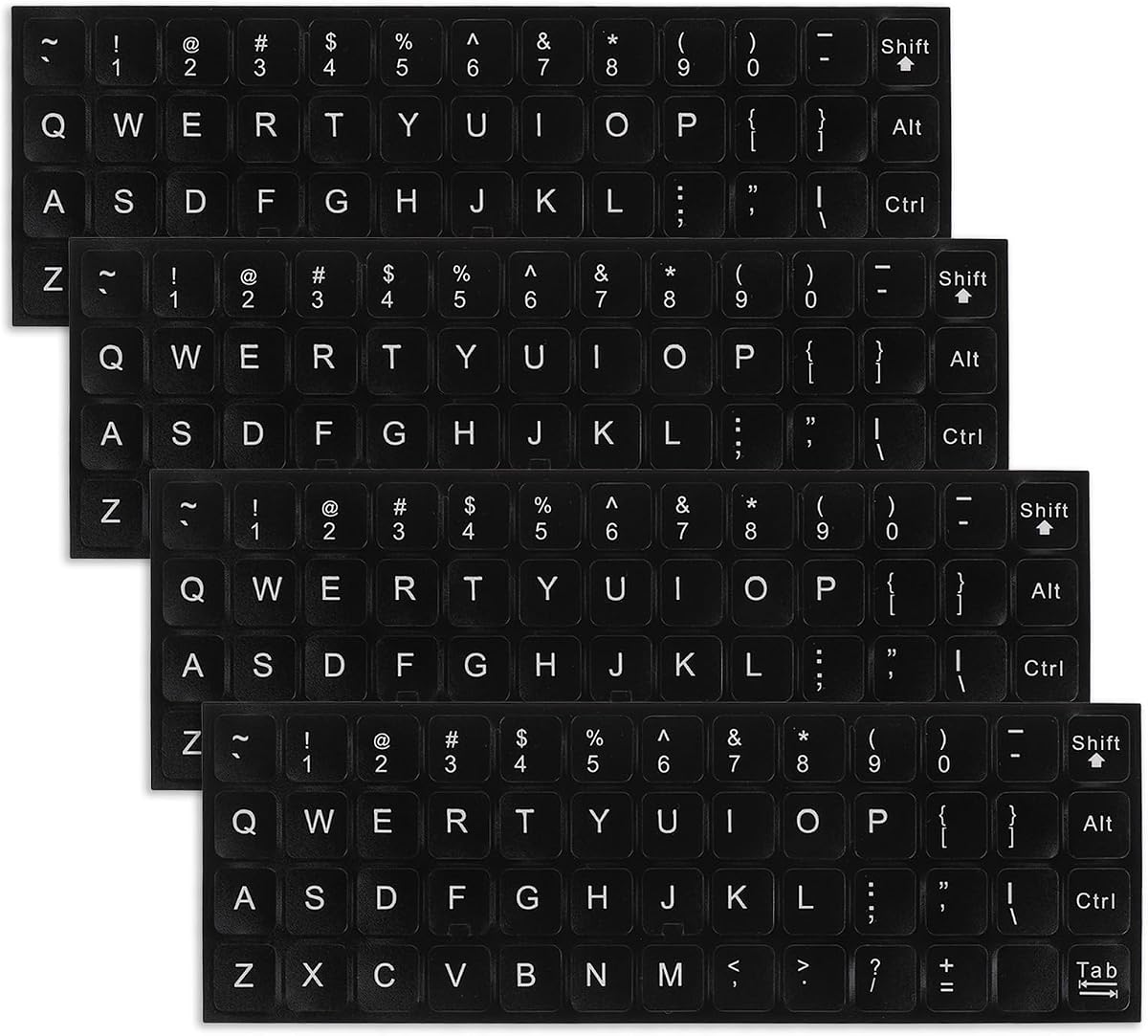
The English Keyboard Stickers, 4 Pcs Universal Laptop Keyboard Stickers have a 4.6 rating, making them the highest-rated product among the ten options. Their four-sheet package, universal positioning, and straightforward material make them a strong all-around choice for renewing a keyboard.
We may earn a commission when you buy through this link, at no additional cost to you.
Each sheet measures 18.5 by 6.4 centimeters, or 7.3 by 2.5 inches, and each small legend measures 1.3 by 1.2 centimeters, or 0.5 by 0.47 inches. The labels are made from opaque matte PVC, described as comfortable to touch, supportive of grip, and similar in feel to an original keyboard.
The product is designed to fit most desktop and laptop keyboards, along with other compatible devices. It is also positioned for language communication, education, and self-study. Application and removal are described as straightforward and residue-free, while the matte frosted texture is intended to give renewed keys a more refined appearance.
Four sheets provide more replacement material than the common two-sheet packages, making the set a good fit for frequently used keyboards or owners who expect the legends to need refreshing again over time. The absence of bundled tools is a minor limitation, but the high rating, broad compatibility, and combination of comfort, visibility, and easy removal make this the most balanced overall pick.
Four sheets offer a larger replacement supply than two-sheet products. That makes the set useful for keyboards with widespread fading or for users who want spare material available for later renewal.
The opaque PVC construction is intended to resemble the surface of a standard keycap while providing a secure tactile feel. Its frosted matte texture is designed to improve both grip and the overall appearance of the keyboard.
We may earn a commission when you buy through this link, at no additional cost to you.
The 3PCS Universal English Keyboard Letter Stickers use a black background with white lettering, offering a higher-contrast appearance than a single-color label. The set has a 4.5 rating and is designed for PC, laptop, and desktop keyboards.
We may earn a commission when you buy through this link, at no additional cost to you.
Three full replacement sheets give users more material than the two-sheet products without reaching the scale of a comprehensive symbol package. The matte process is intended to improve touch, while the bold black-and-white presentation helps worn keys look more uniform and easier to distinguish.
The stickers are described as easy to apply and remove without leaving residue. They can also convert visible keys to an English layout when needed. The product information additionally claims that the stickers can help protect keys from small scratches and keep them looking clean, although the main function remains replacing worn legends.
This is a sensible choice for users who prefer strong visual contrast and want more than one sheet of standard English letters. It does not include installation tools, and its English-only format may be less useful for specialized symbols or unusual layouts. Its three-sheet count, high-contrast finish, and stated easy removal nevertheless make it a practical middle-ground option.
White lettering against a black background creates a clear visual distinction between each legend and the key surface. This can make letters easier to locate, particularly when the original key markings have become faint.
The package provides enough material for a broad refresh while preserving a focused English-letter format. It works well for users who want a coordinated look but do not need a complete set of function and specialty symbols.
We may earn a commission when you buy through this link, at no additional cost to you.
The Universal English Large Lettering Keyboard Stickers use bright yellow characters on a black background to create an especially conspicuous key layout. The 4.2 rating is the lowest in this group, but the product's oversized font directly addresses visibility and key-recognition needs.
We may earn a commission when you buy through this link, at no additional cost to you.
The large-print design is intended to reduce the chance of pressing the wrong key and is positioned for elderly users, people with visual impairments, schools, special-needs departments, libraries, and companies. Its high-contrast appearance gives it a clear functional purpose beyond cosmetic keyboard renewal.
The stickers are designed for desktop, laptop, and notebook keyboards. A matte process is used to improve touch, while the product claims easy application and removal without residue. The bold design is less subtle than standard replacement letters, but that visual difference is precisely what makes it easier for some users to identify quickly.
This set is best for accessibility-conscious setups where large, unmistakable lettering matters more than a discreet appearance. Its lower rating may give cautious buyers pause, and users who prefer a conventional keyboard look may not want such pronounced yellow legends. For the intended use, however, the oversized type and contrast provide a clear functional benefit.
The enlarged font and bright yellow-on-black color scheme are intended to make each key easier to locate. That visibility can be especially useful in classrooms, libraries, shared offices, or any environment where users benefit from unmistakable symbols.
The product is specifically recommended for elderly users and people with visual impairments, as well as institutional settings. Its visual boldness is a feature rather than a flaw for anyone who values immediate key recognition.
We may earn a commission when you buy through this link, at no additional cost to you.
The 2PCS English Keyboard Stickers Replacement Letters Large Print provide two sheets of enlarged English legends for desktop, laptop, and computer keyboards. They hold a 4.4 rating and offer a middle ground between ordinary replacement letters and the exceptionally bold accessibility-focused option farther down the list.
We may earn a commission when you buy through this link, at no additional cost to you.
The high-quality, nontransparent vinyl has a matte texture intended to deliver good grip and a feel close to the original keyboard. The coating is stated to resist fading for five years under normal use, while the individual labels are precisely cut and feature alignment notches on the F and J keys.
The large-print styling is designed to make English communication, education, and language self-study easier. Installation and removal are described as residue-free, so the set can serve both as a visual refresh and as a way to present an English layout on a compatible keyboard.
Each full sheet measures 8.50 by 5.74 inches, while the individual labels are listed as 0.43 by 0.51 inches. The package does not include a brush, cloth, or tweezer, and two sheets are the only supplied replacement material. Even so, the larger sheet format, helpful orientation notches, tactile finish, and stated fade resistance make this a capable option for anyone prioritizing readable letters.
The set emphasizes more readable English legends while retaining a familiar keyboard appearance. It can be useful for learners and users who find tiny or worn markings difficult to read without adopting the strongest possible visual treatment.
F and J notches provide recognizable reference points when applying a new sheet. The larger full-sheet dimensions and neatly cut labels support a more organized installation process.
We may earn a commission when you buy through this link, at no additional cost to you.
The best stickers for laptop keyboard depend on whether your priority is restoring worn legends, improving visibility, changing languages, or obtaining complete symbol coverage. Compare fit, material, legend size, removal behavior, and the included installation equipment before choosing.
Start by confirming that the product supports your keyboard type and the layout you need. Most options in this guide are intended for standard English legends across laptops and desktops, while some explicitly extend to notebooks, tablets, wired keyboards, and wireless models. The large symbol set also includes separate F1 through F12 labels for Mac and PC. Universal does not necessarily mean suitable for every specialized or nonstandard keyboard, so check the shape and size of your keycaps and the language arrangement you intend to use.
Choose a set that explicitly mentions your device class and intended layout. Full-size sheet stickers are generally the most straightforward for conventional keyboards, while individual inlays may require more careful placement.
Letter size should reflect your priorities. Standard replacement labels can restore a worn keyboard without dramatically changing its appearance, while large-print and extra-large designs make keys easier to locate. The high-contrast option uses yellow lettering on black, the three-sheet set uses white lettering on black, and other products use subtle black-on-key designs. High contrast and oversized characters can improve recognition for learners, older adults, and users with visual impairments, although they may be less suitable for users who want the keyboard to retain a conventional appearance.
Match the design to the user rather than choosing the largest option by default. A moderate large print may offer improved visibility without the strongest visual change.
Material affects both durability and the way the keys feel. Most products in this guide use nontransparent vinyl or PVC with a matte surface intended to resemble a conventional keycap and provide a secure grip. The comprehensive symbol set instead uses adhesive-mounted inlays rather than printed symbols. Matte finishes can feel more consistent with many laptop keyboards, while the exact tactile result will depend on the original key material and the condition of the surface underneath. Check whether the material is opaque, because transparent labels may reveal faded markings instead of fully renewing them.
Favor a durable, opaque matte material for a coordinated appearance and comfortable everyday typing. Avoid making assumptions about long-term feel without considering the keycap's own condition.
A keyboard sticker should remain attached through normal typing but still be removable when a layout changes or the keyboard is shared. Several products explicitly state that they can be applied and removed without leaving residue. The comprehensive symbol set highlights a high-tensile-strength adhesive designed to hold firmly in place. Proper preparation and careful removal also influence the outcome, so clean the keys before application and lift slowly rather than pulling a label sideways.
Prioritize products that make clear claims about residue-free removal if reversibility matters to you. The same care should be taken whether the stickers are intended to stay for months or only temporarily.
A two-sheet package may be enough to renew the letters on one keyboard, while a three- or four-sheet set provides additional material for later use. The 194-piece option goes further by covering more than 200 letters, symbols, and function-key elements. Consider not only how many pieces are included but also whether they match the characters and commands you actually use. A small set of standard English letters is more focused, while a broad symbol assortment serves users who also need clearly marked function keys and special characters.
Estimate your coverage by counting worn keys and adding the layout characters you need. Choose a larger package for frequently used keyboards, shared devices, or future refreshes.
Application tools can make a meaningful difference on small, closely spaced keys. The five-in-one English set includes tweezers, a cleaning brush, and a microfiber cloth, while the comprehensive symbol set includes tweezers along with a magnifier and USB LED. These accessories support precise placement, cleaning, and visibility. Basic replacement sets do not include tools, so you may need a fine-point tweezer and lint-free cloth if you want similar control. A brush is also useful for clearing debris before the adhesive surface is placed against the key.
Choose a bundled kit if this is your first application and exact alignment matters. Experienced users may prefer a simpler package and already own the necessary tools.
The ideal set depends on the job you need it to do. Worn English legends can often be restored with a standard matte replacement sheet. Language learners may prefer labels that are easy to remove and reposition, while users who need stronger key identification may want high-contrast, extra-large printing. The large yellow-letter option is explicitly intended for accessibility-oriented environments, and the symbol kit is suitable for people who need extensive coverage. Think about who will use the keyboard, not just what looks worn today.
Use accessibility-focused lettering when visibility is the central concern. Choose standard or large-print replacements when the main goal is a clean, refreshed English layout.
Durability claims vary across the list, with some products stating two- or five-year fade resistance under normal use, and the comprehensive symbol set carrying a three-year warranty. These are manufacturer claims rather than independent results, and actual performance depends on cleaning frequency, hand oils, sunlight, abrasion, and the underlying key surface. A longer stated fade period can help narrow the field, but it should not replace thoughtful installation and care.
Treat durability as supporting information rather than the sole buying criterion. For a shared or heavily used keyboard, material quality, adhesive behavior, and replacement coverage are equally important.
Begin by shutting down the laptop or disconnecting the external keyboard, then clean and dry the target keys. Remove any old adhesive or residue with an appropriate keyboard-safe method, and use the included brush or a soft lint-free cloth if the product provides one. Take a clear reference photo of the original layout so you can match characters, function keys, and modifier positions accurately.
Install only the labels you need. Use the F and J alignment notches where provided, and confirm that each legend is upright and positioned consistently before pressing it down. A fine-point tweezer can help lift and place individual labels without bending them. Work slowly from the reference keys outward, keeping the adhesive surface free of dust and avoiding excessive pressure.
For daily care, wipe the stickers gently with a dry or lightly damp microfiber cloth and avoid aggressive liquids or abrasive tools. Remove a sticker by lifting slowly from one edge; if the set is temporary, removing it carefully can help minimize adhesive residue. Store unused sheets flat and away from heat, direct sunlight, and excessive bending to protect the adhesive coating.
Most of the sets in this guide use opaque vinyl or PVC with a matte texture intended to feel close to an original keyboard key. Comfort can vary with the material of your existing keycaps, so applying a small number first is a sensible way to evaluate the feel. The comprehensive symbol set uses adhesive-mounted inlays rather than a printed layer.
Several products explicitly state that their labels can be removed without leaving residue. Adhesive performance can still vary with age, heat, oils, and the condition of the key surface. Removing labels slowly from one edge and cleaning the key afterward can help minimize leftover adhesive.
No. You can apply only the letters or symbols that are worn, difficult to read, or part of the layout you want to change. A reference photo of the keyboard is useful, and working from the F and J keys outward can help maintain accurate alignment.
Yes. English replacement stickers are commonly positioned as an aid for communication, education, and self-study. Their removable design can also let users change the visible layout when moving between English and another keyboard language without replacing the entire keyboard.
Large-print and high-contrast options can make keys easier to identify, particularly for older adults or users with visual impairments. The most explicit accessibility-oriented choice in this guide uses oversized yellow lettering on a black background. The best choice still depends on the user, their vision needs, and whether a bold visual appearance is acceptable.
No universal set should be assumed to fit every laptop, particularly models with unusually shaped, unusually small, or nonstandard keys. The products in this guide state compatibility with common laptop, desktop, notebook, tablet, wired, and wireless keyboards, but you should compare the dimensions and layout before purchasing.
The five-in-1 English replacement set includes two sticker sheets, tweezers, a cleaning brush, and a microfiber cloth. The comprehensive luminescent symbol set includes tweezers as well as a pocket or purse magnifier and a USB LED. The other options focus primarily on the stickers themselves.
Gently wipe the labels with a soft, dry or lightly damp microfiber cloth and avoid abrasive pads, aggressive cleaning liquids, and sharp tools that could lift an edge. Before applying new labels, cleaning the keycaps helps prevent dust and grime from becoming trapped beneath the adhesive.
The 4 Pcs Universal Laptop Keyboard Stickers stand out as the best overall option because of their 4.6 rating, four-sheet package, opaque matte PVC, and broad device compatibility. The 2 Pack Replacement Keyboard Letters Sticker is a focused budget-friendly choice for renewing standard English legends, while the 194 Piece Luminescent Symbol Set is the most complete option for large visible symbols, extensive coverage, and included accessories.
For most users, prioritize a set that matches the keyboard layout, uses an opaque matte material, and can be removed cleanly. Large-print or high-contrast options are more important when visibility is the main concern, while a complete symbol set makes more sense for users who also need function keys, special characters, Mac and PC labels, or installation tools.
Ratings, stock status, and prices can change, so review the current listing and product details before buying. Comparing the current offer with the specific benefits covered here will help you choose the most appropriate stickers for your laptop or keyboard without unnecessary extras.