
USB C Two-Slot Card Reader
4.5Editor score
Compact USB-C design
Bidirectional file transfer
Broad computer compatibility
This SD Card Reader for iPhone guide compares connectors, card support, transfer features, compatibility, portability, and everyday usability.
An SD card reader for iPhone is one of the simplest ways to move photos, videos, documents, and camera files away from a memory card without relying on a computer. The right adapter should match your phone connector, accept the cards you actually use, transfer files reliably, and fit comfortably into a travel or photography bag.
We compared these ten readers based on connector design, supported card formats, transfer capabilities, device compatibility, file-management features, portability, and practical value. The list includes dedicated USB-C models, dual-connector adapters, multi-interface readers, and corded options made for specific Apple devices and rugged cases.
Each review highlights the features that distinguish its reader from the alternatives and explains who may benefit most from its design. Product ratings and technical details reflect the supplied listings, while availability and prices can change, so confirm the current connector support and card compatibility before purchasing.
4.5Editor score

4.4Editor score

4.4Editor score
The comparison below highlights the most important differences among these ten readers, including their connector styles, card support, transfer directions, and intended devices. Use it to narrow the field before reading the detailed reviews.


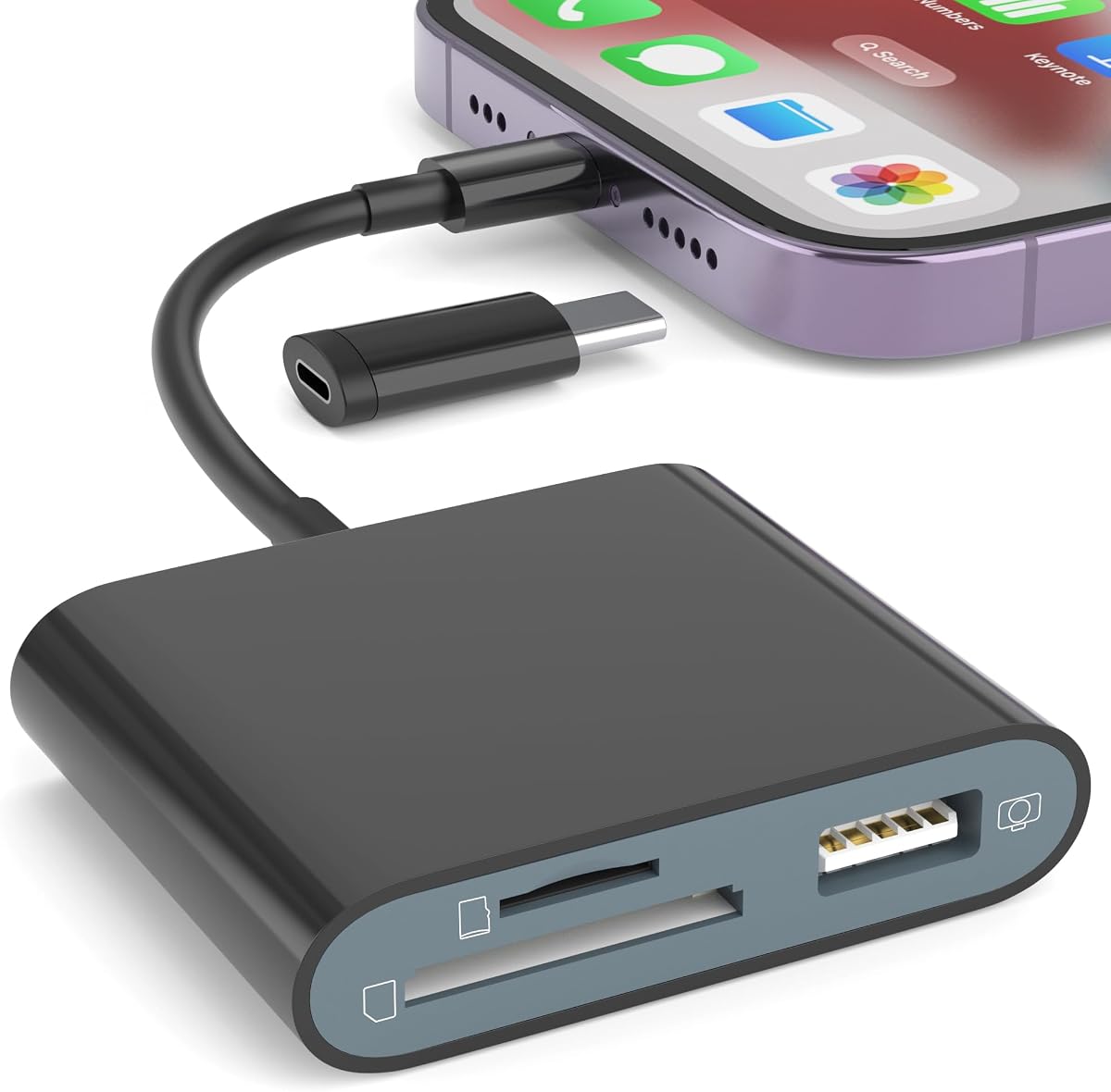


This dual-connector reader has a 4.4 rating and stands out as the most broadly useful option in the group. It includes both a Lightning connector and a USB-C connector, allowing it to serve iPhone 5 through 14-series devices as well as USB-C-equipped iPhone 15 and 16 models, iPads, MacBooks, Macs, laptops, and Android devices.
We may earn a commission when you buy through this link, at no additional cost to you.
Its two card slots accept standard SD and microSD cards, which makes it useful for cameras, trail cameras, action cameras, and devices that use small TF cards. The listing reports transfer speeds of 20MB/s to 30MB/s and support for JPEG, RAW, H.264, and MPEG-4 files, along with memory cards up to 2TB. No application or computer is required for the basic workflow.
The main compromise is that USB 3.0 in the product title should not be confused with the listed 20–30MB/s transfer specification. Older Lightning-equipped iPhones can also require more clearance when a protective case is fitted. Even so, the combination of two connectors, two card formats, broad file support, and cross-platform use offsets these limitations for many buyers.
Choose this reader if you want one dependable adapter for both Lightning and USB-C iPhones or if you regularly move between a camera card, an iPad, and a laptop. It is especially compelling for users who want import and export flexibility without installing a third-party application.
The built-in dual-connector design reduces the need to carry separate Lightning and USB-C adapters. That makes the reader especially convenient for households or travel kits containing devices from different Apple generations.
Support for SD, microSD, JPEG, RAW, H.264, and MPEG-4 expands the reader beyond basic photo storage. It also supports export from an iPhone or iPad to the card, provided the device and file workflow meet the listed requirements.
We may earn a commission when you buy through this link, at no additional cost to you.
This SZHAIYIJIN reader carries a 4.4 rating and offers a flexible combination of card reading, two-way transfer, and USB connectivity. It supports standard SD, SDHC, microSD, and TF cards, while explicitly excluding Wi-Fi-enabled SD memory cards.
We may earn a commission when you buy through this link, at no additional cost to you.
The included detachable USB-C-to-Lightning adapter allows the reader to work with modern USB-C iPhones and older Apple devices. For camera use, the workflow is straightforward: insert the card, connect the reader, wait about five seconds, and use the Photos app to import images. Its female USB interface can also accept compatible flash drives, headphones, musical instruments, and MIDI keyboards, subject to the stated 500mA limit.
Two-way transfer is the defining advantage for users who do more than copy camera files. The listing says it can import from an SD or TF card to an iPhone or iPad and export files from those devices to a card, including movies, music, office documents, and PDFs. Printers and hard disk drives are not supported, and the extra port cannot overcome the compatibility limitations of unsupported peripherals.
This is a sensible pick for iPhone and iPad users who need one adapter for card imports, exports, and occasional USB accessories. Buyers whose cards contain Wi-Fi functions should choose a different model, while those needing only a simple USB-C reader may find a more specialized option easier to carry.
Two-way transfers let you move supported files both from a memory card onto an iPhone or iPad and from the device back onto a card. This is useful for organizing media, moving documents, or creating a card-based transfer workflow without a computer.
The female USB interface broadens the adapter's role to that of a compact OTG hub for compatible accessories. It remains limited by the stated 500mA current ceiling and does not support printers or hard disk drives.
We may earn a commission when you buy through this link, at no additional cost to you.
This USB-C reader has a 4.3 rating and is aimed at users with iPhone 15-series or newer hardware, modern iPads, Android phones, and USB-C laptops. Its straightforward two-slot design accepts SD and microSD cards without requiring an application, driver, or companion service.
We may earn a commission when you buy through this link, at no additional cost to you.
The listing reports transfer speeds from 16MB/s to 31MB/s, making it appropriate for moving high-resolution images and 4K video, although actual results depend on the source card, device, and file sizes. Broad card support includes SD, SDHC, SDXC, MMC, microSD, microSDHC, and microSDXC, which covers many cameras, phones, and portable devices.
Durability is another important selling point. The reader uses flexible TPE material and a reinforced oxygen-free copper core, and the listing states that the cable can withstand more than 10,000 bends. Its reinforced plastic casing is intended to protect against scratches and drops, although those claims should still be considered manufacturer-provided specifications rather than independent test results.
This is a good choice for people who have committed to USB-C and want a compact, two-card reader for travel or everyday media management. It is less convenient for older Lightning iPhones, and anyone who needs Lightning and USB-C in one adapter should look at one of the dual-connector models.
The flexible TPE housing and reinforced copper core target a common failure point: the short cable joining a compact reader to its connector. The stated bend resistance makes the design appealing for users who keep it permanently in a camera or laptop bag.
Support for SDHC, SDXC, microSDHC, and microSDXC expands the number of cards that can be used. That makes the reader practical for a mixture of camera media, action cameras, and devices that use less common MMC or microSD formats.
We may earn a commission when you buy through this link, at no additional cost to you.
This compact reader has a 4.5 rating, tying for the highest listed score among the USB-C-focused products. It is designed for iPhone 15, 16, and other USB-C devices, with the listing also naming numerous iPad, MacBook Pro, and MacBook Air models.
We may earn a commission when you buy through this link, at no additional cost to you.
The dual-slot layout accepts SD, SDHC, SDXC, microSD, microSDXC, and microSDHC cards. Bidirectional transfer allows supported media to move from a card to an iPhone, iPad, Mac, or camera, while files can also be saved from a phone or computer to a supported card. The listing mentions batch uploading for photos and videos, which can reduce repetitive transfer steps.
It is plug-and-play across MacOS, Windows, Linux, and Chrome, with no driver or third-party software required. On an iPad, the built-in Files app handles importing and exporting. Its built-in expandable USB-C cable is designed to save space and allow neighboring ports to remain accessible, making it more practical at a desk than a permanently extended cable would be.
The compact USB-C design makes it a budget-friendly choice for newer iPhones and other USB-C equipment. Its lack of a Lightning connector rules it out for older iPhones unless you already own a suitable USB-C-to-Lightning adapter, and the broad compatibility list should always be checked against the exact device and port you intend to use.
The integrated expandable cable can retract or extend as needed, reducing the chance that a long connector blocks adjacent ports. It is a particularly useful detail for laptop users who regularly connect multiple accessories.
Importing and exporting support makes this more than a one-way camera transfer tool. On supported devices, it can help move media, videos, and files both to and from SD or microSD storage.
We may earn a commission when you buy through this link, at no additional cost to you.
This four-in-one reader has a 4.3 rating and distinguishes itself with USB, USB-C, Micro USB, and iOS device charging connections. It also includes SD and microSD slots, making it a highly versatile adapter for older and newer phones, tablets, cameras, and computers.
We may earn a commission when you buy through this link, at no additional cost to you.
The integrated charging port is the feature most likely to distinguish it from a standard card reader. It is intended to allow an iPhone or iPad to charge while a file transfer is underway, reducing the possibility of a device running out of power during a long media import. The listing describes high-speed two-way transmission and intelligent viewing and file-management functions.
Compatibility extends to iPhones and iPads running iOS 8.0 or later, OTG-capable Android devices, and computers with USB ports. Maximum memory card support is listed at 1TB, which is lower than the 2TB maximum claimed by some competing readers. The package does not include an SD or microSD card, so the reader itself is the only included storage accessory.
A keychain loop and slim body make this option convenient for travel, helping reduce the chance of leaving a small adapter behind. It is best for users who need multiple legacy and modern connections or who want to charge while transferring. Those who only use a modern USB-C iPhone and prioritize simplicity may prefer a less elaborate adapter.
Charging while transferring is particularly helpful during long imports of high-resolution video. The feature is intended to keep the connected iPhone or iPad powered throughout the session.
USB-C, standard USB, and Micro USB coverage makes the reader useful with a broader collection of equipment. It can simplify kits that otherwise need several separate adapters, although its wider construction may take up more space than a basic reader.
We may earn a commission when you buy through this link, at no additional cost to you.
This black dual-connector reader has a 4.4 rating and is positioned as a camera, trail-camera, and general file-transfer accessory. It supports standard SD, SDHC, microSD, and TF cards, but not Wi-Fi SD memory cards. The native workflow uses the Photos app, with imports available after a short connection delay.
We may earn a commission when you buy through this link, at no additional cost to you.
Its detachable USB-C-to-Lightning adapter makes it suitable for iPhone 15–17-class hardware and older Apple devices. A female USB interface can also accommodate digital cameras, SLR cameras, USB flash drives, USB headphones, electric guitars, and MIDI keyboards. The stated peripheral current limit is 500mA, while printers and hard disk drives are explicitly excluded.
Two-way transfers are supported on iOS 13 through 18 according to the listing, allowing compatible files to move from an iPhone or iPad to a card and back again. Common JPEG and RAW photos, plus H.264 and MPEG-4 video, are supported. These capabilities make it more versatile than a reader limited strictly to importing camera images.
The most suitable buyer is a photographer, hunter, or regular iPhone user who works with multiple card formats and may also need a USB camera connection. Check your iOS version and the requirements of any peripheral before purchasing, since the listed compatibility is narrower for some functions than the physical connector selection might suggest.
The reader can connect compatible digital cameras and SLR cameras through its female USB interface, reducing the need to remove a camera's memory card in supported workflows. It also provides a familiar card-based route through the Photos app.
Support for JPEG, RAW, H.264, and MPEG-4 makes the adapter relevant to both photographers and video creators. Two-way transfer adds flexibility when files must be moved from the iPhone back to removable storage.
We may earn a commission when you buy through this link, at no additional cost to you.
This USB-C reader has a 4.5 rating and leads the group in the stated transfer-speed figure, with the listing claiming performance up to 60MB/s. It is designed for iPhone 15, 16, 17, and 18-series devices as well as USB-C iPads, laptops, Galaxy phones, and other compatible hardware.
We may earn a commission when you buy through this link, at no additional cost to you.
It uses a built-in chip intended to speed transfers while supporting safe data movement. No third-party application or internet connection is needed; the reader can be connected and used after a wait of approximately three to five seconds. Its format support includes JPEG, RAW, H.264, and MPEG-4, making it suitable for camera, sports camera, drone, and trail-camera media.
The significant limitation is compatibility. This is a USB-C-only model, so it will not work directly with Lightning-equipped iPhones or iPads, including the listing's explicit exclusion of iPhone 14 and earlier devices. The product description also calls the interface USB 2.0 high-speed while stating a maximum of 60MB/s, so buyers should regard the figure as a listing claim whose real-world result will depend on the card and host device.
Choose this reader if you have a modern USB-C device and prioritize rapid file movement over cross-generation compatibility. It is less suitable for anyone who needs one adapter for both Lightning and USB-C equipment or who regularly relies on an older Apple connector.
The stated speed of up to 60MB/s is the key attraction for large photo libraries and video files. Actual performance can vary with card quality, device storage, file count, and the connection standard of the host device.
Plug-and-play operation means there is no app ecosystem to manage and no internet requirement during use. The reader is designed to present its files through the host device's normal file or media workflow.
We may earn a commission when you buy through this link, at no additional cost to you.
This five-in-one adapter has a 4.4 rating and offers the broadest physical feature set in the roundup. It combines USB-C and USB-A connectivity, SD, microSD, and MS card slots, and two female USB-A ports. The detachable USB-C-to-USB adapter allows it to connect to both current USB-C equipment and older USB systems.
We may earn a commission when you buy through this link, at no additional cost to you.
Card access includes SD, SDHC, SDXC, microSD, TF, microSDHC, microSDXC, UHS-I, and UHS-II camera cards, with read and write support up to 2TB. The two USB-A ports can accept compatible devices such as digital cameras, flash drives, keyboards, and mice. The listing specifically notes that a card can be read or written while both USB ports are used at the same time.
Plug-and-play support covers numerous versions of Windows, macOS, Chrome, and Linux, and no external power is required. Over-current and short-circuit protection is also listed. The broad iPhone, iPad, MacBook, Surface, Samsung Galaxy, and Google Pixel compatibility makes it a more general-purpose adapter than a compact two-slot reader, though its extra ports naturally make it bulkier.
This premium pick is best for people who want a single equipment hub for memory cards and USB accessories. It may be excessive for a simple camera-card transfer, but it offers a capable combination of ports for photographers, students, and mobile creators who regularly move between several types of hardware.
Adding an MS card slot alongside SD and microSD support broadens the range of removable media the adapter can handle. It is particularly useful for users whose equipment does not rely exclusively on the two most common card formats.
The dual USB-A ports allow compatible peripherals to remain connected while a card is being accessed. That combination can serve as a compact hub for a camera, flash drive, keyboard, or mouse without carrying separate adapters.
We may earn a commission when you buy through this link, at no additional cost to you.
This dual-slot USB-C reader has a 4.4 rating and focuses on a clean, uncomplicated approach to moving media. It accepts both SD and microSD cards simultaneously, allowing users to access two cards through one connected adapter without installing drivers or extra software.
We may earn a commission when you buy through this link, at no additional cost to you.
Compatibility is centered on iPhone 15, 16, and 17 models, iPads, MacBooks, laptops, and other USB-C enabled devices. Its trail-camera viewing function provides a practical route for reviewing or transferring photos and videos stored on cards used in compatible outdoor cameras.
The stable USB-C connection is described as supporting quick and reliable movement of photos, videos, and files. Unlike the five-in-one model, this reader has no additional USB-A ports, charging function, or adapter hub, so its appeal lies in portability and a reduced number of features. That simplicity may be preferable for users who only need to read or copy memory cards.
This is a strong choice for modern iPhone users who regularly work with both full-size SD and microSD cards. It is not suitable for older Lightning iPhones without an additional compatible adapter, and users needing to write files to cards, charge a phone, or connect peripherals should look for a more specialized reader.
Simultaneous access to SD and microSD cards is convenient for users who move between devices with different card formats. It can also simplify a workflow where one card holds images and another contains video or documents.
The plug-and-play design avoids driver installation and extra applications. Once connected, the reader is positioned as a straightforward path for reviewing and transferring trail camera or general media files.
We may earn a commission when you buy through this link, at no additional cost to you.
This corded trail-camera reader has a 3.6 rating, the lowest in the group, but its design addresses a specific and important problem: connecting a USB-C iPhone while wearing a thick protective case. The listing states that the improved cord provides a reliable fit without removing cases such as OtterBox or LifeProof.
We may earn a commission when you buy through this link, at no additional cost to you.
It uses the native Apple Files app rather than a third-party application. After connecting the reader, the user can browse the SD or microSD card, select files, and view, save, share, or delete photos and videos. Not auto-importing is a deliberate benefit because it allows the user to review large card contents without immediately filling the phone's internal storage.
The reader supports SD, SDHC, SDXC, and standard or micro memory chips up to 256GB. It works with iPhone 15 and newer USB-C devices and compatible USB-C iPads, but not with Lightning devices such as iPhone 14 and earlier. No batteries, Wi-Fi, or cellular service are required, which makes it straightforward for outdoor use.
Its lower rating reflects the narrower feature set and capacity ceiling, but it remains a focused option for hunters and trail-camera users who prioritize case compatibility and direct browsing. Buyers should confirm that their iPhone uses USB-C and that their card falls within the supported capacity range.
The extended cord provides the physical distance needed to connect when a thick case surrounds the phone's port. This can be more valuable than a very compact adapter when the user is actually outdoors and wearing protective equipment.
Using the Files app allows photos and videos to be viewed, saved, shared, or deleted directly from the card. Avoiding automatic imports gives the user more control over which files enter the phone's storage.
We may earn a commission when you buy through this link, at no additional cost to you.
The best reader depends primarily on your phone connector, memory card format, and transfer habits. Review connector support, card standards, file direction, case clearance, and device limitations before choosing a model.
An iPhone 15 or newer uses USB-C, while iPhone 14 and many earlier models use Lightning. A USB-C-only reader cannot connect directly to a Lightning phone, and a Lightning-only reader cannot connect directly to a modern USB-C model. A dual-connector reader or one that includes a detachable USB-C-to-Lightning adapter is the simplest option when both generations are in your regular rotation.
Match the connector before considering any other feature. Check the exact iPhone model and your protective case, because a case with a narrow or raised port opening may prevent a compact connector from seating properly.
Most cameras use full-size SD cards, while action cameras, drones, and compact devices may use microSD or TF cards. The best reader should support the exact physical format you own, as well as its capacity and speed class. Some listings distinguish SD, SDHC, and SDXC, while others also mention UHS-I, UHS-II, or MMC standards.
Choose a dual-slot model if you switch between camera types or carry equipment with different card formats. Confirm the card capacity limit as well, because it varies significantly across the products reviewed here.
A one-way reader is optimized for copying photos and videos from a card onto an iPhone. Two-way readers can also export supported files from an iPhone or iPad to a card, which is useful for moving documents, music, videos, or other media without a computer. Compatibility may depend on the iOS version and the host device's native file system support.
If your main goal is camera imports, prioritize a simple reader with broad media compatibility. If you regularly move files in both directions, select a product that explicitly supports export and confirm that your iOS version is covered.
Listed transfer speeds range from 16MB/s to as much as 60MB/s, but actual performance also depends on the memory card, phone, computer, file sizes, and connection standard. Large RAW files and extended 4K video can take longer even with a fast reader, and many individual files transfer more efficiently than very large batches.
A higher listed speed is most useful for photographers and video creators moving substantial media. For occasional photo imports, compatibility, connector fit, and ease of use may matter more than the maximum speed figure.
An adapter that fits an iPhone may not work with every iPad, laptop, or operating system. Several products explicitly support MacOS, Windows, Linux, and Chrome, while others name a wider collection of devices. Some functions are also limited by iOS version, including two-way transfers and access to certain external accessories.
Look for the specific device and operating system you plan to use rather than relying on a broad compatibility statement. If a product also acts as a USB hub, verify the peripheral type, current requirements, and any exclusions for printers or hard drives.
A compact direct-connect reader can be awkward with a thick case, particularly when the phone's port is recessed. The corded trail-camera model is specifically designed to improve clearance with rugged cases, while the expandable-cable design can reduce port crowding on laptops. Detachable adapters can also help when a connector is difficult to align.
If you regularly use a rugged case, prioritize a reader whose listing addresses case fit or includes an extended cord. Otherwise, confirm that the connector can physically reach your phone's port with the case installed.
Some readers include a female USB-A port for cameras, flash drives, headphones, musical instruments, or MIDI keyboards. One model also provides two USB-A ports, and another adds charging while transferring. These functions can reduce the number of adapters in a bag, but they also make the device larger and may introduce power or file-support limitations.
Treat extra ports as a convenience rather than the main reason to buy. Check the stated current limit, supported accessories, and exclusions, and avoid paying for hub functions that your own devices cannot use.
A small two-slot reader is easiest to carry, while a four-in-one or five-in-one adapter naturally occupies more space. Maximum supported card capacity varies from 256GB to 2TB across the listings, and some products include keychain or retractable-cable features to make them easier to manage.
Balance portability against the formats, capacity, and ports you genuinely need. The best compact model is not necessarily the best for someone carrying a camera, a legacy device, and several USB accessories every day.
Before connecting the reader, format the memory card in the camera or device that will use it, and confirm that the card type and capacity fall within the reader's supported specifications. Insert the card fully into the appropriate SD or microSD slot, then connect the reader directly to the iPhone, iPad, or computer.
After connecting, allow a few seconds for the device to recognize the reader. On an iPhone or iPad, open the Photos app and look for an import option, or use the Files app to browse the card. Select the files you want to copy, save them to the device, and avoid disconnecting the reader until the transfer has completed.
To eject the card, use the appropriate file-system or media-app workflow and then remove it safely. Keep the connector and slots free of dust, moisture, and debris, and avoid pulling on the card while the reader is connected. Store the adapter in a small case, especially when traveling, and use the included adapter or cable only as directed by the manufacturer.
Yes, if you use a compatible card reader and your iPhone supports the required connection standard. iPhone 15 and newer use USB-C, while older supported iPhones generally require a Lightning connector or suitable adapter. The device must also support OTG-compatible external storage.
Most readers in this guide are designed to work without a third-party application. On an iPhone or iPad, you can typically use the Photos app for imports or the native Files app for browsing. Give the device a few seconds to recognize the reader after connecting it.
Not directly if the older iPhone uses a Lightning port. You would need a compatible USB-C-to-Lightning adapter, or a reader with a native Lightning connector. A dual-connector model is usually the simplest option for anyone using both older and newer Apple devices.
Most of the products reviewed have separate slots for full-size SD and microSD or TF cards. A few models also include an MS card slot. The card's capacity and format must still fall within the specifications of the particular reader you choose.
Some models support two-way transfers, allowing supported media and documents to be exported from an iPhone or iPad to a memory card. The listings note operating-system limitations, including specific iOS version ranges. Check for export support before relying on this feature for backups.
First, confirm that the reader's connector matches your iPhone and that the device supports OTG-compatible storage. Check that the card is inserted fully and is not Wi-Fi-enabled, which several listed readers do not support. A protective case may also prevent the connector from seating correctly, and the operating system may need a few seconds to detect the device.
Many models in this guide support compatible iPads, MacBooks, Android devices, and computers with USB-C or other listed interfaces. Compatibility can vary by model, operating system, iOS version, and device, so verify the exact hardware and system against the product listing.
Several readers are designed specifically for trail camera media. Their native app workflows allow users to browse, view, save, share, or delete supported photos and videos directly from the card. This can be especially useful when internal phone storage is limited.
The Dual Connector SD Card Reader is the strongest all-around choice because it combines SD and microSD support with both Lightning and USB-C connectors. The Compact USB-C Two-Slot Reader is a budget-minded option for modern devices, while the Five-in-One USB-C Adapter is the premium pick for anyone who also needs multiple USB-A ports and broader card support.
Prioritize the connector first, followed by the physical card format and maximum capacity you require. Then consider whether you need one-way imports, two-way transfers, a female USB port, charging while connected, or enough clearance for a rugged phone case. A feature-rich reader is not necessarily better if it adds bulk without solving a problem in your workflow.
Ratings, device support, and product availability can change, and prices should always be checked at the time of purchase. Review the current listing carefully, especially its iOS requirements, supported card capacities, and exclusions, before choosing the adapter that best fits your iPhone and the equipment you use every day.