
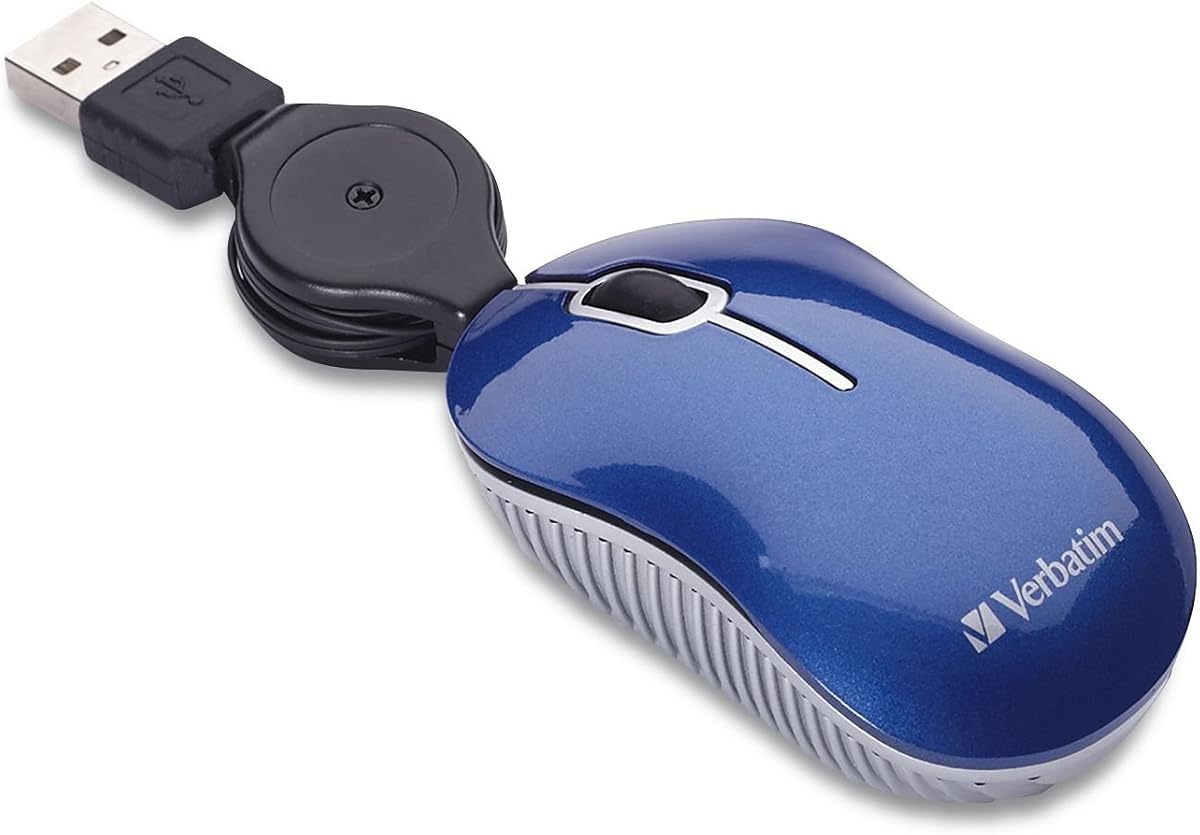
Verbatim Mini Wired Mouse
4.2Editor score
No batteries required
Retractable 27-inch cable
Compact plug-and-play design
A Mini Travel Mouse should make a laptop more comfortable without taking over the space inside a carry-on, laptop bag, or café table. The right model balances a genuinely pocketable shape with dependable tracking, simple controls, usable battery life, and a connection method that suits your devices and work environment.
The ten mice in this guide cover wired, 2.4 GHz wireless, Bluetooth, and multi-mode options, along with different ideas such as silent clicks, rechargeable batteries, adjustable sensitivity, and compact storage. We compared their stated dimensions, connection methods, compatibility, sensor resolution, and practical travel features to identify the strongest options for different needs.
Each review explains where the mouse stands out, who is most likely to enjoy it, and where important trade-offs appear. The shortlist includes simple budget picks, compact wireless models, and feature-rich options for frequent travelers. Product listings and prices can change, so confirm the current details before purchasing.
4.2Editor score

4.5Editor score

4.7Editor score
As an Amazon Associate we earn from qualifying purchases.
The comparison highlights the major differences among all ten mice, including connection style, portability, sensitivity, power requirements, and special features. This makes it easier to match a compact mouse to a specific travel routine or computer setup.


The Logitech Wireless Mini Mouse M187 is a compact, uncomplicated pointer designed for people who want to carry a proper mouse without giving up much bag space. Its 4.5 rating reflects a favorable balance of portability, wireless convenience, and familiar controls. The 1000 DPI optical sensor is appropriate for everyday navigation, document work, and general productivity on a laptop or desktop.
We may earn a commission when you buy through this link, at no additional cost to you.
One of the model's most useful details is how the tiny nano receiver is handled. It can remain plugged into a USB port between sessions, or it can be removed and stored inside the mouse. That arrangement reduces the chance of leaving behind a small accessory, a problem that often undermines otherwise convenient wireless travel mice. Connecting through the supplied receiver also makes the initial setup straightforward: plug it in and begin using the mouse.
The M187 offers only the basic left, right, and scroll controls, so it will not satisfy buyers who want programmable side buttons, adjustable weights, or extensive software options. Its extra-small dimensions may also feel limited for users with larger hands or extended daily desk use. Even so, those limitations are logical for a model whose primary purpose is portability, and the stated 1000 DPI sensor offers enough sensitivity for most travel and office tasks.
This is the strongest general recommendation for someone seeking a small wireless mouse that is easy to carry, quick to set up, and compatible with a wide range of systems. Its stated support for Windows, Mac, Chrome OS, and Linux makes it especially useful for a mixed-device travel kit. Choose the M187 when simplicity, compactness, and dependable everyday tracking matter more than advanced features.
The removable nano receiver is designed to fit inside the mouse when it is not in use. Keeping the receiver with the pointer makes it much easier to pack only one essential accessory, especially when moving between several computers.
The 1000 DPI optical sensor provides a practical level of cursor control without requiring a large surface. It is a sensible configuration for navigating documents, spreadsheets, menus, and web pages while traveling.
We may earn a commission when you buy through this link, at no additional cost to you.
The Verbatim Mini Wired Mouse is a straightforward option for travelers who would rather avoid battery management, wireless pairing, and the possibility of leaving a receiver behind. It carries a 4.2 rating and focuses on the fundamentals: an optical sensor, a compact body, and a retractable USB-A cable. It is particularly relevant for short sessions with a laptop in a café, airport lounge, or shared workspace.
We may earn a commission when you buy through this link, at no additional cost to you.
The retractable cable is the defining feature. At 27 inches when extended, it offers enough length for typical computer placement while retracting when the mouse is not in use. That reduces tangles and removes the need to wrap the cable around the body. Because the mouse draws power through the cable, there are no batteries to replace and no separate receiver to store, making the entire setup straightforward.
Its limitations are mostly inherent to a wired mouse. The cable must remain connected, so the pointer cannot be used while a laptop is on a lap or positioned well away from the user. The supplied information also gives broad Windows 2000 and Windows XP compatibility, while describing general USB use, which means buyers should verify support for any newer or more specialized operating system. The mouse offers fewer controls and settings than feature-oriented travel models.
The Verbatim is a sensible pick for a desk, dorm room, or travel kit where a full-size mouse feels wasteful but a wireless receiver feels unnecessary. It provides an uncomplicated pointer at an approachable tier and is backed by a one-year limited warranty. Pick it when cable-free operation is not essential and dependable, battery-free basic control matters most.
A wired design means the mouse is ready as soon as it is connected to a USB port. There is no separate receiver, charging lead, or battery to organize before departure.
The short retractable cord helps prevent knots and keeps the mouse neater inside a laptop sleeve. Its practical length is sufficient for many conventional desk arrangements.
We may earn a commission when you buy through this link, at no additional cost to you.
This second Verbatim Mini Wired Mouse offers the same fundamental travel concept as the related model: a very small pointer connected by a retractable USB-A cable. Its 4.2 rating indicates solid performance within a simple category. It is a useful alternative for buyers who specifically want stated support for both USB 2.0 and USB 1.1 connections.
We may earn a commission when you buy through this link, at no additional cost to you.
The mouse combines an optical sensor with a 27-inch retractable cord. That means cursor movement does not depend on batteries, and packing does not require a receiver. The cable is long enough for a typical computer and desk relationship, while its retractable construction reduces the loose loops that commonly make compact wired mice awkward to store.
As with any wired travel mouse, usability depends on the location of the computer. Users who regularly work with the laptop directly on their lap may find the tether restrictive. The product information focuses on USB support and does not advertise features such as adjustable sensitivity, programmable controls, or multi-device pairing. Those omissions are acceptable when the objective is uncomplicated pointing at a compact computer setup.
Choose this version if USB 1.1 and 2.0 support is important to your older equipment or if you prefer a no-battery solution. It works especially well for students and office travelers who want a dedicated mouse to leave in a laptop bag. The recommendation is strongest for short, desk-based sessions where cable reach is not an issue.
Stated support for USB 1.1 and USB 2.0 broadens the potential usefulness of the mouse, including with older computers that lack newer connector types.
Pulling the cable out extends it for use, while retraction keeps the cord contained. This makes the mouse easier to place inside a slim laptop sleeve or small carry-on compartment.
We may earn a commission when you buy through this link, at no additional cost to you.
The Three-Mode Rechargeable Mini Mouse is the most versatile entry in this guide, offering 2.4 GHz, Bluetooth 4.0, and Bluetooth 5.0 connections. Its 4.4 rating reflects a strong feature set for a compact mouse. The model is aimed at travelers and mobile workers who may alternate between a notebook, a desktop, and a Bluetooth-capable tablet or phone.
We may earn a commission when you buy through this link, at no additional cost to you.
Its 1200 DPI optical sensor offers more nominal sensitivity than the 1000 DPI options in the list, while silent clicks make it suitable for offices, libraries, meeting rooms, and shared places. The rechargeable design removes routine battery replacement, and an indicator turns red during charging and green when the battery is full. The mouse also enters a power-saving sleep mode when left idle and wakes after a button press and brief wait.
Compatibility deserves careful attention. The stated 2.4 GHz mode depends on a USB port, while Bluetooth support depends on the computer. The product information specifically notes that some desktops and Windows 7 systems do not support Bluetooth and that computers without USB ports cannot use the 2.4 GHz receiver. It also uses Micro USB for charging, which may be less convenient for a traveler who already carries USB-C equipment.
This is a strong choice for a user who values connection flexibility, quiet operation, and rechargeable convenience more than having the smallest possible body. The included mouse case adds another layer of travel utility by providing a place to keep the mouse and receiver together. It is a feature-rich option for frequent travelers who carry more than one type of computer.
The separate 2.4 GHz, Bluetooth 4.0, and Bluetooth 5.0 modes make it possible to move between a USB-equipped computer and compatible Bluetooth devices without relying on a single connection method.
Silent clicks reduce mechanical click noise in quiet environments. Combined with the rechargeable battery and sleep mode, this makes the mouse well suited to prolonged mobile work.
We may earn a commission when you buy through this link, at no additional cost to you.
The Logitech M187 Wireless Mini Mouse is an established compact option for users who want a small pointer that feels familiar rather than experimental. It holds a 4.2 rating and emphasizes simple setup, wireless freedom, and a design that is small enough to place in a laptop bag. The ambidextrous shape is intended to accommodate either hand.
We may earn a commission when you buy through this link, at no additional cost to you.
The included nano receiver can remain connected to a computer or be removed and stored inside the mouse. That storage solution is particularly useful for people who regularly travel between work, home, and shared spaces. The mouse is designed for fast setup without a complicated software routine, while its compact body is intended to offer better click feel and control than a touchpad.
This listing does not state a specific DPI level, so buyers who require a particular sensitivity may want to consult the current product information. It also has a simple three-control arrangement without visible advanced features such as programmable side buttons or adjustable DPI. For a compact travel mouse, those omissions can be positive because the device focuses on portability and uncomplicated operation.
The M187 is a good fit for a traveler who values a tiny wireless design and wants a receiver that can live inside the mouse. It is also a natural choice for anyone moving between computers with a compatible USB port. Choose it for uncomplicated everyday pointing, and look to a higher-feature model if adjustable sensitivity or silent operation is essential.
The extra-small housing takes up very little room, allowing the mouse to share a laptop sleeve with a charger, notebook, and other essentials without adding much bulk.
A USB receiver approach makes the mouse practical for a travel kit containing several portable computers. Keeping the receiver in the mouse reduces the number of loose pieces to track.
We may earn a commission when you buy through this link, at no additional cost to you.
The Cute Mini Wireless Mouse is a small, approachable option aimed at users with medium or smaller hands and anyone who prefers an uncomplicated cordless design. Its 3.9 rating is the lowest among the ten products, but its stated core features remain relevant: 2.4 GHz connectivity, a 1000 DPI optical sensor, three buttons, and a highly portable form.
We may earn a commission when you buy through this link, at no additional cost to you.
The mouse operates by plugging its USB receiver into a compatible computer; no driver installation is required. The receiver is stored on the underside, helping it remain with the mouse. Its curved surface and stated 1000 DPI resolution make it suitable for ordinary laptop and desktop work, while the broad operating system list includes numerous Windows versions, Linux, and Mac OS.
Its main practical limitation is power management. The mouse requires one AAA battery, which is not included, and it does not offer the rechargeable convenience of several other options in the guide. Users should also recognize that a very small housing may not provide the same palm support as a standard mouse, particularly during long working sessions. The listed durability claim of more than three million clicks is encouraging but does not change the need to assess personal fit.
This mouse makes the most sense for a budget-conscious buyer seeking a tiny cordless pointer for occasional travel, schoolwork, or light computer use. It is also a practical gift option for someone who prefers a compact, rounded design. For extended professional use, a larger hand fit or rechargeable multi-mode model may be more comfortable.
The rounded, pocket-sized body is designed to suit small and medium hands. That makes it potentially more comfortable than an extra-small mouse for users who still want a compact form factor.
Because the USB receiver uses a plug-and-play approach and the mouse supports a wide range of common operating systems, it can move between computers without a driver setup routine.
We may earn a commission when you buy through this link, at no additional cost to you.
The Logitech M170 Compact Mouse combines a travel-friendly shape with the battery endurance and connection range that matter for work in large spaces. It carries a 4.5 rating and supports 2.4 GHz operation over a stated distance of up to 33 feet. It is a compelling option for travelers who work in large airports, hotel rooms, shared studios, or temporary offices.
We may earn a commission when you buy through this link, at no additional cost to you.
The ambidextrous body is designed to guide either hand into a natural position, while controlled line-by-line scrolling and optical tracking support accurate navigation. The listed compatibility includes Windows, macOS, Linux, Chrome OS, iPadOS, and Android, making it one of the broadest software compatibility claims in the guide. Setup is fast through the included USB receiver.
The stated 12-month battery life is the standout specification. An auto-sleep function further supports energy conservation, reducing how often the AA battery needs replacement. The trade-off is that this is not a rechargeable or Bluetooth-focused device, and the stated range is achieved through 2.4 GHz rather than a direct Bluetooth connection. Some users may also find the compact shape less supportive during extended work than a full-size mouse.
The M170 is a strong recommendation for a traveler who values a reliable receiver connection, broad compatibility, and long intervals between battery changes. It works especially well for someone who moves between a laptop and a compatible tablet or needs more reach than a short USB cable permits. Choose it when dependable simplicity and battery endurance outweigh Bluetooth flexibility.
A stated 12-month battery life and automatic sleep behavior make the mouse convenient for long travel periods. The design reduces the likelihood that a dead battery will interrupt work.
The listed 33-foot operating range allows the mouse to be used across a room rather than only beside the computer. This is useful in presentations, temporary workspaces, and larger hotel rooms.
We may earn a commission when you buy through this link, at no additional cost to you.
The FMOUSE Ultra-Mini 2-in-1 Mouse is the most unconventional product in the list because it combines a Bluetooth pointer with a Micro SD card reader. It measures 3.07 by 1.49 by 0.87 inches and weighs 30 grams, making it exceptionally small. Its 4.2 rating reflects a distinctive feature set rather than a conventional travel-mouse design.
We may earn a commission when you buy through this link, at no additional cost to you.
Both functions can operate at the same time, and the TF card reader supports cards up to 2TB. The included 8GB card provides usable storage immediately, while the mouse itself supports Bluetooth and three adjustable DPI levels of 800, 1200, and 1600. A long press of the bottom button resets and re-pairs the Bluetooth connection when changing devices, making the mouse more versatile across a travel kit.
Power comes from a 120mAh rechargeable lithium battery, and the supplied USB-C cable permits charging while the mouse remains in use. A USB-C-to-USB-A adapter is included for older ports, and the cable doubles as a lanyard. The stated 33-foot range, broad compatibility with macOS, Windows, Chrome OS, and Android, and two-year warranty add further convenience.
The primary concern is ergonomics. A body this small is likely to suit fingertip control better than users who prefer palm support, particularly for long sessions. The card reader is also niche, so travelers who do not use removable storage may be paying attention to a feature they will rarely need. Even so, it is an excellent choice for a minimal, multifunctional travel setup.
The integrated TF card reader allows removable storage to transfer files without a separate adapter. Both the pointer and card functions can remain active at the same time, which is useful during media transfers or presentations.
Three selectable DPI levels allow the cursor behavior to be adjusted for different tasks and surfaces. A bottom-button reset and re-pair command also simplifies moving the mouse to another compatible device.
We may earn a commission when you buy through this link, at no additional cost to you.
The Donut Pink Rechargeable Mouse combines a 4.7 rating, the highest customer rating in this guide, with a compact and distinctive design. It supports both Bluetooth and 2.4 GHz wireless connections, allowing it to work with a broad range of laptops, desktops, tablets, and phones. A one-button switch makes moving between connection styles relatively simple.
We may earn a commission when you buy through this link, at no additional cost to you.
Silent clicks are a major benefit in offices, classrooms, libraries, and shared homes. The 1200 DPI optical sensor provides smooth tracking for normal productivity, while the stated 30-foot connection range offers useful freedom from the computer. Compatibility includes Windows, macOS, iOS, iPadOS, and Android, and no drivers are required.
Its built-in battery is stated to last up to 20 days, and the mouse can be used while charging, reducing the disruption that might otherwise occur when the battery is low. The tradeoff is that its exterior color and rounded character are aimed at buyers who want style as well as utility. The listing also does not provide exact physical dimensions, so buyers who require a precise fit in a pocket or very small pouch should check the current product details.
This mouse is an excellent choice for a traveler who wants quiet operation, flexible wireless connectivity, and a rechargeable design without having to handle disposable batteries. It is also well suited to anyone moving among a Mac, Windows computer, and tablet. Choose it when appearance, quiet clicks, and multi-device flexibility are especially important.
Bluetooth and 2.4 GHz modes make the mouse suitable for a varied mobile workflow. A single control switches the connection approach, reducing the need to carry and manage separate pointing devices.
Silent buttons allow ordinary document editing and web navigation without the repeated mechanical sound of standard clicks. This makes the mouse well suited to quiet shared environments.
We may earn a commission when you buy through this link, at no additional cost to you.
The EEEKit Ultra Compact Mouse is one of the smallest traditional three-button options in the guide, measuring 3 by 1.57 by 0.98 inches. Its 4.2 rating reflects a product that prioritizes a tiny footprint and simple USB operation. It is particularly suited to children, students, and travelers who need a pointer that occupies very little room.
We may earn a commission when you buy through this link, at no additional cost to you.
The mouse includes left, right, and scroll-wheel controls, with optical tracking designed for cursor movement and text selection. Its fully retractable cable extends to approximately 31.4 inches, giving it more reach than the Verbatim options while still avoiding a permanently loose cord. There is no charging process, battery, receiver, or driver installation, so operation is direct.
The most important consideration is physical size. The manufacturer specifically advises checking the size chart and estimating the mouse in the palm before buying. A body measuring under two inches wide is likely to support fingertip control rather than a full palm grip. It may work well for short sessions or users with small hands, but it can become uncomfortable during extended work. The stated compatibility covers Windows 2000 through Windows 11 and Mac OS X.
The EEEKit is a good choice for buyers who need the smallest simple wired mouse in the list or want to keep one in a slim pouch. It is also a functional option for children learning to use a computer with a proper three-button layout. For adults using it throughout an entire workday, a slightly larger model is likely to provide better comfort.
The narrow housing can fit into spaces where a standard mouse would be inconvenient. The stated dimensions are especially useful for students, children, and travelers carrying limited equipment.
The retractable cable reduces tangles while providing a practical extension for typical desk placement. Direct USB power means there are no batteries to replace and no receiver to lose.
We may earn a commission when you buy through this link, at no additional cost to you.
The most useful travel mouse is not necessarily the model with the smallest dimensions or the most connection modes. Start with how you work, the computers you carry, and the space available in your bag, then evaluate comfort and convenience.
A wired mouse connects directly through USB and avoids batteries, charging, pairing, and a separate receiver. It is the simplest option and often reduces the number of items that must be packed, although the cable must stay connected and the computer must be within cable reach. A wireless mouse offers more freedom but may require batteries, a receiver, or Bluetooth pairing. For frequent travel across several devices, wireless flexibility can outweigh the extra accessories, while for a fixed workstation or short sessions, a wired design can be more dependable and less complicated.
A compact mouse should occupy little space without becoming frustrating to control. Pay attention to the width, length, and height rather than relying only on the word mini. Some models are small enough for a pocket, while others are better described as compact travel mice that fit inside a laptop sleeve. Very small bodies generally favor users with smaller hands and fingertip control. If you will use the mouse for many hours, a slightly larger shape with more palm support may be worth the extra space.
Check which devices you expect to control before choosing a wireless mouse. A 2.4 GHz receiver requires a compatible USB port, while Bluetooth support depends on the operating system and hardware of every target device. Multi-mode mice offer greater flexibility but may involve additional switching or pairing steps. Confirm whether your primary computer supports the advertised Bluetooth version, whether a USB-A receiver will be available, and whether a USB-C adapter is included when needed.
DPI indicates cursor sensitivity, but higher numbers are not automatically better for every task. A 1000 DPI sensor is generally practical for ordinary office and web work, while 1200 or 1600 DPI provides additional adjustment for users who want faster movement or work across larger surfaces. Optical tracking should also be sufficient for common desk and travel environments. Look for adjustable DPI when your workflow changes frequently, and avoid buying a mouse solely for a high sensor number.
Rechargeable mice reduce routine battery replacement and can be especially convenient for travelers, but they require access to the correct charging cable. Disposable-battery models are straightforward and can remain ready for a long time, yet spare batteries add weight and create packing obligations. Consider stated battery life, sleep behavior, whether charging can continue during use, and the type of connector included. A long battery specification is especially useful for a mouse that accompanies extended travel without regular access to power.
Silent buttons can be a major advantage in shared offices, libraries, conference rooms, bedrooms, and public transportation. They reduce the mechanical noise associated with clicking, although they do not mean the mouse is entirely silent. If you work in a quiet environment or frequently attend online meetings from home, a silent model may feel more considerate and less disruptive. If you prefer standard tactile clicks or prefer maximum simplicity, a conventional button layout remains perfectly serviceable.
Small wireless accessories are easy to leave behind, especially when moving quickly through airports or shared workspaces. Several models solve this by storing the receiver inside the mouse or attaching it magnetically to the underside. A multi-mode mouse may also include a case that keeps the pointer and receiver together. Look for a clear storage location and establish a habit of packing the receiver with the mouse. This simple habit can prevent the most common travel-mouse frustration.
A three-button mouse with a scroll wheel covers routine navigation, document reading, and web browsing. More advanced models may add adjustable DPI, device switching, multi-device pairing, or card-reader functions, but each addition can also increase complexity. Decide which features you will use regularly rather than purchasing a model simply because it contains more buttons. If you use specialized creative software, navigate large spreadsheets, or need customizable shortcuts, check whether the mouse offers programmable controls or suitable multi-device behavior.
Before the first use, read the included instructions and identify the connection method. For a wired model, connect the USB plug to an available port and extend the retractable cable only as far as needed. For a 2.4 GHz mouse, install the battery if required, place the receiver in a USB port, and move or click the mouse to establish the connection. A Bluetooth mouse may require pairing through the computer's Bluetooth settings, so complete that process before putting it away.
Choose a clean, lightly colored, and reasonably flat surface for more consistent optical tracking. Avoid placing the mouse on fabric, loose paper, glass with glare, or a surface containing dust and grit. Small mice require less hand movement, so keep the wrist relaxed and use short, controlled movements. If the cursor feels too fast or too slow, adjust the operating system's pointer settings or use the model's available DPI controls.
For battery-powered models, check the charge or battery level before leaving for an extended trip and keep a spare battery if the device uses a common cell type. Rechargeable models should be charged with the specified cable, and the port should be inspected for dust before insertion. When packing, store the receiver with the mouse, retract any cable, and place the entire set in a protective pocket or case so it does not become damaged at the bottom of a bag.
The smallest models are measured in inches and weigh only a few ounces. The FMOUSE Ultra-Mini 2-in-1 is especially compact at 3.07 by 1.49 by 0.87 inches and 30 grams, while the EEEKit is also narrowly sized. Very small mice may be harder to control for long periods, so hand size and preferred grip should be considered before purchase.
A wired mouse is simpler because it needs no batteries, charging, pairing, or separate receiver. Its retractable cable also keeps the cord from tangling, although the pointer must remain connected to the computer. It is a strong choice for short sessions and users who value reliability and minimal packing over cable-free movement.
It depends on the connection method and device compatibility. Bluetooth models may work with compatible laptops, tablets, and phones, while 2.4 GHz models require a USB port and the included receiver. The Donut Pink mouse lists broad operating system support, and the three-mode model offers both Bluetooth versions and 2.4 GHz for greater device flexibility.
Some do, while others are rechargeable or wired. The Cute Mini Wireless Mouse uses one AAA battery, which is not included. The three-mode and Donut Pink models use rechargeable batteries, and the FMOUSE uses a 120mAh rechargeable lithium battery. Wired models require no batteries at all.
Neither is universally better. Bluetooth avoids occupying a USB port and can pair with a wider variety of devices, but compatibility depends on the computer's Bluetooth support. A 2.4 GHz receiver is often straightforward and reliable on USB-equipped computers, and some mice support both modes for greater flexibility.
Comfort depends heavily on hand size and control style. A very small mouse may encourage fingertip movement and provide less palm support than a standard model. Buyers should compare the stated dimensions with their hand, particularly if they will use the mouse for many hours. A slightly larger compact model may be more comfortable for extended work.
Silent click buttons are the defining feature, while rechargeable power, wireless range, and multi-device switching can further improve portability. The Donut Pink model combines silent clicks with Bluetooth and 2.4 GHz modes, a 1200 DPI sensor, and a stated 20-day rechargeable battery. It is well suited to offices, libraries, shared homes, and travel.
Choose a mouse with integrated receiver storage, or keep the receiver in a small case with the mouse. The Logitech M187 and three-mode mouse both offer storage locations, while the FMOUSE includes a carrying case. Consistently packing the mouse and receiver together is just as important as selecting a model that stores them together.
The Logitech M187 Palace Blue is the most balanced general recommendation because it combines an extra-small wireless body, 1000 DPI optical tracking, broad system support, and a receiver that stores inside the mouse. The Verbatim Mini Wired Mouse is the simplest budget-oriented choice, while the Donut Pink Rechargeable Mouse stands out for silent clicks, flexible connectivity, and a 4.7 rating.
Prioritize the features that match your actual routine rather than the longest feature list. Choose a wired model when avoiding batteries matters most, a Bluetooth or multi-mode mouse when you switch among devices, and a rechargeable model when you want low-maintenance wireless operation. Confirm the dimensions against your hand, verify computer compatibility, and consider whether receiver storage or a protective case would make packing easier.
A Mini Travel Mouse is most useful when it actually gets carried and used. Check the current listing, operating system support, included accessories, and seller-provided details before buying, and compare those details with your needs. Product offerings and prices can change, so confirm the latest information at the time of purchase.
