
SABRENT USB 3.0 to 2.5in SATA Adapter Cable
4.7Editor score
Low-profile direct SATA connection
UASP support on compatible systems
Bus-powered 2.5-inch drive use
A laptop hard drive adapter kit gives old or bare drives a convenient bridge to a modern computer. The most useful models handle more than a simple cable connection, with features such as SATA and IDE support, external power, hot swapping, and USB-A or USB-C host connections. A worthwhile kit should match your drive type, laptop ports, and intended task.
The ten products in this guide were compared using the information supplied for each adapter, including supported drive formats, connector types, operating-system compatibility, power arrangements, transfer capabilities, capacity claims, and included accessories. The list covers full-size IDE and SATA adapters, simpler SATA-only solutions, an enclosure, and a four-in-one reader with M.2 support.
Each review explains where a product stands out, where its compatibility stops, and which user is most likely to benefit. The top selections are the Unitek dual-drive adapter, the SABRENT 2.5-inch SATA cable, and the BENFEI USB-C and USB-A enclosure. Product configurations and marketplace listings can change, and prices should be checked at the time of purchase.
4.7Editor score

4.4Editor score

4.6Editor score
As an Amazon Associate we earn from qualifying purchases.
The comparison below shows the drive formats, host connections, power arrangements, and intended uses that distinguish each laptop hard drive adapter. Rather than treating every reader as a general-purpose tool, the chart makes clear which products are best for legacy IDE drives, modern SATA storage, simple 2.5-inch transfers, or multi-protocol access.


The Unitek USB 3.0 IDE/SATA Adapter is the strongest all-purpose option in this guide, combining support for 2.5-inch and 3.5-inch IDE hard drives, SATA hard drives, SATA SSDs, and several optical drive formats. Its 4.4 rating reflects a versatile design that is especially useful for migrations, backups, and recovery work involving both older and newer storage technology.
We may earn a commission when you buy through this link, at no additional cost to you.
The standout feature is genuine dual-drive capability. Its dual-head IDE connector covers both 40-pin and 44-pin arrangements, while the SATA III connection allows one IDE drive and one SATA drive to be used at the same time. The included 12V/2A adapter and 4-pin power cable help maintain stable operation, particularly when two drives are active or a 3.5-inch drive is attached.
Data transfer can reach 6Gbps through the SATA III interface, although real results depend on the drive and connected computer. USB 3.0 is backward compatible with USB 2.0 and USB 1.1, and no driver installation is required. The host side uses USB-A only, so a USB-C-only laptop would require a separate USB-C-to-USB-A adapter.
This is the best general choice for a user who may encounter both IDE and SATA media, needs to copy between two drive types, or wants one device for multiple recovery jobs. Its broader feature set and included power accessories outweigh the inconvenience of a USB-A connection and the need to use the supplied power supply.
The adapter removes much of the inconvenience of owning separate tools for PATA and SATA storage. It can connect IDE hard drives, SATA hard drives, SSDs, and supported optical drives through one USB 3.0 interface, making it useful for old-computer upgrades and archive transfers.
Supporting one IDE and one SATA drive simultaneously is valuable when copying files from an older system to a newer drive. The external power supply, hot-swap support, and activity indicator help make the adapter practical for repeated bench work.
We may earn a commission when you buy through this link, at no additional cost to you.
This USB 3.0 and USB-C to SATA/IDE reader offers broad drive support in a package aimed at file retrieval, backup, cloning, and recovery. It handles 2.5-inch and 3.5-inch SATA hard drives and SSDs, 2.5-inch and 3.5-inch IDE drives, and internal SATA or IDE Blu-ray drives. Its 4.1 rating places it among the more highly rated choices in the group.
We may earn a commission when you buy through this link, at no additional cost to you.
Host-device flexibility is one of its strongest features. The included USB-C-to-USB adapter allows the reader to be used with both standard USB and USB-C equipment, which is particularly useful for modern laptops that lack a full-size USB-A port. The adapter also includes an on/off switch, and the stated maximum capacity of 20TB is notably high for this category.
Transfer capability depends on the attached interface. SATA connections can reach a stated maximum of 5Gbps, while IDE communication is listed at up to 133Mbps. As with every adapter in this roundup, interface speed is not the same as sustained file-transfer speed; drive type, source media, and the host computer all influence actual results.
The reader is a sensible choice for users who want one kit for multiple drive generations and work with both USB-A and USB-C systems. Its 20TB capacity statement, support for several drive categories, and driver-free operation make it versatile, though consumers should verify connector and power details for older 3.5-inch drives before buying.
The USB-C adapter reduces the need to hunt for a separate converter when moving between USB-C and USB-A devices. That flexibility makes the reader useful for technicians, archivists, and home users who do not want to standardize on one host connection.
Support for drives up to 20TB and both SATA and IDE formats provides a broad recovery toolkit. It is still important to confirm that a specific drive uses a standard connection and is not already enclosed in another USB housing.
We may earn a commission when you buy through this link, at no additional cost to you.
The YINNCEEN reader is a capable recovery and transfer adapter for users with a mixed collection of 2.5-inch and 3.5-inch IDE and SATA storage. It supports hard drives and SSDs, provides both 40-pin and 44-pin IDE connectors, and includes a SATA III connection. Its 4.3 rating reflects a solid balance of features and compatibility.
We may earn a commission when you buy through this link, at no additional cost to you.
The kit includes a 12V/2A power supply and a four-pin cable for 3.5-inch IDE drives. That is important because larger drives may not operate reliably from laptop power alone. The reader also supports hot swapping, has an on/off switch, and uses an LED to show power and activity, all of which are useful during data-transfer sessions.
The stated USB 3.0 transfer rate reaches 5Gbps, with backward compatibility for USB 2.0 and USB 1.1. The listed drive capacity is up to 6TB, and the stated operating-system coverage includes Windows XP through Windows 10, Mac OS 10 or later, and Linux. Older IDE disks may require the correct master or slave jumper setting.
This adapter is best for someone recovering files from aging hardware or moving between IDE and SATA media without buying separate readers. It is less convenient for a USB-C-only laptop because the host connection is USB-A, but it remains a capable general-purpose kit with the necessary external power supplied.
Older desktop drives often need more dependable power than a laptop can provide through a USB port. The included 12V/2A supply and four-pin connection give this reader a better chance of spinning up and remaining connected during a transfer.
Hot swapping lets a user change drives without restarting the computer, while the switch and indicator help control power use. These details suit recovery work involving multiple pieces of legacy media.
We may earn a commission when you buy through this link, at no additional cost to you.
The FEMORO reader combines broad IDE and SATA compatibility with modern host connectivity and a complete accessory package. It is designed for 2.5-inch and 3.5-inch SATA hard drives and SSDs, IDE drives, and SATA or IDE Blu-ray drives. Its 4.6 rating is among the strongest in this list and makes it a particularly polished recovery option.
We may earn a commission when you buy through this link, at no additional cost to you.
The kit includes a USB 3.0 cable, a USB-C adapter, a 12V/2A power supply, a four-pin cable, and a manual. Design details include an extended body for easier access to 3.5-inch IDE connections, a softer four-pin cable, and a flexible USB 3.0 cable. An on/off switch and LED status indicator add practical control during transfer work.
File retrieval, large transfers, backups, archiving, Blu-ray access, and temporary storage expansion during computer upgrades are all identified as suitable uses. Installation requires no additional drivers, and the product provides 12-month after-sales support along with professional technical assistance. The reader uses USB 3.0 and remains backward compatible with USB 2.0.
This is an excellent choice for users who want a ready-to-use recovery kit and may work with both older and newer laptops. Its thoughtful accessories, USB-C adaptability, and strong stated rating set it apart from simpler cables, although M.2 users should choose the dedicated four-in-one reader instead.
The extension, flexible power lead, and included power supply address common awkwardness when attaching 3.5-inch drives. Having the correct parts in the box reduces delays when a user needs to read an unfamiliar drive.
The USB-C adapter lets the reader work with contemporary laptops while the IDE connectors preserve access to older hard drives. That combination is ideal for staged computer upgrades and archive transfers.
We may earn a commission when you buy through this link, at no additional cost to you.
The SABRENT EC-DFLT is a focused SATA docking station rather than a universal IDE reader. It supports SATA I, SATA II, and SATA III hard drives and SSDs in both 2.5-inch and 3.5-inch sizes. With a 4.4 rating, it is a dependable option for users who know their storage uses the broad SATA connector.
We may earn a commission when you buy through this link, at no additional cost to you.
Its physical design is straightforward: a lay-flat bay accepts a bare drive without tools, and the drive can be changed without rebooting. A USB 3.0 host cable, UASP support, and backward compatibility with older USB standards make it suitable for common Windows, macOS, and Linux workflows. A status LED provides feedback when the drive is active.
The included 12V/2A AC adapter is essential for dependable 3.5-inch hard-drive operation because those drives cannot reliably run from laptop power alone. The host cable terminates in USB Type-A. A computer limited to USB-C would need a separate USB-C-to-USB-A adapter, and direct connection is preferable to an unpowered hub.
Choose this dock for frequent SATA drive swaps, clean external access to a bare hard drive, or a workstation that regularly uses 2.5-inch and 3.5-inch SATA media. It is deliberately less versatile than the IDE-capable readers, but its dedicated SATA design, tool-free bay, and included power make it a focused and effective option.
The open docking layout is easier to use repeatedly than a fixed enclosure. Hot-swapping and tool-free placement suit technicians, computer builders, and users rotating several SATA drives.
The included external supply addresses the startup and transfer demands of 3.5-inch drives. It also reduces the likelihood of a high-demand hard drive dropping out when connected to a laptop.
We may earn a commission when you buy through this link, at no additional cost to you.
The SABRENT EC-SSHD is a direct adapter cable for 2.5-inch SATA SSDs and laptop hard drives. It is the highest-rated product in this guide at 4.7 and is the simplest solution when those are the only drive types involved. Its low-profile format avoids the separate enclosure or docking hardware required by larger readers.
We may earn a commission when you buy through this link, at no additional cost to you.
USB 3.0 provides a stated interface rate of 5Gbps, while UASP can improve performance on compatible systems. Most 2.5-inch SATA SSDs and laptop hard drives draw enough power to operate directly from the USB bus, so this adapter normally needs no separate power supply. Older or higher-capacity mechanical drives may require a powered hub or another port.
The host cable uses USB Type-A. A laptop with only USB-C ports therefore needs a separate USB-C-to-USB-A adapter. The product does not support M.2 NVMe, M.2 SATA, 3.5-inch desktop hard drives, or slim SATA optical drives, making correct drive identification especially important before ordering.
This is the premier choice for a technician, laptop upgrader, or backup user who regularly handles 2.5-inch SATA media. It combines a strong rating, UASP support, bus-powered operation, and hot swapping in a very manageable cable format. Choose it when simplicity and direct access matter more than legacy compatibility.
The direct cable leaves the drive visible and easy to exchange, making it useful for rapid migrations. It also avoids the shell and closure used by conventional external enclosures.
A 4.7 rating and support for UASP make this cable attractive for fast working storage and routine transfers. Bus power eliminates the external adapter, although demanding mechanical drives may still need supplemental power.
We may earn a commission when you buy through this link, at no additional cost to you.
The BENFEI enclosure is a straightforward way to turn a 2.5-inch SATA SSD or hard drive into portable external storage. It supports SATA I, SATA II, and SATA III media and can connect to a laptop, desktop, PS4, or another compatible system. Its 4.6 rating makes it one of the strongest entries for this focused use.
We may earn a commission when you buy through this link, at no additional cost to you.
The enclosure includes both USB Type-C and Type-A connection options, which is unusually flexible for a compact device. Installation requires no tools: the cover slides off, the drive is placed inside, and the cover is replaced. The design is hot-swappable, needs no added driver, and supports Windows, Linux, and MacOS 8.0 or later.
UASP support enables a stated transfer rate up to 5Gbps, with backward compatibility for USB 2.0 and USB 1.1. The enclosure is designed for 7mm and 9.5mm-thick 2.5-inch HDDs and SSDs, and the supplied information lists compatibility with major drive brands and capacities up to 6TB.
This is the best budget choice for a user who needs a simple, protective external housing for a 2.5-inch drive. It cannot accept 3.5-inch or M.2 media, but for its narrow 2.5-inch SATA remit, it offers an easy installation process, flexible cables, strong stated performance, and a warranty.
The removable cover and straightforward SATA connection make swapping between laptop drives uncomplicated. That ease is useful for routine backups, informal file sharing, and storage upgrades.
Having both USB-C and USB-A options reduces friction when moving among modern and older computers. It also makes the enclosure easier to use with the broad device mix found in many offices.
We may earn a commission when you buy through this link, at no additional cost to you.
This USB 3.0 and USB-C reader is built for mixed-format storage and migrations. It supports 2.5-inch and 3.5-inch SATA hard drives and SSDs, plus 2.5-inch and 3.5-inch IDE drives. The stated capacity is up to 6TB, and the 4.3 rating reflects a generally capable legacy-storage tool.
We may earn a commission when you buy through this link, at no additional cost to you.
Its most notable feature is the ability to operate one IDE and one SATA drive at the same time. It has a SATA III connector and two IDE connectors, one for a 2.5-inch drive and one for a 3.5-inch drive. It does not support two IDE drives simultaneously, so users should not mistake the two IDE sockets for unrestricted dual-IDE operation.
A two-in-one USB and USB-C cable provides flexibility with different host systems, while hot swapping and an LED make drive changes easier. The stated interface rate reaches 5Gbps, and the kit includes a four-pin power cable, 12V/2A power adapter, cable, and manual. Older SATA and 3.5-inch IDE drives should use the external power arrangement.
This adapter is well suited to moving files from an older IDE installation to a SATA drive, particularly when a USB-C laptop is involved. The supplied information notes that new drives may need initialization in Disk Management and that jumper settings should follow the drive manufacturer's documentation, making careful setup important.
The ability to attach one legacy IDE drive and one SATA drive at once makes copying between generations more convenient. Users can move files without repeatedly reconnecting the source or destination.
The included power adapter and four-pin cable are important for older SATA and 3.5-inch IDE media. Stable power can be the difference between a recognized drive and one that repeatedly disconnects.
We may earn a commission when you buy through this link, at no additional cost to you.
This recovery kit is among the most versatile adapters in the guide, supporting 2.5-inch and 3.5-inch hard drives and SSDs, 2.5-inch and 3.5-inch IDE media, and 5.25-inch DVD-ROM, CD-ROM, CD-RW, DVD-RW, and DVD+RW optical drives. Its 4.5 rating reflects a well-rounded feature set for archival and transfer tasks.
We may earn a commission when you buy through this link, at no additional cost to you.
The dual-head IDE connector and SATA III connection allow one IDE and one SATA drive to be connected together. A two-in-one USB and USB-C design makes the reader adaptable to different computers, while hot swapping, an on/off switch, and a power and activity LED improve control during a recovery session.
The stated transfer rate reaches 5Gbps through USB 3.0, with backward compatibility for USB 2.0 and USB 1.1. The box includes the reader, a four-pin cable, 12V/2A power adapter, USB and USB-C two-in-one cable, and manual. The external power and four-pin lead are required for 3.5-inch media and recommended for older SATA drives.
Choose this product for legacy computer work, optical-drive access, or a mixed drive collection. New drives may need to be initialized and formatted through Disk Management before the operating system recognizes them. Older IDE hard drives also require appropriate jumper settings, with the default master arrangement described as using a 2.5-inch IDE drive.
Support for common CD and DVD formats expands the kit beyond hard drives and SSDs. That makes it useful when preserving content from older optical devices or using compatible internal optical drives.
Hot swapping, a dedicated power switch, and an activity LED help users manage repeated drive changes. The external supply also supports older drives that cannot reliably run from laptop power alone.
We may earn a commission when you buy through this link, at no additional cost to you.
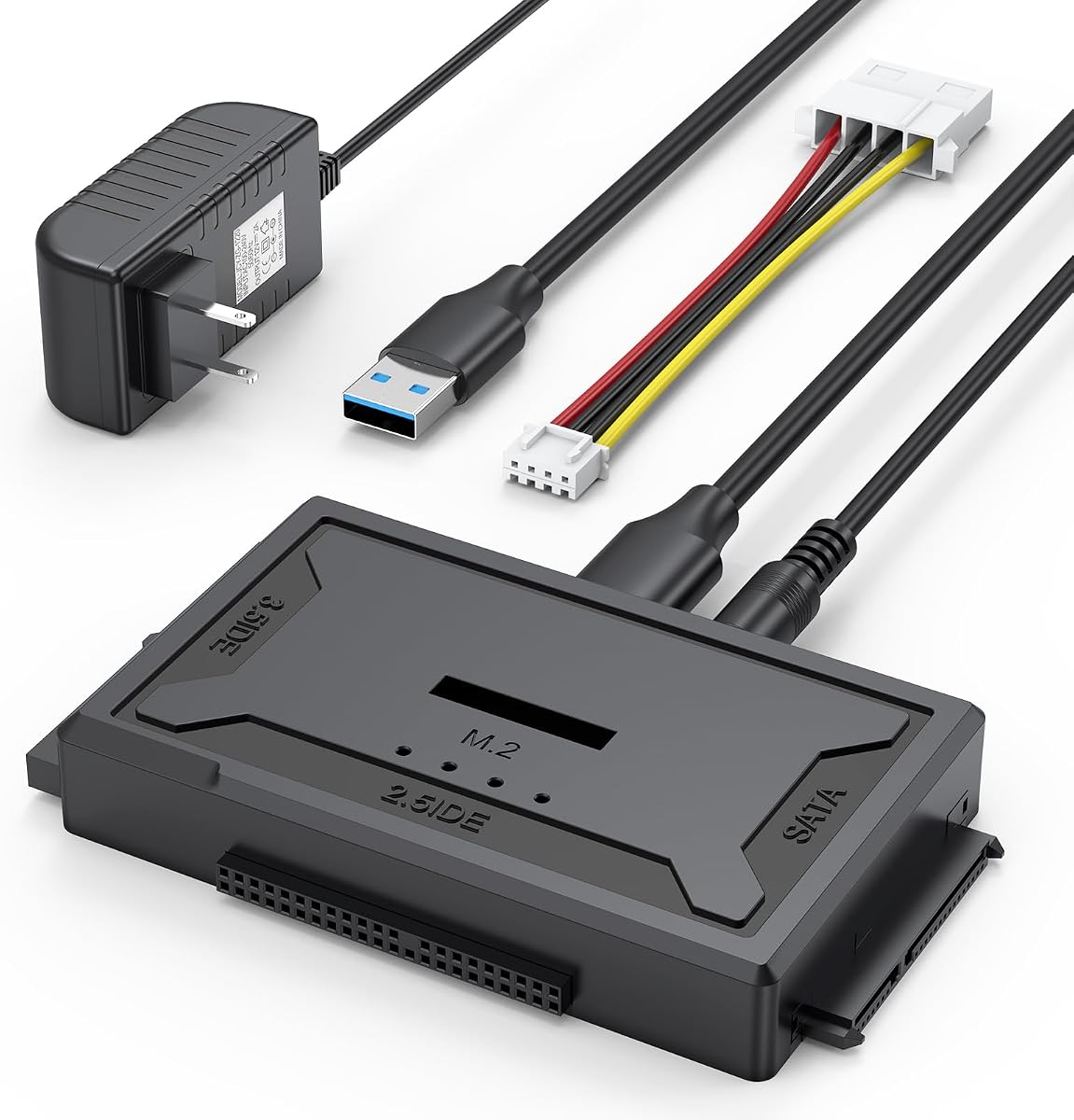
The four-in-one reader is the most protocol-flexible product here, capable of reading IDE, SATA, and M.2 drives. It handles 2.5-inch and 3.5-inch IDE, 2.5-inch and 3.5-inch SATA, and M.2 storage. Its 4.6 rating places it alongside the strongest products, while its broad connector coverage distinguishes it from conventional cables.
We may earn a commission when you buy through this link, at no additional cost to you.
The M.2 side supports the NVMe protocol for M-key drives and the SATA protocol for B+M-key drives, with a stated transfer speed up to 10Gbps. It does not support B-key mSATA drives, and the open M.2 arrangement accommodates different drive sizes. The 2.5-inch and 3.5-inch IDE interface is listed at approximately 100MB/s, while SATA can reach 5Gbps.
The package includes the reader, a three-foot USB-A-to-USB-A cable, a six-inch four-pin power lead, a power adapter, and a manual. Older 3.5-inch IDE drives need the four-pin connection, and dual IDE use requires the external adapter. Internal Blu-ray drives and hard drives also need external power according to the supplied information.
This reader is best for a technician or advanced user whose storage inventory includes M.2, SATA, and legacy IDE devices. It works with Windows, MacOS, and Linux, but file-system compatibility matters: a drive formatted for one system may need to be reworked before it can be used on another. Its multi-format design is a major advantage for versatile recovery work.
Supporting IDE, SATA, and two common M.2 protocols reduces the need for a drawer full of specialized adapters. It is particularly useful for mixed-device workshops and multi-generation computer upgrades.
The stated 10Gbps capability makes the reader attractive for compatible NVMe storage. Buyers should still verify the M-key or B+M-key requirement and avoid confusing standard M.2 with unsupported mSATA.
We may earn a commission when you buy through this link, at no additional cost to you.
The right laptop hard drive adapter kit depends first on the physical connector and size of the drive you need to read. From there, power requirements, host-port style, operating-system support, and transfer features determine whether a simple cable or a powered multi-drive reader will serve you best.
A standard 2.5-inch SATA hard drive or SSD uses a wide, flat, L-shaped SATA connector, while an IDE drive uses a wide ribbon-cable connector. M.2 drives are much smaller and have gold edge contacts, but an M.2 drive may use either NVMe or SATA and may use an M key or B+M key. B Key/mSATA support is not available on every adapter, so identify the drive before purchasing rather than relying on its thin rectangular shape alone.
Choose the connector type first, then confirm the physical size. Several readers in this guide support both IDE and SATA, while the SABRENT cable and BENFEI enclosure handle only 2.5-inch SATA. The four-in-one reader is the only choice here with stated M.2 support.
USB-A remains common, but many modern laptops expose only USB-C. A reader that includes a USB-C adapter or integrated USB-C cable is easier to use across different systems. By contrast, a device whose included host cable ends in USB-A may require a separate USB-C-to-USB-A adapter on a USB-C-only computer. Check the host side as well as the drive-side connector.
For stable operation, a direct connection to the computer is generally preferable to an unpowered hub. The SABRENT dock specifically advises against hubs and USB 2.0 ports for reliable drive access. When using a hub, make sure it can provide sufficient power.
Most 2.5-inch SATA SSDs and many laptop hard draws can operate from USB bus power, which makes a direct cable highly convenient. High-capacity or older 2.5-inch mechanical drives may need more current than a single port supplies. A powered USB hub or a different port can help if a drive does not spin up.
A 3.5-inch hard drive generally requires external power because of its startup demand. IDE desktop drives also commonly need a four-pin Molex-style power lead in addition to the data connector. Kits that include a 12V/2A supply and four-pin cable are therefore more useful for recovering older desktop storage.
Single-drive adapters are ideal for one-time transfers, backups, and routine access. Dual-drive readers can copy directly between two storage devices or keep a source connected while writing to another. The Unitek, USB 3.0 Type C IDE Reader, and USB 3.0 IDE/SATA Recovery Kit support one IDE drive with one SATA drive at the same time.
Dual operation does not mean every pair of drives can be connected together. The USB 3.0 Type C IDE Reader specifically cannot run two IDE drives simultaneously, and the four-in-one reader requires external power for dual IDE use. Read the limitations before planning a migration.
A stated interface rate such as 5Gbps or 10Gbps is a theoretical ceiling, not a guarantee for every file transfer. Mechanical hard drives are often limited by their own sustained read and write speed, while older IDE hardware operates much more slowly. The connected computer, USB mode, cable, drive health, and file type all influence the outcome.
UASP can improve performance on compatible hosts, but the computer and operating system must support it. The SABRENT cable, SABRENT dock, and BENFEI enclosure mention UASP. For older recovery work, a stable connection and correct power are often more important than chasing the highest headline speed.
Most of the products are described as driver-free and compatible with Windows, macOS, and Linux, but that does not mean a drive will appear without preparation. A newly purchased drive may need to be initialized and formatted in Disk Management. A drive formatted with a file system that the current operating system does not understand may also require formatting or another access method.
The four-in-one reader explicitly warns that the drive's file-system format must match the computer's operating-system format. A drive containing important files should not be formatted simply to make it visible. First attempt a read-only or recovery workflow, and preserve the original data whenever possible.
Hot swapping, an on/off switch, and power or activity LEDs are useful indicators that a reader is built for repeated drive work. Hot swapping allows a change without restarting the host, while an on/off switch gives the user greater control over drive power. LEDs make it easier to confirm that the adapter and attached drive are active.
A short, flexible four-pin power cable can also make a 3.5-inch IDE installation less awkward. These details do not guarantee successful recovery, but they improve usability and make troubleshooting easier when older hardware behaves unpredictably.
Before connecting anything, identify the drive type, connector, size, and jumper requirements. For an IDE drive, consult the drive label or manufacturer documentation to determine whether it must be set to master or slave. Make sure the adapter has the correct SATA or IDE connection, and confirm that the laptop has a compatible USB host port. For a 3.5-inch drive, connect the four-pin power lead and the external 12V/2A supply before attempting to use it.
Attach the drive securely, connect the USB cable, and then power on the drive if the adapter has a switch. A new blank drive may appear in Disk Management but require initialization, partitioning, and formatting before normal use. Do not initialize or format a drive that contains irreplaceable files. Open the drive in the file manager, copy the needed data, and use the operating system's safe eject process before changing drives.
Handle bare drives by their edges and protect them from static, impact, moisture, and abrupt power loss. Keep the external supply dry and avoid hot-swapping a 3.5-inch drive unless the manual explicitly permits it. If a drive fails to spin up, check the power lead and connector before repeated attempts. If files are missing or the filesystem is damaged, stop writing to the drive and use a recovery workflow that avoids further modification.
A SATA adapter connects drives that use the modern, flat L-shaped SATA data connector, while an IDE adapter connects older PATA drives with a wide ribbon-style connector. Some kits in this guide support both, but the SABRENT cable and BENFEI enclosure are SATA-only. Confirm the connector on the drive before ordering.
Most of the IDE and SATA readers in this guide cannot read M.2 storage. The four-in-one reader is the exception, supporting NVMe M-key and SATA B+M-key M.2 drives according to its stated specifications. It does not support B-key/mSATA, so protocol and key compatibility must both be confirmed.
Yes, a 3.5-inch hard drive should use external power. Laptop USB ports generally cannot supply enough current for reliable startup and sustained operation. The relevant adapters in this guide include a 12V/2A power supply, and older IDE drives additionally require the included four-pin power lead.
Common causes include an incorrect connector, insufficient power, an incompatible host connection, a missing jumper setting, or an uninitialized drive. Check the drive and adapter compatibility first, then inspect the power arrangement and USB port. A new empty drive may need initialization in Disk Management, while a drive with important files should be handled carefully.
It depends on the included host connection. Products that include a USB-C adapter or cable can connect directly to many USB-C systems. A USB-A-only adapter may require a separate USB-C-to-USB-A adapter, which is not always included. Direct computer connection is generally more stable than using an unpowered hub.
No. Those figures represent interface or protocol limits. Mechanical drive speed, SSD capability, file size, computer performance, and connection stability usually determine actual results. The older IDE interface is also much slower than modern SATA, regardless of the USB connection attached to the reader.
A blank drive generally must be initialized, partitioned, and formatted before it can be used normally. The process may vary by operating system, and a compatible adapter does not remove the need to prepare storage. Never format or initialize a drive containing valuable files unless you have made a verified backup.
An adapter can make a compatible drive accessible to the computer, which may allow normal copying if the drive and filesystem are healthy. It does not guarantee recovery from physical damage or logical corruption. Stop writing to questionable media and use appropriate recovery software or professional service if the drive makes unusual noises, disconnects repeatedly, or contains irreplaceable data.
The Unitek USB 3.0 IDE/SATA Adapter is the strongest all-around choice because it handles IDE and SATA, supports one drive of each type at the same time, and includes external power. For 2.5-inch SATA media, the SABRENT EC-SSHD provides a highly rated direct cable, while the BENFEI enclosure offers a practical, tool-free housing with both USB-C and USB-A options.
Prioritize the physical drive connector before considering speed or extra features. Next, verify the host connection, external-power requirements, supported file system, and intended number of drives. Legacy users should pay particular attention to IDE jumper settings and the four-pin power lead, while owners of M.2 storage should choose the four-in-one reader and confirm the exact M.2 protocol.
Marketplace listings, included accessories, supported specifications, and prices can change over time. Review the current product page before purchasing, and compare the complete package rather than focusing only on a headline transfer rate. The right kit is the one that safely connects the drives you actually own to the laptop or desktop you use.