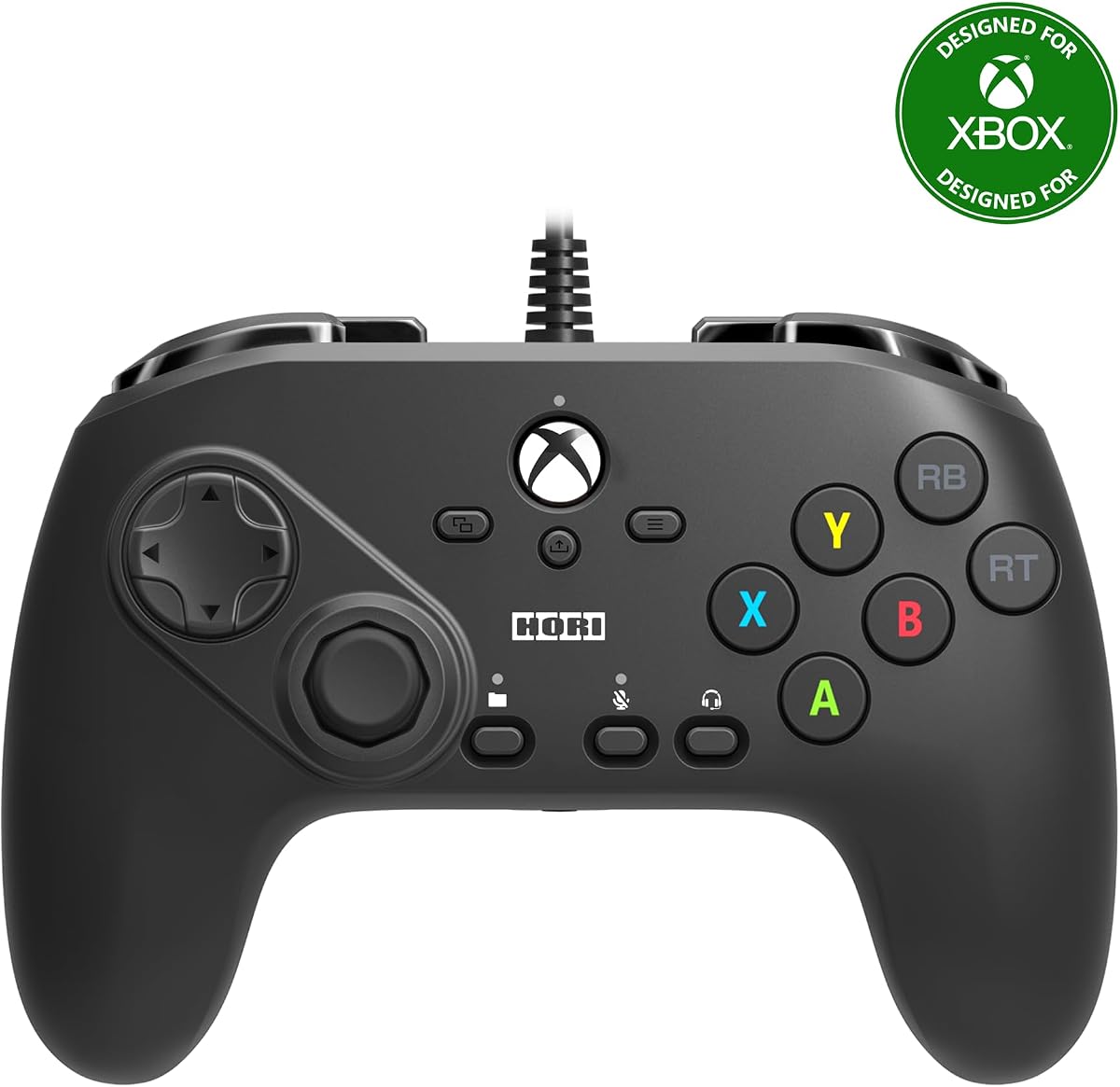
8Bitdo M30 Wired Controller
4.2Editor score
Six-button fighting layout
Wired USB-C connection
Three switchable profiles
Xbox and Windows compatibility
Explore the best fightpads for PC in 2026, comparing button layouts, connectivity, compatibility, customization, controls, and build quality for players.
Fightpads for PC give fighting-game players a more focused alternative to a standard gamepad. A dedicated six-button layout, short-travel sticks, microswitch triggers, and a stable desk or lap base can make directional inputs and attacks feel more deliberate, consistent, and satisfying across competitive and casual matches.
The products in this guide were compared using the information supplied about their layouts, platform support, connection methods, control features, customization options, physical design, and intended use. The list covers licensed PlayStation and Xbox fightpads, multi-platform leverless controllers, a wireless premium model, a compact fighting stick, and an adaptable entry-level gamepad.
Each review explains who the controller is likely to suit, what stands out in its supplied specifications, and where practical limitations may apply. Ratings reflect the available customer feedback, while feature and compatibility details remain subject to software updates or game-specific behavior. Product availability and prices can change, so check the current listing before buying.
4.2Editor score

4.4Editor score

4.2Editor score
The table below compares all ten controllers by control layout, connection, platform support, and standout functionality, making it easier to identify the right option for a PC fighting-game setup.


The HORI Fighting Commander OCTA combines an officially licensed PlayStation design with the focused control layout serious fighting-game players generally want on PC. Its 4.1 rating reflects positive overall customer feedback, while the supplied specifications highlight a tournament-oriented six-button arrangement, microswitch buttons, adjustable D-pad, and a short-throw analog stick with an eight-way gate.
We may earn a commission when you buy through this link, at no additional cost to you.
The short-throw stick and defined eight-way gate are particularly important because they are intended to help players execute directional inputs more accurately and quickly. The face buttons use microswitches rather than relying on a conventional gamepad's membrane-based action. Users can also adjust D-pad sensitivity, which provides useful control over diagonal inputs and repeated directional changes during movement-heavy matchups.
Its wired design is a reasonable trade-off for a PC fightpad because it removes wireless latency concerns and keeps the control path straightforward. The trade-off is that the cable must reach the computer, and desktop users may need a USB extension or careful cable routing. Although the controller supports a PlayStation 4, PlayStation 5, and PC, PC players may still need to configure the correct input method in the game or operating system.
The HORI is a strong all-around recommendation for someone who wants a recognizable licensed fightpad with meaningful tuning options but does not need a wireless connection, leverless buttons, or a large display. It is especially persuasive for owners of a Sony gaming setup who also play on Windows, provided they are comfortable with a wired desktop or laptop arrangement.
The short-throw analog stick and eight-way gate focus directional movement around a compact travel range. That design is intended to support faster, more accurate execution than a broad-feeling standard controller stick, while adjustable D-pad sensitivity gives players another way to tune directional behavior.
The companion app supports customization, while official Sony licensing provides a clear platform identity for PlayStation 4 and PlayStation 5 users. Windows support broadens the controller's usefulness, though game-specific input selection still needs to be handled during setup.
We may earn a commission when you buy through this link, at no additional cost to you.
This HORI Fighting Commander Octa is designed around an officially licensed Xbox control scheme and supports Xbox Series X|S, Xbox One, and Windows 10. It offers the core features associated with a dedicated fightpad: six face buttons, microswitch buttons, an adjustable D-pad, and a short-throw analog stick with an eight-way gate. Its 3.5 rating suggests that buyer experiences are more mixed than those of several alternatives in this guide.
We may earn a commission when you buy through this link, at no additional cost to you.
The most notable distinction is its profile system. Players can create and save up to four profiles through the companion app and then use the controller's profile button to move between them. That is useful when one game uses a different layout, when multiple people share the controller, or when separate settings are preferred for training and competitive sessions.
The wired connection is straightforward and consistent for a PC setup, but it also means the player must account for cable reach and potential interference from other desk equipment. Official licensing and support for both current and previous Xbox generations make the device attractive to a broader console audience, although PC buyers whose games are primarily keyboard-and-mouse focused may find limited use for a fightpad.
The practical drawback is the controller's relatively subdued 3.5 rating compared with the 4.1 to 4.4 ratings attached to several other products here. That figure does not reveal why individual customers were satisfied or dissatisfied, so it should be considered alongside the available features. The HORI remains a sensible choice for an Xbox-centered player who values official licensing, a focused layout, and four saved profiles.
Four saved profiles make this controller more flexible than a fixed-layout gamepad. The ability to change profiles directly from the hardware is useful for sharing a PC or console, moving between a training configuration and a game-specific configuration, or keeping personalized control schemes close at hand.
Windows 10 support and a wired connection create a low-friction path for PC fighting games. The same design also supports Xbox Series X|S and Xbox One, making it a practical shared controller for a household that plays across newer and older Microsoft systems.
We may earn a commission when you buy through this link, at no additional cost to you.
The 8Bitdo M30 offers a practical entry into dedicated fighting-game controllers with an officially licensed Xbox design, a six-button layout, and support for Xbox Series X|S, Xbox One, and Windows. Its 4.2 rating indicates broadly positive customer feedback, and the supplied information emphasizes a direct USB-C wired connection, profile switching, and audio controls.
We may earn a commission when you buy through this link, at no additional cost to you.
Two bumpers, two triggers, and two button-layout switches allow the controller to present different configurations without forcing a single fixed arrangement. A dedicated profile switch button provides access to three profiles, allowing players to keep different control choices for different games, characters, or practice routines. Support for 8BitDo Ultimate Software adds another layer of configuration and platform integration.
Its fixed wired connection is not as flexible as a wireless controller, but that limitation also keeps setup uncomplicated and is well suited to a desk-based PC station. A 3.5mm audio jack and onboard volume control are helpful when playing through a headset without reaching for a separate volume control. As with any six-button controller, the user must ensure the active game recognizes the device and presents the expected input arrangement.
Among the options in this roundup, the M30 is one of the most approachable for a PC player who wants a recognizable fighting layout without moving into a premium leverless ecosystem. It is best for budget-conscious buyers, Xbox owners who want multi-platform use, and anyone who values profile switching and simple wired operation more than wireless freedom.
The dedicated profile switch gives players quick access to three stored configurations. That makes the M30 convenient for games with different control demands, shared setups, or players who want a separate arrangement for training without repeating the full configuration process every session.
USB-C provides a modern, straightforward connection for Windows and compatible Xbox systems. The supplied description characterizes the wired path as virtually lag-free, making it a sensible choice for a stationary PC setup where consistent communication matters more than cable-free mobility.
We may earn a commission when you buy through this link, at no additional cost to you.
The DOYOKY Leverless Controller is an unusually flexible multi-platform option, with supplied support for PC, PS4, PS3, Nintendo Switch, and Steam Deck across five input modes. Its 4.4 rating is among the strongest in this list, while the hot-swappable switches, OLED display, SOCD controls, and browser-based customization make it attractive to players who want to modify their setup.
We may earn a commission when you buy through this link, at no additional cost to you.
The 16-button hitbox-style layout resembles a full leverless controller rather than a conventional six-button pad. Mechanical switches can be changed in seconds without soldering, and the package includes spare keycaps, a spare switch, and a puller. The built-in OLED shows the current input mode, SOCD setting, and Turbo status, reducing the need to guess whether a configuration change has taken effect.
SOCD can be configured in Neutral, Last-Input, and Up-Priority modes, while Turbo macros add another layer of repeatable control. The reinforced USB-C port and detachable 1.5-meter braided cable are designed for repeated daily use, and non-slip rubber feet on a 29.6 by 21-centimeter base help maintain stability. Those larger dimensions, however, make the controller less compact than a simple fightpad.
This is an excellent choice for a player who wants one leverless controller to cover several systems and values easy physical modification. It is particularly attractive to PC, Switch, or Steam Deck users with mixed libraries. Those who prefer a small traditional fightpad, official platform licensing, or a controller that does not require browser-based configuration should consider the more specialized alternatives.
The browser-based configuration system lets players assign buttons, set macros, and adjust key behavior without installing a conventional desktop program. An OLED panel then shows important status information, making it easier to confirm the active input mode, SOCD setting, and Turbo condition during setup.
Hot-swappable mechanical switches let players change the tactile feel of the leverless buttons quickly. Included spare parts provide a convenient starting point, and the switch puller removes the need for a soldering setup when experimenting with different switch types.
We may earn a commission when you buy through this link, at no additional cost to you.
The Akko FUNBOX is the most feature-rich premium fightpad in this guide, built around Kailh Star Mini 2.8mm low-profile Hall Effect magnetic switches, a full-color LCD, and extensive rapid-trigger controls. It supports PC out of the box and lists PS4, Xbox, Switch, and Android, with PS5 available through a Brooks adapter. Its 4.2 rating reflects positive customer feedback despite the controller's advanced nature.
We may earn a commission when you buy through this link, at no additional cost to you.
The rapid trigger is adjustable from 0.1mm to 2.8mm, allowing players to choose how quickly a direction resets after being released. That level of control is useful for movement-heavy games and for users who want a highly personalized response. The stated 50KHz scan rate and 8,000Hz polling on PC reinforce the controller's performance-oriented positioning, although actual results depend on the game and computer.
The 2-inch full-color LCD functions as a control hub for mode changes, SOCD adjustments, input testing, and optional standby animations uploaded through the browser-based driver. An aluminum multi-function dial provides tactile access to those settings. When Tournament Lock is enabled, simultaneous opposing directional inputs are restricted to a single Up direction, while Home, Turbo, Select, and Start are disabled for competition-focused use.
The FUNBOX makes the most sense for competitive-minded players who want rapid-trigger control, modern switch technology, and extensive on-device adjustment. It is less appropriate for a simple plug-and-play purchase because the feature set takes time to understand. Users should also verify adapter requirements and game-specific compatibility before purchasing.
The 0.1mm to 2.8mm rapid-trigger range gives players meaningful control over directional reset behavior. Fine adjustments can support fast movement patterns, while a more deliberate setting may suit certain play styles or games that reward a different input feel.
Tournament Lock provides a rules-oriented preset that limits simultaneous opposing directions and disables several auxiliary inputs. When it is not engaged, the supplied specifications describe four SOCD modes and complete button remapping through the browser driver.
We may earn a commission when you buy through this link, at no additional cost to you.
The HORI Fighting Commander OCTA Tekken 8 Edition is explicitly designed for Windows PC, making it a straightforward choice for players who want a dedicated fightpad without navigating multi-platform setup. It carries official Bandai Namco Entertainment licensing and a 3.8 rating, with supplied features centered on tournament-grade construction, microswitch buttons, and a six-button layout.
We may earn a commission when you buy through this link, at no additional cost to you.
Its left analog stick uses a short throw and eight-way gate to support accurate and rapid directional execution. The D-pad is described as accurate, while an analog slide pad offers a separate method for navigating in-game lobbies and menus. These features preserve the familiar fightpad structure while making the controller less dependent on a conventional directional hat alone.
Its dedicated Windows focus is an advantage for simplicity, but it is also the main limitation for buyers who want to share the controller with a PlayStation or Xbox system. The supplied information does not mention saved profiles, rear buttons, a display, or leverless switches, so this should be viewed as a focused traditional fightpad rather than a deeply programmable modern platform.
The Tekken 8 Edition is best for a PC player who values a clear six-button setup, microswitch action, and navigation controls in a compact, established HORI design. It may appeal particularly to Tekken and general fighting-game users who do not need broad console compatibility or advanced firmware-driven customization.
The controller combines a traditional six-button fighting layout with a short-throw, eight-gate analog stick. That combination gives players recognizable attack placement and a directional control designed around accurate, fast execution.
The analog slide pad provides an additional navigation method outside the main fighting controls. This is useful for moving through character, training, and lobby menus without shifting attention away from the controller's primary face-button arrangement.
We may earn a commission when you buy through this link, at no additional cost to you.
The HORI Wireless Fighting Commander OCTA Pro combines a tournament-style six-button layout with wireless operation for PlayStation 5 and Windows 11 or Windows 10. It has a 3.6 rating and distinguishes itself through programmable rear buttons, tactile shoulder buttons, an analog navigation slider, and a swappable D-pad offered in three configurations.
We may earn a commission when you buy through this link, at no additional cost to you.
Wireless connectivity is the defining feature for a PC player. It removes a cable from the playing position and makes it easier to change seating positions or use a display at a distance. The included USB-C charging cable has a locking feature intended to prevent accidental disconnections, addressing one practical concern associated with charging a wireless controller during use.
The swappable D-pad gives players a way to experiment with directional feel without replacing the whole controller. Programmable rear buttons can add shortcuts for training or menu actions, although their exact operation depends on the supporting software and game. Users should install the latest firmware from HORI's website before use, as the supplied information specifically notes this for the Wireless OCTA Pro.
This controller is a good fit for a PC setup where cable management is inconvenient, or for a player moving between a monitor and television. Its lower 3.6 rating calls for attention to current customer feedback and setup requirements, while the feature set makes it more specialized than a standard six-button pad.
Wireless operation gives the fightpad greater freedom around a gaming station than a wired design. It is particularly useful when the PC display sits farther from the play surface or when furniture makes cable routing inconvenient.
The included swappable D-pad system lets users choose among three directional configurations. This adds a degree of personalization for movement inputs and provides an alternative to committing permanently to a single hat design.
We may earn a commission when you buy through this link, at no additional cost to you.
This renewed HORI PlayStation 5 Fighting Commander OCTA provides an officially licensed tournament-grade design for PS5, PS4, and PC. Unlike the six-button entries elsewhere in the list, it uses an eight-button layout and includes a touchpad and programmable macros. The supplied product data does not provide a numerical customer rating, so this review does not assign one.
We may earn a commission when you buy through this link, at no additional cost to you.
An eight-button layout offers more attack options directly on the face of the controller, which can be useful in games that support the extra inputs. The touchpad maintains familiar PlayStation functionality, while programmable macros offer a way to automate configured sequences. These features make the controller more than a simple replacement for an Xbox-style pad.
The renewed status is the most important consideration. A renewed product may show signs of previous use, and its exact physical condition can differ from that of a new unit. Buyers should review the listing's condition details, included accessories, warranty information, and return terms carefully. The stated PlayStation, PC, touchpad, and macro support still makes it a capable multi-platform option for the right buyer.
This renewed HORI is most appropriate for a PlayStation-focused player who also uses PC and values eight-button coverage. It is less suitable for someone who cannot accept cosmetic wear or wants the reassurance of a current rating and new-unit condition. Confirm that the controller's inputs, cables, and accessories meet your needs before ordering.
The eight-button arrangement gives players more face-button choices than a traditional six-button fightpad. In compatible games, those extra inputs can provide access to additional attacks, assists, or other assigned commands.
A renewed product can deliver the same core functions as a new unit, but visible wear and included accessories may vary. The listing should be checked for condition details and return coverage, especially when a controller is used extensively during competitive play.
We may earn a commission when you buy through this link, at no additional cost to you.
The Logitech G F310 is not a dedicated tournament fightpad, but it remains a capable and adaptable option for PC players seeking a familiar six-button gamepad. Its 4.4 rating is among the strongest in the guide, while the floating D-pad, programmable buttons, broad game support, and simple USB connection make it a practical general-purpose controller.
We may earn a commission when you buy through this link, at no additional cost to you.
The floating D-pad rests on four switches rather than a single central pivot, allowing it to register quick changes in direction. Ten programmable buttons and an eight-way programmable D-pad add flexibility, and Logitech Profiler software can assign keyboard and mouse commands for games that lack native gamepad support. That remapping feature expands its usefulness beyond standard fighting games.
The familiar layout resembles an Xbox 360 controller, so many PC players will need little time to adapt. Its six-foot cord offers more reach than a compact wired fightpad, though it lacks the tournament-specific microswitch action and short-throw stick emphasized by the dedicated HORI products. Remapping also requires installing software, adding a setup step that dedicated modern fightpads may handle differently.
The F310 is a sensible value-oriented choice for a player who wants one controller for fighting games, arcade-style games, and ordinary PC titles. It works best for someone who values familiarity, broad compatibility, and programming over the specialized feel of a tournament-grade fightpad or the adjustability of a leverless controller.
Resting the D-pad on four switches instead of one pivot allows individual directional inputs to register more independently. For fighting games, that arrangement can support quick diagonal changes and movement patterns without the central-pivot behavior found on many conventional gamepads.
Profiler software can assign keyboard and mouse commands to the controller, helping it work with games that do not natively recognize gamepad input. This expands the F310's usefulness across PC libraries, although the required installation adds setup complexity.
We may earn a commission when you buy through this link, at no additional cost to you.
The HORI Fighting Stick Mini brings a familiar arcade-style joystick and eight-button layout to a compact, lightweight package for PS5, PS4, and PC. Its 4.2 rating reflects positive customer feedback, and official Sony licensing makes it a natural fit for players who alternate between PlayStation and Windows games.
We may earn a commission when you buy through this link, at no additional cost to you.
HORI's original joystick uses a V-cut housing, preserving a more traditional lever-based control experience rather than using a flat leverless button array. The classic eight-button arrangement provides a broad set of attack positions, while the compact, portable design makes the stick easier to store and move than a full-size arcade cabinet-style controller.
The included eight-foot cable offers enough reach for many desk arrangements, and its detachable construction is useful for storage and transport. The tradeoff is that even a mini fight stick occupies more space and offers less directional-hand freedom than a low-profile six-button pad or a leverless controller. The supplied information does not list extensive remapping, profile, or trigger features.
The Fighting Stick Mini is best for a player who values the feel and appearance of a joystick-based arcade controller but wants a more manageable footprint than a traditional full-size fight stick. It is also a solid option for Sony console owners who want a licensed controller for both console and PC fighting games.
The original HORI joystick and V-cut housing create a more traditional arcade-style input than a flat directional pad. Players who prefer rotating a lever may find this layout more natural for repeated directional motions and precise eight-way positioning.
The compact, lightweight housing reduces the space and handling burden of a full-size fighting stick. A detachable eight-foot cable makes the controller easier to pack away when the PC or console is not in active use.
We may earn a commission when you buy through this link, at no additional cost to you.
The most suitable fightpad depends on the games you play, the platforms you own, and the level of control you want over buttons, sticks, triggers, and macros. The following factors cover the most important differences across traditional pads, wireless models, leverless controllers, and compact fighting sticks.
Traditional six-button fightpads use a broad horizontal arrangement that closely resembles the controls used in many arcade and competitive fighting games. An eight-button layout adds more attack positions but can feel unfamiliar because the additional inputs are not evenly distributed across the face. Leverless controllers offer a flat grid of switches and can provide more visual consistency, but their larger size and switch spacing may not suit every setup. Check the exact layout in the product imagery and ensure the game supports the number and arrangement of buttons the controller presents.
A PC fightpad should be recognized by both the operating system and the specific game. Officially licensed controllers often provide clearer platform expectations, while multi-platform devices may rely on XInput, DInput, PS4, Switch, keyboard, or another selectable mode. Some games offer their own controller-detection tools, and some use unconventional input conventions. Look for explicit Windows support, identify the required input mode, and check whether an adapter or additional software is needed before purchasing.
A wired controller offers a direct connection and avoids the need to manage battery life or wireless pairing. It is often a simple choice for a fixed desk, although the cable can restrict seating position or compete for space around the PC. Wireless models offer greater freedom but add charging, firmware, latency, and connectivity considerations. Review whether the product supports wireless PC mode directly, what charging system it uses, and whether a locking cable or other accessory is included.
Fightpad controls often emphasize a short-throw stick with an eight-way gate, which gives directional inputs a defined range. A swappable D-pad adds flexibility by allowing different directional designs to be tried. Floating D-pads and floating sticks use separate mechanisms to register directions and can suit players who make frequent diagonal changes. A standard gamepad may feel less focused for fighting, while a leverless model may rely entirely on directional switches. Think about which control method you already use comfortably and whether the game expects stick input for navigation.
Microswitch buttons, conventional mechanical switches, and Hall Effect magnetic switches offer different operating characteristics. Microswitches are associated with crisp physical activation, while mechanical leverless switches emphasize replaceability and feel. Hall Effect switches use a contactless design, and the Akko FUNBOX adds adjustable rapid-trigger behavior from 0.1mm to 2.8mm. Hot-swappable sockets make experimentation easier because switches can be changed without soldering. Players should also consider whether their preferred game benefits from rapid trigger rather than choosing the technology solely on specifications.
Some fightpads save multiple button profiles, while others offer macro functions, SOCD options, remapping, or browser-based configuration. These features are useful for sharing a controller, adapting to different games, or refining input behavior. They also introduce a learning curve. Browser-based tools can be convenient because they may not require a traditional installed application, but a dedicated app or driver is still necessary for deeper settings. Confirm what can be changed, where the software comes from, and whether the controller remains usable without those tools.
SOCD settings determine how a leverless controller resolves simultaneous opposing directions. Neutral mode normally prevents both directions from registering, Last-Input favors the most recently pressed side, and Up-Priority gives upward input precedence. Tournament Lock presets can enforce competition-friendly behavior and disable auxiliary inputs. These features matter most to leverless users, but they are not essential for every traditional pad. Check the available modes, whether they can be changed quickly, and how tournament rules are represented on the device.
A full leverless controller occupies considerably more desk or lap space than a six-button pad, while a joystick-based fighting stick needs enough room to move the lever comfortably. Rubber feet, a broad base, and a detachable cable can improve stability and storage. Consider where the PC is located, whether you sit at a desk or on a couch, and how often the controller will be moved. Portable designs are helpful for shared setups, but physical size and weight still influence handling and stability.
Begin by connecting the controller with the specified USB cable or completing its wireless pairing process. On Windows, open the game's controller settings, select the correct input method, and assign or confirm every face button, trigger, D-pad direction, and stick axis. Leverless controllers may require a browser-based setup page, while licensed PlayStation or Xbox models may need the appropriate companion application. Test the controls in a training mode before entering a match.
Configure the experience to suit the game. Set SOCD behavior, macros, rapid trigger, D-pad sensitivity, or stick behavior as appropriate, and use the controller's profile system when different games or players need different layouts. Save a baseline profile before experimenting so a useful configuration can be restored. For wireless devices, install any required firmware and learn the charging procedure before an important session.
Keep the fightpad stable and clean. Place it on a flat surface with the rubber feet or base fully supported, avoid pulling the cable by the connector, and do not force a lever beyond its intended movement. For hot-swappable controllers, power down and disconnect the device before changing switches. Keep the control surfaces dry, remove dust gently, and inspect the cable, connector, buttons, and joystick for looseness or wear between extended play sessions.
A dedicated fightpad can be better for players who prefer arcade-style controls, a short-throw stick, and more clearly grouped attack buttons. It may feel less comfortable for players accustomed to a standard Xbox-style pad or for games that require extensive stick-based movement. The best choice depends on the game and the player's existing muscle memory, not simply on whether the controller is marketed as a fightpad.
No. Many PC games accept generic controllers through XInput or DInput, and several products in this guide explicitly support Windows. What matters is that the game recognizes the controller and that its layout matches the game's expectations. Licensed Xbox and PlayStation models can offer clearer platform identification, while multi-platform leverless controllers provide selectable input modes.
A six-button fightpad has a traditional horizontal arcade-style button arrangement and usually uses a short stick or D-pad for directions. A leverless controller replaces the stick and traditional directional hat with a flat grid of mechanical, Hall Effect, or similar switches. Leverless designs can offer extensive SOCD, macro, and rapid-trigger control, but they are usually larger and may require more setup.
A wired fightpad avoids wireless pairing and battery-management concerns, which can simplify a fixed gaming station. It also keeps the connection path simple, although the cable may restrict positioning or require extension. Wireless models can be preferable when cable routing is inconvenient. The deciding factors are setup preference, seating distance, and the strength of the device's wireless implementation.
SOCD refers to how a leverless controller handles opposing directional inputs pressed at the same time. Neutral mode stops simultaneous opposites, Last-Input favors the latest press, and Up-Priority gives Up precedence. The right mode depends on the game and player, while Tournament Lock is intended to enforce rules suitable for official competition.
No. Some games provide native support for common controller formats, while others require a specific input mode or have their own detection requirements. A controller with XInput, DInput, PS4, Switch, or keyboard modes can cover several games, but compatibility should still be checked individually. Leverless controllers may also need their browser-based setup completed before a game recognizes the full layout.
Rapid trigger changes when a directional control resets after it has been released. The Akko FUNBOX offers an adjustment range from 0.1mm to 2.8mm, allowing a player to tune how quickly a direction can be pressed again. This can assist with fast movement patterns, though the effect and usefulness depend on the game and the player's preferences.
Disconnect the controller before changing switches, and use the included puller or an appropriate tool so the keycaps and switch pins are not damaged. Keep small parts away from dust and liquids, and confirm that each replacement switch is seated correctly. Periodic cleaning and a visual check of the cable, buttons, and directional controls can help identify wear before it affects play.
The top selections cover three distinct priorities. The 8Bitdo M30 is the best budget fit for players seeking a familiar six-button Xbox-style layout, USB-C connectivity, and three profiles. The DOYOKY Leverless Controller is the most adaptable option, combining hot-swappable switches, an OLED display, broad platform support, and web-based configuration. The Akko FUNBOX is the premium choice for players who want Hall Effect switches, adjustable rapid trigger, high PC polling, and tournament-oriented controls.
Prioritize the features that directly improve your sessions rather than choosing solely by specification count. A traditional pad may be ideal for arcade-style fundamentals, a wireless model may suit a flexible entertainment setup, and a leverless controller may be worthwhile for SOCD control, macros, or switch customization. Also verify Windows input recognition, game support, desk space, and any required software or adapters before ordering.
Customer ratings, product availability, and prices can change over time, so review the current listing and recent feedback at the point of purchase. The supplied ratings provide useful context, but they are only one part of a buying decision. Confirm the controller's current specifications, accessories, condition, platform support, and return terms to ensure it matches your PC and favorite fighting games.