
eufy Security 5-Piece Home Alarm Kit
4.3Editor score
No recurring monthly fees
Includes keypad and sensors
App-based instant alerts
Straightforward self-installation
Keypad control home security systems put everyday arming, disarming, and status checks within easy reach while protecting doors, windows, and common areas. A useful keypad should be intuitive, responsive, compatible with the rest of the alarm, and appropriate for the size and layout of your home.
The systems in this guide range from compact wireless kits to hardwired control panels and color touchscreen controllers. We compared their included components, arming features, sensor coverage, monitoring options, power requirements, compatibility, installation demands, and potential ownership considerations.
Each pick highlights who the product is best suited for and the tradeoffs worth considering before installation. Ratings and availability can change over time, and retailers frequently adjust product details, so verify the current listing, panel requirements, subscriptions, and accessories before buying.
4.3Editor score
4.6Editor score
5.0Editor score
As an Amazon Associate we earn from qualifying purchases.
The table below compares all ten systems by their core hardware, control method, sensor coverage, connectivity, installation needs, and most important buyer consideration. It is designed to make differences between standalone keypads, wireless alarm kits, and hardwired control systems easy to understand.


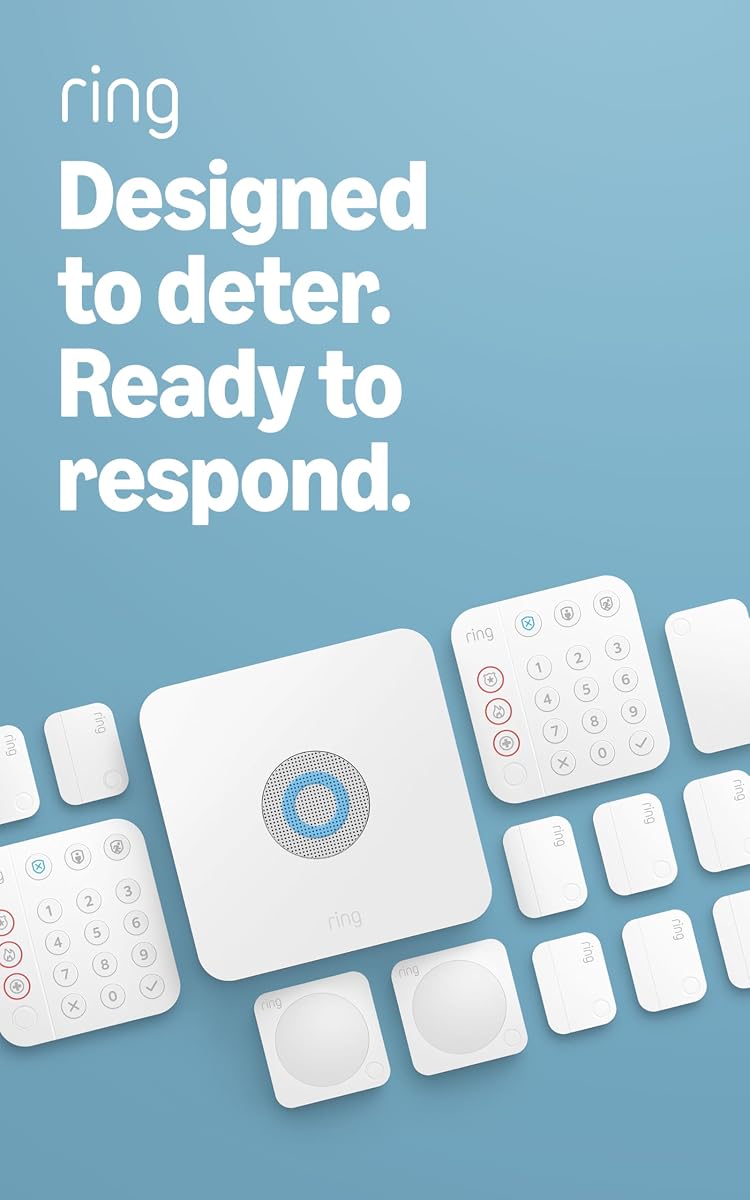
The Ring Alarm 14-Piece Kit offers the broadest ready-to-install combination in this guide, with two keypads, eight contact sensors, two motion detectors, a base station, and a range extender. Its 4.6 rating reflects a well-rounded package for buyers who want meaningful sensor coverage without assembling every component separately.
We may earn a commission when you buy through this link, at no additional cost to you.
The two included keypads make it easier to arm the system near both an entrance and another frequently used exit. Contact sensors cover eight doors or windows, while the two motion detectors add protection to larger rooms or main traffic areas. The range extender is especially useful in a home with thick walls, long hallways, or multiple levels where wireless communication may otherwise become less consistent.
The Ring app serves as a central location for notifications and control of connected Ring devices. Arming away from home and obtaining 24/7 professional monitoring for police, fire, and medical response require a compatible Ring Protect Plan. This subscription distinction matters because the hardware provides a strong foundation, but remote arming, continued online operation during an internet outage, and professional response are optional services.
This is the most balanced choice for a two- to four-bedroom home that wants a substantial first layer of protection. Its main disadvantage is that buyers who do not want any service costs may not use every advertised function. Even so, the included sensor quantity, dual-keypad arrangement, expandability, and app-based management make this the strongest general-purpose system in the roundup.
Eight contact sensors and two motion detectors provide a useful starting layout for common entry points and open living areas. The range extender helps preserve communication across a larger home, while additional Ring sensors and accessories can be added as coverage needs evolve.
Two keypads make local access convenient, and the Ring app adds remote visibility and notifications. Remote arming, voice control, and professional monitoring depend on a compatible subscription, so include the service cost in your decision if those features are priorities.
We may earn a commission when you buy through this link, at no additional cost to you.
The eufy Security 5-Piece Home Alarm Kit is a practical starting system for apartments, smaller homes, and anyone who wants a keypad without committing to a recurring monitoring fee. It combines a HomeBase hub, keypad, motion sensor, two entry sensors, and an owner's manual in a straightforward package, earning a 4.3 rating.
We may earn a commission when you buy through this link, at no additional cost to you.
Installation is designed to be approachable. Entry sensors attach to doors and windows, while the included mounts help position the keypad and motion sensor. When activity is detected, the eufy Security app provides immediate alerts, allowing the homeowner to see what triggered the system and respond accordingly.
The strongest financial advantage is the absence of monthly fees for the stated system. That makes it attractive for users who want local keypad control and app notifications without selecting a professional monitoring plan. The trade-off is scale: two entry sensors and one motion detector cover only a modest area, particularly for a home with numerous accessible doors, windows, and hallways.
Choose this kit when straightforward setup, no monthly commitment, and essential alarm functions matter more than extensive coverage. It is a sensible foundation for a condo, starter home, or single-floor residence. Buyers with larger layouts should plan to expand thoughtfully, because the included components alone will not provide the same immediate coverage as the larger Ring kit.
The system combines security hardware with convenient local and app-based control without requiring a monthly plan. That makes the total ownership experience easier to understand for buyers who prefer not to maintain a monitoring subscription.
Door and window sensors use an adhesive-style installation, while supplied mounts help position the keypad and motion detector. Plan sensor locations before mounting anything so the compact kit covers the entrances and movement areas that matter most.
We may earn a commission when you buy through this link, at no additional cost to you.
The Honeywell 6290W Touch Center is a high-visibility keypad upgrade for compatible security installations. Its seven-inch color touchscreen, wireless design, and voice capability make on-screen status review more approachable than a traditional alphanumeric display, and its 4.6 rating supports its position as a polished professional controller.
We may earn a commission when you buy through this link, at no additional cost to you.
This unit is intended to function as part of a larger intrusion system rather than as a self-contained starter alarm. The large screen offers room for menus, prompts, and status information, while wireless communication can make placement more flexible than a permanently wired keypad. Voice functionality adds another way to interact with the controller.
The main limitation is compatibility. A buyer cannot treat this as a universal replacement keypad for an arbitrary system; it must be matched with the appropriate Honeywell control panel, power, programming, and communications setup. Professional installation may also be important depending on the existing system and the complexity of the upgrade.
This is a compelling choice for a compatible Honeywell installation seeking a modern touchscreen and a more intuitive command center. It is not the most accessible option for a first-time owner starting from zero, but for an existing system or a planned professional installation, it offers a refined and highly visible way to manage arming and system status.
A seven-inch color screen gives users more visual information at a glance than a conventional fixed-display keypad. The larger interface is particularly useful in a home where household members have different levels of comfort with alarm controls.
Because the controller is wireless, it may offer more freedom than a hardwired display, depending on the host panel. Confirm supported power and panel arrangements before purchase so the installation plan is compatible from the start.
We may earn a commission when you buy through this link, at no additional cost to you.
The Honeywell Ademco 6150 Fixed Display Keypad remains a practical choice for owners of compatible wired alarm systems that prefer a traditional interface. Its 4.4 rating reflects a focused product: a fixed English display and tactile controls designed to handle basic arming and system interaction.
We may earn a commission when you buy through this link, at no additional cost to you.
Compared with a color touchscreen, the 6150 offers less visual detail but takes up little space and keeps daily operation uncomplicated. People generally familiar with fixed-display security panels can arm or disarm the system without navigating a graphical menu or handling touch controls.
This is a component rather than a complete home security package. It does not include a control panel, sensors, communications module, or battery, and the compatible alarm installation must provide the proper operating environment. Installation also commonly involves low-voltage wiring and panel configuration rather than a simple adhesive sensor setup.
The 6150 is best for someone replacing a compatible keypad or building a wired Honeywell installation around a familiar, no-frills design. It would be a poor match for a renter seeking a self-contained wireless kit, but it is a sensible and durable control option for the right existing system.
The fixed display and tactile buttons create a predictable interface that does not depend on a touchscreen interface. This can make routine arming and disarming straightforward for users who value a familiar layout.
The 6150 is best considered alongside the control panel and wiring already in place. Verify panel compatibility before purchasing, and arrange proper low-voltage installation if the replacement is not a simple like-for-like swap.
We may earn a commission when you buy through this link, at no additional cost to you.
The Ring Alarm 8-Piece Kit is a compact wireless system that holds a 4.7 rating, the highest among the individual products in this guide. It includes a base station, keypad, four contact sensors, one motion detector, and a range extender, making it a focused setup for a one- or two-bedroom home.
We may earn a commission when you buy through this link, at no additional cost to you.
The local keypad supports straightforward arming and disarming, while the contact sensors report openings at doors and windows. Mobile notifications add remote awareness, and the range extender can improve radio coverage between accessories. The system is expandable, so a household can begin with this kit and add compatible sensors later.
As with the larger Ring Alarm package, a compatible Ring Protect Plan unlocks remote arming, continued system operation when the internet goes down, voice control through Alexa, and access to 24/7 professional monitoring for police, fire, and medical response. Buyers interested only in local control and basic notifications may not need every paid feature.
This is the strongest choice for a small home, apartment, or beginning security setup that needs more than a single sensor but does not need a large installed network. Its excellent rating and balanced component count make it easier to deploy than the 14-piece version, while still providing a clear path toward expansion.
Four contact sensors and one motion detector offer a manageable first layer of coverage. For one- and two-bedroom homes, this is often a more realistic starting point than installing a larger bundle and discovering that many devices are unnecessary.
Compatible Ring alarms and accessories can be added as new entry points or coverage areas become important. The included range extender also helps users place the system across rooms or floors without overcrowding a single area.
We may earn a commission when you buy through this link, at no additional cost to you.
The eufy Keypad E10 is an add-on control device with two standout emergency features: a covert duress code and a one-touch SOS button. It receives a 4.4 rating and is aimed at owners of compatible eufy HomeBase systems who want more ways to arm, disarm, or request help.
We may earn a commission when you buy through this link, at no additional cost to you.
Four operating modes support quick changes when leaving or returning home. If someone is coerced into entering a disarm code, the preset duress code can silently trigger an emergency dispatch while the keypad appears to disarm normally. The top-mounted SOS button offers a more direct route: pressing and holding it for two seconds triggers an alarm and attempts to call for help.
The keypad communicates with a compatible HomeBase 2, HomeBase 3, or HomeBase Professional unit and can operate across a stated open-air distance of up to 656 feet. It also sends instant smartphone alerts. Actual range varies with walls, placement, interference, and the home's physical layout.
This is a strong specialized upgrade for a compatible eufy installation, particularly for users who value an accessible emergency control near a bedroom or main entrance. It cannot stand alone, and households without a supported HomeBase should choose a complete kit instead. For existing eufy owners, however, the duress and SOS functions set it apart.
A duress code provides a way to request a response without announcing that an emergency is occurring. It is a meaningful feature for households that want the keypad to look and behave normally during a coercion scenario.
The dedicated SOS control reduces the number of steps needed to summon assistance. Position it where a person can reach it quickly, while remembering that the alert path still depends on the compatible hub, app, and any required monitoring service.
We may earn a commission when you buy through this link, at no additional cost to you.
The Ring Alarm Keypad, 2nd Gen, is a focused accessory for adding a convenient arming and disarming point to a compatible Ring Alarm setup. It carries a 4.7 rating, making it one of the highest-rated products here, although that score applies to the keypad accessory rather than an entire alarm package.
We may earn a commission when you buy through this link, at no additional cost to you.
Its core function is direct: arm or disarm the Ring Alarm system from a wall-mounted keypad. The second-generation design adds an emergency response button, while wireless communication eliminates the need to run a control cable to that location. That makes it useful for placing a control point near a second entrance, garage, or bedroom.
The emergency response feature requires a compatible Ring Home subscription. The same caution applies to other subscription-based functions, so buyers should confirm which alarm capabilities are included and which require service activation. This unit also cannot operate without a compatible base station and the other elements needed to form a functioning Ring Alarm system.
The Ring Alarm Keypad is best for an existing Ring owner who wants another local control location. New customers should generally purchase a complete kit unless they already own compatible hardware. For that specific use, its simple operation, wireless placement, emergency button, and strong rating make it a particularly useful expansion.
A second keypad can reduce the need to carry a phone or walk to a distant base station just to arm the alarm. It is especially helpful for households that enter and leave through more than one door.
The emergency response button adds a physical route for requesting help, provided the required Ring subscription is active. Position the keypad where it can be reached quickly and test the related alert path after setup.
We may earn a commission when you buy through this link, at no additional cost to you.
The Honeywell Security 6160 Ademco Alpha Display Keypad is a programmable controller for Adecco Vista alarm panels. It combines a 4.6 rating with a more informative alpha display than many simple fixed-display keypads, making it a practical choice for a compatible professionally installed system.
We may earn a commission when you buy through this link, at no additional cost to you.
The alpha display can present more descriptive information than a strictly numeric screen, which is useful when working with zones, system status, and programming. The keypad is designed for Vista panel use, allowing the control interface to fit within Honeywell's established alarm ecosystem rather than functioning as a universal controller.
This is a wired installation component. Users need a compatible panel, appropriate wiring, and the programming knowledge or installer support required to integrate the keypad. It does not provide sensors, communications, or monitoring by itself, and it should not be judged as a ready-to-install home security kit.
The 6160 suits a homeowner replacing an older Vista keypad, adding a control point, or building a wired system with a qualified installer. It is less appropriate for a renter seeking wireless adhesive sensors or for a buyer who wants a complete box. Within the right installation, the clear display and established compatibility are valuable.
An alpha display makes menus, labels, and status information easier to interpret than a keypad limited to simple numerical cues. This is particularly helpful during installation and routine troubleshooting of a larger wired system.
Compatibility with Adecco Vista panels is the defining feature. Confirm the exact panel model, wiring requirements, and programming permissions before ordering so the controller integrates properly with the rest of the installation.
We may earn a commission when you buy through this link, at no additional cost to you.
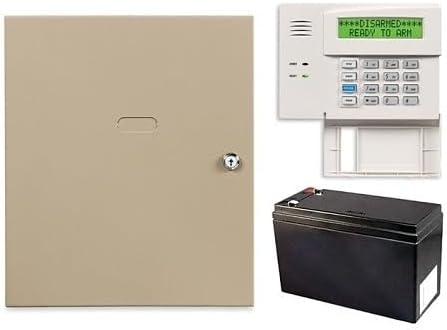
The Honeywell Home VISTA-20P 3-Piece Control Panel Kit is the most complete premium control package in this guide. It includes the VISTA-20P control panel, a 6160 keypad, and a 712BNP backup battery, and its 5.0 rating gives it the highest numerical score among the ten products.
We may earn a commission when you buy through this link, at no additional cost to you.
The panel supports push-button control, IP and cellular radio alarm reporting, and upload and download capability. It can also work with Z-Wave-enabled smart-home devices such as thermostats, lights, and locks. Importantly, the system supports up to four graphic touchscreen keypads, creating room for a more elaborate multi-keypad installation.
This level of control is aimed at users who want a professional-grade foundation rather than a simple adhesive sensor kit. A qualified alarm installer is generally the practical route because panel configuration, addressable devices, wiring, radio modules, and optional communications equipment can add complexity. Sensors, detectors, modules, and additional keypads are also purchased separately.
For a new construction project, substantial renovation, or professionally managed installation, this kit offers a capable and expandable platform. Its smart-home potential and multiple-keypad support distinguish it from the consumer-oriented wireless kits. The trade-off is cost, installation effort, and a greater need for technical expertise.
Support for up to four graphic touchscreen keypads makes the VISTA-20P suitable for homes that want a consistent control interface in several locations. It provides a flexible foundation for a wired system designed to grow over time.
Z-Wave compatibility allows the security control platform to participate in a broader connected-home setup. The panel can work with compatible thermostats, lights, and locks, adding convenience beyond traditional intrusion detection.
We may earn a commission when you buy through this link, at no additional cost to you.
The TUXEDO 7-inch Touchscreen Security and Smart Controller is designed for homeowners who want a prominent, modern command center within a compatible wired security installation. Its 4.3 rating reflects a specialized product with a clear focus on touchscreen control and smart-home functions.
We may earn a commission when you buy through this link, at no additional cost to you.
The seven-inch display is intended to provide a more visual and centralized control experience than a conventional alphanumeric keypad. As a security and smart controller, it may offer broader control over compatible connected functions, but the exact supported features depend on the host panel, wiring, modules, and setup.
The controller is hardwired and contains no separate battery. It draws power from the security system and relies on that system's battery backup during an outage. This architecture reduces the number of standalone power components, but it also means installation and operation depend on a properly configured panel and wiring run.
This is best for a homeowner building or upgrading a professional wired Honeywell-based system and seeking a polished touchscreen. It is not a practical standalone purchase for a renter or a quick wireless installation. Confirm panel compatibility, installer requirements, and the availability of the required modules before making it part of a project.
A large touchscreen can consolidate security status and compatible smart-home functions in one wall-mounted location. That convenience is most valuable in a properly planned installation where the host system supports the desired controls.
Because the controller has no separate battery and uses the panel's backup power, it is best viewed as part of a complete wired alarm installation. Proper wiring and a compatible panel are essential before installation begins.
We may earn a commission when you buy through this link, at no additional cost to you.
The right keypad security system depends on your property, installation skills, existing equipment, desired sensor coverage, and appetite for professional support. Use the following factors to distinguish a straightforward wireless starter kit from a full professional installation.
Wireless systems are generally easier to install, relocate, and expand because contact sensors and keypads communicate with a hub without being connected to the panel with security wiring. They are well suited to apartments, rental properties, and existing homes where running low-voltage cable would be inconvenient. Hardwired keypads and control panels usually provide a more permanent architecture and are better aligned with new construction or professionally installed alarm networks. They can also integrate more deeply with wired smart-home equipment.
In short, choose wireless for easier placement and hardwired for a planned, permanent alarm installation.
A keypad is only one part of a useful alarm. Contact sensors protect individual doors and windows, while motion detectors cover open areas where an intruder could move. Compare the number and type of sensors included, but also count the actual entry points and high-traffic spaces in your home. A five-piece bundle may be sufficient for an apartment, while a larger home may need two motion detectors, numerous entry sensors, and more than one keypad.
In short, count vulnerable openings and uncovered rooms rather than choosing solely by the number of pieces in the box.
Fixed-display keypads prioritize simple, tactile operation, while color touchscreens can provide more visual information and a more modern interface. Consider the users of the system, including children, older adults, guests, and anyone who may be unfamiliar with security controls. Clear prompts, easily identifiable buttons, responsive feedback, and a logical arming menu are more important than display size alone. Voice and emergency features may also improve accessibility.
In short, select the interface that household members can understand quickly and operate consistently under stress.
A standalone keypad is rarely universal. Professional controllers such as the Honeywell 6150, 6160, 6290W, and TUXEDO options are designed for particular panel families, while add-on keypads from Ring and eufy require compatible hubs or base stations. Check the exact model, radio type, power requirements, and firmware support before purchase. Mixing components from different ecosystems can leave you with a controller that cannot communicate with the sensors or panel.
In short, verify the complete parts list and manufacturer compatibility before buying any accessory or replacement keypad.
Local keypad control, mobile notifications, remote arming, cellular backup, and professional monitoring are separate features with different requirements. Ring and eufy offer different combinations of app control and optional services, while traditional Honeywell installations may require a monitoring provider or communications path. Consider how much professional response matters to your household and whether you want the system to remain useful without a subscription. Review service terms before installing equipment around which the entire alarm will operate.
In short, separate hardware ownership from monitoring services and compare the recurring features that genuinely matter to you.
Wireless kits with adhesive sensors and wall-mounted hubs are generally approachable for self-installers, although careful placement still matters. Hardwired panels and professional keypads often require low-voltage wiring, panel programming, compatible power supplies, and knowledge of zone assignments. Hardwired installations also need attention to wire routing, tamper protection, battery backup, and service access. Choose the approach that matches your comfort level or budget for professional installation.
In short, consider installation complexity a core product feature rather than an afterthought.
Keypads can do more than arm and disarm an alarm. The eufy E10 includes a covert duress code and a dedicated SOS button, while the second-generation Ring Alarm Keypad includes an emergency response function. These features can be valuable for households seeking a direct way to request help, but they still depend on compatible hubs, app settings, communications, and any required monitoring subscription. Confirm how alerts are delivered and test the complete path after installation.
In short, treat emergency controls as a full alert chain rather than a button that works independently.
A system that can grow is often more useful than one that perfectly covers today's layout but cannot accommodate new sensors or keypads. Ring and eufy emphasize compatible accessories and wireless expansion, while the VISTA-20P supports multiple graphic touchscreens and Z-Wave-enabled devices such as locks, lights, and thermostats. Check how additional zones, sensors, touchscreens, relays, and smart-home integrations are supported. Expansion may involve compatible accessories, programming, or professional installation.
In short, choose an ecosystem that matches both your present coverage needs and likely future changes.
Begin by mapping every accessible door, window, main hallway, and common area before installing sensors. Open and close each monitored contact once to confirm the paired app identifies it correctly, then walk through the motion detector's coverage. Label the physical sensors discreetly so household members know which entry point has triggered an alert and which zone to check.
Set a memorable PIN that every authorized user can remember, remove access from former household members, and never post the code near the keypad. Test stay, away, and any custom arming modes at different times of day. For systems with duress or SOS functions, use the setup procedure provided by the manufacturer to confirm the exact sequence and ensure a false emergency will not be generated accidentally.
Test the system regularly according to the manufacturer's schedule and after any change in layout, power service, or communications. Replace backup batteries as recommended, keep the hub and panel vents clear, and avoid moisture or direct sunlight. Review app permissions, monitoring contacts, and user access periodically, and contact a qualified installer for hardwired changes instead of opening or modifying the control panel yourself.
Yes, many systems provide local keypad arming, sensor status, and app notifications without professional monitoring. The eufy Security 5-Piece Kit specifically states that its hardware does not require monthly fees. Ring systems can also be used with local control, although remote arming, internet-outage operation, voice control, and professional response are tied to a compatible subscription. Carefully compare the features you need with the service terms.
Usually, yes. Wireless keypads and sensors can often be mounted without running low-voltage wiring through walls, making them convenient for rentals and existing homes. Hardwired systems require panel configuration, cable routing, compatible power, and more extensive technical knowledge. They are usually installed by an alarm professional, although their permanent wired architecture can be valuable in new construction or large installations.
No. Ring and eufy keypads are designed for their own compatible ecosystems, such as a Ring Alarm base station or an eufy HomeBase 2, HomeBase 3, or HomeBase Professional. Honeywell keypads likewise support particular panel families, such as Vista systems. A keypad may power up or display information while still lacking the communication and programming compatibility needed to operate the alarm, so verify all components before purchase.
The right number depends on how people enter and leave the property. One keypad may be sufficient for a small home with a single primary entrance, while two or more can make arming easier near a garage, side door, or bedroom. The Ring Alarm 14-Piece Kit includes two keypads, and the Honeywell VISTA-20P supports up to four graphic touchscreen keypads. Avoid placing them where they are easily visible to visitors or exposed to damage.
A fixed-display keypad uses a small text or numeric screen with physical buttons and is typically valued for straightforward, dependable operation. A touchscreen keypad provides a larger visual interface that can show more system status and may support additional controls. The Honeywell 6290W and TUXEDO options provide seven-inch touchscreen experiences, while the Honeywell 6150 and 6160 prioritize traditional text displays. Choose based on the existing panel, household familiarity, and installation method.
It depends on the product and its power design. A complete wireless kit may contain rechargeable or replaceable backup batteries in specific components, while a professional panel often relies on a separate backup battery. The TUXEDO controller has no battery of its own and draws power from the security system, including its battery backup. Follow the exact battery type, testing schedule, and replacement instructions supplied for the specific system.
Some systems can, but the support depends on the control platform and its communications modules. The Honeywell VISTA-20P is described as compatible with Z-Wave-enabled devices including thermostats, lights, and locks. Ring and eufy ecosystems focus more heavily on their own compatible devices and app-based routines. Confirm supported device lists, modules, programming requirements, and local control behavior before purchasing for a mixed smart-home installation.
Check the system app, event history, and any monitoring provider messages immediately after testing an emergency control. The eufy E10 sends instant smartphone alerts through a compatible HomeBase, while the Ring Alarm Keypad's emergency response function requires a compatible Ring Home subscription. A successful test should confirm the trigger, notification route, and any professional monitoring dispatch procedure rather than only confirming that the button reacts locally.
The Ring Alarm 14-Piece Kit is the strongest all-around recommendation because it combines two keypads, a generous sensor bundle, a range extender, app-based control, optional professional monitoring, and room for expansion. It is particularly well matched to two- to four-bedroom homes that want a substantial wireless system rather than a minimal starter setup.
For buyers seeking the simplest path with no stated monthly fees, the eufy Security 5-Piece Home Alarm Kit offers an approachable hub, keypad, two entry sensors, and a motion sensor. The Honeywell VISTA-20P kit is the premium choice for a planned, professionally installed wired system with multiple touchscreen keypad support and Z-Wave smart-home integration.
Regardless of the option chosen, verify panel compatibility, included components, installation requirements, monitoring options, and current retailer information before purchasing. Product ratings, package contents, subscription terms, and accessories can change, and current pricing should be checked directly on the linked product page.