
Logitech M196 Compact Ambidextrous Bluetooth Wireless Mouse
4.5Editor score
Compact ambidextrous travel design
Twelve-month stated battery life
No receiver or USB port needed
Broad device compatibility
This guide compares the best battery powered Bluetooth mouse options by connectivity, comfort, precision, battery life, portability, and everyday features.
A battery powered Bluetooth mouse offers a practical way to control a laptop, tablet, desktop, or Chromebook without occupying a USB port with a receiver. The best model depends on hand comfort, cursor precision, silent operation, device switching, portability, and how long you want to go between battery replacements.
This roundup compares ten battery powered Bluetooth mice across essential features such as connection methods, adjustable sensitivity, scroll-wheel design, supported devices, ergonomic shape, and stated battery life. It also distinguishes basic travel models from full-size productivity mice, vertical designs, and options built for multiple computers.
Each review explains the product's strongest benefits, practical limitations, and ideal buyer, while the comparison and buying guide simplify the selection process. Product specifications and availability can change, and current prices vary by retailer, promotion, and time, so readers should confirm the latest listing details before buying.
4.5Editor score

4.4Editor score
4.4Editor score
The comparison below highlights each mouse's core configuration, including connection flexibility, sensitivity controls, noise level, and battery proposition. These differences help separate travel-friendly models from feature-rich productivity and ergonomic options.




The Logitech M196 is a compact, battery powered Bluetooth mouse with a 4.5 rating and a refreshingly straightforward feature set. It stands out for its portable size, ambidextrous contoured shape, immediate pair-and-play connection, and stated 12-month battery life. For shoppers seeking a dependable everyday mouse without a receiver or complicated setup, it is an especially balanced choice.
We may earn a commission when you buy through this link, at no additional cost to you.
Its strongest advantage is simplicity. The M196 connects in seconds over Bluetooth, freeing a USB port on devices that may have limited connectivity options. The supplied information states that it works with Apple, Windows, and Chromebook devices, as well as most other compatible systems. Its lightweight body fits easily into a laptop bag, while the symmetric shape makes it accessible for left- and right-handed users.
Optical tracking and line-by-line scrolling support accurate cursor control across nearly any surface. The mouse also uses an auto-sleep feature to conserve energy, and one AA battery is included. Its plastic components contain certified post-consumer recycled material, adding an environmental consideration without complicating the design. The trade-off is that it does not offer adjustable DPI or multiple programmable shortcut buttons.
The M196 is best for students, travelers, home users, and anyone who values a small, uncomplicated mouse that can move between popular device families. It is less suited to detailed creative work, competitive gaming, or users who need horizontal scrolling and extensive macros. Even so, its portability, ambidextrous comfort, and straightforward Bluetooth operation make it an excellent general-purpose recommendation.
The compact footprint and lightweight construction reduce the bulk carried between home, school, and work. Its contoured, ambidextrous shape also gives it broader appeal than a conventional full-size productivity mouse.
Pair-and-play Bluetooth removes the need for a dongle, while automatic sleep helps preserve battery life. The included AA battery makes the initial setup especially convenient.
We may earn a commission when you buy through this link, at no additional cost to you.
The wegear Bluetooth Mouse Silent Wireless Mice is a full-size, battery powered mouse with a 4.5 rating. It combines an ergonomic sculpted grip, silent primary controls, adjustable sensitivity, and long claimed battery life. That mix makes it especially appealing for shared offices, libraries, late-night work, and users who find conventional clicking noisy.
We may earn a commission when you buy through this link, at no additional cost to you.
All three standard controls—left click, right click, and scroll wheel—are designed to operate quietly. A sculpted shape supports the hand during extended sessions, while forward and backward buttons can speed up navigation between web pages and interfaces. Those side buttons are not recognized on Mac, an important limitation for buyers who alternate between Windows and Apple systems.
Three optical DPI settings provide practical control: 800 for general movement, 1200 for balanced daily work, and 1600 for more precise tasks. The mouse uses Bluetooth 5.0 and Microsoft Swift Pair technology, enters sleep mode after 30 seconds of inactivity, and is stated to last up to 24 months on one AA battery. The battery is not included, and the buttons are rated for up to three million clicks.
This mouse suits users who want a full-size, quiet work tool without paying for a multi-device productivity model. It works with Windows, macOS, Chrome OS, and Android, covering a broad set of laptops and desktops. Buy it if quiet operation, adjustable DPI, and a comfortable full-size grip are more important than extensive programmability or simultaneous device switching.
Silent clicks and a quiet scroll wheel reduce interruptions in offices, cafés, libraries, and homes. The effect is particularly noticeable during long document sessions or frequent web navigation.
Three clearly separated DPI levels accommodate routine browsing, office work, and more exact cursor placement. Forward and backward controls add value on supported systems, although Mac users should not expect them to work.
We may earn a commission when you buy through this link, at no additional cost to you.
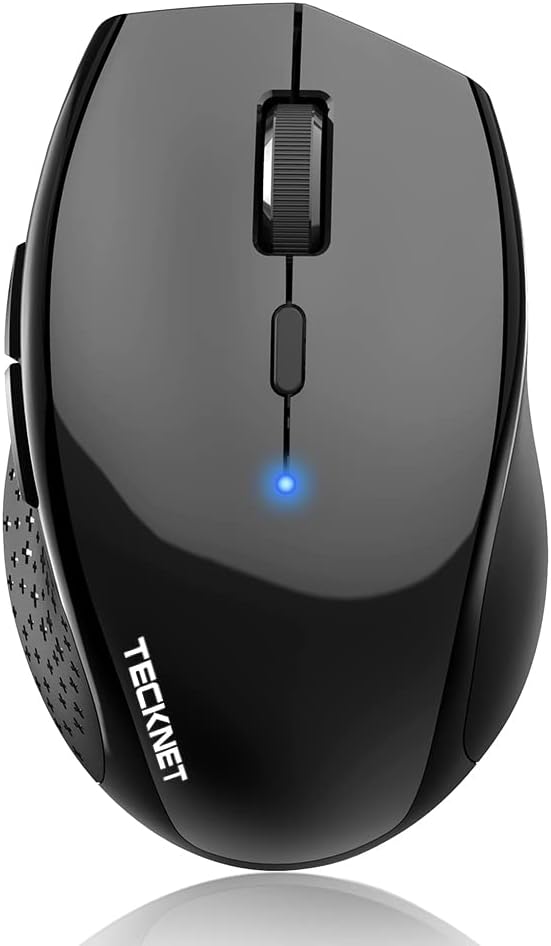
The TECKNET Bluetooth Mouse with 3200 DPI is a multi-device option with a 4.3 rating. Its central attraction is the ability to pair with three devices and move among them through a dedicated switch button. Six DPI levels, silent operation, and a claimed battery life of up to two years give it more capability than a basic travel mouse.
We may earn a commission when you buy through this link, at no additional cost to you.
Pairing is straightforward: enter pairing mode, select the mouse on each device, and use the device-switch button thereafter. That configuration suits people alternating among a desktop, laptop, and tablet. The mouse works with Windows, macOS, Linux, Chrome OS, and Android, making it one of the broadest compatibility lists in this roundup.
Its six selectable levels span 800, 1200, 1600, 2400, 3200, and 4800 DPI, giving users more granular control than most compact models. The primary clicks are described as virtually silent, which is useful in shared settings. Two AA batteries power the device, and the stated typical-use battery life is up to two years. The batteries are not included.
The main ergonomic qualification is size. TECKNET says the mouse is intended for medium and large hands, while noting that smaller hands may manage it with a full-palm grip. The product is a strong choice for desktop-focused users who need multiple devices, broad system support, and detailed sensitivity control. It is less ideal for dedicated travel or very small hands.
Once each compatible device is paired, the switch button provides quick access to the different connections. This reduces the friction of moving between a work computer, personal laptop, and tablet.
The wide DPI range supports everything from routine browsing to more detailed editing. The upper settings can be helpful for large displays, while lower levels suit controlled movements.
We may earn a commission when you buy through this link, at no additional cost to you.
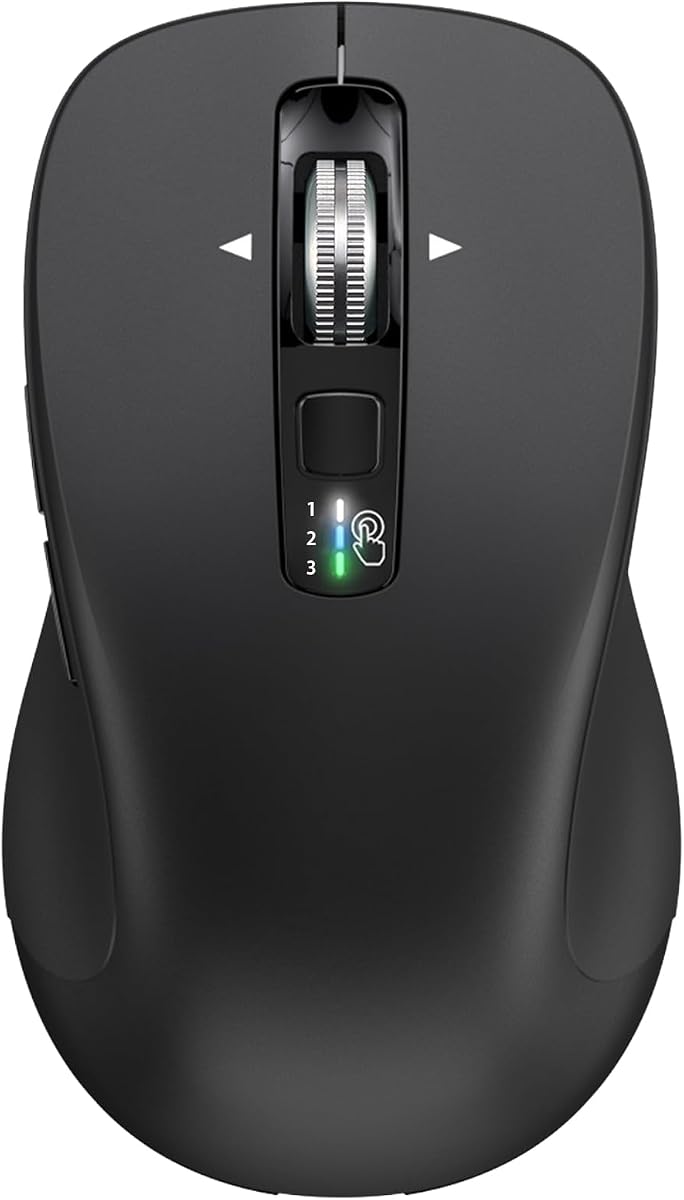
The TECKNET 3-Device Wireless Bluetooth Mouse with 4-Way Scroll Wheel earns a 4.4 rating and stands out as the most productivity-focused model in the roundup. It combines simultaneous Bluetooth connections to three devices, a horizontal-and-vertical scroll wheel, six DPI settings, a quiet-click design, and a built-in wrist rest.
We may earn a commission when you buy through this link, at no additional cost to you.
The four-way wheel is its signature feature. Horizontal movement is useful in wide spreadsheets, expanded artboards, and long code lines, while vertical scrolling handles standard navigation. Bluetooth 5.0 and 3.0 connections can be paired with three devices, and an included 2.4GHz receiver adds a fourth connection method. The stated effective range is up to 15 meters.
Six DPI levels run from 800 through 4800, and an indicator light shows the selected level. A memory function retains the chosen setting between sessions, reducing repeated adjustments. The main buttons are described as 90% quieter than standard mice, although this does not mean every control is silent. Two AAA batteries provide up to 24 months of stated battery life with automatic sleep behavior.
The contoured shell and integrated wrist rest favor medium and large hands, and the listing indicates suitability for right- and left-handed users. This is the strongest recommendation for spreadsheet users, programmers, designers, and office professionals who benefit from horizontal scrolling and multi-computer control. Buyers who need complete silence should verify which secondary controls are relevant to their workflow.
Moving sideways directly from the wheel reduces repeated edge-scrolling and makes broad documents easier to navigate. It is especially useful for financial sheets, design canvases, timelines, and code.
Three simultaneous Bluetooth pairings and an included 2.4GHz receiver offer considerable connection flexibility. Saved DPI settings make repeated workdays more consistent.
We may earn a commission when you buy through this link, at no additional cost to you.
The Lenovo WL310 Bluetooth Silent Mouse is a compact 4.5-rated model aimed at portable work. It combines silent clicks, an ergonomic shape, three selectable DPI levels, and Bluetooth 5.0 connectivity in a lightweight body. Its no-receiver design makes it particularly convenient for laptops, MacBooks, and Chromebooks.
We may earn a commission when you buy through this link, at no additional cost to you.
Silent operation is the defining feature. It is well suited to quiet workspaces, shared environments, and late-night projects where click noise could be distracting. Bluetooth 5.0 provides a stable, lag-free connection according to the supplied description, and no USB receiver is required, preserving valuable ports on slim devices.
The mouse offers 1000, 1200, and 1600 DPI, covering general productivity and more precise design or gaming tasks. Its compact, lightweight design is easy to place in a laptop bag, and the ergonomic shape is intended to remain comfortable during extended use. The supplied specifications do not highlight additional programmable buttons or multi-device switching.
The WL310 is an excellent fit for professionals, students, and travelers who prioritize quiet operation and portability. It is less appropriate for people who regularly operate several computers or require horizontal scrolling and extensive customization. For its targeted use, however, it is a focused and polished everyday tool.
The combination of silent clicks and a compact body suits changing work locations. It can move easily between a café, shared office, classroom, or travel setting.
The available DPI settings are broad enough for common office and creative tasks. Users who require very high sensitivity or numerous presets may prefer a more specialized model.
We may earn a commission when you buy through this link, at no additional cost to you.
The TECKNET Ergonomic Mouse with 4800 DPI is a right-handed vertical mouse rated 4.4. Its angled design places the palm closer to a natural upright position, potentially reducing pressure associated with prolonged conventional mouse use. It also offers flexible connectivity, six DPI levels, and silent primary clicks.
We may earn a commission when you buy through this link, at no additional cost to you.
Bluetooth mode can connect to two devices simultaneously, while the 2.4GHz USB-A receiver provides a separate connection option. The receiver is stored in the bottom of the mouse, and a bottom button handles mode selection and pairing. This setup supports a more fluid workflow for users moving between a laptop and another Bluetooth-enabled computer.
The DPI button cycles through 4800, 3200, 2400, 1600, 1200, and 800, with an indicator flashing a corresponding number of times. The mouse operates quietly in important areas, though the listing clarifies that only the left and right click buttons are silent. It works with Windows, Mac, Chrome, and Linux laptops, although side buttons are not compatible with macOS.
Two AAA batteries are required but not included. A blinking LED provides a low-battery warning, and deep sleep begins after roughly 10 to 30 minutes of inactivity. The vertical shape is the key reason to choose it, but that benefit only applies if the mouse aligns naturally with a right-handed user's hand and desk setup.
The vertical form rotates the interaction away from a flat, extended wrist posture. Users who find conventional mice uncomfortable may find the taller shape easier to maintain during long sessions.
Bluetooth and 2.4GHz options offer practical connection choices, while six DPI levels cover both broad navigation and detailed work. The stored receiver makes the alternate mode easy to carry.
We may earn a commission when you buy through this link, at no additional cost to you.
The TECKNET 4000 DPI mouse is a compact 2-in-1 wireless model with a 4.4 rating. It supports Bluetooth 5.0, Bluetooth 3.0, and a 2.4GHz USB receiver, allowing one device to be controlled over Bluetooth and another through the receiver. It is a sensible travel option for people who need more flexibility than a single-connection mouse.
We may earn a commission when you buy through this link, at no additional cost to you.
Six DPI levels range from 800 to 4000, and Tru-Wave optical tracking is designed to work on most surfaces. The mouse has a contoured shape, 10-million-click durability rating, and a compact size suited to travel. It is not designed for large hands, an important distinction for shoppers with bigger grips.
Automatic sleep is stated to extend battery life to up to 18 months using two AA batteries. Back and forward buttons help with documents and browser navigation on Windows and Android, but they are not suitable on Mac. The mouse uses audible clicks, which makes it less attractive for shared offices or late-night use.
This model is a good compromise for mobile workers who alternate between two systems and want receiver flexibility. It is less suitable for users who require silent clicks, a larger hand fit, rechargeable power, or more than two controlled devices. Its strongest use is compact, cross-platform productivity with broad sensitivity options.
Combining Bluetooth and 2.4GHz allows one connection to avoid receiver limitations while the other offers a different operating path. The receiver stores inside the mouse for convenient transport.
Six sensitivity levels provide useful control across different screen sizes and tasks. Optical tracking supports common work surfaces, although the smaller shape is best for modest hand sizes.
We may earn a commission when you buy through this link, at no additional cost to you.
The CITLLA Wireless Bluetooth Mouse is a feature-rich full-size model with a 4.4 rating. It combines a 2.4GHz USB receiver with two Bluetooth connections, a four-way metal scroll wheel, five programmable buttons, and adjustable DPI. It is aimed at productivity users who want more controls and device flexibility.
We may earn a commission when you buy through this link, at no additional cost to you.
The scroll wheel moves vertically and horizontally, helping with broad spreadsheets, design workspaces, and long documents. Five programmable buttons can be assigned to shortcuts, macros, or frequently used commands, allowing users to shape the mouse around their routine. The additional control makes this one of the more configurable options in the roundup.
Compatibility extends across computers, laptops, all-in-one PCs, tablets, smartphones, iPads, and MacBooks, with support for Windows, iOS, macOS, Android, Linux, and Chrome OS. DPI can be set to 1000, 1600, 2400, or 3000. A rubber side grip is designed to resist sweat and improve traction.
The mouse measures 4.6 by 2.6 by 1.6 inches, giving it a substantial full-size footprint. It runs on included batteries, and the supplied information states a battery life of up to three years and four months with a power-control system. It is best for users ready to customize controls and manage several device types.
Programmable buttons can turn frequently repeated actions into direct inputs. This is valuable for editing, research, media navigation, and multi-application office routines.
Dual Bluetooth and a USB receiver create several ways to connect, while the extensive operating system list makes the mouse useful across mixed personal and work environments.
We may earn a commission when you buy through this link, at no additional cost to you.
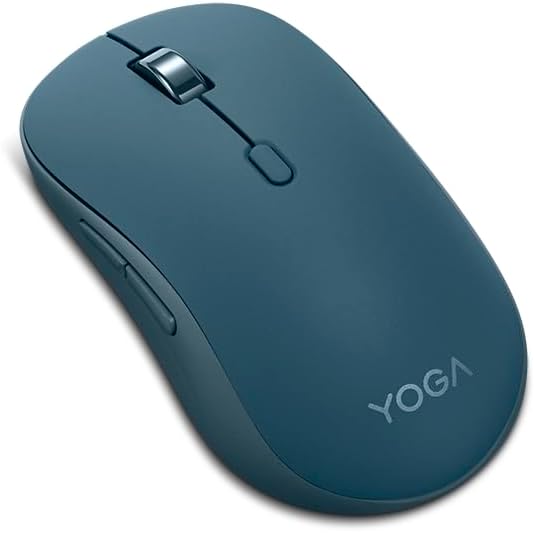
The Lenovo Yoga Bluetooth Silent Mouse is the premium pick in this roundup, carrying a 4.4 rating. It combines a refined soft-touch finish, quiet operation, programmable buttons, three-device Bluetooth pairing, and a stated battery life of 36 months. Its design is oriented toward professionals who want a polished, low-maintenance daily tool.
We may earn a commission when you buy through this link, at no additional cost to you.
Bluetooth 5.3 allows simultaneous connections to three devices. Swift Pair supports non-Yoga devices, while tap-to-pair is available for Yoga PCs. The result is convenient movement among multiple computers without repeatedly entering pairing mode. Major operating systems are supported, making the mouse useful beyond a single Lenovo ecosystem.
The soft-touch coating adds a refined tactile experience and is intended for long working sessions. Programmable buttons support common productivity actions, while three DPI levels offer useful sensitivity variation. The mouse is designed to operate quietly, which makes it appropriate for meetings, shared offices, and nighttime work.
One AA battery powers the mouse, and the supplied specifications state a battery life of 36 months. The premium distinction rests on design, connectivity, and refinement rather than an extremely broad DPI range. It is an excellent choice for style-conscious multitaskers who want a capable desktop accessory without an oversized feature set.
Simultaneous Bluetooth 5.3 pairings make it easy to move among several computers. Swift Pair and Yoga tap-to-pair reduce friction across different devices.
The soft-touch surface gives the mouse a more premium feel while quiet operation supports focused work. These qualities suit a permanent desk setup as well as mobile use.
We may earn a commission when you buy through this link, at no additional cost to you.
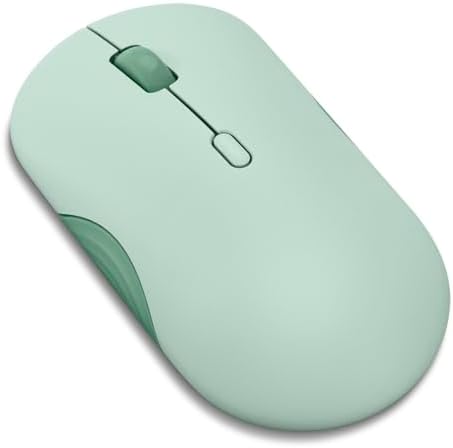
The Lenovo 350 Wireless Bluetooth Mouse is a balanced 4.4-rated everyday option. It brings together silent clicks, three DPI levels, two-device pairing, Bluetooth 5.3, and a stated 36-month battery life. It is less elaborate than the Yoga model but offers many of the conveniences that matter in a regular work setup.
We may earn a commission when you buy through this link, at no additional cost to you.
The mouse can switch between two connected devices, allowing a user to move between a personal computer and a work laptop with less disruption. Bluetooth 5.3 is designed to provide a strong, secure, and seamless connection across major platforms, and no receiver is needed.
Sensitivity settings of 1000, 1600, and 2400 DPI cover standard productivity and more precise tasks. The left and right buttons are rated for up to five million clicks. Scrolling is limited to the standard up-and-down movement, which distinguishes it from the four-way options in this roundup.
One AA battery powers the device, and the stated 36-month battery life minimizes maintenance. The Breeze Moss color and customizable buttons give it some visual and functional character, but the core appeal is dependable, quiet everyday control. It is well suited to students, hybrid workers, and anyone balancing two computers.
A 36-month stated battery life reduces the likelihood of routine battery changes. The single-AA configuration also keeps replenishment simple.
Two-device pairing supports the common pattern of alternating between work and personal systems. Silent clicks and adjustable DPI cover the basics without demanding complex configuration.
We may earn a commission when you buy through this link, at no additional cost to you.
The right battery powered Bluetooth mouse depends on where it will be used, how many devices you control, the size of your hand, and whether quiet operation, precision, or portability matters most. The following factors help narrow the field without overlooking important compatibility details.
A pure Bluetooth mouse keeps setup simple and avoids occupying a USB port, but a model that also includes a 2.4GHz receiver can be more flexible across desktop computers and older systems. If you regularly move among several computers, look for a dedicated device-switch button and confirmation that the mouse can hold multiple Bluetooth pairings at once. The TECKNET 4-Way Scroll model, for example, pairs with three Bluetooth devices and adds an included receiver.
A mouse that feels comfortable in a store can become uncomfortable after weeks of daily use, so hand fit deserves close attention. Compact, low-profile shapes suit travel and smaller hands, while contoured full-size shells and integrated palm rests tend to suit larger grips. Vertical mice create a more upright hand position but are not automatically more comfortable; their orientation must also fit the user's hand and desk. TECKNET explicitly notes that some of its models are intended for medium or large hands.
Adjustable DPI gives you control over cursor speed across different display sizes and tasks. Lower settings support controlled movement, while higher settings help cover large displays or allow more precise targeting. Most models here use optical tracking, and several specify that their sensors work on nearly any surface or most common work surfaces. Avoid placing a mouse on glass, highly reflective materials, or fabric surfaces unless the manufacturer explicitly supports them.
Silent switches can make a meaningful difference in offices, libraries, shared homes, and late-night sessions. However, silent left and right clicks do not always mean the scroll wheel or secondary buttons are quiet. The TECKNET vertical mouse makes this distinction explicit, while the TECKNET 4-Way Scroll model is described as 90% quieter than standard mice. Check which controls you actually use and whether the wheel and navigation buttons remain audible.
Stated battery life depends heavily on activity, sleep behavior, connection mode, and the manufacturer's testing assumptions. Longer claims are useful for reducing maintenance, but the included battery configuration also matters. Some models include batteries, while others require AA or AAA cells that are not supplied. Automatic sleep, power controls, and low-battery indicators help extend runtime, and a rechargeable mouse may be preferable if you already prefer that workflow.
The standard vertical wheel handles most navigation, but horizontal scrolling can materially improve spreadsheet, design, and code workflows. Four-way wheels add direct sideways movement, while programmable buttons can place frequently used commands closer to the user's fingers. These extras are most valuable for experienced multi-application users. If your work is mainly web browsing and document reading, a simpler wheel and button arrangement may feel more manageable.
Bluetooth support alone does not guarantee identical behavior across operating systems. Side buttons may work in Windows but not macOS, and certain tablets can show a circular pointer or restrict cursor behavior. Review the complete compatibility list, not just the operating systems named in the product headline. The broadest options support combinations of Windows, macOS, Linux, Chrome OS, Android, and iOS, but specific functions can still vary by platform.
Travel users should consider size, weight, surface finish, and receiver storage. A compact mouse with a receiver stored inside it is easier to carry without losing the adapter. Larger full-size models generally provide a more substantial grip and can include more controls, but they occupy more bag and desk space. Click-durability figures offer a rough construction indicator, while shape and material often tell more about daily comfort.
Begin by installing the specified batteries and selecting the appropriate connection mode. For a Bluetooth-only mouse, enable Bluetooth on the computer or tablet, put the mouse into pairing mode, and select its name from the device list. For a dual-mode model, choose the 2.4GHz option and insert the included receiver into a compatible USB-A port before following its pairing button procedure.
After connecting, move the mouse across a compatible surface and test the primary buttons, scroll wheel, DPI control, and side buttons. If the pointer moves too quickly or slowly, cycle through the available DPI levels. Open the computer's Bluetooth settings to confirm the connection, and consult the product instructions for device-switch sequences when using more than one paired computer.
To preserve performance, remove debris from the underside and gently clean the wheel and buttons with a dry or lightly damp cloth. Avoid liquids, abrasive cleaners, and excessive moisture around the battery compartment. Replace batteries as needed, particularly when the low-battery indicator appears, and store the mouse in a dry environment when it will not be used for an extended period.
A Bluetooth mouse is often more convenient for travel because it connects directly and leaves USB ports free. A 2.4GHz mouse can be advantageous on systems with limited Bluetooth support or when the receiver is already stored in the mouse. Many of the models reviewed offer both, making them more versatile than a single-mode option.
The Logitech M196 is specifically compact and lightweight, while the smaller TECKNET 4000 DPI model also stores its receiver internally. For the lightest travel setup, compare the physical dimensions, hand fit, and included accessories before deciding. A very small mouse may be less comfortable if your hand is larger.
Most models in this roundup list macOS or Chrome OS compatibility, but specific functions can vary. Side buttons may be ignored on macOS, and some tablets show a circular pointer. Always confirm the full operating system and feature list for the exact model before buying.
Adjustable DPI changes how far the pointer travels for a given physical movement. Higher settings are useful on large displays or for quick navigation, while lower settings allow finer positioning. The models here offer anywhere from three to six levels, depending on design.
Not necessarily. Some products silence only the left and right clicks, while the scroll wheel or secondary buttons may still make noise. For a completely quiet workflow, look for wording that covers every control you plan to use and consider a model dedicated to silent operation.
Most multi-device mice provide a dedicated switch button that cycles among previously paired connections. Pair each device first, then press or hold the designated control according to the manual. Models with multiple Bluetooth versions or a 2.4GHz receiver may require slightly different sequences for each connection mode.
A vertical mouse holds the hand in a more upright position and may feel more natural to some users. It is not a universal solution, and a left-handed user cannot use the right-handed TECKNET vertical model included here. Adjustments to desk height, chair position, and break frequency can be just as important as mouse shape.
The interval depends on the model, connection mode, and frequency of use. The listed claims range from 12 months to as much as 36 months, with one product stating up to 40 months. Treat those figures as estimates, and replace standard cells promptly when performance declines or a low-battery warning appears.
The Logitech M196 is the most straightforward recommendation for travel, light use, and buyers seeking an ambidextrous mouse with no receiver. The TECKNET 4-Way Scroll model takes the lead for productivity because it combines three-device Bluetooth control, horizontal scrolling, remembered DPI settings, and a supportive wrist rest. For a premium daily setup, the Lenovo Yoga mouse offers refined materials, quiet operation, programmable buttons, and three-device pairing.
Prioritize the features that affect your daily routine: choose a compact shape for travel, a full-size contoured body for long sessions, silent switches for shared spaces, and high DPI with horizontal scrolling for detailed or technical work. Device count, operating system support, and the behavior of secondary buttons deserve equal attention because they can cause more day-to-day friction than small differences in advertised battery life.
Before placing an order, verify the current product listing, supported operating systems, required battery types, and included accessories. Specifications, software behavior, availability, and retailer promotions can change, and current prices vary. Comparing those details with the intended workflow will help identify the most suitable battery powered Bluetooth mouse with fewer compromises.