
Cooler Master Q300L V3
4.6Editor score
Flexible airflow-focused layout
Supports 366mm graphics cards
Fits 200mm ATX PSUs
Movable I/O panel
Discover the best compact E ATX case options, comparing airflow, motherboard support, GPU clearance, cooling, dimensions, and build flexibility.
A compact E ATX case offers the appealing balance between a full-size ATX motherboard, a manageable footprint, and room for powerful components. Unlike cases limited to Micro-ATX boards, these enclosures can support E-ATX, ATX, and sometimes Mini-ITX platforms while keeping the overall installation more space-conscious than a conventional mid-tower.
This guide compares ten compact E ATX cases across motherboard compatibility, graphics-card clearance, CPU-cooler height, power-supply length, radiator support, airflow, front connectivity, portability, and ease of assembly. The list includes models supplied with fans as well as designs that leave cooling entirely to the builder, helping reveal where each chassis is most practical.
Each review highlights the features that distinguish its enclosure from the alternatives and also identifies compromises worth considering. The top picks represent the strongest all-around, budget-conscious, and premium options in this group, while prices and availability can change over time. Always confirm the latest component limits and current listing details before purchasing.
4.6Editor score

4.7Editor score

3.9Editor score
The comparison below highlights the motherboard support, graphics-card clearance, cooling capacity, and practical features that separate each compact enclosure.



The Cooler Master QUBE 540 combines a compact ATX-style mid-tower footprint with unusually broad motherboard support, including large E-ATX boards up to 11 inches wide. Its 4.4 rating reflects a versatile design built around high airflow, a tempered-glass presentation, and the freedom to install the enclosure horizontally or vertically. The reversible I/O panel and movable handles reinforce the idea that this chassis can adapt to different spaces and working habits.
We may earn a commission when you buy through this link, at no additional cost to you.
Its standout benefit is genuine E-ATX compatibility within a relatively compact structure. Graphics cards up to 415 millimeters can fit when the front fan is removed, making the enclosure suitable for long, high-end cards. The full front mesh panel and pre-installed SickleFlow 120mm fan provide a useful foundation for airflow, while front access includes two USB 3.2 Gen1 ports and a USB 3.2 Gen2 Type-C connector.
There are trade-offs. Horizontal and vertical positioning may require a different approach to managing cables, and builders using a long graphics card may need to adjust the front fan configuration. Although the dimensions avoid the footprint of many large mid-towers, the QUBE 540 is not the smallest enclosure in this comparison. It also does not include a large collection of fans, so a serious high-performance build may still benefit from additional cooling.
This is a strong choice for a builder who wants E-ATX support without choosing a large traditional tower. It particularly suits creators, workstation users, and enthusiasts pairing a long graphics card with a capable motherboard. For anyone who can accept a slightly less diminutive footprint than the smallest models, the flexible orientation and broad clearance make the QUBE 540 one of the most interesting options here.
Supporting motherboards up to 11 inches wide is the key differentiator, allowing this case to serve builders who want expansion and abundant rear I/O without moving to a full-size mid-tower. The compact layout preserves desk space while leaving the board itself unrestricted.
The 415mm graphics-card limit provides generous room for large modern GPUs. Removing the front fan when necessary prevents the card from pressing against a restrictive intake, although buyers should plan their cooling arrangement around that configuration.
We may earn a commission when you buy through this link, at no additional cost to you.
The Lian Li O11D Mini V2 is a compact ATX mid-tower designed around visibility, flexible cooling, and modern component support. Its 4.7 rating makes it one of the strongest-rated cases in the group, while the pillar-less tempered-glass front and side panels provide an expansive view of the hardware. This model is sold without fans, giving experienced builders complete control over every fan position.
We may earn a commission when you buy through this link, at no additional cost to you.
The 10-degree slanted bottom improves direct cold-air intake and GPU cooling while helping maintain a compact footprint. Unlike many small cases that force the power supply into a restricted position, this design accommodates full-size ATX power supplies. Horizontal and vertical GPU anti-sag brackets support heavy graphics cards, and dedicated 24-pin motherboard-cable brackets help maintain a tidy internal appearance.
The absence of included fans is the central compromise. A new owner will need to purchase enough airflow for the front, rear, and any radiator positions, which can increase the total build cost and complicate first-time assembly. The pillar-less glass also places importance on careful component selection, since a crowded or untidy interior remains visually noticeable. Back-connect motherboards receive particular optimization.
Choose the O11D Mini V2 if the build is as much about presentation as performance and you already know how to configure case fans. It suits enthusiasts who want full-size ATX hardware, a long graphics card, and a clean glass-sided display in a smaller chassis. For buyers wanting a turn-and-go arrangement with cooling already installed, one of the fan-equipped alternatives may be more convenient.
Pillar-less tempered-glass panels remove visual obstructions from the front and sides, making components, cable routing, and lighting easier to appreciate. The result is especially attractive when the case is positioned on a desk and visible from more than one angle.
Selling the chassis without fans gives builders control over fan models, counts, and airflow direction. That customization is valuable for quiet systems or coordinated cooling setups, but it means the case should be evaluated as a shell rather than a ready-to-build platform.
We may earn a commission when you buy through this link, at no additional cost to you.
The Mechanic Master C34Pro is designed for powerful compact builds that may need to move between locations. It supports ATX and E-ATX motherboards, accommodates graphics cards up to 420 millimeters, and provides a 30.6-liter capacity with dimensions listed as 429 by 205 by 349 millimeters. Its integrated carry handle and extensive mounting options distinguish it from conventional cases intended to remain on a desk.
We may earn a commission when you buy through this link, at no additional cost to you.
Cooling support is extensive, with mounts for 360mm radiators and CPU coolers up to 165 millimeters. Multi-zone fan positions across the top, bottom, and front are complemented by dust filters and an airflow-oriented layout. The power supply can be mounted at the front, bottom, or side, and a 220mm ATX PSU is supported. Cable-management space of 18 millimeters helps separate the build from the dense component arrangement.
Its 3.9 rating is lower than the other models, and the broad specification list suggests that careful planning is important. A 420mm GPU and 360mm radiator can create a densely packed interior, while multiple mounting options may increase assembly complexity. The included magnetic screwdriver kit helps with installation, but the case still rewards a builder who is comfortable managing a compact, feature-rich layout.
This model is best for someone who regularly transports a desktop or wants a portable ATX/E-ATX platform with unusually broad clearance. It can also appeal to builders assembling a compact high-performance system with long GPUs, liquid cooling, and a full-size power supply. Buyers seeking the simplest possible installation should compare it with a more conventional, preassembled fan layout.
The combination of E-ATX support, 420mm graphics-card clearance, and 360mm radiator compatibility is unusually ambitious for a portable case. It gives builders room for flagship-sized parts without abandoning the 30.6-liter concept.
The integrated handle makes the enclosure easier to move between rooms, LAN events, or workstations. Its rigid aluminum exterior and steel frame also support the practical demands associated with transporting a completed computer.
We may earn a commission when you buy through this link, at no additional cost to you.
The Cooler Master Q300L V1 is a budget-oriented compact chassis for Micro-ATX and Mini-ITX builds rather than a true E-ATX model. Its 4.5 rating reflects a straightforward design with good airflow, useful component clearances, and a transparent side panel. It remains a practical option for buyers whose motherboard is smaller than full-size ATX.
We may earn a commission when you buy through this link, at no additional cost to you.
The interior supports graphics cards up to 360 millimeters and CPU coolers up to 159 millimeters, giving builders room for substantial hardware without moving to a large tower. Cooling flexibility includes support for a 240mm liquid cooler and up to five fans. Its perforated sides promote an open thermal path, while magnetic dust filters help reduce the buildup of debris around the intake areas.
The main limitation is obvious: it does not accept E-ATX or full-size ATX motherboards. That makes it better suited to compact builds centered on Micro-ATX, where it can still deliver a polished result. The 160mm PSU clearance is also more restrictive than many contemporary cases, so a large modular power supply may not fit. The movable I/O panel is useful because it allows the controls and ports to remain accessible in different placements.
Consider the Q300L V1 when you want a compact, airflow-oriented chassis for a Micro-ATX system and do not need E-ATX expansion. It is a sensible match for gaming and productivity builds using a moderately sized GPU. Buyers with a full-size ATX board should look to the QUBE 540, O11D Mini V2, Mechanic Master C34, or NZXT H5 Flow instead.
Perforated panels across multiple sides encourage airflow through the enclosure, reducing reliance on a sealed exterior. This open design is complemented by magnetic dust filters and compatibility for multiple fans, making it a sensible foundation for a compact air-cooled system.
The modular I/O panel may be positioned at the front, top, or bottom on either side. That flexibility is particularly useful in small desks, wall-mounted arrangements, and other installations where conventional front access would be inconvenient.
We may earn a commission when you buy through this link, at no additional cost to you.
The Mechanic Master C34 brings full-size ATX motherboard support to an ultra-compact enclosure and adds an integrated carry handle. Its 4.6 rating reflects a well-balanced approach to component compatibility, modern front I/O, and portability. It is a relevant option for people who want ATX expansion without the footprint of a traditional mid-tower.
We may earn a commission when you buy through this link, at no additional cost to you.
Standard ATX motherboards and full-size ATX power supplies are supported, along with graphics cards up to 335 millimeters. The case accommodates air coolers up to 162 millimeters or a 240mm liquid-cooling radiator. Its metal front I/O panel includes USB 3.0 and USB Type-C, providing more convenient everyday connectivity than many minimalist compact cases.
The internal layout is optimized for easy building, but the manufacturer specifically recommends an SFX/L power supply for the cleanest cable management and easiest installation. Even though full-size ATX PSUs can fit, using one in this tight enclosure may make routing and access more difficult. It also does not extend to E-ATX boards, so buyers who need the largest motherboards should examine the C34Pro or QUBE 540.
The C34 is best for a compact full-ATX build that may need to travel between rooms or workstations. It suits builders who want modern ports, a long graphics-card allowance, and cooling flexibility in a relatively small package. For straightforward stationary use, the ASUS Prime AP201 may be easier to work with, but the C34 adds a distinctive portability advantage.
Full-size ATX support is a meaningful advantage over Micro-ATX alternatives because it provides more rear I/O, expansion slots, and memory positions. The C34 makes that capability available without requiring a standard large mid-tower.
USB 3.0 and USB Type-C on the metal front panel simplify connections to compatible accessories. A 240mm radiator mount and 162mm air-cooler allowance provide meaningful thermal options within the compact layout.
We may earn a commission when you buy through this link, at no additional cost to you.
The ASUS Prime AP201 is a highly efficient Micro-ATX enclosure with a 33-liter footprint and a 4.7 rating. Its principal achievement is fitting substantial PC hardware into a small, carefully organized volume. Although it is not designed for E-ATX boards, it offers a compelling combination of airflow, radiator support, cable management, and tool-free access for Micro-ATX builders.
We may earn a commission when you buy through this link, at no additional cost to you.
Quasi-filter mesh panels contain more than 57,000 machined 1.5mm holes, combining ventilation with a clear view of the internal components. Cooling support extends to 280mm and 360mm radiators and as many as six fans. Despite the small footprint, the case accepts full-size ATX power supplies up to 180 millimeters, graphics cards up to 338 millimeters, custom liquid cooling, and various storage devices.
The side panels use a clip mechanism that allows tool-free removal while resisting accidental dislodging. An extended motherboard tray, strategically placed cutouts, and a 32mm cable-management gap help maintain an orderly build. The trade-off is that the AP201 supports Micro-ATX rather than E-ATX, and its stationary design lacks the integrated handle found on the Mechanic Master models.
This is our Editor's Choice for buyers who interpret compact E ATX case shopping broadly and prioritize the strongest all-around small-form design. It is especially appropriate for a Micro-ATX system with a powerful GPU and liquid cooler. If E-ATX itself is mandatory, use the QUBE 540 or Mechanic Master C34Pro; otherwise, the AP201 delivers exceptional efficiency and refinement.
The 33-liter footprint demonstrates that a case can remain compact without severely restricting common performance hardware. A 338mm graphics card, 180mm power supply, and 360mm radiator can coexist when each component is planned carefully.
Thousands of precisely machined holes create a fine mesh that promotes airflow while keeping the internal hardware visible. The visual texture adds interest without relying on a fully open frame, balancing presentation and dust-conscious construction.
We may earn a commission when you buy through this link, at no additional cost to you.
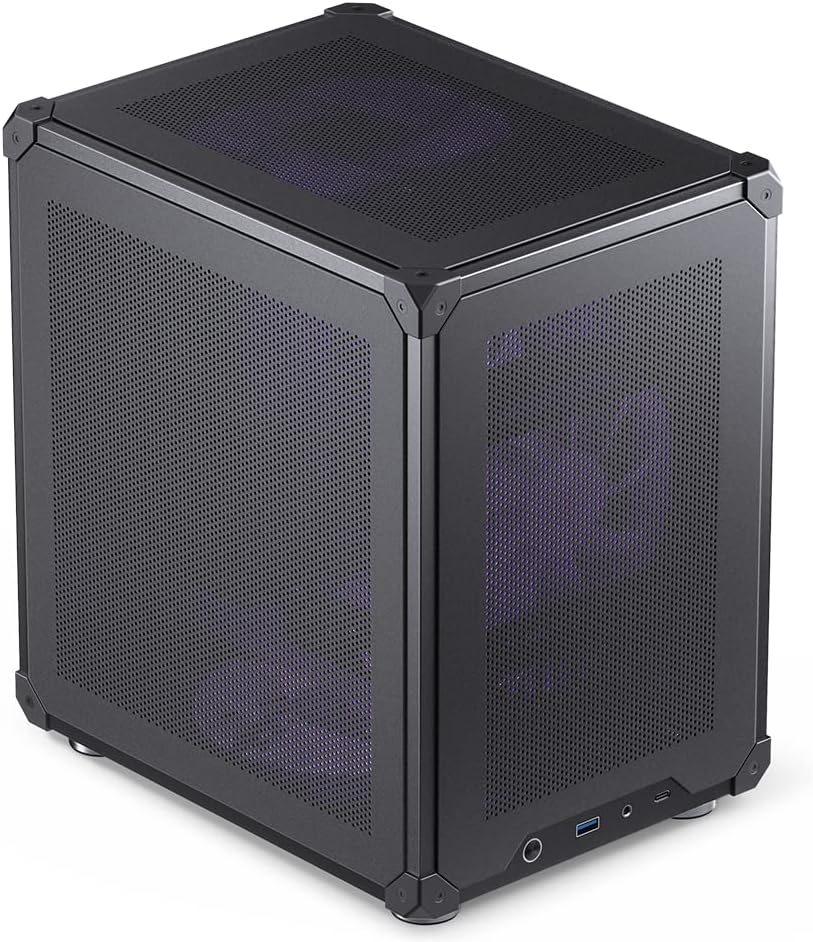
The Cooler Master Q300L V3 is a modern high-airflow compact chassis for Micro-ATX systems. Its 4.6 rating reflects a versatile layout capable of accepting long graphics cards, sizable CPU coolers, 200mm power supplies, and multiple fan arrangements. The tempered-glass panel adds visual appeal while the design remains focused on keeping heat away from sensitive components.
We may earn a commission when you buy through this link, at no additional cost to you.
Graphics cards up to 366 millimeters fit comfortably, giving builders room for many modern NVIDIA GeForce RTX and AMD Radeon gaming cards. The cooling section supports up to six 120mm or 140mm fans, 240mm all-in-one radiators, and CPU air coolers as tall as 178 millimeters. This makes the V3 suitable for either a quiet air-cooled configuration or a more elaborate liquid-cooled build.
A movable I/O panel, magnetic dust filters, and dedicated cable-management areas improve daily usability and maintenance. The trade-off is that the case remains limited to Micro-ATX motherboards, and the listed specifications do not indicate that cooling fans are included. Buyers may also find that selecting 140mm fans requires checking the chassis geometry carefully because performance and fit do not always translate directly between fan sizes.
The Q300L V3 is a strong budget choice for a Micro-ATX gaming system, particularly when the graphics card is long and the CPU cooler is substantial. It offers more generous clearances than the original Q300L V1 and a more refined panel design. If your build requires a full-size ATX motherboard, choose one of the dedicated ATX-capable cases instead.
The ability to install a 178mm air cooler or 240mm radiator gives the builder several thermal paths. Up to six fans can be arranged throughout the chassis, allowing intake, exhaust, and dedicated GPU cooling to be balanced around the selected components.
The 366mm graphics-card allowance and 200mm power-supply support reduce the risk of an immediate replacement. These dimensions make the enclosure well suited to modern gaming hardware despite its Micro-ATX motherboard limitation.
We may earn a commission when you buy through this link, at no additional cost to you.
The Zalman CUBIX M-ATX is one of the most space-efficient cases in this guide, with a total volume of 17.1 liters. It is built for Micro-ATX systems and prioritizes a small desktop footprint over broad component support. Its 4.5 rating reflects a compact and durable approach, with a perforated front, a pre-installed 80mm fan, and a sturdy 0.8mm steel shell.
We may earn a commission when you buy through this link, at no additional cost to you.
Despite its small dimensions, the CUBIX supports standard ATX power supplies and graphics cards up to 260 millimeters. CPU air coolers may reach 137 millimeters, which allows for moderately sized tower coolers but excludes many oversized models. The front interface includes one USB 3.0 port, one USB 2.0 port, and a 3.5mm stereo audio connection for straightforward peripheral hookup.
The component limits are meaningful. A 260mm GPU is shorter than the allowance offered by most cases in this comparison, and the 80mm fan is smaller than the 120mm and 140mm options prevalent elsewhere. The compact steel construction also adds weight relative to an all-aluminum design. Nevertheless, those constraints help explain the enclosure's small footprint and strong structural character.
Choose the CUBIX when desk space is the overriding priority and your hardware fits within its established limits. It works well for a modest gaming or productivity system with a compact graphics card and a standard power supply. Builders with a long, high-end GPU should verify dimensions carefully or choose a larger model, while anyone requiring E-ATX will need an enclosure designed specifically for that board format.
At 17.1 liters, the CUBIX is substantially smaller than most of the other cases reviewed. It is well suited to a compact workstation, media center, or secondary gaming system where conserving physical desk space matters more than future expansion.
The 0.8mm steel construction provides a more substantial feel than many similarly compact cases. A perforated front and included 80mm fan establish basic cooling, while the case's restrained shape integrates more easily into a small office or home setup.
We may earn a commission when you buy through this link, at no additional cost to you.
The JONSBO C6 is a compact desktop chassis for ITX and Micro-ATX motherboards, combining an all-mesh structure with tool-free access. Its 4.6 rating reflects a simple, space-conscious approach that remains appropriate for compact components. The listed dimensions are 202 millimeters wide, 266 millimeters deep, and 295.2 millimeters high, including the footpad.
We may earn a commission when you buy through this link, at no additional cost to you.
Its mesh coverage extends across the chassis, and the upper cover and side panel open without tools for easier assembly and maintenance. Optional 120mm or 140mm fans may be installed at the top and bottom, with a further 120mm position at the front if the drive arrangement permits. Front connectivity includes a 20-pin Type-C connection, one USB 3.0 port, and combined audio and microphone inputs.
The largest constraint is the 75mm CPU-cooler limit, which rules out many conventional tower coolers. Graphics-card support ranges from 200 to 255 millimeters, meaning even moderately large cards may not fit. ATX power supplies can be used up to 185 millimeters, and the storage layout offers one 3.5-inch hard drive or two 2.5-inch solid-state drives. These limits demand careful component selection before assembly.
The C6 is best for a small system built around a low-profile CPU cooler and compact graphics card. It offers easy panel removal, a full mesh exterior, and modern front connectivity in a simple desktop form. It is not a strong match for a high-end gaming PC with a large GPU, and buyers should prioritize the unusually short CPU-cooler allowance when selecting hardware.
Tool-free removal of the upper cover and side panel reduces the friction of building in a confined workspace. The quick-access design also makes component installation and routine maintenance more convenient after the system is complete.
An all-mesh chassis and three potential fan positions provide airflow options despite the small footprint. The design works best when paired with a low-profile cooler and a graphics card that leaves room for unobstructed intake.
We may earn a commission when you buy through this link, at no additional cost to you.
The NZXT H5 Flow is a polished compact ATX mid-tower that combines a straightforward exterior with useful cooling provisions. Its 4.6 rating reflects a balanced product featuring fine mesh panels, two installed 120mm fans, and support for both air and liquid cooling. It is designed for builders who want ATX capability without the bulk of a large mid-tower.
We may earn a commission when you buy through this link, at no additional cost to you.
The perforated power-supply shroud draws air through its side and bottom openings, allowing two 120mm fans to be positioned in the lower chamber for GPU cooling. The case accepts a radiator up to 360mm in the front and one up to 240mm at the top. Ultra-fine mesh across the top, front, and side panels supports airflow and dust filtration, while two Quiet Airflow fans arrive installed at the front and rear.
Cable management is handled through wide channels, hooks, and straps, helping the compact interior remain clean. Like several other cases here, the H5 Flow supports standard ATX rather than E-ATX motherboards. Because the supplied information does not specify exact graphics-card and power-supply length limits, buyers should consult the manufacturer or retailer diagrams for those dimensions before ordering. The enclosed visual style also offers less unrestricted component visibility than an open-frame case.
The H5 Flow suits compact gaming and productivity builds that use a full-size ATX motherboard and want an immediately usable cooling arrangement. Its mix of preinstalled fans, radiator options, and tidy cable routes reduces setup work. If E-ATX is non-negotiable, select the QUBE 540 or C34Pro; if open visibility is the priority, consider the O11D Mini V2.
Two 120mm fans are already installed at the front and rear, providing a practical starting point for airflow. Additional radiator positions and lower-chamber intake options allow the configuration to expand for more demanding processors and graphics cards.
Wide routing channels, hooks, and straps help manage the cables that would otherwise consume valuable space. The perforated shroud also combines presentation with a route for cooling air to reach the graphics card.
We may earn a commission when you buy through this link, at no additional cost to you.
The best compact E ATX case is determined less by exterior dimensions alone than by the hardware it accommodates, the cooling it supports, and the ease of building inside it.
Begin by confirming the exact motherboard standard. True E-ATX support means the case can accept a large E-ATX board, while some listings use compact ATX as a broad category that also includes standard ATX and Micro-ATX models. The Cooler Master QUBE 540 and Mechanic Master C34Pro explicitly support large E-ATX boards, whereas the ASUS Prime AP201, Cooler Master Q300L models, Zalman CUBIX, and JONSBO C6 are Micro-ATX designs.
Choose E-ATX only when your processor, memory, expansion needs, or rear I/O require it. Otherwise, a well-ventilated Micro-ATX case can be smaller, easier to cool, and less expensive. Always compare the board outline and mounting area rather than assuming every case marketed as ATX will accept E-ATX.
Modern graphics cards vary dramatically in length, and the listed clearance can determine whether a case works with the GPU you already own. The Mechanic Master C34Pro offers the most generous allowance at 420mm, followed by the Cooler Master QUBE 540 at 415mm. The Q300L V3 permits 366mm, the Q300L V1 reaches 360mm, the ASUS Prime AP201 allows 338mm, and the Mechanic Master C34 reaches 335mm.
Long-card support often comes with airflow or assembly caveats. The QUBE 540 can require removal of the front fan, while the smallest cases may restrict the front intake around the card. Measure from the motherboard mounting area to the drive cage or front panel, and leave enough space for the power connector and side panel to close properly.
CPU cooler clearance is one of the most important checks because a tower cooler may be taller than the case allows. The Cooler Master Q300L V3 supports air coolers up to 178mm, the Mechanic Master C34 reaches 162mm, the C34Pro reaches 165mm, and the Q300L V1 permits 159mm. The ASUS Prime AP201 supports custom liquid cooling, while the JONSBO C6's listed 75mm limit is intentionally restrictive.
Measure the cooler from the motherboard surface to the highest point, including any fan clips that may sit above the heatsink. A low-profile cooler is often the easiest solution in a very small chassis. For liquid cooling, confirm both radiator dimensions and the locations of the pump, tubes, reservoir, and fittings before ordering.
A compact chassis can still accept a full-size ATX power supply, but the trade-off may be tighter cable routing. The C34Pro supports up to 220mm, the Q300L V3 up to 200mm, the JONSBO C6 up to 185mm, the ASUS Prime AP201 up to 180mm, and the Cooler Master Q300L V1 up to 160mm. The Lian Li O11D Mini V2 is specifically designed to accommodate full-size ATX power supplies while remaining compact.
Check the chassis specification before selecting a modular or high-capacity model. The Mechanic Master C34 recommends an SFX/L power supply for the cleanest build even though full-size units are supported. If using a standard ATX supply, allow extra room for bends, connectors, and the power-switch cable rather than relying only on the stated length.
Airflow depends on both the chassis openings and the number and placement of fans. Cases with preinstalled fans are more convenient, while fan-free models offer complete control. The QUBE 540 includes a 120mm SickleFlow fan, the Zalman CUBIX includes an 80mm fan, the NZXT H5 Flow includes two 120mm fans, and the Lian Li O11D Mini V2 is supplied without fans.
Radiator capacity can be a stronger indicator of future flexibility. The C34Pro and ASUS Prime AP201 support 360mm radiators, the NZXT H5 Flow accepts a 360mm front or 240mm top radiator, and the Q300L V3 supports 240mm liquid coolers. Match radiator size to the available mounting area and consider whether a GPU occupies the same intake zone.
Volume is only one part of footprint; width, depth, height, and the position of the power supply also affect whether a case fits under a desk or beside a monitor. The Zalman CUBIX is exceptionally small at 17.1 liters, while the ASUS Prime AP201 uses 33 liters. The Mechanic Master C34Pro is larger at 30.6 liters but includes a handle and supports several mounting orientations for its power supply.
If the computer will travel, an integrated handle is more useful than the smallest possible volume. The C34 and C34Pro both include carrying solutions, while the NZXT H5 Flow and ASUS Prime AP201 are better suited to stationary desks. Check clearance behind the case for cables and confirm that the side panels and front controls remain accessible in the intended orientation.
A clean build is easier to cool and maintain, particularly when space is tight. The ASUS Prime AP201 provides a 32mm cable-management gap and strategically placed motherboard-tray cutouts. The C34Pro offers 18mm of cable-management space, the Lian Li O11D Mini V2 includes brackets for the 24-pin motherboard cable, and the NZXT H5 Flow uses wide channels, hooks, and straps.
Tool-free side panels can speed up installation, as seen on the ASUS Prime AP201 and JONSBO C6, but they should still lock securely after the panels are replaced. Check that drive cages do not block the graphics card, that front connectors reach the motherboard headers, and that the power-supply compartment does not crowd the main chamber.
Front USB Type-C is increasingly useful for compatible laptops, phones, and accessories, but it is not universal among compact cases. The QUBE 540, Mechanic Master C34, and JONSBO C6 include Type-C. The ASUS Prime AP201 focuses on a spacious layout and tool-free access, while the Q300L V1 and V3 use movable I/O panels that can be oriented according to the installation.
Also verify the number and speed of USB-A ports, audio connections, and power-button placement. A small case with a higher-quality I/O arrangement can be more convenient daily than a larger model with limited connectivity. Ensure the included cables reach their motherboard headers and that the chosen port format matches the devices you plan to connect.
Before assembling a system, lay out the case, motherboard, power supply, graphics card, storage, cooling hardware, and every required cable. Compare each component with the published clearance figures, then install the standoffs and rear I/O shield before securing the motherboard. Removing the side panels early will make it easier to route the front-panel wires and connect the power supply.
Build the cooling system in an order that avoids contact between fans, radiators, and other components. If using a front radiator, connect the pump and fans before installing the motherboard. Route cables behind the tray or through the designated channels as you go, leaving enough slack at each connector to support the panel when it closes. Confirm that the graphics card, storage, and cooler do not obstruct one another.
After assembly, power on the system and check every fan for the intended direction. Use the case's mesh or dust filters as intended, clean them regularly, and keep unrestricted airflow around the front and rear exhaust. Inspect cable areas and removable dust filters every few months, and clean the interior with compressed air while the system is powered off. Before transporting a computer, shut it down fully, secure the panels, and disconnect any easily movable accessories.
ATX cases support standard ATX motherboards, while E-ATX cases additionally support larger E-ATX boards. E-ATX provides more expansion slots, rear ports, and memory capacity, but it generally requires a wider chassis. Confirm the exact motherboard width and mounting pattern rather than relying only on the case's marketing category.
A compact case can support high-end gaming hardware when its graphics-card, cooler, power-supply, and radiator clearances fit. Cases with 335mm or more of GPU room offer broader selection than ultra-compact models. Cooling quality, unobstructed intake, and sensible fan placement matter more than the case's exterior size alone.
No. Although many compact cases accept standard ATX power supplies, each has a maximum supported length. Some models perform best with an SFX-L unit, while others provide several mounting positions. Check the published length, connector bends, and available cable-routing space before choosing the power supply.
An SFX or SFX-L power supply can simplify cable routing and create more usable space in a tight chassis. It is not automatically required, because several cases here support full-size ATX units. The Mechanic Master C34 specifically recommends SFX-L for the cleanest installation, while the C34Pro offers multiple full-size power-supply mounting options.
Many can, but radiator dimensions and mounting locations are the decisive factors. The C34Pro and ASUS Prime AP201 support 360mm radiators, the NZXT H5 Flow accepts a 360mm front or 240mm top radiator, and the Q300L V3 supports 240mm liquid coolers. Always account for pump connections, tube routing, and the position of the graphics card.
They are not inherently difficult, but they require more planning and additional purchases. A fan-free model gives precise control over airflow, noise, and aesthetics, which experienced builders may prefer. Buyers who want immediate operation should choose a model with preinstalled fans or budget for a complete cooling and dust-filtering setup.
Compare the card's total length, including any integrated power connector or bracket protrusion, with the case's stated clearance. Also check whether a front fan or radiator must be removed and whether side-panel clearance is sufficient. Long graphics cards can require extra care with power cables even when the manufacturer's length figure appears compatible.
Dust filters should be cleaned regularly because restricted intake can raise component temperatures. Compressed air can remove dust from vents, fans, radiators, and the power-supply chamber while the computer is switched off and disconnected. Open the panels periodically to inspect cable placement and confirm that every fan remains unobstructed.
The ASUS Prime AP201 stands out as the most refined high-efficiency option, delivering useful hardware support and a carefully organized 33-liter layout. The Cooler Master Q300L V3 is the strongest budget-focused alternative for a Micro-ATX gaming build, while the Lian Li O11D Mini V2 offers a particularly attractive display-oriented approach for builders willing to configure their own cooling. For explicit full-size E-ATX support, the Cooler Master QUBE 540 and Mechanic Master C34Pro are the more relevant choices.
The right compact case depends on the components you already own or intend to buy. Prioritize motherboard format first, followed by graphics-card length, power-supply dimensions, CPU-cooler height, and radiator placement. A slightly larger chassis with adequate clearance can be easier to cool and assemble than an aggressively compact model, while a handled design may be more valuable if you expect to move the computer regularly.
Product specifications, configuration options, and prices can change, so review the current listing and manufacturer documentation before ordering. Checking the case against your exact component dimensions and reviewing its front I/O, included fans, and airflow layout will help avoid a mismatch and produce a compact build that is comfortable to use.