
MAIWO 4 Bay USB-C Enclosure
3.5Editor score
Two temperature-responsive cooling fans
10Gbps USB-C interface
Up to 96TB combined capacity
Daisy-chain expansion support
A four-bay hard drive enclosure with cooling fans gives you a convenient way to combine several SATA drives in one desktop or portable storage system. The best enclosure balances drive compatibility, active cooling, transfer speed, power delivery, ease of maintenance, and enough capacity for backups, media libraries, and demanding data workflows.
We compared the ten listed models using their published specifications, emphasizing the number and type of supported drives, cooling approach, USB interface, maximum stated capacity, display support, power design, and serviceability. The guide covers direct-attached storage, RAID-capable models, USB-C docks, eSATA enclosures, and a hybrid HDD and NVMe system.
Each review identifies the feature that makes a particular enclosure most useful, along with the compromises a buyer should understand. Ratings and specifications can change as products are updated, so check the current listing and manufacturer details before purchasing. The selection includes both conventional four-bay units and specialized models for specific workflows.
3.5Editor score

4.2Editor score
4.1Editor score
As an Amazon Associate we earn from qualifying purchases.
This side-by-side comparison highlights the major differences in interface speed, drive support, cooling, capacity, expansion, and display features so buyers can match an enclosure to their storage setup.



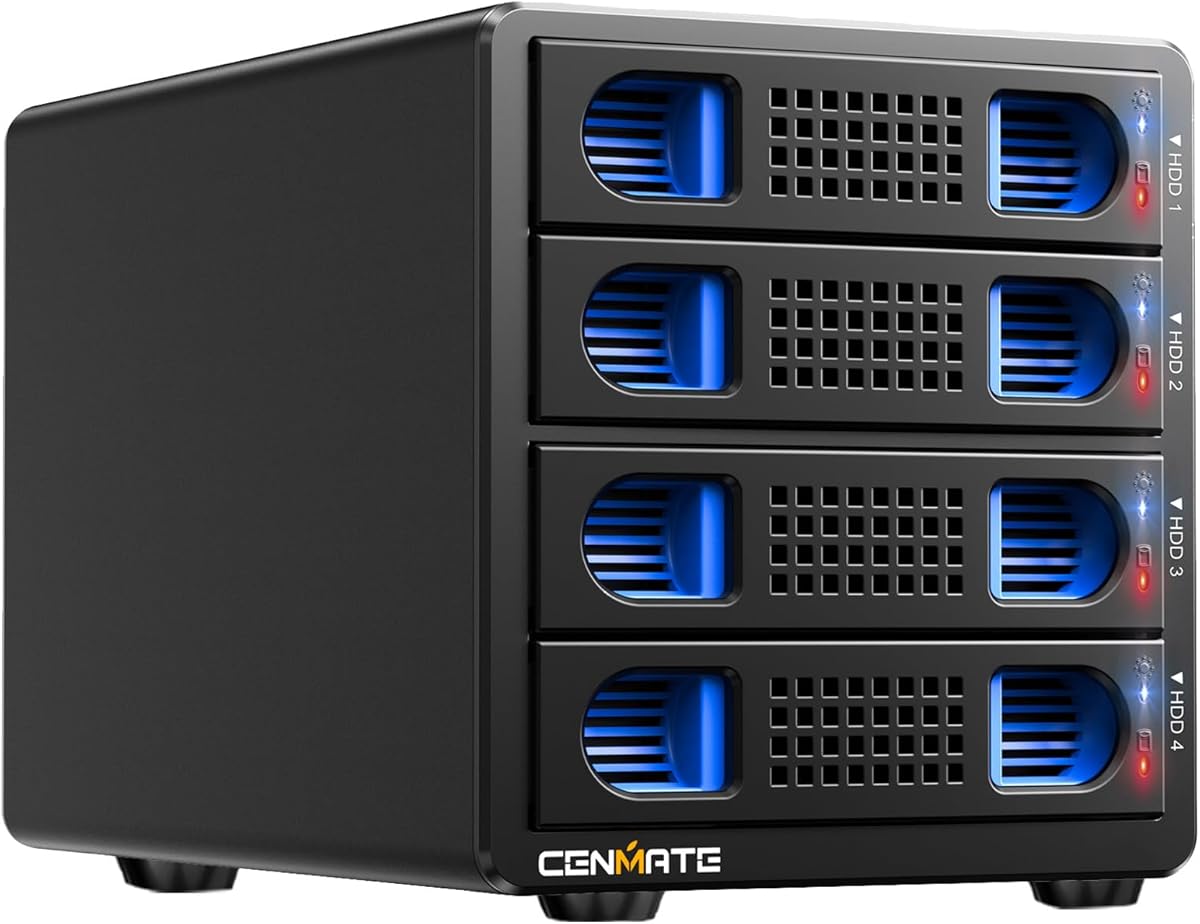
The CENMATE Aluminum 4 Bay USB-C enclosure combines a flexible four-bay layout with a 5Gbps USB 3.0 interface and active cooling. It supports both 2.5-inch and 3.5-inch SATA hard drives and SATA SSDs, with stated combined capacity of up to 80TB when four 20TB drives are used. Its 4.3 rating reflects a generally favorable reception, especially among buyers seeking a simple, expandable direct-attached storage system.
We may earn a commission when you buy through this link, at no additional cost to you.
The enclosure's aluminum-alloy body is intended to help move heat away from the drives, while the built-in 2-inch fan provides active airflow. It also uses tool-free, hot-swappable trays, allowing a drive to be removed without taking down the entire enclosure. The included USB A and USB-C 3.0 cables provide convenient connection options, while the 12-volt power adapter supports stable operation with multiple rotating hard drives.
The main limitation is that this is a 5Gbps design rather than a 10Gbps model, so it will not deliver the higher interface ceiling offered by several competitors. The listed fan operates continuously and is described as producing approximately 40 to 50 decibels of noise, which may be noticeable in a quiet office or recording environment. It is also a direct-attached storage product rather than a NAS or RAID system, although it does support hot-swapping through its USB connection.
This model is a strong general recommendation for anyone who wants four 2.5-inch or 3.5-inch SATA drives in a single enclosure without a complex network setup. It is particularly useful for desktop backups, consolidated media storage, and a multi-drive game or project library. Buyers prioritizing maximum throughput should look toward a 10Gbps option, but those seeking broad compatibility and straightforward maintenance will find a well-balanced feature set here.
Supporting both 2.5-inch and 3.5-inch SATA HDDs and SSDs makes this enclosure useful for combining older desktop drives with compact solid-state storage. The tool-free tray design also reduces the effort required to install or replace media.
Aluminum construction and a dedicated 2-inch fan work together to dissipate heat during extended transfers. Fans that continue running improve consistency, although the stated noise level deserves consideration in quiet spaces.
We may earn a commission when you buy through this link, at no additional cost to you.
The CENMATE Aluminum 4 Bay 10Gbps enclosure is a natural step up for buyers who want more interface headroom than a conventional USB 3.0 dock can provide. It supports up to four 2.5-inch or 3.5-inch SATA drives, offers a stated combined capacity of 80TB, and uses USB 3.2 Gen 2 with a maximum interface rate of 10Gbps. Its 4.1 rating indicates a solid overall reception.
We may earn a commission when you buy through this link, at no additional cost to you.
Published performance figures include approximately 1,016MB/s aggregate read and write throughput with four hard drives and approximately 510MB/s with one SSD under USB Attached SCSI Protocol control. Those numbers represent the enclosure's stated capabilities, but actual results depend on the hard-drive generation, solid-state drive, host computer, cable, and operating system. A USB-C host that supports USB 3.0, USB 3.1, USB 3.2, Thunderbolt 3, or Thunderbolt 4 can use the enclosure through the supplied USB-C cable.
Thermal management uses an aluminum-alloy enclosure and a 2-inch fan, with the manufacturer noting approximately 40 to 50 decibels of fan noise. Hot swapping is supported, making it possible to replace drives without powering down the device. As with the preceding model, it is direct-attached storage and does not create a NAS or a hardware RAID array.
Choose this enclosure when your workflow moves larger collections or benefits from the improved 10Gbps link, especially if you already own a modern USB-C or Thunderbolt computer. It offers the same flexible 2.5-inch and 3.5-inch support as the 5Gbps CENMATE but has a more future-oriented connection. It is less compelling for light tasks that cannot benefit from the additional bandwidth.
A 10Gbps interface can reduce bottlenecks when several fast SATA SSDs or multiple hard drives are active. The enclosure's stated aggregate throughput makes it more appropriate for intensive media, archive, and backup workflows than a basic 5Gbps dock.
Tool-free hot-swappable trays make it easier to update storage or move drives between sessions. Users should still confirm that the host and operating system support the intended replacement workflow before beginning a critical task.
We may earn a commission when you buy through this link, at no additional cost to you.
The MAIWO 4 Bay USB-C enclosure delivers a useful combination of two cooling fans, a 10Gbps interface, and a relatively accessible design for four 3.5-inch SATA drives. The stated maximum is 96TB using four 24TB drives, and the enclosure also supports daisy chaining with compatible storage devices. Its 3.5 rating is the lowest among the ten products, so buyers should assess the published details carefully.
We may earn a commission when you buy through this link, at no additional cost to you.
Two major advantages distinguish this model. First, the aluminum-alloy housing and dual fans provide more active cooling than single-fan alternatives. The fans automatically activate when drive temperature exceeds 48 degrees Celsius, allowing airflow to increase when needed. Second, its daisy-chain capability can make it easier to extend a storage setup without relying only on the four built-in bays.
The 84-watt external adapter is designed to provide dependable power for larger-capacity hard drives, while the independent power switch offers a clear way to turn the enclosure off. An HD-TV output is included for compatible display use, and the enclosure is described as suitable for Windows, macOS, and Linux systems, as well as compatible smart TVs, computers, and laptops.
Its main limitation is drive-size flexibility: the product information specifies 3.5-inch SATA HDDs and SSDs rather than 2.5-inch media. It also does not provide RAID. This is a practical choice for users who want four large desktop hard drives, particularly when automatic dual-fan cooling and daisy-chain expansion are priorities. Buyers needing smaller 2.5-inch drives should choose a more versatile enclosure.
The two fans automatically activate above a stated 48-degree Celsius threshold. This responsive approach can be useful during long transfers, while the aluminum shell contributes additional passive heat dissipation.
The four internal bays can hold up to 96TB in the stated configuration, and daisy chaining extends the number of devices in the broader storage setup. That makes the model relevant to users building storage gradually rather than replacing all drives at once.
We may earn a commission when you buy through this link, at no additional cost to you.
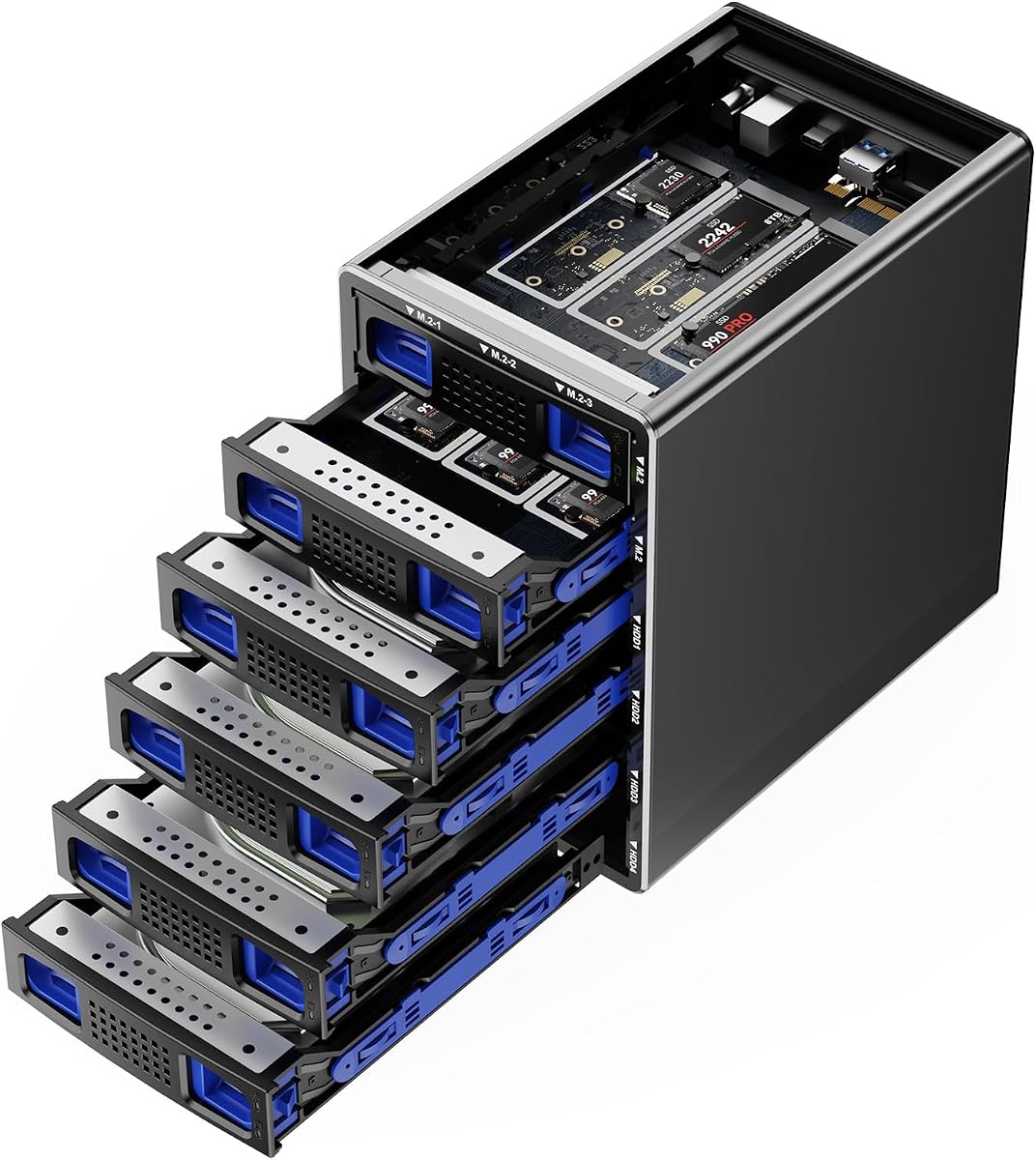
The CENMATE Hybrid HDD and NVMe enclosure is the most specialized product in this guide, combining four SATA drive positions with six M.2 NVMe positions. It accepts 2.5-inch and 3.5-inch SATA hard drives or SSDs, plus 2230, 2242, 2260, 2280, and 22110 M.2 NVMe drives. Its 4.1 rating reflects a generally positive reception among buyers seeking an unusually flexible drive platform.
We may earn a commission when you buy through this link, at no additional cost to you.
The stated maximum capacity reaches 136TB when four 22TB hard drives and six 8TB NVMe SSDs are installed. This mix allows users to place high-capacity archival media beside faster solid-state scratch space within one housing. USB 3.2 Gen 2 provides a 10Gbps interface, and the listed full-load read rate of 200 to 300MB/s gives a more realistic indication of the expected performance envelope.
Cooling is handled by an aluminum-alloy body and two 2-inch silent fans. The description says these fans do not sleep and continually cool the drives, which is reassuring for sustained use but also means the enclosure is not designed to become completely silent when occupied. Tool-free hard-drive trays simplify installation and removal, and the included USB A and USB-C cables support common host connections.
This enclosure is best for a technically inclined user who wants one device to contain both conventional SATA storage and compact NVMe media. It is less appropriate if four ordinary SATA bays are all you need, since the extra drive positions add complexity without necessarily improving single-drive performance. Check M.2 form-factor and key support carefully before buying, and verify the intended drive arrangement in the operating system.
The combination of four SATA bays and six M.2 positions is especially useful for editors, developers, and data-heavy users who want fast scratch storage beside archival hard drives. It also reduces the number of separate desktop boxes needed for a mixed workflow.
A maximum stated capacity of 136TB enables a tiered arrangement in which large hard drives hold less frequently accessed data while NVMe SSDs handle active projects. The enclosure remains direct-attached storage, so the operating system controls how the individual drives appear.
We may earn a commission when you buy through this link, at no additional cost to you.
The WAVLINK 88TB USB-C enclosure combines a four-bay SATA storage system with a 10Gbps USB-C connection, dual cooling fans, and HDMI display output. It supports 3.5-inch SATA hard drives and SSDs and also offers 2.5-inch support, with a stated maximum capacity of 88TB. Its 4.0 rating reflects a balanced feature set rather than an exceptionally polarizing user experience.
We may earn a commission when you buy through this link, at no additional cost to you.
The enclosure acts as more than a basic drive dock. An additional USB 3.2 Type-C port can be used for peripherals or daisy-chaining, while the HDMI interface supports up to 4K at 60Hz when the host uses DisplayPort 1.4 capability. The host computer must support USB-C video output, and the listed instructions call for a USB-C-to-C cable for the HDMI function.
The aluminum housing provides passive heat dissipation, and two built-in fans automatically activate at 48 degrees Celsius. Each bay has an independent on/off power switch, giving the user more control over individual drives than a single enclosure switch provides. The product is also described as supporting hot-swappable drive workflows, though buyers should follow the manufacturer's handling instructions to avoid data issues.
This WAVLINK is a strong fit for a desk that needs both storage and display connectivity from a single USB-C setup. Its 88TB capacity and 10Gbps interface suit large media collections, project archives, and external backups. It may be overkill for users who only need a quiet, simple four-bay drive box, while anyone using 2.5-inch drives should note that suitable 2.5-inch-to-3.5-inch mounting brackets are not included.
HDMI output and an additional USB-C connection make this enclosure useful as a compact workstation hub. The display function is conditional on a compatible USB-C host and appropriate cabling, so those requirements should be confirmed before purchase.
Independent bay switches provide a useful level of control, while dual fans activate automatically at the stated 48-degree threshold. Together, these features support organized storage management and temperature-aware operation.
We may earn a commission when you buy through this link, at no additional cost to you.
The SABRENT DS-4SSD is built for users whose storage needs center on 2.5-inch SATA SSDs and thin hard drives rather than full-size desktop disks. It accommodates up to four drives with a maximum thickness of 12.5mm, supports a stated combined capacity of 64TB, and has a 4.2 rating. The magnetic cover and tool-free access make drive changes especially convenient.
We may earn a commission when you buy through this link, at no additional cost to you.
Its USB 3.0 interface has a maximum stated transfer rate of 5Gbps and remains backward compatible with USB 2.0 and USB 1.1 devices. The enclosure works with Windows, macOS, and Linux without drivers for standard operation, which simplifies adoption across different computers. A built-in fan provides active cooling, while an optional on/off switch lets the user control fan noise and power use.
The product is described as engineered for continuous 24/7 operation, making it a candidate for always-available external storage. It does not create a RAID array, so each drive is managed as an individual volume. That simplicity can be an advantage for users who want to add or remove storage without learning hardware RAID configuration.
The SABRENT enclosure is best suited to compact laptops, small workspaces, and portable SSD-based storage libraries. It should not be considered if you plan to install 3.5-inch desktop hard drives or 15mm-thick drives. For those who need a slim, tool-free, four-bay unit with controllable cooling, it offers a focused feature set without unnecessary complexity.
The magnetic cover and tool-free design remove the need for screws during routine access. This makes the dock attractive for users who frequently move between portable SSDs or maintain separate working sets.
A built-in fan helps maintain a suitable operating environment for the drives, and its optional switch provides a way to reduce sound or power consumption. Continuous-operation suitability is especially relevant to always-on archive or download workflows.
We may earn a commission when you buy through this link, at no additional cost to you.
The CENMATE 5Gbps eSATA enclosure is a traditional four-bay direct-attached storage solution with both USB 3.0 and eSATA connections. It supports 2.5-inch and 3.5-inch SATA hard drives and solid-state drives, with a stated maximum capacity of 80TB. Its 4.0 rating reflects a useful design with important limitations that are especially relevant to eSATA users.
We may earn a commission when you buy through this link, at no additional cost to you.
USB provides the primary 5Gbps route, while the included USB A, USB C, and eSATA cables allow different connection strategies. The eSATA path is attractive for systems with a native port and for users who value a direct SATA-oriented connection. However, the product information clearly states that hot-swapping is not supported and that a computer's SATA-to-eSATA adapter cannot be used.
For multiple bays to be accessed through eSATA, the computer's eSATA port must support RAID functionality. Without that support, only one drive bay can be accessed. This requirement makes eSATA less convenient for many modern computers, which increasingly omit the port. Cooling is provided by an aluminum-alloy shell and one 2-inch fan, with stated fan noise of approximately 40 to 50 decibels.
This enclosure makes the most sense for a workstation that has a properly supported eSATA setup or for a buyer who wants both connection standards available. General users should use USB 3.0 and enjoy the simpler hot-swappable workflow offered through that interface. It is a practical option for flexible drive sizes, but it is not the easiest choice for users who expect seamless eSATA hot swapping.
USB 3.0 offers the more convenient general-purpose route and supports hot swapping, while eSATA can suit compatible workstations. The distinction matters because a native eSATA port without RAID support may expose only one bay at a time.
The enclosure supports common 2.5-inch and 3.5-inch SATA media in an aluminum body with active fan cooling. Its broad drive support and 80TB stated ceiling make it useful for both portable SSD collections and full-size hard-drive archives.
We may earn a commission when you buy through this link, at no additional cost to you.
The WAVLINK 128TB USB-C enclosure stands out for its stated maximum capacity of 128TB, achieved with four 32TB drives according to the product information. It supports 3.5-inch and 2.5-inch SATA hard drives and SSDs through four SATA 6Gbit/s bays, includes dual temperature-controlled cooling fans, and offers a 10Gbps USB-C connection. The 4.2 rating suggests broad buyer satisfaction.
We may earn a commission when you buy through this link, at no additional cost to you.
For users assembling a large archive, the headline capacity is the defining advantage. The enclosure also functions as a docking station, with an additional USB 3.2 Type-C port for peripherals or daisy chaining and an HDMI output capable of 4K at 60Hz under DisplayPort 1.4. As with the other WAVLINK model in the guide, the host must support USB-C video output and the correct cable must be used.
The aluminum shell contributes to structural rigidity and passive heat dissipation. Two built-in fans automatically activate when the temperature reaches 48 degrees Celsius. Independent on/off switches for each bay make it possible to manage individual drives more closely than with a single shared switch, while the hot-swappable design is intended to streamline drive replacement.
This is an appealing choice for users who want substantial capacity, modern connectivity, and display functionality in one device. It fits large creative archives, extensive media collections, and multi-drive backup workflows. The 2.5-inch caveat is important because compatible 2.5-inch-to-3.5-inch mounting brackets are not included. Buyers should also confirm that their chosen 32TB drives are compatible with their host and intended use.
The stated 128TB ceiling provides considerable room for media, project archives, and backup sets without requiring multiple external enclosures. Capacity is theoretical until suitable drives are installed, so the enclosure should be matched to compatible high-capacity media.
Dual temperature-controlled fans and an aluminum shell form a practical thermal strategy for sustained storage work. The added USB-C and HDMI connections turn the enclosure into a useful workstation hub as well as a drive container.
We may earn a commission when you buy through this link, at no additional cost to you.
The CENMATE 8-Mode RAID enclosure adds hardware array management to the familiar four-bay aluminum design. It supports 2.5-inch and 3.5-inch SATA hard drives and SSDs, with a stated combined capacity of 80TB, and carries a 3.8 rating. Its main distinction is support for RAID 0, RAID 1, RAID 3, RAID 5, RAID 10, Clone, Large, and Normal modes.
We may earn a commission when you buy through this link, at no additional cost to you.
The enclosure offers USB 3.0 and eSATA connections at a stated 5Gbps rate, along with a 12-volt external power adapter. Cooling comes from the aluminum-alloy chassis and a 2-inch fan, with the same stated noise range of approximately 40 to 50 decibels. Hot-swapping is not supported, and the eSATA requirements for multi-bay access are the same as those described for the non-RAID eSATA model.
RAID mode selection requires disconnecting power, using a screwdriver to move a paddle to the desired position, pressing and holding the reset button, and then restoring power while continuing to hold reset for ten seconds. The product information warns that changing RAID modes can result in data loss. It also notes that macOS does not include RAID software for this device.
This enclosure is appropriate for experienced users who need array options, particularly redundancy, striping, cloning, or a large combined volume. It is a poor choice for a first-time storage buyer because mistakes during mode changes can be consequential. Anyone considering it should back up important data, read the full instructions, and understand how the desired RAID mode will be used before installing valuable drives.
The available modes cover performance, redundancy, cloning, and large-volume configurations. RAID 1 and RAID 5 can improve resilience under appropriate conditions, while RAID 0 emphasizes speed, but each mode has different capacity and operating implications.
Mode switching is a physical process and the manufacturer warns about possible data loss. Users should consult the instructions, preserve a separate backup, and avoid changing array settings while the enclosure contains irreplaceable data.
We may earn a commission when you buy through this link, at no additional cost to you.
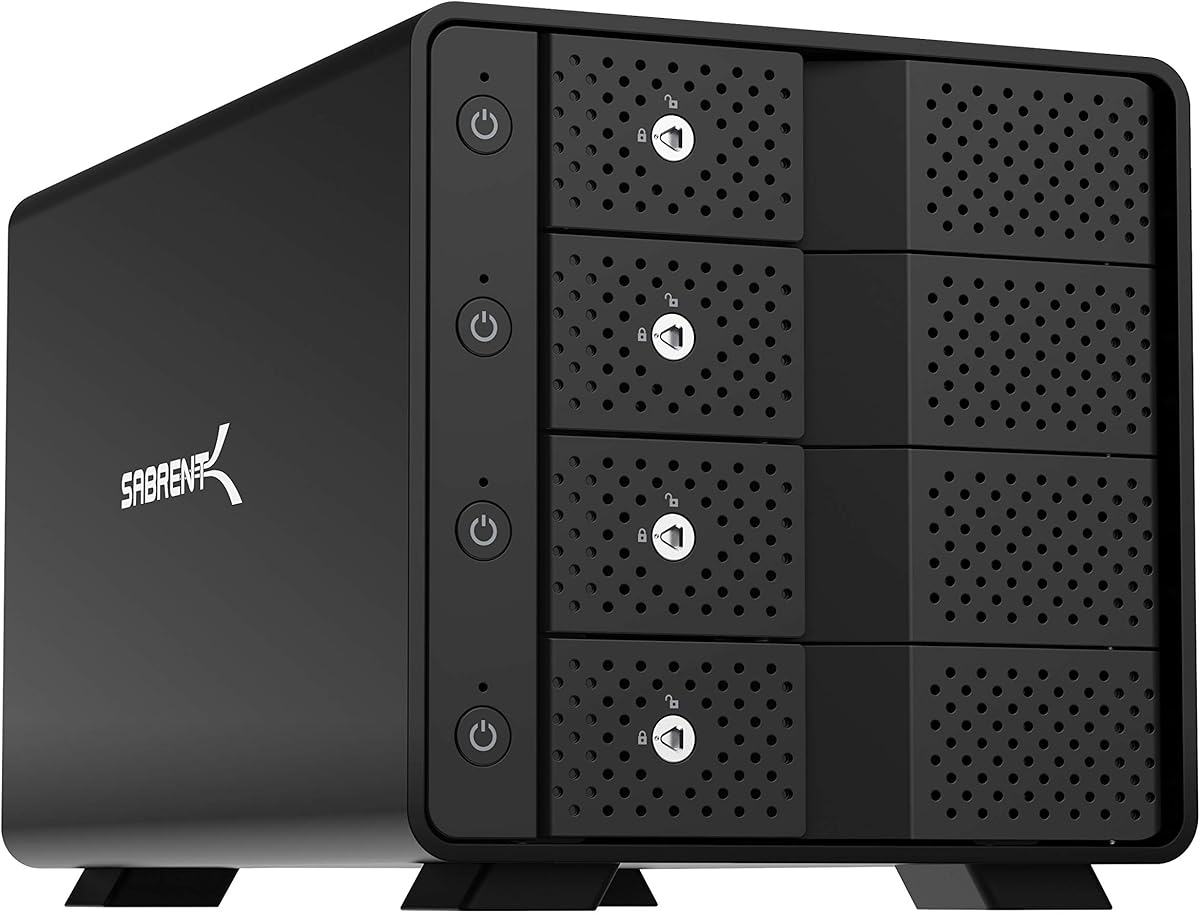
The SABRENT DS-SC4B is a polished four-bay direct-attached storage dock built around a 10Gbps USB-C interface. It holds up to four 3.5-inch SATA hard drives or SSDs, supports a stated 80TB combined capacity, and has a 4.1 rating. Its strongest differentiator is a dedicated ASMedia ASM1351 controller for each bay, providing every drive with an independent connection.
We may earn a commission when you buy through this link, at no additional cost to you.
The drive trays support tool-less insertion and hot swapping, while each bay includes an on/off switch and activity LED. A locking key and Kensington slot add physical security for shared or semi-permanent installations. The aluminum-and-metal housing is designed for durability, and a 92mm fan supports active cooling during continuous operation.
Its auto-switching 100 to 240-volt external power supply is designed for use in different regions, and a USB-C-to-USB-C connection is recommended for the most reliable link to the computer. The enclosure is backward compatible with USB 3.0 and USB 2.0. It works with Windows, macOS, and Linux and mounts each drive individually in a JBOD-style arrangement.
This is a strong recommendation for offices, studios, and advanced home users who value independent bay control, visible status, secure hot swapping, and a durable enclosure. It does not provide hardware RAID, so users seeking an array should choose the RAID-capable model instead. The active fan is expected in a dock designed for sustained use, but noise-sensitive buyers should consider their placement.
Dedicated controllers, per-bay switches, and activity lights make the enclosure easy to manage in a busy setup. These details are particularly useful when different drives are active for separate projects or when a user needs clear status feedback.
Tool-less trays make drive replacement fast, while the locking key and Kensington slot help protect a permanently deployed system. The enclosure's metal construction and active fan support are also oriented toward continuous operation.
We may earn a commission when you buy through this link, at no additional cost to you.
The right four-bay enclosure depends on drive size, interface, capacity, cooling behavior, and how much configuration flexibility you need. These factors determine whether the enclosure fits your computer, storage media, and day-to-day workflow.
Choose a mixed-size model for maximum flexibility, or a specialized compact dock if all storage is portable SSD based.
Use the newest interface supported by your computer, and avoid expecting interface speed to overcome slower hard-drive mechanics.
For heavy workloads, favor multiple temperature-responsive fans; for quiet offices, consider fan controls and enclosure placement.
Select capacity for your current drives and realistic future expansion, not merely the largest headline number.
Choose DAS for simplicity and independence; choose RAID only when you understand redundancy, rebuild behavior, and mode-change risk.
Confirm the connection path, operating-system behavior, and drive-removal procedure before depending on hot swapping for active work.
Treat display and expansion features as useful additions, but verify host compatibility before buying a dock for a specific workstation setup.
Before installing drives, verify that every disk uses the supported SATA form factor, check the enclosure's maximum capacity guidance, and read the manual for bay orientation and tray removal. Connect the external power supply first, then attach the appropriate USB or eSATA cable to the computer. For the strongest and most stable link, use the specified cable and a host port that supports the enclosure's full interface speed.
After connection, open the computer's file manager or disk utility and confirm that every installed drive appears. Format new disks using a filesystem appropriate for the host and intended use. If the enclosure includes RAID controls, configure the array carefully, follow the manufacturer's mode-switching procedure, and maintain a separate backup before changing any setting that could alter existing data.
Keep the enclosure on a stable, ventilated surface with its intake and exhaust paths unobstructed. Listen for unusual noise, watch for repeated disconnections, and avoid moving the unit while data is transferring. Back up important information regularly, shut down the enclosure before removing the final drive, and periodically inspect cables, power connections, and airflow for signs of wear or heat-related problems.
Most of the listed products are direct-attached storage enclosures, not network-attached storage systems. They connect to one computer through USB or eSATA and appear as local disks, although the operating system can provide network sharing. The CENMATE RAID model is also described as DAS rather than a NAS. A true NAS requires compatible network hardware, an operating system, and relevant services.
It can be, especially with multiple fast SATA SSDs or a favorable multi-drive setup. A single mechanical hard drive may not sustain the higher interface rate, while the gap becomes more visible with NVMe media, although the listed enclosures are SATA-based rather than full-featured NVMe docks. The host interface, cable, drive, and protocol all influence the final result.
No. Several general-purpose CENMATE and WAVLINK models support both sizes, but the MAIWO model is specified for 3.5-inch SATA drives and the SABRENT DS-4SSD accepts 2.5-inch SATA drives up to 12.5mm thick. The WAVLINK models support 2.5-inch drives but require additional 2.5-inch-to-3.5-inch mounting brackets that are not included.
Some models are explicitly designed with continuous operation in mind. The SABRENT DS-4SSD is described as engineered for 24/7 use, and the SABRENT DS-SC4B includes a 92mm fan intended for safe continuous operation. Other units use active cooling but do not make the same explicit claim, so users should follow the relevant product guidance and monitor drive temperatures.
No. The listed CENMATE 5Gbps eSATA and RAID models explicitly do not support hot swapping. Their USB connections may support the intended workflow, but eSATA has additional restrictions: the computer must have a native eSATA port with RAID support, and SATA-to-eSATA adapters are not supported. USB-C models with tool-free hot-swappable trays offer the clearest replacement process.
No. RAID can improve availability, performance, or combined capacity depending on the mode, but it does not protect against accidental deletion, malware, controller failure, or physical loss of the entire enclosure. Even RAID 1 and RAID 5 should be paired with a separate backup strategy. A direct-attached enclosure with independent drives can sometimes be safer for archival storage than an array whose failure event affects every member.
Fans move air across hot drives, but they also generate audible movement. The listed CENMATE models describe approximately 40 to 50 decibels, which may be acceptable in a busy office but distracting in a quiet room or recording space. Temperature-controlled models may remain silent until a threshold is reached, while a user-controllable fan switch offers another way to manage sound.
Several models can serve that role. The MAIWO and WAVLINK units include HDMI output, while the WAVLINK models also provide an additional USB-C port for peripherals or daisy chaining. The host must support USB-C video output, the correct USB-C-to-C cable may be required, and the display resolution and refresh rate ultimately depend on the computer, operating system, and connected display.
The WAVLINK 128TB USB-C stands out for its high stated capacity, modern 10Gbps connection, dual automatic fans, per-bay controls, and HDMI output. The SABRENT DS-SC4B is the premium choice for users who prioritize independent controllers, secure tool-less hot swapping, and continuous-operation design, while the MAIWO model offers a practical value combination of 10Gbps connectivity and two temperature-responsive fans.
Most buyers should begin with drive size, host interface, and intended capacity, then confirm cooling and maintenance needs. A 10Gbps model is preferable for demanding transfers, a dual-fan enclosure offers extra thermal headroom, and a simple DAS design avoids the configuration risks of RAID. Extra features such as daisy chaining, HDMI, and independent bay switches are worthwhile when they match a real workstation requirement.
Finally, check the current listing and manufacturer information before ordering because product specifications, availability, ratings, and commercial terms can change. Confirm the exact drive dimensions, supported connection, power requirements, operating-system behavior, and any included accessories. Those checks will help you select an enclosure that remains useful as your storage library grows.