
Webcam Streaming Kit
4.2Editor score
1080P webcam at 30FPS
RGB USB microphone included
Adjustable five-mode LED light
Streaming Equipment for Beginners guide comparing microphones, webcams, mixers, podcast kits, and controllers for new creators.
Streaming equipment for beginners should make setup straightforward without limiting the growth of a new channel. A good starter system balances dependable audio, useful controls, broad device compatibility, and enough features to support common formats such as gaming streams, podcasts, interviews, singing, and online videos.
We compared ten products using their published specifications, included accessories, control options, connectivity, and suitability for new creators. The list covers complete audio bundles, standalone USB microphones, a webcam and lighting kit, multi-person podcast systems, and a DJ controller designed for connected music performance.
Each review explains the strongest reason to choose the product while also identifying limitations that matter during early setup. Ratings and specifications reflect the supplied product information, and prices, availability, and bundle contents can change, so readers should confirm current listings before purchasing.
4.2Editor score

4.1Editor score

4.7Editor score
The comparison highlights the number of supported creators, microphone type, major control features, connectivity, and best-fit use case for every product, helping beginners narrow the field before building a first streaming setup.



The TENLAMP G10 Creator Audio Mixer Bundle has a 4.1 rating and offers one of the most cohesive starter packages in this guide. It combines an audio mixer, condenser microphone, and essential accessories, allowing a new streamer to focus on assembling a functional workstation rather than researching every separate component. Its creator-oriented design is especially relevant for talking streams, podcasts, short videos, gaming commentary, and live performances.
We may earn a commission when you buy through this link, at no additional cost to you.
A major strength is the range of real-time controls. Bass, treble, reverb, and pitch can be adjusted while streaming, and the included Follow Singing mode is designed to let performers hear the original track privately while sending a vocal-and-music mix to viewers. Voice styles and triggered effects such as applause or laughter can add interaction without requiring complicated software routing.
The bundle is also designed to reduce compatibility friction. It supports PC, phone, and tablet connections and lists Windows, Mac, iOS, and Android compatibility, while no driver installation is required. That makes it easier to move from desktop recording to a mobile stream. The trade-off is that physical audio effects and mixing controls have a steeper learning curve than a simple USB microphone, and a creator making face-camera content will still need a separate webcam.
This is a strong recommendation for a beginner who wants a complete audio foundation and plans to experiment with sound. Choose it over a bare microphone if live mixing, voice effects, music accompaniment, and one coordinated bundle matter more than the absolute simplicity of a single USB device. It is also a sensible first step for creators who expect their production style to evolve beyond straightforward voice commentary.
The mixer, condenser microphone, and supporting accessories reduce the number of initial purchases. That cohesion makes the G10 particularly approachable for creators who are uncertain which pieces they will eventually need.
Pitch, reverb, voice styles, and triggered sound effects can make a basic stream feel more engaging. These controls are particularly useful for singing, short-form video, interactive talk shows, and informal gaming streams.
We may earn a commission when you buy through this link, at no additional cost to you.
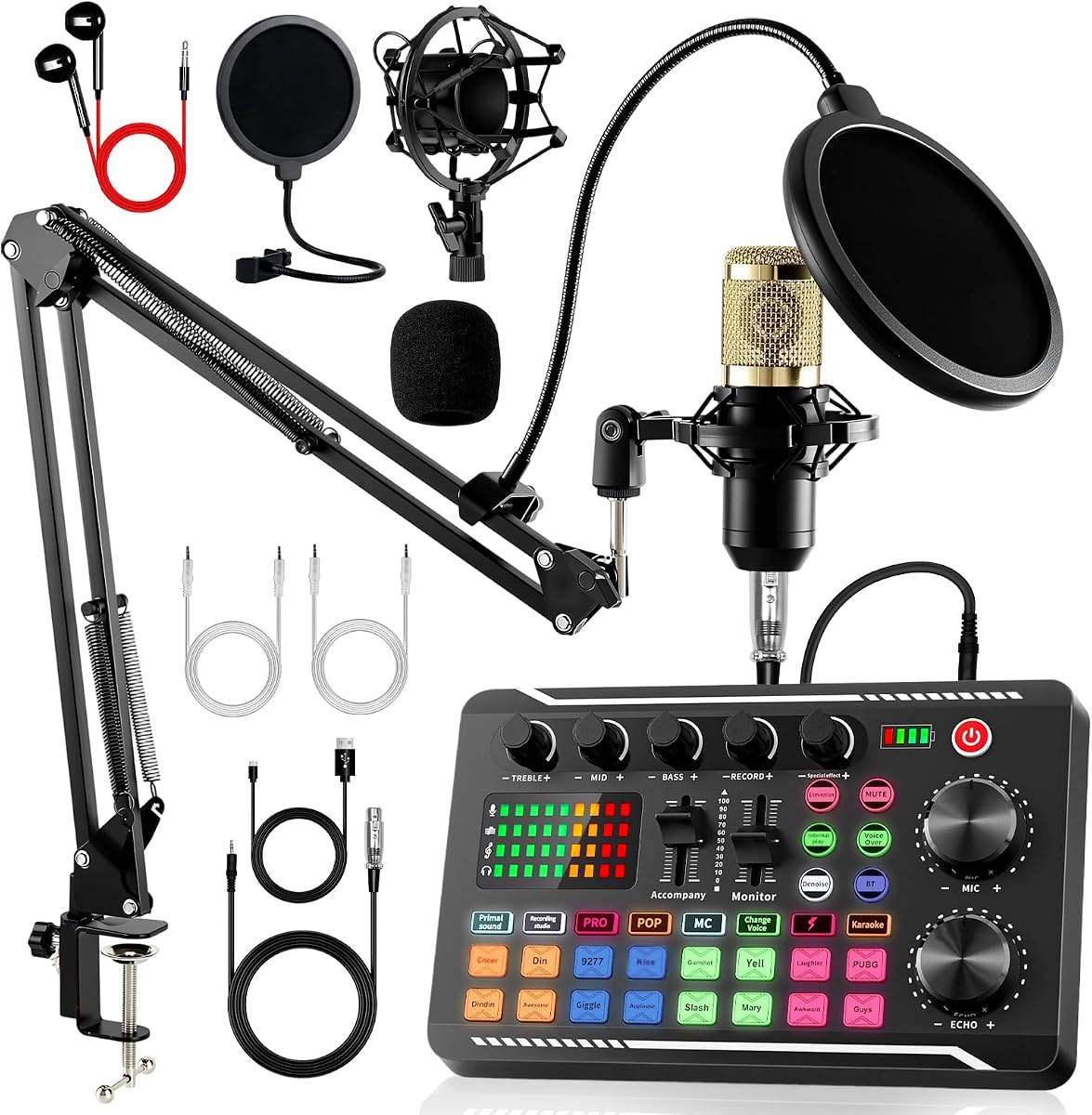
The Also GO F998 Audio Mixer and BM800 Microphone Bundle has a 4.2 rating and is built for a beginner who wants podcast-style tools without assembling the setup one component at a time. Its package includes a sound card, BM800 microphone, boom arm, earphone, shock mount, pop filter, foam cap, XLR and USB cables, and several 3.5 mm audio cables.
We may earn a commission when you buy through this link, at no additional cost to you.
The F998 interface is unusually feature-rich for a starter product. It provides 16 background effects, seven podcast and recording modes, four voice changer modes, and nine adjustable knobs. Cardioid pickup, noise reduction, a dual-layer pop filter, and a windproof foam cap all support clearer speech capture, although the BM800 itself still requires a sensible gain setting and adequate physical distance from the speaker.
Compatibility is another advantage. The system connects directly with PCs, smartphones, laptops, Xbox systems, and major desktop and mobile operating systems without stated converter requirements. For a phone or tablet, Bluetooth can be convenient, while the included cables may feel more direct with a computer. The trade-off is that the abundance of modes and effects can make the control panel look intimidating, even though the platform is explicitly designed for users without advanced audio skills.
Choose the F998 if your main goal is a flexible podcast and voice-content kit with many accessories at once. It is less appropriate for someone who wants the smallest possible desktop footprint or only needs a polished microphone for occasional calls. Within that niche, however, it offers a generous and accessible feature set for experimenting with different formats.
The included stand, pop filter, shock mount, foam cover, earphones, and collection of cables cover many of the accessories usually required for a first voice setup. It reduces both shopping effort and the chance of discovering a missing connection cable later.
Seven recording modes and four voice changes provide more variety than a basic mixer. Beginners can begin with familiar podcast controls and introduce effects gradually as their confidence and production requirements increase.
We may earn a commission when you buy through this link, at no additional cost to you.
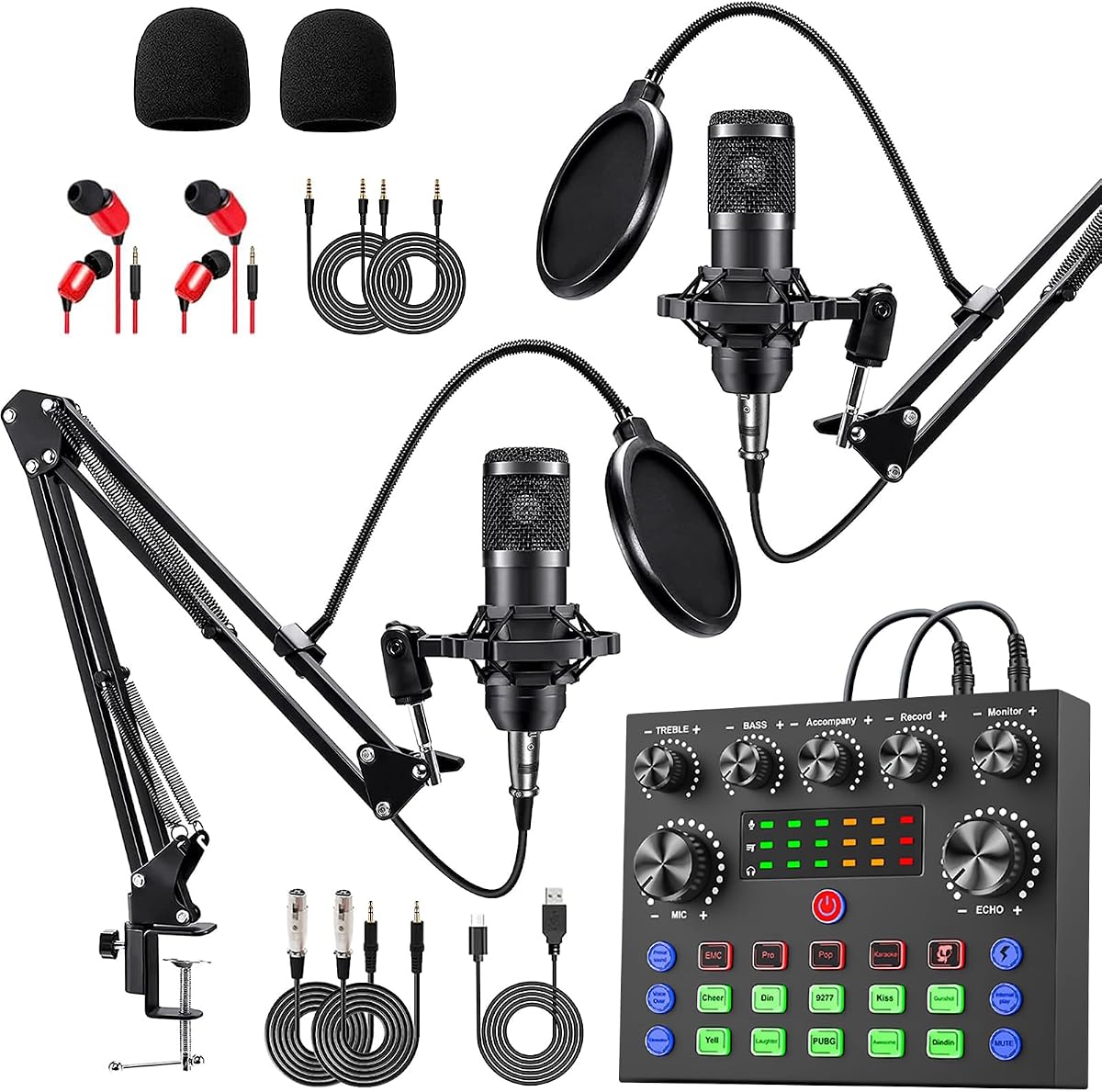
The Brvomussy Podcast Equipment Bundle for 2 has a 4.2 rating and targets creators who want two people to broadcast or record together. It includes two condenser microphones, two hanging arm clippers, a sound card, earphones, shock holders, spray protections, foam covers, XLR and USB cables, 3.5 mm audio cables, and a user manual.
We may earn a commission when you buy through this link, at no additional cost to you.
Its cardioid microphones, intelligent noise reduction, double-layer pop filter, foam cap, and DSP processing work together to improve voice clarity. The mixer adds 10 effects, including reverb, treble and bass adjustment, noise reduction, accompaniment, dodge, and voice changing, along with four voice variations and four sound modes. Instrument input gives guitar or bass players another way to incorporate live performance into a stream.
The package supports Windows, iOS, Android, Mac OS, Chrome OS, PCs, smartphones, and game platforms, with a free-drive, plug-and-play approach. The limitation is physical rather than electronic: two microphones, two arms, and the mixer require more desk space than a standalone USB microphone. The instructions also recommend fully charging the device before first use or after long storage, which adds one setup step.
This bundle is a good fit for couples, friends, interview hosts, and small teams starting together. Choose it when simultaneous speech is a core requirement and the included accessories are more valuable than a minimal footprint. It may be unnecessary for a solo creator who speaks, records, and streams independently but wants only one microphone and a small mixer.
Two microphones and individual boom arms make the package immediately relevant to interviews, co-hosting, gaming partnerships, and collaborative music content. The mixer is designed to manage more than one voice in the same production.
Instrument input allows a creator to bring guitar, bass, or another instrument directly into the mix. This expands the bundle beyond conventional podcast work into singing and live music sessions.
We may earn a commission when you buy through this link, at no additional cost to you.
The AM100-V8 Podcast Equipment Bundle has a 4.0 rating and provides a conventional microphone-centered setup for vlogging, podcasting, short videos, music recording, and live broadcasting. The package contains a BM800 condenser microphone, adjustable scissor arm, shock mount, pop filter, anti-wind foam cap, power cable, and live sound card.
We may earn a commission when you buy through this link, at no additional cost to you.
The microphone uses cardioid pickup to focus on the source directly in front of it, while the included professional sound chipset is intended to preserve vocal detail. The voice-changing function adds creative options for entertainment streams, calls, singing, TikTok, and YouTube. It is a useful distinction from the most minimal microphone-first kits because the interface does more than simply pass a signal to a computer.
Its device support is broad for a beginner product. The supplied information lists compatibility with Windows, Mac OS, Android, iOS, tablets, iPads, PS4, Xbox, Switch, computers, laptops, and mobile phones. That flexibility suits a creator moving between a desk setup and a phone-based workflow. However, the product should be charged before first use, and its 4.0 rating is slightly below the ratings of most other options in the guide.
Choose the AM100-V8 for a straightforward microphone, boom stand, and sound-card package rather than a large multi-person system. It is most appropriate for one-person voice work, informal vlogs, and beginner gaming commentary. Those wanting a wider accessory collection, more defined platform options, or multiple microphones will find alternatives better matched to those priorities.
The combination of a condenser microphone, scissor arm, shock mount, pop filter, and foam cover covers the essential physical elements of a first recording setup in one package.
Support for computers, mobile systems, tablets, and game platforms gives the bundle relevance beyond a desktop-only podcast workflow. Connection method and platform details should still be checked against the current instructions before recording.
We may earn a commission when you buy through this link, at no additional cost to you.
The Webcam Streaming Kit has a 4.2 rating and is the most complete visual starting point in the guide. It combines a 1080P webcam, an RGB USB microphone, and an adjustable LED light in a single package, giving a new creator the three most visible components of a face-camera stream without requiring a large initial shopping list.
We may earn a commission when you buy through this link, at no additional cost to you.
The webcam's CMOS sensor captures 1920 by 1080 video at 30FPS with automatic brightness and color compensation. The 14 mm cardioid USB microphone includes a built-in pop filter, gain control, shock mount, and real-time headphone monitoring. Together, these features make the kit useful for Twitch, YouTube, Zoom, Teams, and video calls where both picture and speech need immediate improvement.
The lighting panel is another major strength. Its CRI 90+ output spans 3000 to 7200K, includes five color modes, offers five brightness levels, remembers a preferred setting, rotates 180 degrees, and can hook onto a monitor. The trade-off is that this is not a console kit, and PS5 or Xbox streaming requires a separately sold capture card. The included audio also lacks the deeper live-mixing controls found in dedicated podcast bundles.
Choose this kit if your first stream is a face-camera format and you want a cohesive visual result quickly. It is especially useful for video calls, beginner broadcasts, and content where lighting matters as much as audio. It is less suitable for a creator who already has a satisfactory camera or needs a sophisticated audio mixer.
The 1080P webcam, automatic image compensation, and adjustable lighting solve three visible presentation problems at once. This makes the kit easier for a first-time creator to position and use than assembling mismatched components independently.
Real-time headphone monitoring lets a creator hear what the audience hears, while the microphone gain control makes level adjustments faster. It is a useful middle ground between a simple USB mic and a full audio mixer.
We may earn a commission when you buy through this link, at no additional cost to you.
The Pioneer DJ DDJ-FLX4 has a 4.7 rating, the highest among the ten products, and it stands apart as the premium option for creators who want to mix and perform music live. Its layout comes from professional Pioneer DJ equipment, but the feature set is deliberately structured to help newcomers learn rather than overwhelm them.
We may earn a commission when you buy through this link, at no additional cost to you.
Smart Fader is the central beginner-oriented feature. It automatically adjusts volume, bass, and BPM so users can blend genres by moving a single fader. Behind that assistance sits a conventional two-channel, two-deck layout with 16 Performance Pads assigned to Hot Cues, Pad FX, Beat Jump, and Sampler functions. The design offers room to develop beatmatching and performance skills while still providing shortcuts early on.
The controller is built for connected playback and streaming. It can mix from Apple Music, Tidal, and Beatport, live-stream or MC from one device, and connect by USB or Bluetooth to PC, Mac, iPhone, iPad, or Android. Its built-in sound card supports speaker output. The main limitation is purpose: it does not provide a conventional condenser microphone, webcam, or podcast boom arm, so spoken commentary would require additional equipment.
Choose the DDJ-FLX4 if your content centers on DJ-style music mixing, live performance, or an energetic transition format. It is less suitable for a standard talking-head stream or a first podcast. For a creator committed to that specialized path, however, its high rating, guided Smart Fader, familiar layout, and portable connectivity make it a strong long-term platform.
Smart Fader reduces the number of manual variables involved when blending tracks. The familiar controller layout also makes the device easier to learn through regular practice rather than requiring software memorization from the outset.
Support for major music services, mobile and desktop systems, and an integrated sound card makes the controller relevant to live streams. USB and Bluetooth options provide flexibility for rehearsing away from a permanent desk.
We may earn a commission when you buy through this link, at no additional cost to you.
The Also GO Podcast Equipment Bundle for 2 has a 4.5 rating, making it one of the highest-rated options in the comparison. It combines a V8s sound card with a BM800 podcast microphone, DJ mixer, boom arms, shock holders, pop filters, foam covers, and a 3.5 mm earphone in a package designed for co-hosting, interviews, and collaborative streams.
We may earn a commission when you buy through this link, at no additional cost to you.
Audio processing includes cardioid microphone pickup, noise reduction, DSP processing, and a dual-layer pop filter with windproof foam cap. The sound card provides 10 effects, including reverb, treble, bass, and noise reduction, plus four distinct voice changes. Four sound modes and 13 functions offer enough variation for entertainment content, although beginners should start with a few basic settings rather than exercising every control at once.
The system supports PCs, smartphones, Xbox, Windows, Mac OS, iOS, and Android. The product information suggests Bluetooth for straightforward phone and tablet pairing, while included cables can be preferable with computers. This dual connection approach adds flexibility, but users should verify the correct app and routing behavior for their chosen platform. As with other rechargeable bundles, charging before first use is recommended.
Choose the V8s package when two-person creation is a priority and you want a high rating without leaving out essential stands and acoustic accessories. It is a better match for a talk show or paired podcast than for a solo creator, and the multiple effects may be unnecessary for straightforward speech. Its combination of rating, accessory coverage, and two-person support makes it one of the most balanced bundles here.
Two-person support, multiple microphones, boom arms, and included acoustic accessories cover the core physical needs of an interview or collaborative podcast. The package reduces setup friction for a new duo.
Reverb, tonal controls, noise reduction, and four voice changes can give a broadcast a distinct identity. Using only a small number of these tools can add character without sacrificing clarity.
We may earn a commission when you buy through this link, at no additional cost to you.
The M100 Podcast Equipment Bundle for 4 has a 4.3 rating and is the most complete multi-person system in the guide. It includes four dynamic microphones, desktop stands, monitor earphones, a high-performance audio interface mixer, shock mounts, foam covers, earphone splitters, and a collection of dedicated cables. It is aimed at multi-host podcasts, group streams, voice recording, and group content production.
We may earn a commission when you buy through this link, at no additional cost to you.
Dual XLR and dual 3.5 mm microphone inputs make the mixer suitable for the included dynamic microphones while preserving options for different connection types. Independent channel volume controls and one-click mute functions are especially useful when several speakers join the conversation. Smart noise reduction filters ambient hum, room interference, and background noise, while treble, mid, bass, reverb, pitch correction, loopback, side chain, auto tune, pads, and voice changer modes provide extensive control.
USB plug-and-play operation removes stated driver installation requirements, and compatibility includes Windows, iOS, and Android along with major platforms such as TikTok, YouTube, and Twitch. A 4000mAh rechargeable battery and Bluetooth music playback also support mobile work. The trade-off is complexity: four microphones, stands, a full mixer, and a display demand space and careful level management that a solo beginner may not need.
Choose the M100 when building a small group studio is the goal and a multi-voice format is central to the content. It is overkill for a one-person stream but appropriate for teams that want independent controls, convenient muting, and portable operation from the outset. For that use case, its all-in-one approach is more valuable than buying a basic mixer and several separate microphone accessories over time.
Per-channel volume adjustment and one-click mute help a host manage uneven voices and interruptions. These are practical controls for group discussion rather than features added solely for visual effect.
The rechargeable battery, Bluetooth music playback, and broad platform support make the system relevant to indoor studios and outdoor mobile streams. A stable, uncluttered surface remains important when four stands are in use.
We may earn a commission when you buy through this link, at no additional cost to you.
The sktome V8s Voice Changer Bundle has a 4.1 rating and combines two BM800-style condenser microphones with a V8s sound card for creators who want flexibility across podcasting, recording, singing, streaming, and gaming. The package includes two boom arm clippers, two earphones, shock holders, spray protections, foam covers, XLR-to-3.5 mm cables, a USB charging cable, 3.5 mm audio cables, and a manual.
We may earn a commission when you buy through this link, at no additional cost to you.
The microphones use cardioid pickup to capture the source in front of the speaker, and the metal construction is intended to support consistent recording. The V8s panel integrates the audio interface with multiple real-time controls. Its functions include reverb, treble and bass adjustment, noise reduction, accompaniment, dodge, and voice change, with 12 electric sounds, 12 sound effects, and 10 modes available for creative variation.
The major benefit is consolidation. The interface, microphones, suspension accessories, cables, and monitoring earphones are combined in one coordinated package, so a new two-person creator does not need to search for every matching component. The trade-off is physical weight and complexity, as two metal microphones and two hanging arms occupy more room than a single desktop setup. The instructions also advise charging the bundle after delivery.
Choose the sktome system for two creators who want a complete package with broad creative options. It is less suitable for a minimalist desk or for a creator who only records finished voice tracks and never needs live effects. Used conservatively, its controls can add polish to a co-hosted podcast or gaming broadcast without becoming the focus of the production.
The two microphones, arm attachments, shock holders, foam covers, earphones, and cables are supplied as one package. This makes matching a complete two-speaker setup much more approachable.
Accompaniment, dodge, voice change, multiple sound effects, and numerous modes provide tools for animated broadcasts. A restrained setup can add interest while keeping speech intelligible.
We may earn a commission when you buy through this link, at no additional cost to you.
The ZealSound K66 has a 4.4 rating and is the strongest choice for a beginner who wants one polished microphone rather than a large collection of devices. It connects directly by USB, requires no stated driver or software installation, and includes a long cable, USB-C and Lightning adapters, a foam windscreen, manual, and technical support. The 360-degree rotatable top-addressed body and weighted metal base make it straightforward to position on a desk.
We may earn a commission when you buy through this link, at no additional cost to you.
Its condenser capsule and cardioid pattern focus on the voice while reducing unwanted background sound. A 40Hz to 18kHz frequency response and 46kHz sample rate provide a broad capture range, while a noise reduction mode activated by holding the mute button can help reduce keyboard clicks, fan noise, air-conditioning hum, and background chatter. Dedicated knobs handle microphone volume, monitoring volume, and echo.
The most useful feature for new creators is real-time, zero-latency monitoring through the 3.5 mm headphone jack. It allows a streamer or podcaster to hear the signal and catch distortion or inconsistent levels before the audience does. The trade-off is that the K66 is a microphone rather than a full mixer, so multi-person recording, live sound effects, and simultaneous music control require software or separate hardware. The echo control is also a stylistic feature rather than a universal improvement for clean speech.
Choose the K66 for solo commentary, podcasts, meetings, online classes, voice-over work, and light streaming where a simple USB device is preferable. It is a strong recommendation for a small desk or a creator who wants to begin with clean audio and add a mixer only when a genuine need emerges.
A direct USB connection, top-addressed design, and included desktop base reduce the number of separate components. A new creator can connect the microphone, position it, and begin working with the platform already used for streaming or recording.
Independent gain, monitoring, and mute controls let a creator check levels and avoid unwanted transmission in real time. The press-and-hold noise reduction mode adds a useful option for imperfect real-world rooms.
We may earn a commission when you buy through this link, at no additional cost to you.
Beginner streaming equipment should match the number of speakers, type of content, available desk space, and preferred recording platform. The most useful purchase is not always the largest bundle; it is the system that provides the controls and accessories needed without making setup unnecessarily complicated.
A solo streamer can begin with one microphone, while interviews, co-hosted podcasts, gaming partnerships, and panel discussions require multiple inputs. Two-person bundles include dual microphones and related accessories, while the M100 expands the concept to four speakers. Beginners should count the people who need independent audio rather than buying extra microphones simply because a bundle contains more equipment.
Cardioid pickup focuses on sound arriving directly in front of a microphone and reduces pickup from many other directions. This is useful for desks, untreated rooms, and close-speaking podcasters, but it does not remove every reflection or background sound. A pop filter, foam cover, sensible gain, and proper microphone distance remain important parts of achieving clear speech.
A standalone USB microphone offers a short path from unboxing to recording. A mixer or sound card adds physical level controls, effects, multi-person inputs, music routing, and greater device flexibility. Choose the microphone alone if you need one voice and a simple setup; choose a mixer when live control, multiple speakers, accompaniment, or creative effects are central to the stream.
USB is the most direct route for many computer-based creators, while Bluetooth can simplify phone and tablet use. Some bundles also support game consoles, although console streaming may require a separate capture card. Check the operating system, connection method, included cables, and any required application before ordering, especially if your workflow changes between desktop, mobile, and console.
Monitoring lets a creator hear the microphone signal before the stream or recording goes live. Adjustable gain, independent headphone volume, mute buttons, and per-channel controls make it easier to prevent clipping, feedback, and uneven levels. These features are more valuable than decorative effects when basic usability is the priority.
Noise reduction, echo control, DSP processing, and voice changing can help in different environments, but they cannot substitute for an appropriate microphone position. Digital effects cannot fully remove a noisy room, unstable desk, or excessive gain. Test the complete setup at the volume you will actually stream and keep nearby fans, keyboards, and hard surfaces under control where possible.
A microphone-focused setup improves sound but does not create a polished on-camera presentation. A webcam kit can add a camera, front-facing light, and basic USB audio in one package. Evaluate image resolution, frame rate, automatic color and brightness compensation, lighting color range, and positioning options alongside your audio requirements instead of choosing a bundle based only on its category.
A large feature count can make a system feel complex, while a minimal device can leave important functions to software. Look for the exact mix of accessories required by your format: boom arm, stand, pop filter, shock mount, earphones, cables, splitters, and carry support. Before buying a multi-microphone setup, measure the desk and allow room for arms, cables, and comfortable hand movement.
Begin by assembling the equipment in a quiet area and testing each component before the first live broadcast. Charge rechargeable units as directed, connect the microphone or mixer to the intended device, and confirm that the streaming or recording application recognizes the correct input. For a multi-person kit, give every microphone a numbered path so levels and mute states remain understandable.
Position the microphone slightly off-axis or at a comfortable speaking distance, then set gain before adding effects. Use headphones at a moderate level, speak at the volume you naturally use on stream, and watch the application's level meter for clipping. Test a short recording, listen back through both headphones and speakers, and adjust tone, monitoring volume, echo, noise reduction, and each channel as needed.
Care for the system by keeping microphones away from moisture, dust, cables under strain, and sudden impacts. Store stands and cables without sharp bends, clean the microphone grille gently, and avoid leaving a foam cover or windscreen wet. Before every session, check mute indicators, cable connections, battery charge, and room noise, since a quick routine can prevent avoidable interruptions.
A good starting point is a reliable microphone, stable connection, comfortable headphones, and appropriate lighting if the format is face-camera based. Newcomers should master gain, monitoring, and mute controls before adding complex effects. A complete bundle can be convenient, but every included item should have a clear role in the planned content.
A USB microphone is ideal for one creator who wants the fastest, simplest setup. A mixer becomes more useful when the creator needs several microphones, music routing, live effects, instrument input, or physical controls during a broadcast. Many sound-card bundles also support streaming software, but the application and connection route should be verified before purchasing.
A webcam and dedicated light are generally unnecessary for a purely audio podcast. They become important for video podcasts, tutorials, gaming streams, and online presentations where the audience can see the creator. A combined webcam kit can simplify those needs, although console use may require a separate capture card.
One microphone can technically capture more than one voice, but placing everyone close to it often produces uneven levels, plosives, and room reflections. A two- or four-person system gives each speaker an independent microphone, channel volume, and mute control, which is usually more practical for conversations and panel discussions.
Monitoring lets the creator hear the microphone signal in real time, normally through headphones, so levels and problems can be checked before going live. Echo control modifies the sound being recorded or streamed, sometimes by adding depth or reducing resonance. Clean spoken-word content generally relies more on monitoring, proper gain, and good room placement.
Voice changers can be entertaining and useful for themed content, gaming interactions, and creative storytelling. They are less essential for a conventional interview or educational show where natural vocal clarity is the priority. Beginners should test each effect at a normal monitoring volume and avoid stacking too many processors at once.
Many bundles in the guide list compatibility with iOS and Android, but the correct connection method matters. Included USB or 3.5 mm cables may suit one workflow, while Bluetooth can be more convenient for another. Mobile applications also vary in their support for external microphones and sound cards, so the app's current requirements should be checked.
Begin by moving the microphone closer, using a cardioid microphone at a consistent distance, and reducing disruptive room noise where possible. The included pop filters, foam covers, noise reduction, and physical gain controls can help with plosives, hum, and hiss. Digital processing cannot completely correct a very noisy room, so realistic expectations remain important.
The TENLAMP G10 Audio Bundle is the strongest integrated choice because it pairs a microphone and mixer with real-time creative controls across major device families. The Webcam Streaming Kit offers the best balanced route into face-camera content, while the Pioneer DJ DDJ-FLX4 is the leading specialized option for a creator whose main goal is connected music performance.
For a solo creator seeking minimal setup, the ZealSound K66 provides a focused USB microphone with monitoring, gain controls, noise reduction, and mobile adapters. Multi-person productions should instead consider the Brvomussy, Also GO V8s, sktome, or M100 bundle according to the number of speakers, required accessories, and desired level of control.
Before buying, verify the current device compatibility, included accessories, connection method, and platform support for the specific content format. Product listings, ratings, bundle contents, and prices can change over time, so checking the latest product page and accessory list will help prevent an avoidable mismatch with the intended streaming setup.