
NUU N20 Basic Cell Phone
3.7Editor score
Unlocked 4G smartphone
Expandable 128GB storage
Parental-control app support
Choosing a smartphone for an 11-year-old means balancing communication, creativity, independence, and safety. A useful device should feel appropriate for a child without being frustrating, while offering the controls, accessories, and everyday features families need.
We compared the ten products by examining their stated displays, cameras, batteries, parental-control options, learning tools, network compatibility, portability, and intended age ranges. The list covers unlocked smartphones, carrier-locked models, and offline toy-style phones with different levels of connectivity.
Each pick highlights a distinct use case, from real calling and messaging to educational entertainment and backup communication. Ratings and product details reflect the supplied listings, while availability and pricing can change, so readers should confirm current conditions before purchasing.
3.7Editor score

3.8Editor score

3.8Editor score
As an Amazon Associate we earn from qualifying purchases.
The table below compares all ten options by connectivity, display, camera, battery or power capacity, and child-focused features. It includes fully connected smartphones, a locked carrier model, a basic feature phone, and several offline learning phones designed for younger children.



The NUU N20 is a genuine unlocked 4G Android phone with a rating of 3.7, making it a practical choice for an 11-year-old who needs calls, messaging, web access, and ordinary apps. Its 6.6-inch 90Hz display offers a modern-looking interface, while 128GB of internal storage and support for another 128GB through microSD provide room for photos, videos, games, and school-related files.
We may earn a commission when you buy through this link, at no additional cost to you.
One of its strongest family-oriented features is Android 15 support for parental-control apps, including Google Family Link, Bark, and Qustodio. A side fingerprint sensor provides quick unlocking, and the package includes a screen protector, TPU case, and charger. The listed 16MP rear camera, 8MP wide-angle lens, and 5MP front camera are also sufficient for everyday photographs, video calls, and keeping in touch with friends and relatives.
The 5000mAh battery is generous for ordinary communication and light media use, although the listing notes that gaming and high-brightness use require more frequent charging. The device is fully unlocked for major GSM carriers such as T-Mobile, Metro by T-Mobile, and Mint Mobile, but compatibility must be checked before activation. The SIM card is not included, and carrier coverage remains the family's responsibility.
This is a strong recommendation for parents seeking real smartphone functions without committing to a major carrier contract. It is less suitable for a child who needs advanced gaming performance, rugged water resistance, or a camera system beyond everyday use. For most school-age children, however, its combination of connectivity, storage, included accessories, and flexible carrier choice makes it one of the most functional options in this guide.
Because the NUU N20 is unlocked, families can compare coverage from several GSM networks without being tied to one provider. Verify the exact model bands and service area before purchase, then confirm that the chosen SIM activates correctly with Android 15.
The combination of 128GB internal storage, expandable memory, and 12GB of combined physical and extended RAM supports photos, messaging, educational media, and light gaming. Families can also use the supplied case and screen protector to reduce the need for separate basic accessories.
We may earn a commission when you buy through this link, at no additional cost to you.
This 4-inch kids learning phone carries a 4.4 rating and is designed for children ages 3 to 12, placing it close to the stated age range of an 11-year-old. It operates without Wi-Fi, so it provides entertainment and learning without exposing a child to unrestricted web content. Its defining strengths are 28 educational games, seven learning themes, puzzle activities, music, stories, and a piano function.
We may earn a commission when you buy through this link, at no additional cost to you.
The HD touchscreen is sized for relatively small hands, while dual front and rear cameras let children take selfies, record family moments, and add 13 decorative stickers to pictures. A 32GB memory card provides space for downloaded songs, stories, images, and video. The phone also includes a cartoon-style silicone case intended to withstand accidental drops, a particularly useful feature for a child who may carry it to school or on trips.
Its 1000mAh battery is listed as supporting up to eight hours of play under suitable conditions. That makes the device more useful during long car rides, flights, or quiet weekends at home, although actual runtime will depend on which functions the child uses. It is an entertainment and learning toy rather than a conventional connected phone, so it cannot replace a device for school communication, family calls, or navigation.
For a family that wants a low-distraction introduction to phone-shaped play, this is a compelling option. An 11-year-old may still enjoy the games, camera, stories, and holographic projection, particularly if younger siblings share the device. It works best as a supplemental learning and travel toy, not as the child's primary means of contacting friends or teachers.
The no-Wi-Fi design keeps the experience focused on preloaded activities rather than open browsing. This can make the phone easier to supervise while still offering educational games that cover letters, flags, landmarks, logic, and hand-eye coordination.
The included 32GB card, portable size, protective case, and long stated play time make this model useful for flights, road trips, and other situations where connectivity may be inconsistent. Downloaded songs and stories expand the activity choices without requiring an online account.
We may earn a commission when you buy through this link, at no additional cost to you.
The Multi-App Kids Phone is a non-internet-connected toy smartphone with a 4.2 rating. Although the listing emphasizes children ages 3 to 8, its compact 4.3-by-2.3-inch body and broad collection of functions may appeal to an 11-year-old as a lightweight novelty or travel device. It includes 23 entertainment, educational, and practical functions rather than a standard cellular connection.
We may earn a commission when you buy through this link, at no additional cost to you.
School mode provides a basic way to manage playtime, while games, drawing, music, photos, letter cards, habit tracking, audio books, and calendars give children several ways to use the device. An IPS HD screen offers a clearer viewing experience, and the full-frequency speaker supports audio playback. A 3.5mm headphone jack also allows private listening when the child does not want to play sound around others.
The front and rear cameras are described as 8.5MP autofocus cameras, and 19 cartoon stickers can be added to pictures. An 8GB memory card supplies extra room for saved media. The 600mAh battery supports up to five hours of continuous use according to the listing and can be fully charged in approximately two hours using the included USB-C cable.
The main limitation is age fit. A child approaching 12 may quickly outgrow the simple interface, tiny screen, and toy-oriented features, particularly if siblings are also using it. It is most attractive for families seeking a durable, compact introduction to smartphone-style interaction, or for an 11-year-old who wants a dedicated offline entertainment gadget without cellular distractions.
School mode is one of the most relevant features for a young child because it gives adults a basic way to limit gaming periods. Parents should still establish clear household rules because the offline phone does not provide the granular controls of a full mobile operating system.
The small dimensions, included silicone case, and lanyard make the device easy for younger users to carry and less likely to be dropped. Its dual cameras and 8GB card are also useful for keeping lightweight creative memories.
We may earn a commission when you buy through this link, at no additional cost to you.
The Ashfly Learning Phone stands out for the volume of educational content, offering more than 210 interactive learning games aimed at children ages 3 to 12. Its 3.97-inch touchscreen makes it one of the larger offline learning phones in the group, while a 4.2 rating indicates generally favorable customer reception. The listed focus on logic, creativity, responsiveness, STEM, and drawing gives an 11-year-old more advanced activities than a basic toddler toy.
We may earn a commission when you buy through this link, at no additional cost to you.
Creative features include 28 drawing templates, 120 coloring pages, and five stories. The camera system supports front selfies, rear photography, 8MP imaging, and 1080P video recording, allowing a child to document projects, events, or family moments. An 8GB memory card can hold photos, songs, and learning materials, making the device more useful as a dedicated creative station.
A 2000mAh rechargeable battery is among the larger capacities listed for the offline children's phones, supporting longer use between charges. The parental-control mode reportedly includes password protection, application management, time management, and multiple-account creation. Those functions add value for an older child who may otherwise spend long periods moving among games and creative tools.
This model is a good match when the goal is guided learning and entertainment rather than real communication. It is less appropriate as a first cellular phone because it does not provide cellular calling, messaging, or web access. For an 11-year-old, it works best as a supplemental educational device, especially for drawing, STEM-style games, and photography practice under a parent's supervision.
The unusually large collection of games and drawing pages gives the device more repeat value than simpler toy phones. It also lets an older child move beyond basic alphabet exercises into more varied puzzles, creativity tools, and STEM-oriented activities.
Password protection, app management, time limits, and account creation make it easier to structure independent play. Adults can use these controls to define when and for how long the child uses the phone without eliminating the educational content entirely.
We may earn a commission when you buy through this link, at no additional cost to you.
The Habit-Tracker Kids Phone combines entertainment, practical tools, and routine-building features in an offline device. Its 4.2 rating reflects a solid reception, and the product includes 13 puzzle games, ABC learning themes, animal sounds, talking cards, and sight-word activities. These features make it more useful than a purely decorative toy phone for a child beginning to organize daily tasks.
We may earn a commission when you buy through this link, at no additional cost to you.
A 2.8-inch IPS touchscreen displays the games and utilities, while the built-in MP3 player and 3.5mm headphone jack support both shared and private listening. Other tools include a recorder, calculator, calendar, alarm clock, flashlight, countdown timer, and stopwatch. This broad set of functions can be especially useful for homework routines, alarms, and short creative recordings.
The front and rear cameras are described as an 8-megapixel configuration with 1080P video, and 23 stickers allow children to personalize pictures. Anti-addiction mode lets parents manage daily gaming time, while an 8GB SD card offers space for saved media. The rechargeable 600mAh battery supports four to five hours of continuous shooting according to the listing.
Although the toy nature and small screen make it less appropriate as an 11-year-old's main device, it can be a useful travel or shared-family toy. The habit tracker and anti-addiction mode add practical value, while the lightweight 70g body and compact size make it easy for small children to carry. An older child may appreciate the novelty camera and music features most.
The habit tracker, alarm, calendar, and countdown tools create a useful routine-building theme around an otherwise conventional children's toy. A parent can use these features to practice check-ins, scheduled activities, and manageable time limits.
The built-in MP3 player, included storage, and headphone jack allow music to be enjoyed without a subscription, internet connection, or downloadable app. This makes the phone dependable for car rides and other offline settings.
We may earn a commission when you buy through this link, at no additional cost to you.
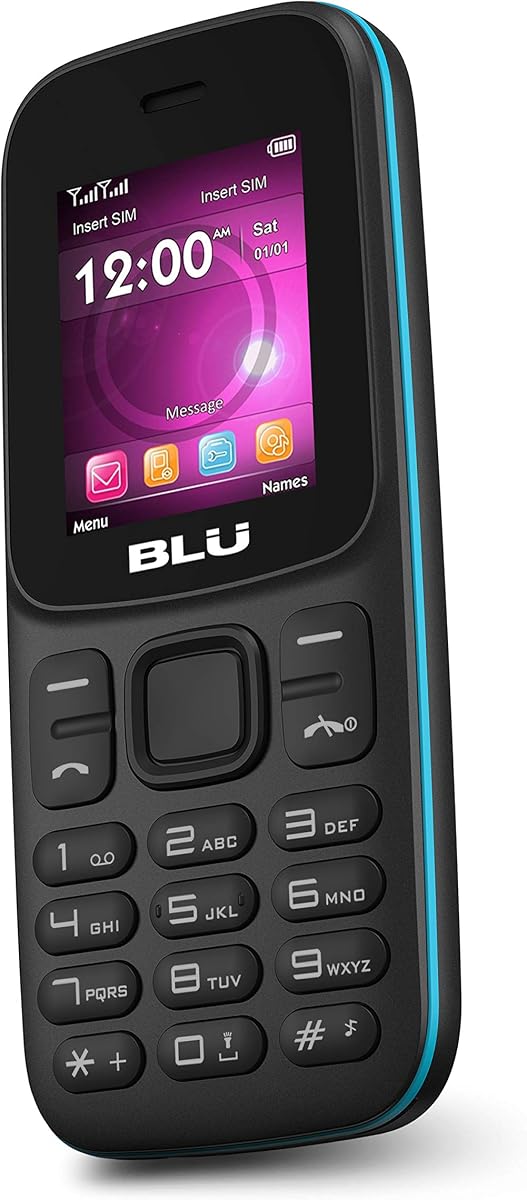
The BLU Z5 is the most stripped-down connected device in this roundup, but its simplicity may be exactly what some families want. It provides real GSM calling through an unlocked dual-SIM design while avoiding the apps, games, and web access that can complicate giving a smartphone to a child. Its 3.4 rating is the lowest among the ten listed products and should be weighed carefully.
We may earn a commission when you buy through this link, at no additional cost to you.
The 1.8-inch display has a resolution of 128 by 160, making it much smaller and less visually engaging than the modern smartphones in the guide. Internal memory is only 32MB, although a microSD slot supports expansion by as much as 32GB. This combination is better for basic contacts, calls, and messages than for storing many photos or installing many advanced applications.
Its 600mAh battery and basic feature-phone design make it easy to carry, while the built-in FM antenna, MP3 and MP4 player, and flashlight add a few useful offline functions. The VGA camera is suitable for quick snapshots rather than meaningful photography. A child who only needs to call a parent or guardian may find this less distracting than a full smartphone.
The BLU Z5 is best considered a backup phone, an emergency communication device, or a first introduction to making calls. It is not a strong choice for gaming, schoolwork, social messaging, photography, or daily entertainment. Families should also confirm that its supported GSM bands and network functions meet the child's requirements before purchase.
The small display, modest camera, and low internal memory keep the device focused on communication rather than entertainment. That limited scope can reduce exposure to games, browsing, and app-based distractions for a child who is not yet ready for a full smartphone.
Its compact size, dual-SIM support, and basic calling functions make it useful as a secondary phone for trips or emergencies. A parent can keep it charged and available without giving a child unrestricted access to the family's main device.
We may earn a commission when you buy through this link, at no additional cost to you.
The Nokia G10 combines a full Android experience with the battery life and security features that make it a sensible first smartphone for a child. It has a 3.8 rating, a 6.52-inch screen, 3GB of RAM, and 32GB of storage. Its defining advantage is the claim of up to three days of battery life between charges, reducing one of the most common day-to-day concerns for families.
We may earn a commission when you buy through this link, at no additional cost to you.
The device supports dual SIM use and is unlocked for confirmed GSM carriers, including AT&T, Boost, Cricket, H2O Wireless, Metro, Net10, Simple Mobile, T-Mobile, and Tracfone. Other GSM networks cannot be confirmed, and the listing explicitly says the phone is not compatible with Verizon. Coverage still depends on the carrier's service area, so families should verify their local network before buying.
A 13MP triple-camera system provides more flexibility than the basic camera found on a feature phone, while a side fingerprint sensor and secure face recognition offer two convenient unlock methods. The listing also mentions two years of upgrades and newer Android features, although the specified model is listed with Android 11 and the newest available version should be downloaded during setup.
Overall, the Nokia G10 offers the strongest balance for an 11-year-old who needs everyday communication, apps, and media in a conventional phone. The main compromises are modest storage, an older stated Android version, and carrier restrictions. For families on a supported network, it is a practical and durable-feeling first-device choice without the learning-focused limits of a toy phone.
The stated three-day battery life is a meaningful advantage for a child who may forget a charger. It can support communication, navigation, music, and other daily tasks with less charging anxiety than many compact smartphones.
Fingerprint and face recognition provide convenient access controls, while unlocked GSM support allows families to choose among several compatible services. Confirm carrier compatibility, activation requirements, and coverage before handing the phone over.
We may earn a commission when you buy through this link, at no additional cost to you.
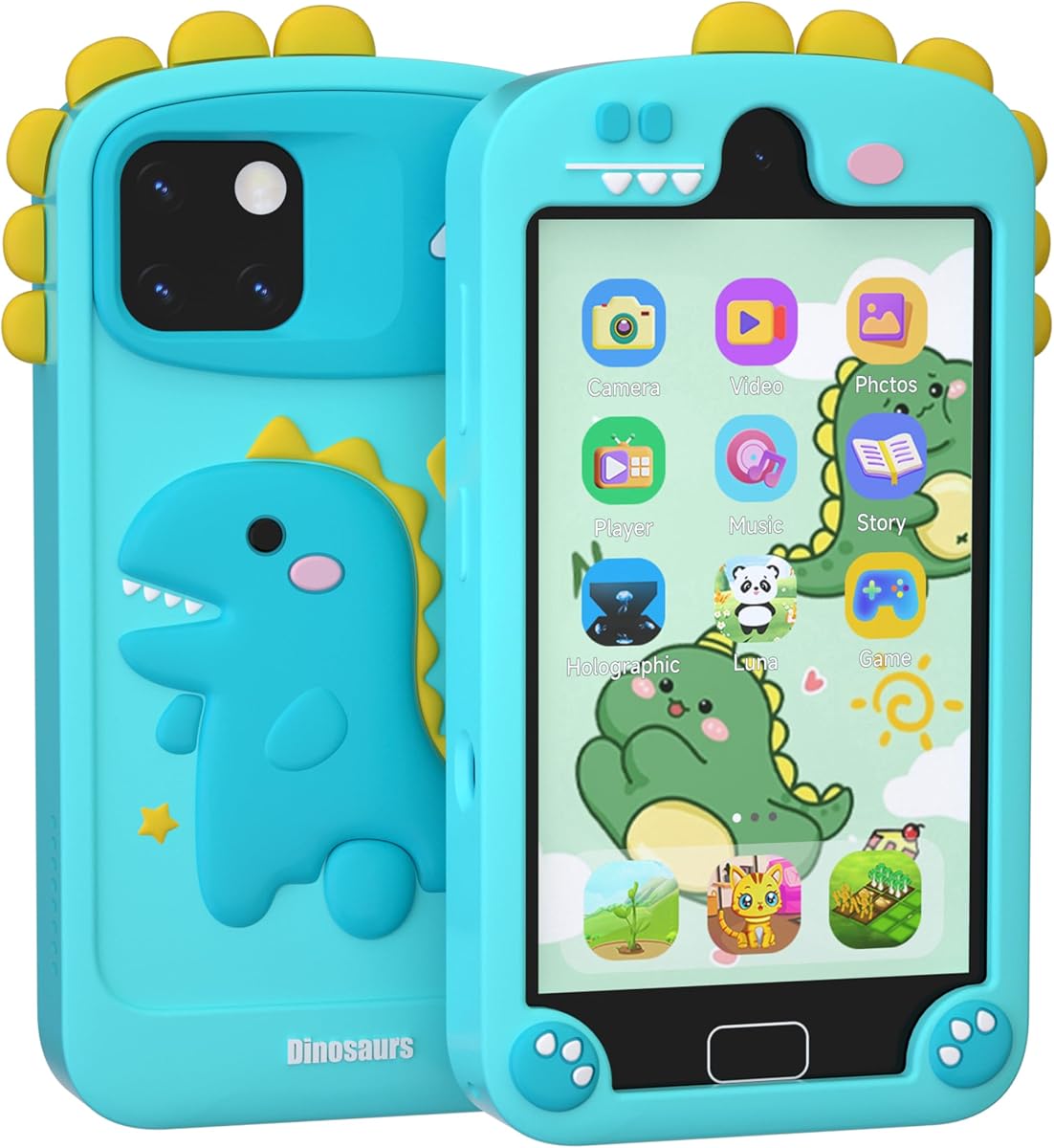
This 4-inch boys learning phone shares a 4.4 rating with the other top-rated toy model, reflecting favorable customer response. It offers more than ten feature categories, including puzzle games, educational activities, camera functions, video, music, stories, holographic projection, piano, painting, a recorder, calculator, calendar, alarm clock, flashlight, and stopwatch. That variety gives an 11-year-old several ways to experiment.
We may earn a commission when you buy through this link, at no additional cost to you.
The 4-inch HD touchscreen supports dual-camera photography and video with 13 selectable stickers. Thirteen educational puzzle games and seven learning themes cover areas such as the alphabet, world flags, and notable buildings, while painting and piano functions encourage creative play. The 3D holographic projection feature adds a particularly noticeable novelty that may help the device feel less like a basic learning gadget.
A 32GB card is included for music, sleep stories, pictures, and video, and the phone operates without Wi-Fi. The 1000mAh battery offers a stated extended usage period, while the included cartoon-pattern silicone case is designed to be drop-proof and durable. Twenty-three wallpapers allow some personalization, although the design remains clearly oriented toward children.
This phone is best for creative and offline entertainment, not communication. An 11-year-old may enjoy the drawing, projection, camera, and music features, but the interface and activities are primarily aimed at ages 3 to 12. It works well as a travel accessory, shared plaything, or alternative to screen time on a family tablet.
Drawing, painting, storytelling, music, and holographic projection make this model more varied than a phone limited to puzzles. These activities can provide a screen-time alternative that still feels like play rather than passive video viewing.
The included 32GB card, protective case, and no-Wi-Fi operation make the phone convenient for travel. Families can preload approved music and stories, then rely on the device without adding a network plan or managing a connected browser.
We may earn a commission when you buy through this link, at no additional cost to you.
The Motorola Moto g Play combines a smooth 6.5-inch 90Hz HD+ display with a 5000mAh battery and a 16MP triple-camera system. Its 3.8 rating places it among the stronger-rated true smartphones in the guide, while the larger battery and high-refresh screen are particularly attractive for an older child who will use the device for messaging, media, games, and photography.
We may earn a commission when you buy through this link, at no additional cost to you.
The defining restriction is carrier locking. The phone can only operate on the Total by Verizon network and must be activated through that provider's website. This is a substantial limitation for families currently using another carrier or hoping to change networks later, but it may suit households already committed to Total by Verizon and its no-contract talk, text, and data options.
The non-removable 5000mAh battery is marketed with three-day battery life, although actual performance will vary with use, signal strength, display brightness, and application activity. The triple-camera setup gives an 11-year-old more creative options than a single-camera phone, and the 90Hz display should make menus, games, and scrolling appear smoother than on many entry-level devices.
This is a strong choice when the network is a nonissue and the family values display smoothness, battery capacity, and camera flexibility. It is not the most flexible option because the network lock cannot be overlooked. Verify the carrier, activation process, service coverage, and parental-control approach before making it the child's primary phone.
The 90Hz HD+ display provides a more fluid feel for messaging, browsing, video, and casual games. It is a meaningful upgrade over basic feature-phone screens and can make a child's everyday interactions feel more responsive.
The device's network restriction is the most important buying consideration. It cannot be used on a competing network, so households should confirm that Total by Verizon service is suitable in their area and that its plans meet the child's needs.
We may earn a commission when you buy through this link, at no additional cost to you.
The 220-Game Kids Phone is built around a large offline content library, offering more than 220 games and a 4.0 customer rating. The collection includes 55 first-learning games, 15 brain-training games, more than 90 Montessori games, 39 art and craft games, and 19 STEM games. This is one of the most content-heavy devices in the roundup and can sustain interest better than a toy phone with only a few apps.
We may earn a commission when you buy through this link, at no additional cost to you.
A 3.97-inch touchscreen provides access to games, photos, videos, music, drawing, an alarm clock, timer, stopwatch, and calculator. The camera system supports both photographs and video, while the alphabet-learning and science material is designed to encourage curiosity. The device requires no Wi-Fi and no app downloads, allowing it to be used immediately after switching it on.
Parental-control mode includes password protection, app management, time management, child-account creation, and phone settings. These options are important given the number of included activities. The 1500mAh battery is listed for approximately 1.5 to two hours of continuous use, so a charging cable should be kept nearby during longer play sessions.
The principal drawback is that the phone remains an offline toy. It cannot provide cellular communication, web browsing, or access to school messaging services. For an 11-year-old, it is best understood as a feature-packed entertainment and learning gadget, perhaps more suitable than the smaller devices for independent creative play because of its larger screen and deeper library.
The mix of first-learning, brain-training, Montessori, art, craft, and STEM activities gives the device broader appeal than a single-purpose educational phone. Older children can move toward creative and science-oriented tasks while younger users begin with basic games.
Password protection, app management, time limits, and child accounts are especially useful with such an extensive collection. Parents can use the settings to make the device less likely to encourage continuous play.
We may earn a commission when you buy through this link, at no additional cost to you.
The right choice depends on whether the child needs genuine communication, supervised creativity, or a simple backup. Consider connectivity, parental controls, age fit, battery expectations, and the likelihood that the device will be used daily before deciding which category is most appropriate.
A connected smartphone can handle calls, messaging, educational websites, navigation, and ordinary apps. The NUU N20, Nokia G10, and Motorola Moto g Play fall into this category, while the BLU Z5 provides basic cellular calls without a modern app experience. The remaining products are explicitly non-internet-connected toys designed for games, music, stories, and camera use rather than family communication. An 11-year-old who needs to contact a parent, join class activities, or coordinate with friends should receive a genuine connected device with an appropriate parental-control system.
Choose real connectivity when independence and communication are the priority. Choose an offline toy when the goal is distraction-free entertainment, shared play, or travel entertainment without managing data plans and web access.
A child smartphone should support an adult's ability to set boundaries, monitor activity, restrict downloads, and manage screen time. The NUU N20 supports common parental-control applications such as Google Family Link, Bark, and Qustodio. The Nokia G10 provides standard Android security through a fingerprint sensor and face recognition, while the offline toy phones offer varying degrees of local time management, app control, passwords, and child profiles. Local controls can simplify setup, but they do not provide the same visibility into online activity as a properly configured connected device.
Look first for the control options required by your family. Use connected-device monitoring for web and app oversight, and use a time-limited toy phone when the parent specifically wants the child to work without cellular or internet access.
Most of the learning phones in this guide are designed for children ages 3 to 12, with some emphasizing toddlers and early elementary learners. That makes them relevant for an 11-year-old, but appearance and content should not be the only criteria. Consider reading level, motor skills, complexity, and whether the child will quickly outgrow the interface. A 4-inch screen and larger button layouts may be easier for younger siblings, while a conventional Android phone feels more age-appropriate for most preteens.
Match the device to the child's actual capabilities and interests. A child who enjoys drawing, puzzles, and stories may be happy with an offline learning phone, but one who wants messaging, photography, and the same apps as peers will need a full smartphone.
Battery needs differ sharply between a connected smartphone and an offline toy. The Nokia G10 is advertised with up to three days of battery life, while the NUU N20 and Motorola Moto g Play each have 5000mAh batteries. The NUU listing specifically notes that heavy gaming and high-brightness use may require more frequent charging. Offline devices range from 600mAh models with roughly four to five hours of stated use to the Ashfly's 2000mAh battery, but claimed runtime depends on screen brightness, game load, and battery condition.
For daily school use, prioritize a phone that can comfortably last through the day and recharge overnight. For a travel toy, consider how often the family can provide a charging cable and whether a small battery is manageable for the child.
An unlocked phone offers more freedom, but it still needs a compatible carrier and a SIM. The NUU N20 is fully unlocked for major GSM carriers, and the Nokia G10 supports a named list of GSM providers but is not compatible with Verizon. The Motorola Moto g Play is locked to Total by Verizon and cannot be used on another network. The BLU Z5 supports GSM bands and is also unlocked. In every case, local coverage, activation rules, data requirements, and parental-account controls matter more than a generic compatibility label.
Check the child's intended network before ordering. An unlocked model is usually easier to manage over time, while a carrier-locked model may be suitable when the household already uses that provider and values a simple activation process.
An 11-year-old may use a phone for photos, videos, lessons, and entertainment, so screen size and storage deserve attention. The Nokia G10 has a 6.52-inch display but only 32GB of internal storage, while the NUU N20 pairs a 6.6-inch screen with 128GB and microSD expansion. The Motorola Moto g Play offers a smooth 6.5-inch display and 32GB of storage. Offline devices range from the BLU Z5's tiny 1.8-inch screen to the 4-inch learning phones, with included storage ranging from 8GB to 32GB.
A larger, smoother display suits general smartphone use, while dedicated storage and an included card benefit toy-phone buyers. Camera resolution should be considered alongside storage because higher-resolution images and videos consume more room.
Children frequently drop, scratch, and forget devices, so the physical design and included protection deserve attention. The NUU N20 includes a screen protector, TPU case, and charger. The offline learning phones generally include silicone cases, with some also providing lanyards or charging cables. These accessories can reduce immediate damage and make a new device feel more child-friendly. No product in the list should be treated as waterproof or indestructible, and a protective case remains important for an active 11-year-old.
Check what is actually included before ordering another case, screen film, or cable. Remember that a toy phone may include a cable without including a wall charger, and that card-based storage is not necessarily the same as internal storage.
The biggest mistake is choosing based on the number of games, camera megapixels, or screen size without defining the device's job. A first phone should prioritize calling, messaging, security, and manageable data service. A shared travel toy should prioritize offline games, included content, and a durable case. A backup device should be compact, dependable, and simple. An educational device should offer age-appropriate activities without encouraging unlimited use. The most feature-rich option is not automatically the most appropriate choice for an 11-year-old.
Write down the three activities the child will perform most often, then choose the simplest product that supports them reliably. This prevents an expensive specification sheet from distracting from the features your family will genuinely use.
Start by establishing clear rules before handing over a connected phone. Agree on appropriate calling and messaging hours, which apps are allowed, how the child will request exceptions, and what happens if the device is lost or damaged. For an Android model, create or select the child account during setup and configure a parental-control system before adding unrestricted apps. For an offline toy, set expectations for charging, storage limits, and the amount of time spent with the game library.
Teach basic care and communication habits. Show the child how to use the case or screen protector, keep ports free of dust, use the correct charging cable, and avoid sharing personal information with people they do not know. Emphasize that the device should not be used during walks, crossings, bike rides, or other situations where a distraction creates risk. Cameras and video features also require good manners: always ask before photographing another person.
Review the setup regularly rather than waiting for a problem. Check used time, newly installed apps, browser history where appropriate, and the remaining storage. Keep the operating system and applications updated, back up important files, and confirm that location, camera, microphone, and contact permissions match the child's needs. Replace a damaged protector promptly, and retire the device if battery health or physical condition becomes unsafe.
The Nokia G10 is the strongest all-around option in this guide because it combines a full Android experience, strong stated battery life, security features, and unlocked GSM support. The NUU N20 is also compelling for families prioritizing expandable storage, included accessories, and carrier flexibility. The best choice ultimately depends on network compatibility, parental-control preferences, and how much the child needs advanced apps.
A real smartphone is more appropriate when the child needs to call family, message friends, participate in school-related online services, or use navigation. A toy phone is better for offline games, music, camera play, and distraction-free travel entertainment. Children who are not ready to manage online communication and app permissions generally benefit from closer adult supervision.
No. The learning toy phones listed here are non-internet-connected devices with games, cameras, music, stories, and local controls. They do not support normal cellular calls, text messaging, web browsing, or app installation. The NUU N20, Nokia G10, Motorola Moto g Play, and BLU Z5 are the connected choices in this roundup.
Look for time limits, app or category restrictions, purchase controls, and an adult-managed account. The NUU N20 supports common services such as Google Family Link, Bark, and Qustodio, while the offline devices offer local time management and password features. No control system is sufficient without consistent family communication and periodic review.
Storage needs depend on whether the child takes frequent photos, downloads videos, installs games, or keeps school files offline. The Nokia G10 and Motorola Moto g Play provide 32GB, while the NUU N20 offers 128GB plus microSD expansion. The offline toys include cards ranging from 8GB to 32GB, which is generally sufficient for downloaded music, stories, and a collection of media.
Unlocked does not mean compatible with every carrier. The Nokia G10 supports a listed set of GSM providers but is not compatible with Verizon, and the NUU N20 requires checking compatibility with the selected major GSM carrier. The BLU Z5 also supports GSM bands, while the Motorola Moto g Play is locked exclusively to Total by Verizon.
The Nokia G10 is advertised with up to three days of battery life between charges, and the Motorola Moto g Play also carries a three-day battery-life claim. Actual results depend on use, brightness, signal quality, and selected applications. The NUU N20 includes a 5000mAh battery but notes that gaming and high-brightness use drain it more quickly.
A durable case and tempered-glass screen protector are the most useful additions for a new phone. The NUU N20 already includes both, along with a charger. For learning toys, check whether a charging cable and case are included, and consider a lanyard for younger children. A child should also learn not to leave the device charging unattended overnight or under a pillow.
The Nokia G10 is the best-balanced connected choice for most 11-year-olds, combining Android functions, useful security features, a large display, and exceptional stated battery endurance. The NUU N20 stands out for families seeking an unlocked device with expandable storage and included protective accessories, while the Motorola Moto g Play is a capable option for households already using Total by Verizon.
For a child who does not yet need online communication, the Ashfly Learning Phone and the 220-Game Kids Phone offer the richest educational and creative libraries. The 4-inch learning phones, Multi-App Kids Phone, and Habit-Tracker Kids Phone are better suited to younger children or shared family entertainment, while the BLU Z5 is most useful as a straightforward calling or backup device.
Before buying, verify the current network, storage, accessories, age suitability, and parental-control setup, and check current prices and availability at the time of purchase. The right smartphone for an 11-year-old is not simply the most powerful model; it is the device that supports safe communication, appropriate entertainment, and a realistic daily routine for your child.