
UBIQUITI UniF Aggregation Switch Pro
Four 25GbE SFP28 ports
Twenty-eight 10G SFP+ ports
760Gbps switching capacity
Layer 3 switching features
Local touchscreen display
Discover the best 25GbE switches with SFP28 ports, comparing port layouts, management, throughput, scalability, and ideal network roles now in 2026.
A 25GbE switch built around SFP28 ports sits at the practical midpoint between mainstream 10GbE networks and demanding 100GbE data center fabrics. The right model can connect servers, NAS systems, creative workstations, and high-speed storage while preserving a clear path toward faster uplinks.
This guide compares all ten available products by examining SFP28 availability, supporting port speeds, switching capacity, management features, chassis design, power options, and likely deployment roles. The list includes both genuine 25GbE SFP28 models and several adjacent multi-gigabit or high-speed switches worth understanding.
Each review explains where the hardware fits, which capabilities distinguish it from its competitors, and what trade-offs buyers should consider. Product availability and pricing can change over time, so confirm current specifications, accessories, and transceiver requirements before making a purchase.


4.6Editor score
The comparison highlights genuine 25GbE SFP28 capacity alongside broader high-speed alternatives, helping buyers distinguish direct 25G options from switches whose primary ports operate at 10G, 2.5G, or 1G speeds.






The QNAP QSW-M7230-2X4F24T-US is the most balanced option in this guide for buyers who want genuine 25GbE SFP28 connectivity without committing to a large-scale data center fabric. Its four SFP28 ports, two 100GbE QSFP28 ports, and twenty-four 10GbE copper ports provide a useful combination of high-speed uplinks and broad device access. It carries no listed customer rating, so the evaluation here focuses on its documented capabilities rather than an implied consensus.
We may earn a commission when you buy through this link, at no additional cost to you.
Its standout feature is the mix of access and aggregation ports. The 10GbE RJ45 ports can connect compatible servers, workstations, and management networks without requiring optical hardware, while the SFP28 and QSFP28 interfaces can serve storage arrays, data center spines, and future-facing uplinks. The switch supports IPv4 and IPv6 static routing, VLANs, QoS, and bandwidth control through a web interface, giving administrators meaningful segmentation and traffic-control options.
Lossless-network features are particularly relevant to high-speed storage and AI-oriented environments. Priority Flow Control and Explicit Congestion Notification can help manage congestion in demanding workflows, while the stated use cases include RoCEv2 and virtualized server infrastructure. The trade-off is that there are only four dedicated 25G ports, so buyers expecting dense 25G server access may need to look at the MikroTik or Cisco alternatives in this list.
This QNAP is best for small data centers, enterprise storage rooms, NAS-heavy businesses, and technical users building a mixed 10G-to-100G topology. It combines enough management capability for segmentation and routing with a flexible transceiver-based design. For buyers who value balanced copper access, fiber uplinks, and congestion-aware features more than maximum 25G port count, it is the strongest general recommendation here.
The 10GbE access ports support existing copper-based infrastructure, while the SFP28 and QSFP28 interfaces create a bridge to faster optical backbones. This makes the model particularly useful for organizations migrating beyond 10G incrementally rather than replacing every endpoint at once.
Static routing, VLAN support, QoS, and bandwidth controls provide a stronger operational foundation than an unmanaged switch. These features help separate storage, management, user, and virtualization traffic as the network becomes more demanding.
We may earn a commission when you buy through this link, at no additional cost to you.
The TRENDnet TEG-S50284 is the value-focused multi-gigabit alternative in this collection, although it does not actually include 25GbE SFP28 ports. It earns its place for buyers seeking a high-density 2.5GbE access switch with four 10G SFP+ uplinks, a 120Gbps switching capacity, and a 4.8 customer rating. Its 24 copper ports can operate over existing Cat5e or better cabling, making it a useful endpoint and access-layer solution.
We may earn a commission when you buy through this link, at no additional cost to you.
The hardware is organized around 24 2.5GbE RJ45 ports and four 10G SFP+ ports. VLAN passthrough using IEEE 802.1Q is supported, and the switch includes LED indicators, smart fans, and a one-rack-unit 19-inch metal enclosure with mounting hardware. Lifetime manufacturer protection and stated NDAA and TAA compliance in the United States and Canada add practical reassurance for institutional and business buyers.
The central limitation is unavoidable: this model cannot serve as a native 25GbE SFP28 aggregation switch. Its four high-speed ports operate at 10G rather than 25G. That makes it better suited to distributing multi-gigabit connectivity to workstations, access points, and smaller servers while leaving 25G traffic to another tier. The trade-off is a lower-cost, lower-complexity path into faster edge connectivity.
Buyers should choose the TEG-S50284 when their immediate need is widespread 2.5G access rather than a true 25G backbone. It can serve as a sensible access-layer complement to one of the genuine SFP28 switches in this guide. Within this list, it is the best budget-oriented product for multi-gigabit users, but it should not be mistaken for a native 25GbE SFP28 solution.
Because the 2.5GbE ports work over Cat5e or better wiring, this switch can deliver a meaningful speed increase without forcing a complete cabling replacement. It is especially attractive for offices with many Wi-Fi access points, creative endpoints, and compact servers.
The included rack hardware and metal housing make the unit a straightforward addition to a small server cabinet. Four SFP+ uplinks provide room for fiber trunks or higher-speed aggregation beyond the ten-gigabit tier.
We may earn a commission when you buy through this link, at no additional cost to you.
The renewed Cisco Nexus N9K-C92160YC-X delivers the highest dedicated 25GbE SFP28 density among the products described here: 48 ports, supported by six QSFP+ or QSFP28 interfaces. That scale makes it a serious option for data centers, high-performance computing environments, storage fabrics, and organizations consolidating numerous 25G server links into a single access layer.
We may earn a commission when you buy through this link, at no additional cost to you.
Dual AC power is one of the more important details in the listing. Redundant power support is valuable where an individual power supply is not an acceptable point of failure, while the six high-speed uplink ports can be used for connections to aggregation layers or additional switch fabrics. The product is categorized as a network switch and comes with the scale and port density expected from a Nexus platform.
As a renewed item, it warrants careful consideration. Amazon-qualified vendors professionally inspect, test, and clean it, and compatible accessories may be included. However, accessories may not be original, the product may arrive in a generic box, and no customer rating is supplied. Buyers should confirm the exact inventory, included components, warranty, licensing situation, and operational condition before purchasing.
This Cisco is best for buyers who prioritize port density and an established enterprise platform over purchasing the newest enclosure. It may be especially compelling for experienced administrators comfortable with certified refurbished networking equipment. Despite its renewed status, the combination of 48 native 25GbE SFP28 ports, six expansion ports, and dual AC power makes it the strongest high-density selection in the roundup.
The 48-port SFP28 layout removes the need to aggregate a large server fleet through a smaller number of high-speed ports. This concentration is valuable for rack rows, hypervisor hosts, and storage appliances that each require a dedicated 25G attachment.
Professional refurbishment can provide access to enterprise hardware at a more accessible acquisition point, but buyers should not assume every original accessory or box is included. Checking the seller-provided condition details and remaining coverage is essential.
We may earn a commission when you buy through this link, at no additional cost to you.
The MikroTik CRS520-4XS-16XQ-RM combines broad transceiver flexibility with unusually substantial processing resources. Its listed configuration includes 28 SFP28-class ports, a 100GbE QSFP28 port, two 2.5GbE ports, and ten-gigabit Ethernet support. With a 4.6 rating, it has positive customer feedback, but buyers should verify the exact module population and configuration for their intended application.
We may earn a commission when you buy through this link, at no additional cost to you.
Processing is a major strength. The CCR-series CPU runs at 2GHz across four ARM cores and is paired with 4GB of DDR4 memory. That level of headroom can benefit complex filtering, routing, queues, and other advanced switch functions. The 100GbE QSFP28 connection also gives the platform a path to a substantially faster spine, which makes it more than a basic 25G access switch.
Its flexibility introduces planning work. SFP28 devices can serve different roles depending on transceiver selection and configuration, while the high-speed uplink may require appropriate cabling and optics. Administrators familiar with MikroTik RouterOS will have more freedom to shape the switch, but those coming from simpler web-managed products may need to invest more time in the operating system and initial design.
This model is best for technically confident organizations that want a dense, programmable 25G platform with a 100G uplink and strong internal resources. It is particularly relevant to labs, service providers, high-performance clusters, and specialist network builders. Buyers should confirm which port groups are populated, obtain compatible transceivers, and design around their specific traffic pattern before ordering.
The quad-core 2GHz CCR processor and 4GB of DDR4 memory distinguish this model from simpler access switches. Those resources are particularly relevant when operators want detailed queues, routing policies, filtering, or other functions that can consume more memory.
The QSFP28 uplink creates a path to a 100-gigabit aggregation layer. This supports a staged topology in which individual services connect over 25G while selected inter-switch or backbone traffic moves over 100G.
We may earn a commission when you buy through this link, at no additional cost to you.
The UBIQUITI Switch Pro Aggregation is an appealing middle ground between a 10G access switch and a large data center platform. It combines 28 10G SFP+ ports with four 25G SFP28 ports, a fully managed Layer 3 feature set, and 760Gbps switching capacity. Although it has no listed customer rating, its combination of high-speed port density and approachable UniFi management makes it a credible upgrade for growing organizations.
We may earn a commission when you buy through this link, at no additional cost to you.
The switch includes a 1.3-inch LCM color touchscreen for concise system and connection information, while the UniFi Network web application and mobile app allow monitoring and configuration from anywhere. Its Layer 3 capabilities support aggregation-oriented designs, and the large pool of 10G SFP+ interfaces offers flexibility for existing fiber deployments as well as 25G server connections.
There is an important configuration limitation. The four SFP28 ports do not support mixed speed while operating in 25G mode: once one port is configured for 25Gbps, the others are limited to 25Gbps as well. Mixed-speed behavior is available when all four ports remain at 1Gbps or 10Gbps. In addition, only four ports are dedicated to 25G, so this is better viewed as a broad aggregation switch than a dense 25G server switch.
This UniFi model fits studios, small enterprises, branch consolidation, and technical teams that want a capable aggregation layer without adopting a complex hyperscale operating environment. It is particularly useful where 10G devices dominate and only a small number of endpoints need 25G. For buyers who value centralized management and a large SFP+ pool over maximum 25G port count, it is a strong choice.
Twenty-eight 10G SFP+ ports provide considerable room for optical aggregation, server connections, and existing 10G infrastructure. The four SFP28 ports add a selective path to 25G without forcing the entire deployment into that speed tier.
The local touchscreen provides quick insight into system and connection status. At the same time, remote management through the UniFi Network application supports distributed administration without requiring physical access for routine changes.
We may earn a commission when you buy through this link, at no additional cost to you.
The Dell EMC PowerSwitch N3224P-ON stands out by bringing PoE++, multi-gigabit access, and high-speed SFP28 connectivity into a one-unit managed chassis. The supplied listing identifies four 25GbE SFP28 ports and two 100GbE QSFP28 ports, alongside PoE++ access supporting 10, 100, 1,000, 2.5, 5, and 10-gigabit rates. It has no listed customer rating, so documented interface details are the primary basis for consideration.
We may earn a commission when you buy through this link, at no additional cost to you.
PoE support can make a meaningful difference in offices, warehouses, studios, and edge facilities where powered access points, cameras, phones, or other edge devices need both data and electrical power. The presence of 2.5G and 5G support on those access interfaces also suggests a useful transition path for mixed-speed installations. The two 100GbE QSFP28 ports create an option for high-capacity backbone connections.
The largest stated drawback is the 944-watt power-consumption figure, which makes this a serious infrastructure purchase rather than a lightweight desktop switch. The product title also appears truncated, and the available description contains limited detail about the exact count and arrangement of every access interface. Buyers should obtain the complete configuration guide, power requirements, thermal characteristics, PoE budget, transceiver support, and management software details.
This Dell EMC model is best for organizations that need PoE at the access layer but also require native 25G and 100G aggregation within the same platform. It suits edge data centers, enterprise campuses, surveillance deployments, and distributed offices where cabling and power constraints favor consolidation. It is less attractive for small networks that do not need its substantial power and infrastructure footprint.
Integrating PoE++ access with 25G SFP28 and 100G QSFP28 interfaces lets a rack consolidate powered edge devices and high-speed backbone connections. That can simplify cabling and make the switch useful across both access and aggregation roles.
The stated 944-watt consumption calls for careful capacity planning at the circuit, power-distribution, and cooling levels. Buyers should determine whether the full PoE and high-speed switching capacity will be used simultaneously and whether the installation environment can support it.
We may earn a commission when you buy through this link, at no additional cost to you.
The TRENDnet TEG-3284WS is a web-managed access switch for organizations interested in 2.5G and 10G rather than native 25GbE SFP28. It includes 24 2.5GbE RJ45 ports, four 10G SFP+ ports, a web interface, and a 3.4 customer rating. Its managed feature set includes access control lists, VLANs, IGMP snooping, QoS, RMON, SNMP traps, and syslog.
We may earn a commission when you buy through this link, at no additional cost to you.
Its main advantage is operational flexibility without requiring a full command-line environment. The browser-based interface can simplify deployment for small and midsize networks, while cloud service support offers another route for remote configuration and diagnosis. Smart fan behavior and a metal rack-oriented form factor make it more suitable for infrastructure rooms than casual desktop use.
It does not meet the core 25G SFP28 requirement, and its rating suggests that some buyers may have been dissatisfied. The cloud service also carries the possibility of an additional fee, which should be evaluated as part of the ownership decision. As with any web-managed platform, administrators should change default credentials, restrict management access, and maintain a local configuration backup.
The TEG-3284WS is best for offices, studios, and branch sites that need many 2.5G access ports and four 10G fiber uplinks with basic managed controls. It may be useful as an access layer beneath a genuine 25G aggregation switch. For buyers committed to native 25GbE SFP28 links, however, the QNAP, Cisco, MikroTik, Ubiquiti, and Dell options are more direct choices.
VLAN support, ACLs, IGMP snooping, and QoS provide the essential controls for separating users, management, voice, surveillance, and storage traffic. These features make the switch useful for networks that have outgrown basic unmanaged equipment.
Cloud management can simplify monitoring across distributed sites, but administrators should understand whether the service requires a recurring subscription. Local web access and configuration retention remain important for operational resilience.
We may earn a commission when you buy through this link, at no additional cost to you.
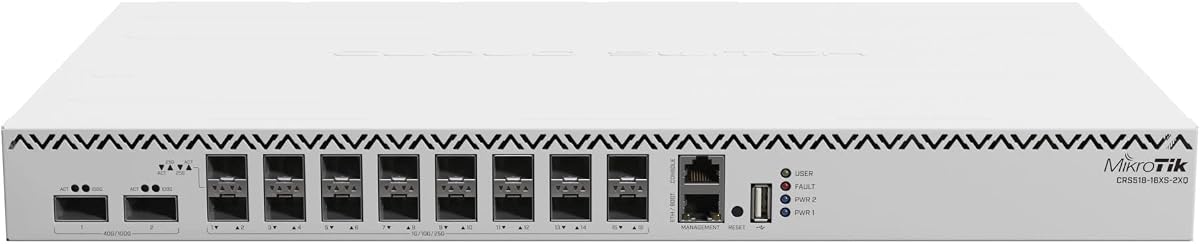
The MikroTik CRS518-16XS-2XQ-RM is a compact cloud router switch built around high-speed QSFP28 connectivity. Its 4.5 customer rating suggests generally favorable experiences, and the combination of routing and switching roles may appeal to administrators who want a single platform for branch or edge network control. However, the supplied product data contains less detail than the other listings, so its exact port capabilities require verification.
We may earn a commission when you buy through this link, at no additional cost to you.
The model designation indicates sixteen XS ports and two QX high-speed positions, while the title explicitly identifies QSFP28. That makes it attractive for environments using compact multi-gigabit or high-speed optical links, particularly where routing, firewall, or service functions are needed close to the switching layer. It is also a natural fit for operators already comfortable with MikroTik RouterOS.
The main complication is incomplete information in the listing. Buyers need confirmation of the precise maximum speeds and breakouts available for the XS and QX interfaces, the number and type of copper ports, forwarding capacity, power requirements, and licensing model. They should also establish whether the QSFP28 interface can directly satisfy the planned 25GbE topology or primarily serves a higher-speed backbone role.
The CRS518-16XS-2XQ-RM is best for technically capable small offices, branch networks, labs, and compact deployments where routing and switching are both required. Its favorable rating and integrated design support shortlist inclusion, but the documentation should be reviewed carefully. It is not the safest recommendation for buyers who need an unambiguously documented 48-port or 28-port 25GbE SFP28 arrangement.
A cloud router switch can simplify smaller installations by consolidating network control and traffic forwarding. This can reduce the number of separate appliances required where branch routing, inter-VLAN traffic, and high-speed aggregation all need support.
Because the available listing provides limited detail, buyers should obtain the official hardware documentation and confirm every supported rate and breakout configuration. That step is particularly important when QSFP28 connectivity is central to the planned 25GbE design.
We may earn a commission when you buy through this link, at no additional cost to you.
The renewed Cisco N9K-C93180YC-EX is a formidable data center switch with 48 fixed 10/25-gigabit SFP+ ports, six fixed 100-gigabit QSFP28 ports, and a listed switching capacity of 3.6Tbps. It carries the strongest customer rating in the guide at 5.0, and its support for virtualization, automation, and high-availability design makes it well suited to large infrastructure teams.
We may earn a commission when you buy through this link, at no additional cost to you.
The switch uses a cut-through architecture with latency described as less than one microsecond. VXLAN support enables scalable overlay networking, while Cisco ACI supplies automation and management for physical and virtual networks. Hot-swappable power supplies and fans, redundant power support, and a modular design are important for deployments where maintenance and component failure must not interrupt critical traffic.
Back-to-front airflow is a specialized detail that must match the rack's hot-aisle and cold-aisle arrangement. The renewed condition should also be treated as a meaningful caveat: buyers should review the seller's inspection details, warranty, included components, software status, and exact hardware revision. Licensing and feature availability can be just as important as physical performance in enterprise environments.
This Cisco is best for large-scale data centers, high-performance computing, big-data networks, and sophisticated virtualization clusters that can exploit its 100G uplinks and automation platform. It exceeds the needs of most small businesses, but for organizations with the right operating model it offers exceptional density and performance. Confirm airflow, licensing, optics, and refurbishment terms before integrating it into production.
ACI and VXLAN support align the switch with modern overlay and automation workflows. These capabilities are particularly valuable where physical port configuration must be coordinated with virtual network policy across a large estate.
Hot-swappable power and fan components support continuous operation, but back-to-front airflow requires careful placement. A technically correct purchase can still underperform if installed against an incompatible cooling pattern or without appropriate redundancy planning.
We may earn a commission when you buy through this link, at no additional cost to you.
The D-Link DGS-1210-28 is included as the baseline access switch in this roundup. It offers 24 Gigabit Ethernet ports and four Gigabit SFP combo ports in a fanless, rack-mountable managed design. Its 4.4 customer rating is respectable for a long-established smart switch, but it does not provide native 25GbE or SFP28 connectivity.
We may earn a commission when you buy through this link, at no additional cost to you.
Its Layer 2+ feature set includes VLANs, QoS, port mirroring, link aggregation, spanning tree, IGMP snooping, static routing, bandwidth control, and cable diagnostics. Security features include ACLs, 802.1X with RADIUS, ARP spoofing prevention, and D-Link Safeguard Engine. ONVIF support and surveillance mode simplify deployments that include compatible network cameras.
The switch excels where simplicity, silent operation, and reliable Gigabit access matter. Its fanless design is useful in offices and small equipment rooms, while the SFP combo ports can support short optical uplinks where copper distance is inadequate. However, the one-gigabit ceiling makes it unsuitable for direct 25G server links or high-bandwidth storage workflows.
This D-Link is best for traditional access networks, surveillance installations, offices, and small businesses that need more capability than an unmanaged switch but do not require multi-gigabit or 25G connections. It can serve as the foundational access layer beneath a separate high-speed aggregation device. For this keyword specifically, it represents the affordable baseline rather than a native 25GbE SFP28 option.
VLANs, QoS, link aggregation, port mirroring, IGMP snooping, and static routing cover the most common requirements for a managed office or surveillance network. Cable diagnostics also simplify troubleshooting when a physical fault is suspected.
The fanless chassis is appropriate for quiet rooms and small offices. Four SFP combo ports add flexibility for optical connectivity and longer links while preserving the simplicity of a one-gigabit access platform.
We may earn a commission when you buy through this link, at no additional cost to you.
A useful purchase decision depends on more than the headline speed. Port count, transceiver compatibility, management depth, power resilience, cooling, and the intended role of the switch can matter more than a single throughput specification.
In short, verify each interface's maximum speed before choosing a model for a 25GbE workload.
Choose a port layout that matches the physical rack plan, current endpoints, and planned expansion without excessive unused capacity.
Build the transceiver list and compatibility requirements into the budget and deployment plan before ordering the chassis.
Select controls your team can configure, monitor, secure, and recover confidently rather than buying unused complexity.
Evaluate throughput per port and under realistic traffic loads, not just the largest capacity figure printed on the box.
Match the chassis to the rack's airflow pattern and electrical capacity, especially for 100GbE and PoE-heavy designs.
Favor a platform whose failure modes, maintenance process, and support path have been tested against your availability requirements.
Start with the role, traffic pattern, and administrative skill set; then select the hardware that supports them cleanly.
Begin with a rack plan, power calculation, and airflow map. Verify that every intended 25G endpoint supports the same rate and encoding, then confirm the switch's transceiver compatibility. Label ports and cables, connect management access through a secured network, and keep console access available in case the initial network configuration needs adjustment.
Configure VLANs and routing according to the role of the switch rather than enabling features without a plan. Apply QoS to latency-sensitive traffic, enable IGMP snooping for multicast-heavy networks, and use monitoring or logging for port errors and utilization. Back up the configuration after changes and schedule periodic reviews of thermal conditions, firmware releases, optics, and active power supplies.
For physical care, operate the switch within its specified temperature and humidity limits, preserve unobstructed airflow, and use the correct rack kit. Clean ports and connectors with appropriate tools, avoid touching optical contacts, and replace damaged cables rather than troubleshooting around persistent errors. Refurbished equipment should be monitored closely after installation, while every high-speed link should be tested for errors and sustained throughput before entering production.
SFP28 is designed for 25-gigabit-per-second Ethernet links, while a standard SFP+ port is commonly associated with 10-gigabit-per-second links. Some modern platforms allow SFP+ cages to operate at 25G, so the connector marking should not be treated as the only specification. Buyers should check the switch's explicit supported-rate matrix for each port.
No. The list includes several genuine 25GbE SFP28 switches, but it also includes 2.5GbE and 10G access-layer alternatives and a 1G managed baseline. These adjacent products can be useful in access tiers, yet they should not be purchased when native 25G connectivity is a non-negotiable requirement.
Usually, yes. SFP28 ports require compatible optical modules or direct-attached cables unless the switch includes an integrated media interface or the endpoint uses a compatible built-in interface. Check vendor support for the exact module, cable length, media type, and operating temperature. Compatible-looking connectors do not guarantee interoperability.
A small business may need only two to four 25G ports for a NAS, hypervisor host, or high-performance workstation. Larger data centers can require dozens of dedicated server connections. Count simultaneous high-speed endpoints, future expansion, uplink requirements, and the need for redundancy rather than selecting solely by the largest advertised port count.
They are not always necessary for a simple flat network, but they become valuable when traffic must move between VLANs or subnets through the switch. Layer 3 Lite, static routing, and advanced switching can reduce reliance on an external router. More complex environments should compare routing scale, automation, overlays, telemetry, and operational support.
Only when the full path supports it. End devices, cabling, transceivers, storage throughput, CPU processing, and upstream links must also handle 25G. A faster switch cannot overcome a bottleneck elsewhere, so organizations should profile existing traffic and identify the limiting component before investing in new infrastructure.
Renewed hardware can be attractive when it provides capabilities unavailable within a new budget or when an established platform is required. The buyer should verify refurbishment quality, warranty, included accessories, software status, licensing, and hardware condition. Production operators should also confirm support availability and replacement-part logistics.
Depending on the chassis, installations may require compatible SFP28 or QSFP28 transceivers, direct-attach cables, fiber patch leads, rack-mount hardware, console cables, and suitable power connections. High-speed, PoE-equipped, and data center models may also need dedicated circuit capacity and carefully aligned cooling. The complete accessory list should be prepared before delivery.
The QNAP QSW-M7230-2X4F24T-US is the most balanced general recommendation because it combines four 25G SFP28 ports, 10G copper access, 100G uplinks, and useful congestion-aware features. The renewed Cisco Nexus N9K-C92160YC-X wins on 25G density, while the MikroTik CRS520-4XS-16XQ-RM offers the most flexible high-density platform with substantial processing power.
Before ordering, prioritize native 25G support, transceiver compatibility, the number of simultaneous endpoints, management requirements, and the intended switch role. Do not treat a 2.5G or 10G access switch as an equivalent substitute, and consider power, cooling, redundancy, and support needs alongside throughput. In smaller installations, the Ubiquiti aggregation model may provide the easiest managed path to a mixed 10G and 25G topology.
Product specifications, availability, and pricing can change, so confirm the current listing and manufacturer documentation before purchasing. Most importantly, verify the exact port matrix, included components, transceiver requirements, management licenses, and power specifications. Those checks will prevent a technically attractive switch from becoming an awkward or expensive mismatch in the final network.