
1-to-3 ARGB Splitter 2-Pack
5.0Editor score
Two one-to-three splitters
11.8-inch cable length
Eight male connectors included
No soldering required
ARGB splitter cables compared for branching, reach, connector quality, and compatibility, helping you choose the right 5V 3-pin option for PC lighting builds.
ARGB splitter cables make it easier to connect multiple addressable RGB fans, light strips, and compatible cooling components to a single 5V 3-pin motherboard header. A useful cable should provide the right number of branches, sufficient reach, secure connectors, and clear 5V compatibility without introducing complicated wiring or soldering.
We compared all ten products by splitter ratio, cable length, included components, connector design, construction details, stated device compatibility, and customer rating. The list covers one-to-two and one-to-three branches, a higher-capacity one-to-five design, simple extension cables, and multipacks intended for PC chassis lighting.
Each review explains the product's practical strengths, limitations, and best fit so you can choose according to your header count and layout. Product availability and pricing can change over time, so check the current listing and confirm your motherboard's connector specification before ordering.
5.0Editor score

4.7Editor score

4.9Editor score
This side-by-side comparison highlights each cable's branch count, length, pack quantity, connector details, and intended PC lighting applications.


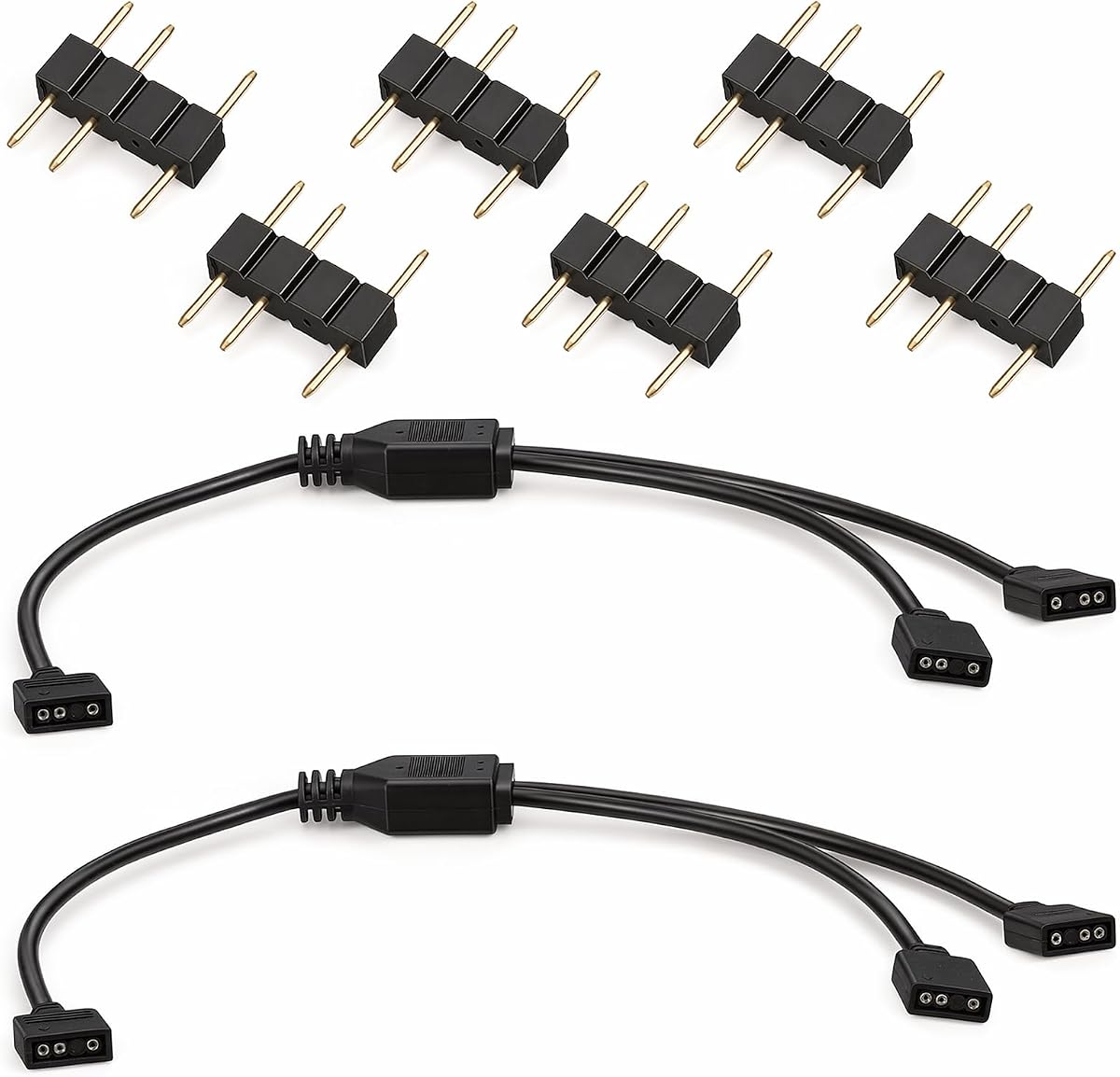


This two-pack gives each motherboard ARGB header the ability to feed up to three compatible lighting devices, making it a practical middle ground between a simple one-to-two cable and a larger splitter. Its 4.6 rating reflects generally positive customer feedback, and the supplied information clearly identifies it as a 5V, three-pin addressable RGB product.
We may earn a commission when you buy through this link, at no additional cost to you.
The main appeal is balanced expansion. At 11.8 inches long, each cable can reach multiple fans or addressable strips without becoming excessively cumbersome inside a chassis. The package also contains eight three-pin male connectors, which gives the buyer additional plug options and reduces the chance that one slightly imperfect connector will compromise the whole setup.
Its limitations are dictated by the format rather than the build quality. It cannot connect to a four-pin, 12V RGB header, and a three-way branch still requires adequate power and compatible lighting hardware at the other end. The relatively compact length may also be less useful in large cases where a radiator fan and distant strip sit far from the motherboard.
This is a good choice for builders who need to connect two or three ARGB devices from one header and want a two-pack for planning around multiple lighting groups. Choose it after confirming that every connected component uses the 5V three-pin standard and that its arrow markings match the motherboard header.
A three-way branch is useful for pairing two case fans with an addressable strip, or for grouping a CPU cooler with nearby lighting. The splitter keeps the connection plan simpler than stacking several separate adapters at the same header.
Eight male connectors across the two-pack provide useful installation options. It is a convenient allowance for builders who may need to replace a connector or leave one branch available for a later lighting addition.
We may earn a commission when you buy through this link, at no additional cost to you.
This white one-to-two splitter set is aimed at builders who want a simple way to connect two compatible devices while keeping a coordinated appearance inside a light-colored case. Its 4.7 rating places it among the stronger customer-rated options in the group, while the supplied description highlights soft PVC construction and newly supplied copper wiring.
We may earn a commission when you buy through this link, at no additional cost to you.
Each of the two cables measures 11.8 inches and uses a Y-shaped one-to-two layout. That makes it a straightforward choice for adding one more fan beside an existing lighting run or connecting a cooler and a short strip. Six male connectors are included, providing extras beyond the two cable assemblies.
The main compromise is capacity. Two branches are enough for compact lighting arrangements but may not suit a case that already contains several fans and wants to centralize more of them under one header. The product is also strictly for three-pin, 5V addressable RGB equipment, so it should never be forced onto a 12V four-pin RGB socket.
This splitter is most attractive for white-themed builds with a straightforward two-device lighting plan. Its combination of a clean finish, two-cable pack, and relatively high rating makes it a strong alternative to larger black splitters, especially when color matching matters more than maximum branch count.
The white cable exterior is the distinguishing detail here. It can blend more naturally with white components and pale interior accents than a conventional black splitter cable.
One-to-two distribution is easy to plan and can reduce visible cable clutter. It is a sensible middle option when a single additional ARGB device needs to share a motherboard header.
We may earn a commission when you buy through this link, at no additional cost to you.
The ZCZQC one-to-two ARGB cable combines a useful 13.19-inch length with one of the more considered safety features in this category: insulating protective caps on the connector pins. Its 4.7 rating makes it a well-regarded general option for fans, CPU coolers, and other compatible addressable lighting devices.
We may earn a commission when you buy through this link, at no additional cost to you.
This cable solves the common problem of having a single motherboard header and two components that both need access. Its female-to-two-male arrangement allows one header connection to feed two branches, while the stated multi-interface design supports practical chassis layouts. The additional length offers a little more placement flexibility than several 11.8-inch alternatives.
Because the protective caps are intended to reduce contact with the metal chassis, the installer should still route the cable carefully and avoid pinching it during assembly. Only one cable is included, so it offers less planning flexibility than the two- and three-packs, although its focused design keeps the installation uncomplicated.
This is the pick for someone who values basic electrical protection and wants one dependable way to split a five-volt header. It works especially well with a CPU cooler and a nearby fan, provided both devices use the correct ARGB connectors and the builder aligns the arrow indicators correctly.
The protective caps help prevent unused pins from bending and contacting the chassis when energized. That is a meaningful safety benefit during installation and cable management inside a metal computer case.
At 13.19 inches, the cable offers slightly more reach than the common 11.8-inch model. That extra distance can help when connecting a cooler or fan positioned farther from the header.
We may earn a commission when you buy through this link, at no additional cost to you.
This is the most expansive splitter in the group, offering one input and five output branches at 19.6 inches long. The two-pack gives serious PC builders a way to centralize numerous fans, strips, or cooling components without requiring every device to occupy a separate motherboard header.
We may earn a commission when you buy through this link, at no additional cost to you.
Its 50-centimeter length is the longest stated cable in the comparison, which is helpful for distributing devices across a larger chassis. The package includes two one-to-five splitters and twelve male connectors. Construction details mention durable plastic and genuine new copper cores intended to support reliable signal transmission.
The tradeoff is physical bulk. Five branches can create more wiring to organize, and distributing many loads through one header may place greater demand on the motherboard's lighting output and power delivery. This model is strictly limited to 5V three-pin addressable RGB and cannot serve a four-pin 12V RGB header.
Choose this product when one ARGB header must support a large group of compatible devices and your case has room for the additional branches. It is particularly relevant for builders consolidating a fan cluster or combining several short addressable strips around a large motherboard.
The one-to-five configuration is the category's highest branch count here. It is intended for builds where several ARGB accessories need to share one available motherboard connector.
At 19.6 inches, the cable can span a wider chassis than shorter models. Its extra reach may reduce the need for separate extension cables when devices are widely separated.
We may earn a commission when you buy through this link, at no additional cost to you.
This one-to-three, two-pack receives a perfect 5.0 rating and offers one of the category's more useful combinations of capacity and included accessories. Each cable is 11.8 inches long and designed to connect addressable strips, 5V PC fans, or compatible CPU heat-sink lighting to a motherboard's three-pin ARGB header.
We may earn a commission when you buy through this link, at no additional cost to you.
The two-pack provides meaningful planning freedom. One cable could serve a group of case fans while the other handles lighting strips or a cooler, and eight male connectors are supplied in total. Installation requires no soldering or special tools; the user simply aligns the arrows and connects the devices.
Its limitations are standard across this group. The splitter supports only 5V three-pin ARGB, so 12V four-pin RGB equipment is excluded. A fixed one-to-three branch also provides no intermediate one-to-two option, and the 11.8-inch length may need supplemental routing in a particularly large enclosure.
This is an excellent general choice for PC builders who want three-way distribution, two complete cables, and a very strong customer rating without paying for premium materials. It suits compact and mid-size cases particularly well when a fan group and a lighting group need separate hubs.
The listed 5.0 rating is the highest numerical feedback score in this comparison. That makes it an attractive pick for shoppers who prioritize the collective experience of existing customers.
Two independent splitters make it easier to organize lighting by zone. One can handle case fans while the other supports strips or cooling hardware.
We may earn a commission when you buy through this link, at no additional cost to you.
This product is technically a one-to-one extension rather than a multi-branch splitter, but it fills a closely related gap for builders whose ARGB devices are too far from the motherboard. It has a 4.5 rating and includes two 11.8-inch cables along with four three-pin male connectors.
We may earn a commission when you buy through this link, at no additional cost to you.
The principal use is extending an existing chain rather than creating several outputs from one header. If a strip ends before reaching the next device, an extension can bridge the gap while preserving the addressable signal. The product listing also positions the cables for synchronization with compatible PC fans and LED series.
It cannot solve a shortage of header positions because it does not create additional branches. Anyone expecting a fan and strip to plug into one motherboard header will need a true one-to-two or one-to-three splitter instead. As with the other products, 4-pin 12V RGB compatibility is explicitly excluded.
Choose this two-pack for cable-routing refinement rather than header expansion. It is particularly useful when existing ARGB leads are marginally too short, when components need additional clearance, or when a builder wants a spare extension ready for the next lighting installation.
A one-to-one extension is most valuable when the signal path already works but the physical distance is inadequate. It adds reach without changing the number of connected devices.
The female-to-female arrangement is intended to work with male-ended ARGB leads. Aligning the printed arrows remains the key step for correct data and power orientation.
We may earn a commission when you buy through this link, at no additional cost to you.
This two-pack of one-to-two splitters earns a 5.0 rating and is designed for the common task of sharing a single ARGB header between two compatible devices. At 30 centimeters, or approximately 11.8 inches, each cable balances useful reach with manageable chassis routing.
We may earn a commission when you buy through this link, at no additional cost to you.
Pure copper cores are the notable construction detail, and the product description emphasizes their role in power and data transmission. The standard three-pin arrow indicator helps with correct polarity, while the male motherboard-side connector allows a plug-and-play installation without soldering or specialty tools.
As a one-to-two product, it cannot accommodate as many accessories as the one-to-three or one-to-five models. The two-cable pack still provides good zoning flexibility, but each header ultimately receives only two branches. It is also incompatible with the physically and electrically different 12V four-pin RGB standard.
This is a strong choice for a straightforward two-device expansion, particularly when the buyer values a perfect customer rating and copper-core construction. It works well for two case fans, a fan-and-strip pairing, or a compatible cooler and accent-light combination.
The listed pure copper cores are intended to support efficient power and data transfer. This is particularly relevant for addressable lighting, where stable communication helps maintain synchronized colors and effects.
Two splitter cables let you organize devices into separate groups rather than placing every component on one crowded branch. It is a convenient option for fans in different parts of the case.
We may earn a commission when you buy through this link, at no additional cost to you.
This three-pack provides three separate one-to-three ARGB splitter cables, offering more organization options than most of the two-cable competitors. Its 4.6 rating is solid, and the package is aimed at builders who want to expand fans, addressable strips, and CPU heat-sink lighting from individual motherboard headers.
We may earn a commission when you buy through this link, at no additional cost to you.
Each cable is 11.8 inches long and includes male pins at the relevant connection points. Across the full package, twelve male connectors are supplied. This is particularly helpful for builders who expect to rearrange devices, create multiple lighting zones, or want spare connectors available during installation.
The obvious downside is that three three-way splitters can be more than a modest build needs. More cable also means more routing and connector management inside the case. The product remains limited to 5V three-pin addressable RGB and should not be attached to a 4-pin, 12V RGB header.
This multipack is best for a heavily illuminated system with several lighting groups. It gives the installer three ready-made hubs, each capable of serving up to three compatible devices, and avoids the need to purchase several separate splitter units.
Three splitter assemblies offer substantial placement flexibility. Each can serve a separate zone, such as intake fans, exhaust lighting, and accent strips.
Twelve male connectors add practical flexibility for installation and replacement. The extra pieces can also help maintain a standardized connector set across the completed build.
We may earn a commission when you buy through this link, at no additional cost to you.
This two-pack of one-to-three splitters combines a 5.0 rating with a straightforward three-branch layout. Each 30-centimeter cable is intended to distribute addressable lighting among up to three compatible devices, giving it broad usefulness for PC fans and LED series.
We may earn a commission when you buy through this link, at no additional cost to you.
The construction description specifies pure copper core wires within a soft PVC outer sheath. It also states that the outer layer is wear resistant and designed to resist aging over long-term use. Arrow markings on the standard 3-pin connectors help the installer orient the cable correctly without tools or soldering.
The soft sheath supports manageable cable handling, but the three branches still need to be organized carefully in a crowded chassis. The product description does not claim compatibility with the 12V four-pin RGB format, so it should be treated as exclusively 5V addressable RGB equipment.
This is a compelling pick for a builder wanting three-way expansion with two available hubs. Its perfect rating, copper-core description, and moderate length make it especially appealing for a two-zone lighting setup across a mid-size PC.
The soft PVC sheath is easier to bend and route around motherboard components. It can also create a tidier result than stiffer cabling in a confined chassis.
Each cable supports three outputs, and the pack includes two separate units. That combination works well for separate fan and accent-light groups that still need synchronized behavior.
We may earn a commission when you buy through this link, at no additional cost to you.
This four-pack is the most elaborately specified option in the guide, earning a 4.9 rating and standing out through gold-plated contacts, oxygen-free copper wiring, and braided outer sleeves. Its one-to-three configuration supports up to three devices per cable, while the complete set can organize up to four lighting groups.
We may earn a commission when you buy through this link, at no additional cost to you.
The stated construction targets both signal integrity and physical durability. Gold-plated contacts are intended to support stable connections, while the braided sleeves reduce tangling and electromagnetic interference. Sixteen male connectors are included, providing a generous spares package across the four cable assemblies.
The manufacturer also lists a friction-lock design intended to keep joins secure during cable management. As always, compatibility is restricted to a motherboard's 5V three-pin ARGB header, and buyers should verify that every fan, strip, and cooler accepts that voltage and pin arrangement before installation.
This premium set is best suited to an extensively illuminated build with several zones and a preference for organized, protected wiring. It is also a strong choice for builders who want spare splitters and connectors available rather than installing only a single hub.
Gold-plated contacts and oxygen-free copper wiring are the central premium features. Together, they are intended to maintain consistent data transfer and color coordination across connected ARGB devices.
Four one-to-three splitters can divide fans, cooling hardware, and accent strips into separate groups. Each zone can then be assigned its own lighting effect through compatible motherboard software.
We may earn a commission when you buy through this link, at no additional cost to you.
The right ARGB splitter depends on connector compatibility, branch count, reach, pack quantity, and the physical complexity of your lighting plan.
ARGB and four-pin RGB look superficially similar but are not electrically interchangeable. The products in this guide are designed for a 5V three-pin addressable RGB motherboard header, so every fan, strip, and cooling component you intend to connect must use that standard. Check the manual, motherboard specification, or markings on the existing cable rather than judging by connector shape alone.
Choose only a model explicitly rated for 5V three-pin ARGB. Never force one of these splitters onto a 12V four-pin RGB header.
A one-to-two splitter can share one header between two devices, while a one-to-three model supports three branches. The one-to-five design is appropriate only when a large group must share a single header. More branches are not automatically better because each additional load can increase demand on the header, and cable routing becomes more complicated.
Count the devices in one lighting group, then choose the smallest splitter that covers that count without crowding.
Cable length determines whether a splitter can reach from the motherboard header to the intended fans or strips without a tight bend or excess slack. The reviewed lengths range from 11.8 inches to 13.19 inches, with the one-to-five model reaching 19.6 inches. Measure the actual route, including the path around the CPU cooler, motherboard, and drive cage.
Select the shortest length that comfortably reaches every branch. Excess cable should be routed carefully rather than left loose near fans.
Multipacks can be more useful than a single splitter when a build has several lighting zones, when different groups need separate hubs, or when spare connectors are valuable. Two- and three-packs offer room to expand or replace a cable. A single cable may be sufficient for one small group of devices.
Buy the pack size that matches your planned zones, not simply the largest option. Unused splitters still need somewhere safe to store.
Good connectors make installation faster and reduce the chance of a loose fit. Look for clear arrow indicators that show the correct orientation, a secure friction or locking fit, and insulated contacts where available. Products that include additional male connectors can be easier to install because you have alternatives if a connector becomes damaged.
Prioritize visible polarity markings and a secure fit. These details are especially valuable in narrow spaces where reconnections are inconvenient.
Copper conductors are common among these products, while premium options add gold-plated contacts, oxygen-free copper, or braided sleeves. The outer covering should be flexible enough to bend around components without becoming sharply creased. Soft PVC and braided designs can also simplify routing, although no material alone guarantees reliable performance in every build.
Favor durable, flexible cables with clear construction claims. Proper routing and careful connector alignment remain important regardless of materials.
The listed applications include 5050 and 3528 addressable RGB strips, PC fans, and compatible CPU coolers or heat sinks. That broad range makes a splitter useful across several parts of a build. Nevertheless, a device can be physically similar while using a different proprietary lighting connection, so its own specifications remain decisive.
Confirm that every device accepts a standard three-pin ARGB input before building the branch layout.
A simple one-to-two splitter is easier to manage than a one-to-five unit, but it may not accommodate the planned device count. Very large splitters provide more options at the cost of bulk and routing complexity. Consider both the number of connected accessories and how many zones you want to control separately through motherboard lighting software.
Use larger splitters for larger groups and smaller ones for tidy, localized installations. Simplicity is often the better choice when the layout does not require extra capacity.
Before installation, switch off the computer and disconnect its power cable. Open the case, locate the motherboard's 5V three-pin ARGB header, and inspect the connector markings. Identify every fan, strip, or cooling component that will join the splitter and confirm that each uses the same addressable RGB standard.
Plan the cable route before connecting anything. Keep the splitter and its branches away from sharp case edges, CPU fan blades, radiator fans, and moving storage equipment. Match the arrow on the male connector to the arrow on the motherboard header, then connect each device to a female branch using the same orientation. Route excess length along the case edge or behind the motherboard tray.
After every device is connected, inspect the joints for loose pins, reversed connectors, or exposed contacts that may touch the chassis. Reconnect the power and start the computer with the side panel removed so you can observe the lighting behavior. Confirm synchronization and color control through the motherboard's software, then install the side panel once the system is operating normally.
No. The splitter cables in this guide are designed for 5V three-pin addressable RGB headers. A four-pin RGB connection normally uses 12V and has a different electrical and data arrangement. Connecting the two standards can damage the cable, lighting hardware, or motherboard, so verify the header specification before installation.
Yes, provided the motherboard and connected devices support ARGB and the splitter has enough branches. A one-to-two cable supports two devices, a one-to-three cable supports three, and the one-to-five model supports five. Keep the total electrical demand reasonable and use a splitter specifically rated for the number and type of devices being connected.
Most ARGB connectors and splitters include an arrow or similar orientation mark. Align the arrow on the cable with the arrow or reference mark on the motherboard header, and apply the same orientation to each device connection. If your motherboard does not show a clear mark, consult its manual rather than relying on wire colors alone.
A splitter adds device branches so multiple ARGB accessories can connect to one header. An extension cable increases the physical distance between two compatible ARGB connections without increasing the number of attached devices. Some products in this category combine both functions, but a one-to-one extension is mainly useful for closing a cable gap.
They are designed to carry addressable RGB power and data signals to compatible devices, allowing the motherboard to control their colors and effects. Synchronization depends on using compatible 5V three-pin ARGB equipment, aligning the connectors correctly, and configuring the lighting through the motherboard's software. Non-addressable RGB strips or proprietary connectors may not work as intended.
Yes, provided the cable length and branch count suit the available space. The 11.8-inch options are generally manageable in compact cases, while the 19.6-inch one-to-five model may require more routing. Secure the branches away from fans and avoid tight bends that could stress the connector or cable.
No. All of the reviewed products use plug-style 3-pin connectors and are described as requiring no soldering, tools, or welding. Installation consists of aligning the arrow indicators and pressing the connectors into place, although the system should be powered off during the connection process.
Disconnect the computer and check the cable orientation first, ensuring the arrows align at every connection. Then verify that the device uses a 5V three-pin ARGB connector rather than a proprietary or 12V RGB connection. Reseat the branch and inspect for bent pins, damaged contacts, or a cable caught against a fan before testing the lighting again.
The ZCZQC one-to-two cable stands out as the most balanced single-cable option, especially because its protective pin caps add a thoughtful safety detail. For broader three-way expansion, the perfect-rated one-to-three two-pack is a versatile budget choice, while the gold-plated four-pack is the strongest option for complex, multi-zone lighting.
Prioritize 5V three-pin compatibility first, then choose the branch count that matches your actual device group. Consider cable reach, connector orientation, pack quantity, and the number of separate lighting zones you want to control. More branches are only useful when the motherboard, fans, strips, and cooling hardware can all support the intended arrangement.
Finally, check the current product listing and latest customer feedback before ordering, since ratings, availability, and pricing can change. Confirm the connector type one final time, inspect the package contents, and make sure the cable can be routed without interfering with moving components.