
ACMER S1
4.3Editor score
2500mW diode laser
130 by 130mm workspace
Preassembled lightweight design
Free Acmerstudio software
A cheap laser engraver can turn logos, patterns, labels, and personalized gifts into polished projects, but the lowest cost does not always mean the best experience. The most useful machines balance cutting capability, engraving detail, safe operation, straightforward software, and a work area suited to realistic home or small-business projects.
This guide compares ten laser engravers using the information supplied for each model, including laser class, stated power, working area, control options, compatible software, included accessories, and intended uses. It covers compact beginner machines as well as enclosed and more specialized systems for advanced workflows, without claiming to have personally tested them.
The list reveals the main trade-off behind each recommendation: the ACMER S1 prioritizes low cost, the xTool M2 emphasizes enclosed creativity, and the xTool S1 supports larger, faster production work. Every ranking is based on supplied specifications and feature sets, while current listing terms, availability, promotions, and product configurations can change over time.
4.3Editor score

4.5Editor score

4.6Editor score
As an Amazon Associate we earn from qualifying purchases.
The table below compares the ten featured engravers by core specifications, making it easier to identify differences in laser power, workspace, safety, and intended production scale.



The ACMER S1 is the most approachable entry in this guide for buyers who want a capable desktop engraver without paying for an enclosed premium system. Its 4.3 rating reflects a generally favorable balance of features, while the supplied specifications highlight a 2500mW diode laser, 10,000mm/min engraving speed, and 0.01mm repeatable positioning accuracy.
We may earn a commission when you buy through this link, at no additional cost to you.
Its strongest advantage is the combination of free Acmerstudio software and broad compatibility. It works with macOS, Windows, and Linux and supports LightBurn and LaserGRBL, so creators are not restricted to one workflow. Common NC, DXF, BMP, JPG, and PNG files can also be used, reducing the friction associated with importing artwork.
The compact 130 x 130mm working area and 2kg aluminum-alloy frame are the main limitations. That footprint is suitable for keychains, labels, small signs, and other compact pieces, but it cannot match the larger beds offered by the LONGER Ray5, AlgoLaser MK3, or xTool S1. The Class 4 certification and IEC 60825-1 compliance also call for careful use and appropriate safety practices.
This is our Best Budget pick because it combines a preassembled setup, useful software, portability, and capable stated specifications in a relatively accessible machine. It is most appropriate for beginners, students, hobbyists, and creators who prioritize small projects over large-format cutting or fully enclosed operation.
Free Acmerstudio software removes an early barrier for beginners, while LightBurn and LaserGRBL support give experienced users familiar alternatives. The wide operating-system compatibility also makes the machine more flexible for mixed computer environments.
A 2kg frame and 130 x 130mm bed make the S1 easy to store, carry, and use on small batches. It is better suited to detailed personal items than oversized signs or production quantities.
We may earn a commission when you buy through this link, at no additional cost to you.
The xTool M2 earns our Editor's Choice designation by bringing together an enclosed design, dual cameras, approachable software, and a 10W laser in a creative-focused package. Its 4.5 rating is the second-highest among the featured products, and the listed features are particularly relevant to home crafters who want more control than a basic open-frame engraver provides.
We may earn a commission when you buy through this link, at no additional cost to you.
Built-in dual cameras provide a real-time view of the workspace and support the stated Place & Go workflow. xTool Studio adds hundreds of templates and an integrated AI image generator, helping new users move from an idea to a prepared design without navigating a complicated professional interface. The machine can also connect to more advanced workflows when projects demand them.
The M2 has a modular architecture. A CMYK Inkjet module can add full-color printing and print-to-cut operation, while an optional 3W IR laser can support fine engraving on metal and plastic. Neither module nor the RA3 Lite Rotary is included with the standalone configuration, so buyers should budget their intended accessory needs separately.
This is a strong recommendation for makers producing gifts, stickers, home decor, personalized items, and mixed-media crafts. The enclosure and Class 1 designation make it especially attractive where an open laser would be difficult to integrate into a busy household. It is less compelling for buyers whose only goal is maximum cutting power or a very large work area.
The two integrated cameras give creators a live view of the work surface, making placement more intuitive for small objects. This visual feedback is particularly useful for lettering, centered logos, and repeated batches.
xTool Studio keeps common projects approachable, while optional printing, infrared, and rotary modules broaden the range of finished products. The base machine is versatile without forcing every user to purchase accessories immediately.
We may earn a commission when you buy through this link, at no additional cost to you.
The BlazeX M3 is a 10W enclosed engraver that emphasizes precision, safety, and a generous starter bundle. Its 4.0 rating places it behind several higher-rated options, but the supplied features make it a noteworthy choice for beginners who want an enclosure, honeycomb bed, tool kit, and sample materials as part of a new setup.
We may earn a commission when you buy through this link, at no additional cost to you.
The machine lists 0.01mm ultra-fine accuracy and compatibility with more than 300 materials, including wood, leather, glass, and coated metal. LightBurn, LaserGRBL, and CutLabX support extends its appeal to users with different software preferences, while Windows, macOS, iOS, and Android compatibility adds flexibility.
Safety features include a Class 1 rating, an integrated fan, and automatic shutdown if the machine tilts or its lid opens. These protections make the enclosure more than a cosmetic upgrade, although users must still follow operating instructions and use approved materials. Air Assist, a Purifier, Rotary Roller, and Risers are ecosystem additions rather than standard essentials for every buyer.
The M3 is best for desktop DIY users, personalized jewelry makers, and small-batch creators who value a complete initial package. Its lower rating and optional accessory strategy may discourage buyers seeking the simplest high-confidence premium choice, but the included enclosure and support materials improve the value of the overall package.
The enclosure, extraction fan, and automatic stop responses create a more controlled beginner environment. Lid and tilt detection can interrupt an operation before an accidental movement becomes a larger problem.
A stated 0.01mm accuracy figure and dense laser focus support fine lettering, portraits, and decorative patterns. Actual results still depend on calibration, focus, material preparation, and suitable design settings.
We may earn a commission when you buy through this link, at no additional cost to you.
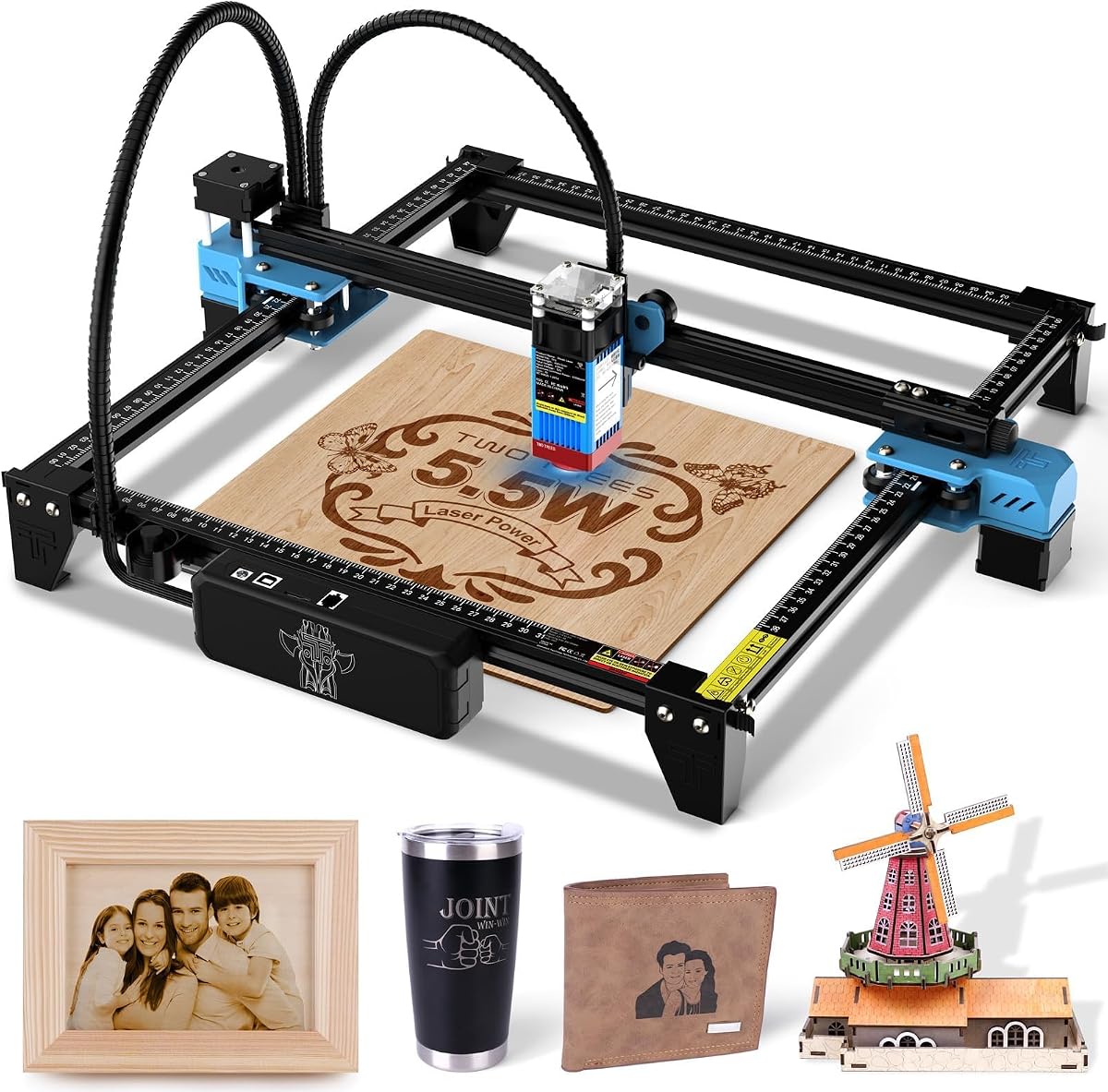
The Twotrees TTS-55 Pro combines a 5500mW laser with one of the highest stated engraving speeds in this group, reaching up to 30,000mm/min. Its 4.3 rating and open-frame format make it most relevant to hobbyists and small-business users who understand laser safety and need fast output on a moderate 300 x 300mm bed.
We may earn a commission when you buy through this link, at no additional cost to you.
Compression laser technology uses a 23mm focal length to create a tighter focus, while the listed engraving accuracy reaches 0.1mm. The supplied material examples include wood, leather, acrylic, paper, and stainless steel, with stated cutting capability for 5mm plywood, 3mm acrylic, and 0.7mm leather under appropriate settings.
The included metal air-assisted nozzle can help direct debris away from the material, while the red laser shield adds visual protection. A dual-core 32-bit controller, TF card operation, and built-in Wi-Fi offer useful ways to run jobs. LaserGRBL and LightBurn compatibility support both a straightforward interface and more advanced design preparation.
This is a good match for makers prioritizing speed, open-bed access, and flexible control. It is less appropriate for households seeking a fully enclosed Class 1 system, and actual cutting capacity should always be tested with the specific material, thickness, and settings involved.
The 30,000mm/min maximum speed is the standout specification for engraving simple designs in quantity. Rapid travel can shorten job times, although the usable result depends on motion settings and the complexity of each file.
Wi-Fi, USB, and TF card options let users alternate between connected and offline workflows. This is useful when transferring a prepared design to the machine or controlling it from a supported application.
We may earn a commission when you buy through this link, at no additional cost to you.
The xTool F2 is designed for creators who want more than a single-laser workflow. It combines a 15W diode laser with a 5W infrared laser, enabling the diode to handle cutting and embossing while the infrared module supports deeper color marking on metal. Its 4.4 rating reflects a strong feature set for advanced hobbyists and professional workflows.
We may earn a commission when you buy through this link, at no additional cost to you.
A built-in 50MP camera provides detailed workspace visualization, while the machine lists 0.1mm alignment accuracy and 0.00199-inch motion accuracy. The supplied speed rating of up to 6000mm/s, paired with the optional Slide Extension, makes it especially relevant to repeated items such as coasters and phone cases.
The fully enclosed, leak-proof body includes a fan, and an optional purifier can help manage fumes in indoor use. At 4.6kg, the F2 is portable enough for workshops, stores, fairs, and pop-ups, although it remains substantially more advanced than entry-level open-frame systems. Its Class 4 designation requires strict adherence to safety procedures.
Buyers should consider this model when infrared metal marking, high-resolution placement, embossing, and batch output justify the investment. It is a specialist option rather than the most budget-friendly starting point, but it can consolidate several production tasks into one enclosed system.
The infrared module adds a capability that a standard diode laser cannot provide in the same way, particularly for color marking on metal. The diode side remains the general-purpose option for engraving, embossing, and cutting.
The 50MP camera offers a close visual view of the workspace, helping with small-piece alignment and intricate layouts. Camera clarity is especially valuable when matching a design to a curved, transparent, or irregular object.
We may earn a commission when you buy through this link, at no additional cost to you.
The xTool S1 is the leading large-production choice in this guide, combining a 40W laser with a 23.93 x 15.16-inch bed. Its 4.6 rating is the highest among the ten products, and the enclosed Class 1 design brings together substantial output, safety controls, and software designed to reduce the learning curve.
We may earn a commission when you buy through this link, at no additional cost to you.
The machine lists cutting capability through 18mm cherry wood in one pass and engraving speeds up to 600mm/s. That combination makes it suitable for door signs, batches of dog tags, tumblers, and other larger objects. Pin-point positioning and AutoPassthrough technology extend its usefulness to curved surfaces and projects reaching 3000mm.
xTool Creative Space includes AI-assisted design generation, over 1,000 step-by-step tutorials, and parameters pre-tested across more than 400 materials. Auto-focus reduces setup time, while five flame sensors, an emergency stop, and a lid-open stop provide layered protection. The protective cover is stated to filter 99% of laser light and also helps contain smoke and noise.
This is our Best Premium pick for serious makers, professional personalization services, and small production businesses. The large frame and high power demand more space and a larger budget, but they also create a much greater project range than compact desktop models. It is the strongest choice when batch size and large-bed versatility matter more than minimal footprint.
A 40W laser and nearly 24-inch-wide work surface can reduce the need to split oversized designs into multiple placements. This is valuable for signs, event batches, and high-volume personalized products.
Auto-focus, material guidance, AI-assisted artwork, and detailed tutorials make the S1 approachable despite its professional capability. Pre-tested material settings can also help new users move from design to a more repeatable first job.
We may earn a commission when you buy through this link, at no additional cost to you.
The LONGER Ray5 offers an unusually broad set of entry-level specifications: a 10W module, 400 x 400mm workspace, 0.06mm laser spot, and a 3.5-inch touch screen. Its 4.3 rating places it among the better-rated products, while the bed size and dual-beam claim make it attractive for creators who need more room than a compact model.
We may earn a commission when you buy through this link, at no additional cost to you.
The stated engraving speed reaches 10,000mm/min, and the listed cutting capabilities include materials up to 20mm thick in wood and 30mm in acrylic. These figures should be treated as machine claims that depend on material preparation, machine settings, and the specific test conditions, so buyers should evaluate them against their own project materials.
Control options include USB, TF card, Wi-Fi, and an app, while LaserGRBL and LightBurn compatibility gives users both simple and professional software choices. The 240MHz ESP32 controller uses a multi-core architecture and can reportedly control multiple engraving machines at once. An emergency stop, motion protection, heat protection, protective cover, and hidden cooling system add practical safeguards.
The Ray5 is a good fit for home workshops, classrooms, and small production runs involving medium-sized items. Its Class II designation means it is not the fully enclosed Class 1 option offered by several other models, and the machine's marketing terminology may require careful attention when comparing its actual configuration.
The 400 x 400mm bed is a major step up from compact 130mm and 300mm alternatives. It allows larger signs, multiple coasters, or several smaller pieces to be arranged in one job.
USB, TF card, Wi-Fi, and app control accommodate different working habits. Offline operation is particularly helpful for creators who prepare files in advance and want the machine to run without a constant computer connection.
We may earn a commission when you buy through this link, at no additional cost to you.
The ELIDOR Z6 combines a 5.0 customer rating with a portable 2.13kg design and a 300 x 300mm working area. Its 6W module and stated 0.01mm engraving accuracy target makers who want detailed work on wood, leather, acrylic, cardboard, ceramic, glass, and metal without the footprint of a larger production system.
We may earn a commission when you buy through this link, at no additional cost to you.
The listed laser spot measures 0.04 x 0.14mm, and maximum engraving speed reaches 10,000mm/min. Those specifications support crisp text, graphics, portraits, and personalization work, although material coatings and preparation can affect the appearance of a mark on metals and other difficult surfaces.
LaserGRBL and LightBurn compatibility covers Windows, macOS, and Linux. NC, DXF, BMP, JPG, and PNG formats are supported, allowing artwork to be prepared in a range of common tools. The product data does not describe a large built-in display or enclosure, so users should consider whether a conventional computer-based workflow suits their needs.
The Z6 is recommended for mobile makers, craft-fair sellers, classrooms, and home users who prioritize portability and precision. Its perfect rating is encouraging, but ratings should be considered alongside workflow preferences, enclosure design, accessories, and the specific materials each creator expects to use.
The 2.13kg weight makes the Z6 easier to transport than larger enclosed machines, while the 300mm square bed remains useful for signs, coasters, keychains, and medium craft pieces.
A narrow stated spot and 0.01mm accuracy are well suited to text, logos, portraits, and other detail-heavy artwork. Preparing coated metals correctly remains important for consistent results.
We may earn a commission when you buy through this link, at no additional cost to you.
The AlgoLaser MK3 stands out for its 3.5-inch IPS touchscreen and AlgoOS operating system, allowing users to sketch, type, and import designs without a computer for everyday projects. Its 5.0 rating and 8W laser make it an attractive all-around option for beginners who value direct control and a spacious work area.
We may earn a commission when you buy through this link, at no additional cost to you.
A 400 x 400mm bed provides room for signs, coasters, gifts, and light batches, while the stated speed reaches 15,000mm/min. The 8W diode is listed for wood, leather, dark opaque acrylic, coated or anodized metal, prepared glass, and laser-safe plastics, making it important to follow material-specific instructions.
AlgoOS includes more than 400 stated material presets, visual positioning, and repeat-processing mode. For advanced jobs, LightBurn and LaserGRBL remain available through a computer, while phone control uses the AlgoLaser app. Transfers can be handled over Wi-Fi, USB, or an SD card, providing several practical paths for moving artwork onto the machine.
The 95% preassembled frame, factory-aligned modules, and flip-down focus column are designed to reduce setup. A two-year warranty and lifetime technical support add reassurance. This is a compelling recommendation for users who want touchscreen convenience, and it is worth comparing closely with the LONGER Ray5 because both provide a 400mm square workspace.
The built-in touchscreen makes the MK3 convenient for quick jobs at a craft table or in a shared workspace. Computer and phone options remain available when a design needs more advanced editing or control.
A flip-down focus column places the focus mechanism directly over the material, making height changes faster and reducing the chance of losing small focus accessories. Material presets further simplify repeated work.
We may earn a commission when you buy through this link, at no additional cost to you.
The LaserPecker LP1 Plus is the smallest and most portable engraver in this guide, designed for quick personalization away from a permanent workshop. Its 4.2 rating reflects a focused feature set centered on wood, leather, acrylic, paper, and other compatible non-metal materials rather than heavy cutting or industrial production.
We may earn a commission when you buy through this link, at no additional cost to you.
The machine can fit into a backpack and operate from a power bank, making it useful at markets, classrooms, events, or while traveling. Its stated two-minute setup is supported by a simple adjustable stand, magnetic base, and cross-platform app that can import photos or doodles before a project begins.
Multi-angle positioning is achieved through the 360-degree adjustable stand, which can make engraving the sides of small objects more convenient. The supplied instructions specify a 200mm distance between the laser lens and the material surface, measured with the included ruler. Correct distance is therefore an important part of achieving a clean result.
Metal engraving is explicitly unsupported, so the LP1 Plus is not a substitute for a diode-and-infrared system or a higher-power production machine. It is best for beginners, mobile crafters, and light personalization work on small non-metal items where portability and rapid setup matter more than cutting depth or large-bed capacity.
The compact body and power-bank compatibility make the LP1 Plus convenient for use away from a fixed desk. It is particularly attractive to creators who personalize items at fairs, workshops, or social gatherings.
The cross-platform application accepts imported photos or doodles, reducing the need for complex design software. Maintaining the specified lens distance and using compatible materials are the two most important operating checks.
We may earn a commission when you buy through this link, at no additional cost to you.
The right low-cost laser engraver depends on the materials you use, the size of your projects, your tolerance for an open-frame setup, and whether you prefer a computer, touchscreen, or app-based workflow. Compare these factors before focusing on a particular wattage figure.
Choose an enclosed system when accessibility, fumes, noise control, or workspace integration are important. Choose an open frame when you value a lower-cost structure, direct access to the bed, and the flexibility to work on larger projects.
Match power to your hardest routine material, not to a marketing headline. For primarily decorative engraving, focus on precision and ease of use; for repeated cutting, consider a stronger, faster system.
Measure the objects you expect to engrave before choosing. Choose a compact bed for portable small goods, a square medium bed for general crafting, or a large bed for signs and production batches.
For portraits, fine text, and small logos, prioritize a small spot, stable focus, good camera positioning, and materials prepared according to the manufacturer's instructions.
Beginners should favor a guided interface and strong preset library, while experienced users may prioritize LightBurn, LaserGRBL, offline control, and direct file importing.
Check the entire safety system, not just the laser class. Use only approved materials, keep the work area clear, follow enclosure rules, and provide suitable extraction.
Favor a portable model if storage, travel, or fast on-site personalization is central. Favor a preassembled desktop system if you want to concentrate on design rather than assembly and alignment.
Choose expandability when you already know which curved, metallic, color, or batch-processing tasks you want to add. Otherwise, concentrate on the core bed, laser, and workflow.
Begin with a stable, well-ventilated surface and read the machine's instructions, safety guide, and material restrictions before powering it. Confirm that the lens, protective window, bed, and exhaust are clean, and install the appropriate focus gauge or measuring tool. If the machine has a lid, enclosure, emergency stop, flame sensor, or motion protection, test those functions before loading a project.
Prepare artwork at a size suitable for the bed, use simple vector artwork where possible, and select the correct operating system or control method. For a touchscreen model, load or import the file directly; for software-controlled models, use the specified LightBurn, LaserGRBL, Acmerstudio, xTool Studio, xTool Creative Space, CutLabX, AlgoOS, or app workflow. Confirm focus and material settings, then run a small test before processing a full batch.
Keep the area clear of reflective or flammable objects, never leave the machine unattended during operation, and follow the specified focus distance. Clean the lens with an approved method, remove residue from the bed, and empty the collection tray or purifier according to the manual. Store the machine in a dry environment, protect it from impact, and update software or firmware only through the manufacturer's official process.
A compact diode laser engraver is generally the most approachable starting point for beginners. Look for a small work area, a simple control method, a suitable safety enclosure or protective setup, and compatibility with a software platform you can learn. The ACMER S1 is the budget-oriented option in this guide, while the AlgoLaser MK3 is worth considering if touchscreen control matters more than a minimal cost.
An enclosed model can be more suitable for a busy household because it limits direct access to the working area and helps contain some smoke and noise. However, an enclosure does not remove the need for safe material selection, ventilation, eye protection where required, and careful operation. Open-frame machines may work for experienced users who can maintain a controlled workshop.
Common diode-laser materials include wood, bamboo, leather, paper, cardboard, and suitable plastics. Some machines can mark prepared glass, ceramic, coated metal, or anodized surfaces, but the result depends on coatings, preparation, and settings. Never engrave unknown plastics or reflective metals, because they may release hazardous fumes or damage the machine.
No. Higher wattage can improve cutting potential, but precision, focus, frame stability, cooling, extraction, software, and safety also shape the finished result. A carefully configured lower-wattage machine may suit engraving better than an overpowered model operated without proper technique. Choose the lowest class that reliably handles your most demanding routine material.
The xTool M2 and AlgoLaser MK3 are strong beginner choices because their supplied information emphasizes guided software, templates, touchscreens, and material presets. The ACMER S1 is simpler in structure and includes free software. The best choice depends on whether the buyer prioritizes a low entry point, enclosure, touchscreen workflow, or a larger work area.
Most of the featured machines combine engraving and cutting functions, though their depth and speed differ. Engraving creates a mark on the surface, while cutting sends enough energy to penetrate the material. Actual results depend on wattage, focus, material density, thickness, and the number of passes, so test a small offcut before committing to a finished piece.
LightBurn, LaserGRBL, Acmerstudio, CutLabX, xTool Studio, and xTool Creative Space appear across the featured machines. The best option depends on your computer, comfort with design tools, and the laser controls you need. New users may benefit most from a vendor-provided interface with presets and templates, while advanced users often prefer broader design and parameter control.
Ventilation is important whenever the selected material can produce smoke or odor, even if the machine has a built-in fan. An air assist nozzle can improve cutting by controlling debris, while a purifier may help with airborne odor, but neither replaces suitable room ventilation. Confirm whether the enclosure includes extraction and whether the manufacturer's guidance requires additional equipment.
The ACMER S1 is the strongest budget-oriented recommendation because it combines a preassembled 2500mW machine, free software, broad platform support, and a lightweight frame. The xTool M2 is the more versatile creative choice, offering an enclosure, dual cameras, guided templates, and optional expansion modules. For large-format or higher-volume work, the xTool S1 provides the bed size, cutting power, automation, and safety system needed for more demanding jobs.
Start with the materials and project dimensions you already know you will use. Favor a larger bed only when you need it, choose an enclosure for accessibility and workshop integration, and select software based on your design habits. An open-frame machine can still be appropriate for a controlled workspace, while a portable model suits creators who value mobility over cutting depth.
Before ordering, verify the current listing configuration, included accessories, safety classification, material guidance, and warranty terms. Specifications and promotions can change, so confirm the latest details on the product page. Use the supplied guide to compare capabilities, then test a representative material before running a full production job.