
Kanto SP6HD Desktop Speaker Stands
4.7Editor score
Heavy steel construction
Two mounting plate sizes
Up to 15° rotation
Desktop speaker stands can improve a listening setup by elevating speakers, directing sound toward the listener, reducing surface vibration, and reclaiming usable desk space. The right model depends on speaker size, desk construction, preferred mounting method, and how precisely you need to control height, tilt, and angle.
We compared all ten products across the supplied specifications, focusing on clamp range, adjustment mechanisms, top-plate dimensions, weight capacity, isolation materials, speaker compatibility, cable handling, and installation requirements. The list includes compact freestanding platforms, adjustable pedestal stands, clamp-mounted models, and one floor-stand alternative.
Each recommendation highlights a different practical strength: the Liquid Stands pair offers extensive positioning control, the Kanto SP6HD targets medium and large speakers, and the Vondynote clamp set delivers adjustable support at a compact footprint. Product details and pricing can change, so verify current information before purchasing.
4.7Editor score

4.8Editor score
4.6Editor score
As an Amazon Associate we earn from qualifying purchases.
The comparison below shows how the ten stands differ in mounting style, height adjustment, speaker positioning, and support capacity, making it easier to identify the option that fits your desk and audio setup.




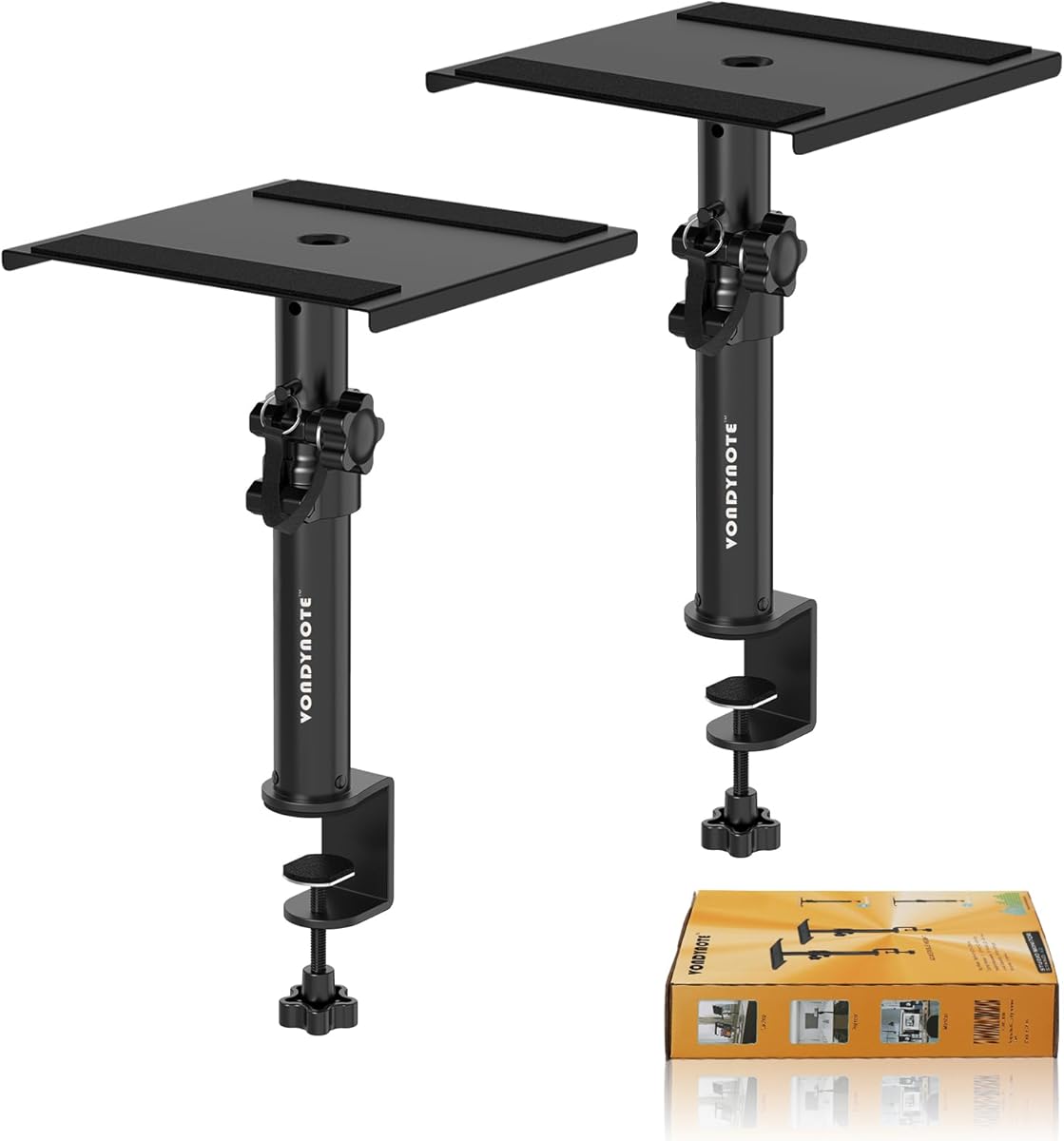
The Vondynote Set of 2 Desktop Clamp Speaker Stands is a compact solution for users who want monitor speakers or other desktop audio devices elevated without sacrificing a large portion of the work surface. Its two short stands clamp to the desk, while a four-position height system provides enough variation for different speaker sizes and listening arrangements.
We may earn a commission when you buy through this link, at no additional cost to you.
The clamp uses reinforced steel screws, a 5mm-thick clamp body, and a 3mm EVA pad intended to reduce scratches. A 9×9 inch metal top plate includes a 2mm anti-skid pad, which helps limit movement and vibration. The stated capacity of 50 pounds is generous for desktop speakers, laptops, projectors, and compact hi-fi equipment.
Its main limitation is the relatively low 9–14 inch adjustment range. Speakers that require a higher listening position or more substantial elevation may not sit comfortably at ear level. The top plate is also fixed at one size, so compatibility depends on the base and dimensions of the speaker rather than an included selection of mounting surfaces.
This pair is well suited to compact workstations, editing desks, and home offices where every inch of surface area matters. It is especially attractive for users who prefer clean attachment to the desk and need multiple height choices without a large freestanding base. For those needs, it delivers one of the most space-conscious designs in the roundup.
Each stand needs only 32.5 square centimeters of clamp space, making this pair useful when a traditional pedestal base would occupy valuable desk area. The padded clamp also helps protect common desktop finishes during installation and daily use.
The telescoping support locks at 9, 10.6, 12.3, and 14 inches. Those defined positions make setup predictable and reduce the need for continual readjustment once the speakers have been positioned.
We may earn a commission when you buy through this link, at no additional cost to you.
The Kanto SP6HD Desktop Speaker Stands are designed specifically for medium and large bookshelf speakers as well as full-size studio monitors ranging from approximately 4 to 7 inches. Their heavy steel construction and closed-cell foam padding address the vibration problems that can make desktop audio sound muddy or boomy.
We may earn a commission when you buy through this link, at no additional cost to you.
A 6-inch elevation brings the tweeters closer to ear level while preserving a familiar, nearfield desktop arrangement. Each stand includes two top-plate sizes with a mounting hole and 1/4-20 screw for compatible speakers, while the upper platform can rotate up to 15 degrees in either direction to create a focused listening angle.
This is not a height-adjustable stand, so buyers need to confirm that 6 inches suits both their speakers and seating position. Its relatively substantial construction may also consume more surface area than the smallest clamp or pedestal options. Nevertheless, the design feels purpose-built rather than adapted from a generic riser.
Choose the Kanto pair if your speakers are too large for lightweight platforms, your desk has room for stable freestanding bases, or you want a refined setup that includes a secure mounting provision, foam isolation, and cable management. It is a particularly convincing option for dedicated listening desks and larger nearfield monitoring systems.
The included plate options accommodate different speaker footprints and provide a standard threaded attachment for compatible models. This is more adaptable than a single fixed platform and more appropriate for larger cabinets than many compact desktop stands.
Because the upper plate rotates independently, the speakers can be aimed inward without moving the entire stand. The 15-degree range makes it easier to preserve stereo imaging and direct high frequencies toward a seated listener.
We may earn a commission when you buy through this link, at no additional cost to you.
The Vondynote Pair of Studio Monitor Stands combines an under-desk clamp with adjustable tilt and multiple height positions. Its 9×12 inch platform offers more surface area than many compact stands, making it a practical option for studio monitors whose bases benefit from additional support.
We may earn a commission when you buy through this link, at no additional cost to you.
The upper plate adjusts from level to 12 degrees, allowing the speaker face to be directed toward the listener. Height is set across four positions between 10.4 and 15.4 inches, with a locking knob and secondary security pin intended to keep the telescoping column stable.
A 3mm EVA pad protects the desk at the clamp, while a 3mm anti-skid pad on the platform helps reduce speaker vibration and movement. The stated load limit is 60 pounds, although users should still consider cabinet dimensions and the desk-edge space required for the clamp.
This pair is a good middle ground for compact studios, gaming rooms, and editing desks where tilt control matters but a fully freestanding platform would be inconvenient. It does not offer continuous height adjustment, yet the four-position mechanism offers useful flexibility without a complicated control system.
The 0–12 degree range helps align a speaker’s acoustic axis with the listening position. This can improve perceived clarity while keeping the speaker cabinet visually and physically organized on the desktop.
A locking knob provides the main height control, and the safety pin acts as an additional restraint. Together, they help maintain a consistent position once the selected drilling height has been reached.
We may earn a commission when you buy through this link, at no additional cost to you.
The Liquid Stands Studio Monitor Stands offer the most flexible positioning system in this guide. They can be used in short or tall configurations, horizontally or vertically, and the platform tilt can be adjusted from zero to 20 degrees. That makes the pair useful for studio monitors, nearfield speakers, and other desktop audio equipment.
We may earn a commission when you buy through this link, at no additional cost to you.
Heavy-duty stainless steel provides the structural core, while 6mm anti-slip isolation padding separates the speaker from the platform. A 4-inch-wide base and 65-pound capacity make the construction suitable for substantial monitor speakers, while the narrow rear clearance allows placement close to a wall.
The platform measures 9×12.5 inches and height ranges from 9.5 to 13.5 inches. Installation depends on a desk between 0.5 and 2 inches thick, and the included lips can be added or removed to suit the chosen orientation. This versatility comes with more setup decisions than a basic fixed riser.
This is the strongest all-around recommendation for buyers who want active control over angle, height, and orientation. It particularly appeals to music creators who need to adapt a stand to different monitor types or room layouts. A ten-year warranty also adds meaningful reassurance to an otherwise feature-rich design.
Adding or removing the four included lips allows the platform to be configured for different cabinet shapes. Horizontal and vertical use makes the pair less dependent on one speaker size, which is useful for mixed production environments.
The 0–20 degree adjustment is the broadest range among the desktop-focused models here. It gives nearfield users a meaningful degree of control over tweeter direction and desk placement.
We may earn a commission when you buy through this link, at no additional cost to you.
The Vondynote Desk Studio Monitor Stands provide a useful middle ground between low desktop risers and tall studio stands. Their height range starts at 11 inches and extends to 16 inches, giving larger monitor cabinets more clearance while remaining practical for a desktop workstation.
We may earn a commission when you buy through this link, at no additional cost to you.
The top platform has a full-coverage 2mm EVA pad intended to reduce resonance, while a knob and locking pin secure the selected height. Tilt adjusts from zero to 12 degrees, and the platform can rotate freely for more precise placement. It can also be configured horizontally to save room.
A 9.5×9.5 inch flat base provides stability, and the stated load capacity is 60 pounds. The trade-off is that this freestanding footprint occupies considerably more desk area than a clamp-mounted option, while the four drilled height positions are less fluid than a continuously adjustable column.
These stands are appropriate for users who want their monitors visibly raised and aimed but do not need the full orientation system of the Liquid Stands pair. They are particularly attractive for nearfield monitoring, gaming displays, and creative desks where moderate elevation and broad speaker compatibility matter.
An 11-inch starting point can place monitor tweeters closer to ear level than ordinary bookshelf speakers placed directly on a desk. The 16-inch upper setting provides additional clearance for larger cabinets.
Independent tilt and rotation provide practical control without moving the base. The option to use the stand horizontally also helps users conserve space when strict monitor orientation is not required.
We may earn a commission when you buy through this link, at no additional cost to you.
The Vondynote Set of 2 Desktop Studio Monitor Speaker Stands is built for users who want a visibly elevated pair of bookshelf speakers or studio monitors. Its 11.6–18 inch range is the tallest among the desktop-focused products in this roundup, offering more separation from the desk surface than conventional low risers.
We may earn a commission when you buy through this link, at no additional cost to you.
A telescoping steel support locks at 12, 14, 16, and 18 inches, with a safety locking device supporting the selected position. The 9-inch square plate includes a 2mm EVA anti-skid pad to reduce movement and vibration, and the matte black construction is intended to blend into a studio or office environment.
The main drawback is the freestanding footprint. A 9-inch plate can occupy a meaningful part of a compact work area, and the stand does not offer tilt or horizontal rotation. The maximum stated capacity is 50 pounds, which is appropriate for many bookshelf speakers but should still be compared with the manufacturer’s speaker guidance.
This pair suits listeners who want their speakers at a traditional elevated level and value a straightforward, strong-looking pedestal design. It is less suitable for very small desks or listeners who need precise toe-in control, but it offers a broad height range and simple four-position setup.
Four defined positions cover 12 through 18 inches, giving more separation than most compact stands. The range can help reduce direct desk interference while accommodating different speaker sizes.
A steel construction and locking safety device create a stable platform. The 2mm EVA pad adds isolation and protects the speaker base from unwanted movement.
We may earn a commission when you buy through this link, at no additional cost to you.
The Suptek Universal Desktop Speaker Stands offer a straightforward way to raise a matched pair of speakers above the desk. Their 6.1-inch elevation is intended to bring drivers closer to ear level, while the 7.9×6.5 inch top plates provide a stable surface for common bookshelf, desktop, studio, and gaming speakers.
We may earn a commission when you buy through this link, at no additional cost to you.
Each stand includes an anti-slip mat, and the stated capacity reaches 44 pounds per stand. That is more than adequate for most consumer desktop speakers and many compact studio monitors. The design avoids complicated adjustment mechanisms, making it approachable for first-time users assembling a listening station.
Unlike several other models here, the stands offer no height or tilt adjustment and do not highlight integrated cable management. Users must position the cabinets themselves and confirm that a fixed 6.1-inch elevation suits their seating arrangement. The simple approach is also its main appeal.
The Suptek pair is a good choice for a gaming desk, home office, or simple nearfield system where convenience matters more than fine positioning. The illustrated assembly instructions and straightforward construction should make setup approachable, while the broad platform accommodates many speaker shapes.
The product includes two matching stands and clearly illustrated instructions. Its uncomplicated construction makes it practical for users who want a quick improvement without learning a complex adjustment system.
At 6.1 inches, the stands provide meaningful separation from the desk without creating the visual bulk of a tall studio pedestal. This is a practical middle ground for compact speakers and everyday listening.
We may earn a commission when you buy through this link, at no additional cost to you.
The Desk Speaker Stands for Most Bookshelf Speakers are built around a pronounced 16-degree upward angle. That fixed geometry directs the speaker face toward a seated listener, making the pair especially easy to deploy when conventional flat-topped risers leave the tweeters aimed too low.
We may earn a commission when you buy through this link, at no additional cost to you.
These stands can be used straight out of the box or fitted with screws for a more secure speaker connection. The metal base measures 7.1×4.8 inches, which is narrower than many square platforms, and a protective pad underneath helps guard the desk from scratches.
The stated 22-pound capacity is lower than that of the heavy-duty studio stands in this guide. It remains suitable for many bookshelf and desktop speakers, but buyers should check the weight of their specific models. The fixed angle is another important constraint because it cannot be tuned after installation.
This pair is a strong option for gaming stations, casual listening setups, and creative workspaces where a pronounced upward angle and quick setup are priorities. It is especially attractive for listeners who want a ready-made solution without tools, provided their speakers fit the dimensions, weight limit, and fixed angle.
The 16-degree incline is substantially steeper than the 6-to-12-degree adjustments offered by many competitors. It can better direct a low desktop speaker’s acoustic axis toward the listener.
The stands can be used immediately in a freestanding arrangement or secured to compatible speakers with screws. This lets users begin simply and add attachment when they want a firmer connection.
We may earn a commission when you buy through this link, at no additional cost to you.
The PERLESMITH Universal Speaker Stands are technically floor stands rather than compact desktop risers, making them most relevant to home theater and surround-sound configurations. Their height extends from 33.3 to 45.1 inches, allowing satellite, studio, and small bookshelf speakers to sit above a seating area or along the walls of a larger room.
We may earn a commission when you buy through this link, at no additional cost to you.
Both the height and the width of the top support are adjustable. A twist-lock mechanism provides tool-free height changes, while the platform accommodates widths from 4.5 to 9 inches. The stands are compatible with many common speaker brands, but the supplied information explicitly excludes round and irregularly shaped cabinets.
Cable management is unusually considered for this category. The hollow poles include a 1.18-by-0.59-inch routing opening, and hook-and-loop straps provide an alternative for cables or connectors that cannot pass through the holes. Non-slip foot pads and deep threaded connections support stability on the floor.
Because the capacity is limited to 11 pounds and the footprint is much larger than desktop stands, this pair is not the natural choice for a compact nearfield monitor setup. It is best for small surround speakers or lightweight bookshelf models that need flexible height and width positioning in a room-scale installation.
A 33.3-to-45.1-inch range is useful for placing speakers above a low couch, console, or entertainment unit. The twist-lock system allows changes without additional tools.
Cable holes in the hollow columns help keep wiring less visible. External hook-and-loop straps offer a practical alternative when a connector will not pass through the designated opening.
We may earn a commission when you buy through this link, at no additional cost to you.
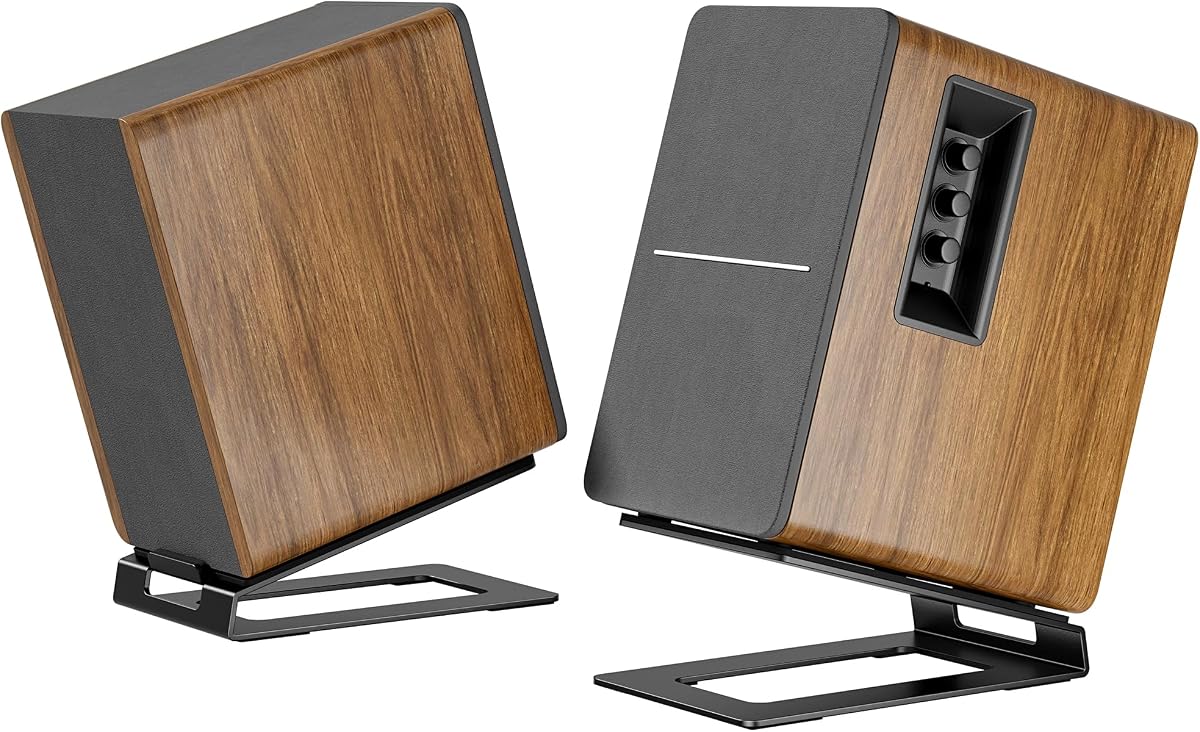
The Cantilevered Bookshelf Speaker Stands use a C-shaped design to keep the area under each speaker open. This makes them more unusual than conventional solid-base risers and allows items such as a keyboard edge, papers, or a small display to remain partially accessible beneath the raised cabinets.
We may earn a commission when you buy through this link, at no additional cost to you.
The speaker platform has a 6-degree tilt intended to align the driver with the listener’s ears. An extendable ledge stopper provides adjustable depth from 5.5 to 7.5 inches, accommodating different cabinet sizes while reducing the chance that a speaker slides off the support.
Soft EVA pads improve stability and help protect the speaker from scratches, while a vibration-absorption pad is intended to reduce resonance. A preset slot accommodates speakers with bottom mounting holes. Each stand supports up to 12 pounds, making the pair best suited to small and medium desktop speakers rather than heavy studio monitors.
This design is most useful where preserving storage space matters as much as elevation. The 6-degree angle is subtle, so users who need pronounced toe-in should look elsewhere. Even so, the open underside and adjustable depth make it a functional alternative for bookshelves, compact computers, and smaller office audio systems.
The open C-shaped structure leaves approximately 5.9 inches beneath the speaker, preserving room for items that would otherwise be blocked by a solid pedestal base.
The extendable ledge can be adjusted to fit different speaker depths. This helps keep a compact cabinet supported without leaving a large unsupported gap behind it.
We may earn a commission when you buy through this link, at no additional cost to you.
The most useful desktop speaker stand is the one that matches your speakers, fits your desk, and provides the placement control you actually need. Compare mounting methods, dimensions, load limits, and adjustment features before making a choice.
Start with the dimensions and weight of both speakers. The stand’s top plate should fully support the cabinet without overhang that could make it unstable, and the listed load limit should comfortably exceed the combined weight of each speaker. Also check whether the base is wider or deeper than the speaker itself, since mismatched dimensions can create a tipping concern.
Measure your speaker’s footprint and compare it with the available platform area. A 9×9 inch plate suits many compact monitors, while a 9×12 or 9×12.5 inch platform may be more appropriate for wider cabinets. Bottom mounting holes and recessed connector areas can also affect whether a speaker sits flat and securely.
Clamp-mounted stands attach to the underside of the desk and can reclaim considerable surface area. Their primary requirement is enough clearance below the desktop and a compatible desk thickness. Freestanding stands are simpler to reposition and work with any desk material, but they occupy more room and can be pushed out of alignment.
Choose a clamp when desk space is the priority and you can install it comfortably. Choose a freestanding pedestal when portability, simple setup, and broader desk compatibility matter more. Optional screw-mounted platforms offer a third approach, combining a free-standing base with a more secure speaker connection.
The best height brings the tweeters close to seated ear level without forcing an awkward viewing angle. Fixed 6-inch platforms suit many compact desktop speakers, while taller monitor stands can improve nearfield imaging with larger cabinets. Adjustable models are more forgiving because different speakers and seating positions can require different elevations.
Pay attention to the exact adjustment range rather than only the maximum height. A useful model should include a setting that matches your preferred listening position. If your speakers are directional, confirm that the stand’s tilt and rotation can direct them toward you.
Tilt raises the acoustic axis, while horizontal rotation points the speaker inward. A 6-degree incline is subtle, a 12-degree angle is a common compromise, and a 20-degree range offers the most directional control. Freely rotating platforms are especially useful for arranging a compact stereo pair on a rectangular desk.
Choose a fixed angle if your speaker position and seating are certain. Select an adjustable platform if the speakers may move, the desk shape is unusual, or you want to experiment with toe-in. Check that the adjustment locks securely, because a platform that shifts under a powerful speaker can change alignment over time.
Capacity figures are useful, but the stand’s construction, base width, locking mechanism, and support surface also determine stability. Heavy steel and a broad base generally create a steadier platform than a lightweight riser. For large studio monitors, favor a model with a substantial column, reinforced joints, and a stated capacity above the speaker’s weight.
Do not stretch a stand to its limit. Leave some capacity margin, and verify that the speaker sits fully within the supported area. For clamp models, inspect how the pads meet the desktop and whether the clamp can be tightened without damaging the surface. Locking pins and knobs add security on adjustable columns.
Speakers placed directly on a desk can transfer cabinet and cone vibration into the surface. EVA or foam isolation pads help absorb some of that energy, while anti-skid materials reduce movement. These features cannot change the speakers’ inherent sound, but they can support cleaner playback in a resonant workspace.
Look for a full or substantial pad covering the speaker’s contact area rather than a very thin strip. Some stands also protect the desktop with a separate pad at the base. Pairing isolation with a stable, rigid column gives the best practical foundation for consistent nearfield monitoring.
Compare the total footprint with the usable area behind the monitor. Clamp models are attractive for narrow desks, while compact low-profile platforms may be better beneath larger screens. C-shaped stands can preserve storage space under the cabinet, and hollow columns can route wiring vertically, although the available openings should be checked against connector size.
Plan the cable route before installation. A vertical stand may conceal most of the speaker wire, while a low riser leaves it exposed. If appearance matters, prioritize stands with integrated routing or enough clearance behind the base to gather excess cable discreetly.
Review the supplied hardware, required tools, and desk-clearance requirements before buying. Some clamp stands include bolts and an Allen key, while fixed platforms are ready to use. Adjustable models may require assembly before the final speaker can be attached.
Check the desk thickness range for clamp models and allow enough room underneath for the clamp body. For screw-mounted options, confirm that the speaker has compatible bottom mounting holes and that the supplied screws match. A stand that is difficult to install or unsuitable for your desk should be excluded even if its other features look appealing.
Begin by identifying each speaker’s weight, footprint, bottom mounting pattern, and directional requirements. Compare those specifications with the stand’s capacity and platform dimensions. Place the stands symmetrically on the desk, then adjust their spacing and angle so both cabinets face the same listening position rather than pointing directly forward.
For a clamp installation, position the padded jaw against the desktop edge, tighten the clamp gradually, and verify that the stand does not slide or rotate. For telescoping models, set the height before tightening the knob and engaging any secondary locking pin. Place the speaker on the isolation pad, and use supplied screws only when the mounting pattern is compatible.
Keep the pads clean and the fasteners snug, but do not overtighten hardware that presses against a speaker cabinet. Check the stand periodically for movement, especially after moving the desk or changing the speaker position. Avoid placing heavy objects on the platform, and use a dry cloth to remove dust without soaking the padding or finish.
They can improve the setup by elevating and aiming the speakers more accurately toward the listener. Isolation pads may also reduce vibration transferred to the desk. They cannot correct a poorly matched speaker system, but they can make placement more consistent and controlled.
Clamp-on models are excellent when desk space is limited and the desk thickness falls within the supported range. Freestanding stands are easier to reposition and work on virtually any desk surface, but they take up more area. The better choice depends on your available clearance and how often you move the speakers.
The goal is to place the tweeters near ear level while seated at your normal listening position. A 6-inch rise works for many compact speakers, while larger monitors may need more elevation. Adjustable stands are useful because the correct height depends on the cabinet and your seating posture.
Tilt is helpful when speakers would otherwise aim below your ears. It can improve perceived high-frequency direction and stereo focus. A fixed tilt works when your setup will not change, while an adjustable angle offers more flexibility for different seating positions or speaker placements.
Only if the stand’s load rating, platform dimensions, and base design match the monitor. Models in this guide support varying limits, so heavier monitors should be matched with stands offering substantial capacity and a broad base. Always check the speaker manufacturer’s stand recommendations as well.
Confirm the platform’s exact dimensions and the speaker’s footprint before ordering. Avoid relying on a partial overhang unless the manufacturer explicitly permits it. Some models include multiple plate sizes or mounting provisions, while others are designed for one general footprint.
They are useful when you want a mechanically secured connection rather than relying only on friction and weight. Check the thread type and pattern carefully because mounting standards can differ. A stand with preset slots or compatible screws can make the installation more secure.
Place the speakers symmetrically and rotate or tilt them inward so each acoustic axis reaches the listener. Avoid placing one speaker much closer than the other, and keep the stands stable. A rough test using familiar music or dialogue can reveal whether the stereo image feels centered and balanced.
The Liquid Stands pair stands out for the most adaptable positioning system, offering a broad tilt range, multiple orientations, substantial support capacity, and a long warranty. The Kanto SP6HD is a refined choice for larger bookshelf speakers and studio monitors, while the compact Vondynote clamp set is a practical budget-oriented option for conserving desk space.
Prioritize compatibility before aesthetics. Confirm speaker dimensions, weight, mounting needs, desk thickness, and intended elevation. Choose clamp mounting for a crowded desktop, a freestanding pedestal for portability, and adjustable tilt when precise directional control matters. Isolation padding and locking hardware are worthwhile additions to a stable foundation.
Product specifications, availability, and pricing can change, so check the current listing before making a final decision. The right desktop speaker stand should support your equipment securely, fit the available space, and make it easier to create a consistent, enjoyable listening position.