
INSWAN INS-1 Classic
4.6Editor score
8MP Sony imaging sensor
Built-in LED and microphone
Bundled Documate software
Our Document Camera guide compares ten leading models for classroom teaching, remote learning, live demos, web meetings, image quality, lighting, and connectivi
A document camera turns paper, small objects, and hands into a live digital image, making it valuable for teachers, remote instructors, presenters, and office teams. The most useful model combines accurate focus, even illumination, flexible positioning, clean microphone audio, and software that works smoothly with the computer and meeting applications you already use.
We compared the ten cameras in this guide by examining their stated sensors, maximum resolutions, frame rates, viewing areas, lighting, microphones, connection methods, portability, compatibility, and presentation features. The list covers USB-only models for straightforward teaching setups as well as wireless and multi-interface cameras for more demanding professional environments.
Each review identifies what distinguishes the camera, where it fits best, and which compromises may matter to a particular buyer. Ratings reflect the supplied customer feedback, while specifications and features come from the manufacturer descriptions. Product prices and availability can change, so confirm the current listing before purchasing.
4.6Editor score
4.5Editor score

4.6Editor score
This side-by-side comparison highlights sensor resolution, frame rate, lighting, connectivity, viewing area, and major presentation features, making it easier to match each document camera with a classroom, meeting room, or mobile teaching setup.


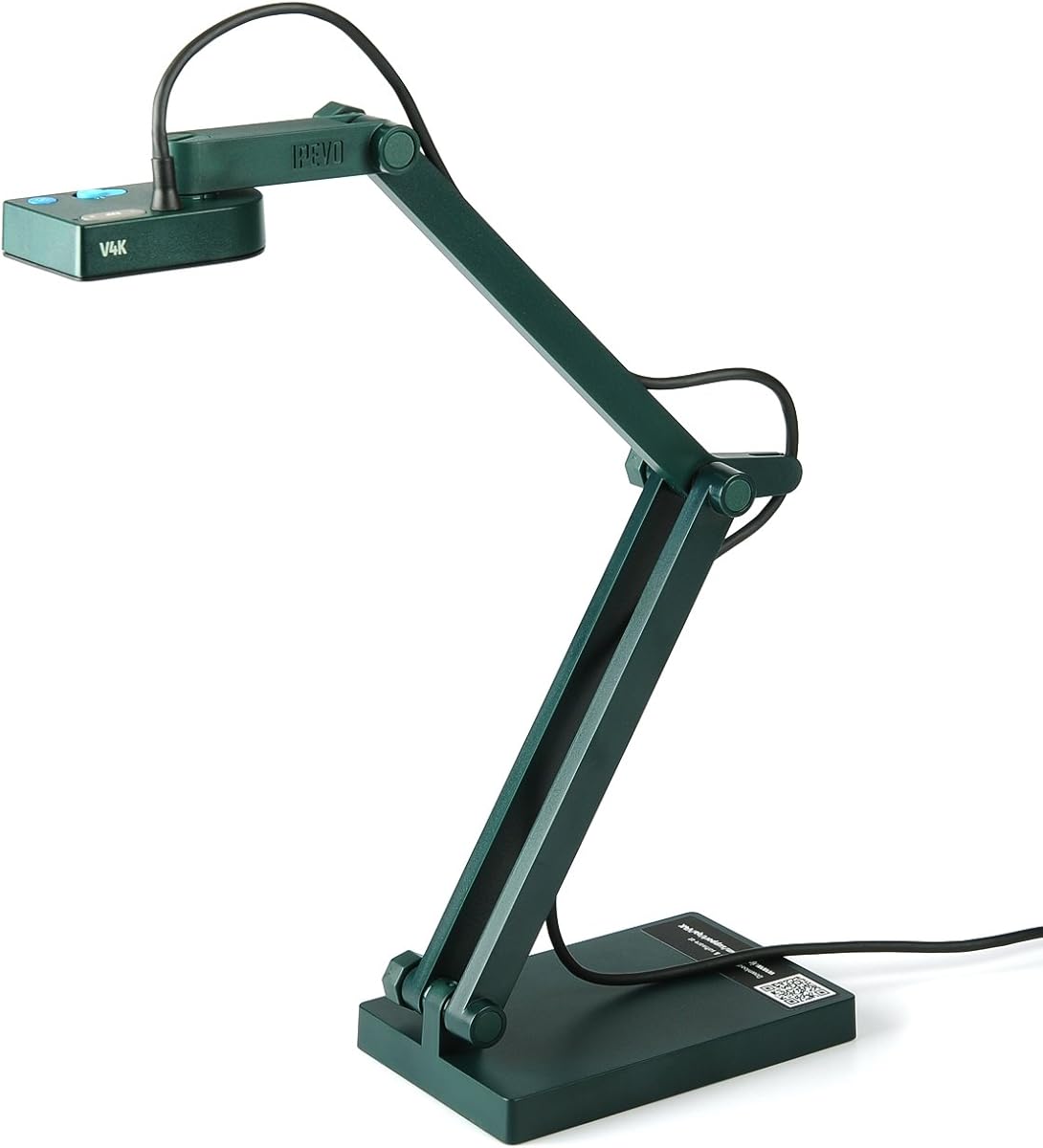
The IPEVO V4K is an 8-megapixel USB document camera built around a Sony CMOS image sensor and a maximum live resolution of 3264 by 2448 pixels. It carries a 4.5 customer rating, and its strongest combination is image detail, responsive focusing, and a relatively compact articulated design. That mix makes it a strong general-purpose choice for live demonstrations, remote teaching, and everyday document sharing.
We may earn a commission when you buy through this link, at no additional cost to you.
The camera streams at up to 30 frames per second in full HD and up to 15 frames per second at its maximum 3264 by 2448 resolution. Its fast focusing behavior is particularly useful when a presenter alternates between a worksheet, handwritten notes, and a three-dimensional object. The sensor's stated noise reduction and color reproduction also help in dim rooms, while the 13.46 by 10.04-inch maximum shooting area is sufficient for common letter-size materials.
The main compromise is that the listed specifications do not mention an integrated LED, microphone, or wireless connection. It is a wired camera designed to work with a variety of Mac, Windows, and Chromebook software. Some users may also need more than the stated viewing area for oversized charts or pages. For ordinary sheets, books, small experiments, and desk demonstrations, though, its imaging performance and rapid focus adjustments make it well balanced.
Choose the IPEVO V4K when you want one capable camera for multiple teaching or presentation environments without committing to a specialized ecosystem. It is particularly attractive for users who value fine text clarity and a stable USB workflow. It is our Editor's Choice because it delivers the most broadly useful combination of resolution, frame rate, focus speed, compatibility, and flexible positioning among the document cameras examined.
The 8MP Sony CMOS sensor captures up to 3264 by 2448 pixels, giving the camera enough detail for dense text, diagrams, and small objects. At the same time, its stated 30fps full-HD stream helps keep handwriting and object movement looking fluid during a lesson.
USB connectivity and stated support for Mac, Windows, and Chromebook make the V4K easy to incorporate into existing online meeting or presentation routines. Its multi-jointed stand provides enough positional freedom to frame papers and small objects without requiring a separate mount.
We may earn a commission when you buy through this link, at no additional cost to you.
The INSWAN INS-1 Classic combines an 8-megapixel Sony camera, built-in LED, and microphone in a desktop-friendly document camera. Its 4.6 rating is the highest among the ten products in the guide, and the feature set is notably complete for a budget-oriented model. It suits teachers, tutors, and office users who need dependable illumination and clear documents without a complicated installation.
We may earn a commission when you buy through this link, at no additional cost to you.
The stated 30fps stream at all resolutions keeps live movement smooth, while the maximum 3264 by 2448 output provides detail for dense pages. The viewing area reaches 14.72 by 11 inches, giving it enough coverage for letter-size material. Seven-segment brightness control, an anti-glare sheet, autofocus, macro focusing down to 3.9 inches, and image flip are useful additions for real-world tabletop work.
The bundled INSWAN Documate software expands the camera's usefulness with digital zoom, annotation, hue adjustment, rotation, recording, and snapshots. Compatibility is stated for Windows, Mac, iPad with USB-C, and Chromebook, and the included USB-A cable supports a simple connection. Its limitations are that it is still fundamentally wired and has no listed battery, so cable management and access to a USB port matter more than they do for a wireless model.
Pick the INS-1 Classic for an affordable, feature-rich introduction to document cameras, particularly in a classroom where a microphone and LED are both important. It is our Best Budget pick because it provides a more complete package than a bare imaging device, including lighting, audio, software, and broad compatibility. Users prioritizing wireless freedom or very large viewing areas should look farther up the list.
The integrated LED and seven brightness levels help control uneven illumination, while the built-in microphone reduces the need for a separate audio device during demonstrations. These additions make the INS-1 especially convenient for a compact all-in-one teaching station.
INSWAN Documate provides annotation, digital zoom, rotation, color adjustment, snapshots, and video recording. These functions make it more versatile than a camera that only acts as a standard webcam for a meeting application.
We may earn a commission when you buy through this link, at no additional cost to you.
The THUSTAR 8MP Document Camera is a functional classroom visualiser with a 4.4 rating, a 2448P output, 30fps live transmission, dual microphones, and a three-level ring light. It covers an A3-size area and folds for easier storage, making it a practical option for teachers who need to show worksheets, posters, or small objects from a crowded desk.
We may earn a commission when you buy through this link, at no additional cost to you.
Its most useful classroom controls are accessible directly from the device. Image inversion can correct left-to-right or top-to-bottom orientation without entering software, while brightness buttons offer ten-degree manual adjustments. The ring light provides three brightness levels, helping the camera operate in both dark and bright rooms. The focus button triggers a single autofocus operation, which is designed to reduce distracting focus hunting when an object moves beneath the lens.
A multi-jointed arm lets the camera capture both flat documents and three-dimensional objects from different angles. The stated maximum coverage of 16.5 by 11.6 inches is among the largest in this roundup. Against that flexibility, the 2448P maximum output is lower than the 3264 by 2448 resolution offered by several competing 8MP models, and the listed connectivity is USB only. Compatibility with Zoom, Teams, Google Meet, and other platforms is convenient, but there is no stated battery or alternate interface.
This THUSTAR model is a strong choice for a compact teaching kit that must handle large paper, two-way audio, and quick orientation changes. It offers more classroom-specific hardware than many similarly positioned alternatives. Choose it when easy folding, a large illuminated area, and built-in microphones matter more than having the highest stated pixel resolution.
The A3-sized coverage allows a teacher to frame larger worksheets and posters without moving the camera constantly. Combined with the articulated arm, this reduces repositioning when moving between a textbook page and a demonstration object.
Direct brightness, focus, and image inversion controls reduce the need to open settings menus during a lesson. The dual microphones are also useful when the camera must serve as a basic webcam as well as a document visualiser.
We may earn a commission when you buy through this link, at no additional cost to you.
The Kitchbai 4K USB Document Camera is a portable visualiser rated 4.5 by customers. It combines 8-megapixel 2448P output, 30fps streaming, dual microphones, a three-level LED light, and manual image inversion. The design targets teachers and remote presenters who want a simple camera that folds down for storage and covers a full A3 sheet.
We may earn a commission when you buy through this link, at no additional cost to you.
Its one-touch autofocus is intended to produce a clear image after an object is moved into position, reducing the automatic focus hunting that can make a live demonstration look unstable. A 10-degree manual brightness adjustment and three lighting levels offer additional control under changing conditions. The multi-jointed arm rotates freely to accommodate documents and three-dimensional subjects, while the included USB-C cable supports plug-and-play operation on compatible systems.
The listed platform support covers Windows 7 through 11, Mac OS 10.11 or later, and Chromebooks, with stated use in Google Meet, Zoom, Microsoft Teams, and TikTok. The principal limitations are the lower maximum resolution compared with 3264 by 2448 alternatives and the lack of stated wireless or HDMI connectivity. As a wired and foldable unit, it is best suited to a fixed teaching station rather than roaming around a large room.
Choose the Kitchbai camera if portability, classroom controls, and a generous illuminated viewing area are your priorities. It is especially useful for instructors who need to move the device between home and school or between classrooms. For users who require the highest fine-detail resolution or battery-powered operation, one of the IPEVO or OKIOCAM models offers a more capable specification.
The embedded foldable design reduces desk space when the camera is not in use and makes it easier to carry between teaching locations. It is a practical alternative to a fixed full-size visualiser for tutors, substitute teachers, and travelling presenters.
Manual image inversion can correct the mirrored view encountered in some applications and configurations. This is helpful when letters or diagrams would otherwise appear backward during a lesson or meeting.
We may earn a commission when you buy through this link, at no additional cost to you.
The PAKOTOO 8MP USB Document Camera is a 4.3-rated classroom camera with 2448P output, a three-level LED light, dual microphones, and an A3/A4 viewing area. Its defining feature is hardware-based image inversion in four directions, allowing the presenter to correct a reversed or upside-down feed without opening presentation software.
We may earn a commission when you buy through this link, at no additional cost to you.
Three brightness levels and ten exposure adjustment steps offer finer control than a simple on-off lamp. The camera also has a manual autofocus button, which is intended to focus once after an object is moved into position and avoid repeated automatic focus shifts. Its multi-jointed support can rotate to frame flat and three-dimensional objects, while the folding construction keeps the footprint small.
Compatibility is broad across Windows PCs, Macs, and Chromebooks, and it works with Google Meet, Zoom, Microsoft Teams, and TikTok. However, the product information specifically says the camera is not plug-and-play: users must select the USB Camera within the computer's camera settings. It also does not support zoom or HDMI, and compatibility with iPad is expressly excluded. Those limitations make it less convenient for mixed-device teaching.
Choose the PAKOTOO if you value immediate hardware controls, particularly image inversion and exposure adjustment. It is a solid fit for teachers working primarily with a Windows PC, Mac, or Chromebook who understand that one manual camera-selection step may be necessary. Buyers seeking zero-configuration setup or broader device support should favor a model explicitly designed for plug-and-play use.
Left-to-right and top-to-bottom inversion can be performed with the camera's buttons. This avoids searching through software menus when a class needs a correctly oriented diagram or handwritten text.
Ten exposure levels complement the three brightness settings, providing additional control in rooms where a fixed lamp output is not enough. This is useful for pale paper, reflective surfaces, or darker demonstration areas.
We may earn a commission when you buy through this link, at no additional cost to you.
The OKIOCAM S-4K is an 8-megapixel portable document camera with a 4.5 rating and a useful combination of Sony Exmor R imaging, physical controls, and software-based AI assistance. It reaches 3264 by 2448 pixels, captures letter-size materials in landscape orientation, and includes OKIOPoint technology that can zoom and follow a pointer within OKIOCAM Live.
We may earn a commission when you buy through this link, at no additional cost to you.
Its streaming is stated at up to 30fps in full HD and 15fps at maximum resolution. That distinction matters for buyers deciding between smoother live motion and greater static detail. Four buttons on the camera allow users to adjust focus, exposure, zoom, and a 180-degree image flip without navigating software. The Exmor R sensor is also described as providing low-light performance, noise reduction, and vibrant color reproduction.
The portable structure is designed to save desk space, and the stated hinges underwent more than 10,000 rotations in laboratory testing. Software options extend beyond basic video input to annotation, digital zoom, rotation, recording, snapshots, stop-motion, and time-lapse. The trade-off is that AI pointer tracking depends on the appropriate OKIOCAM software and workflow; it is not a physical substitute for moving the camera itself. Maximum-resolution streaming is also slower than full-HD streaming.
Choose the S-4K for teachers who want a compact, polished camera and are willing to use OKIOCAM Live. It is especially appropriate for small text, demonstrations, and remote classes where a guided pointer can direct attention without requiring precise manual reframing. Those who only need a standard webcam feed may find the same sensor and stand in a simpler package more appropriate.
OKIOPoint uses AI tracking to follow the area indicated by the visual pointer, zooming in as needed. In a lesson, this can make small details easier for remote students to see without requiring constant manual camera positioning.
Focus, exposure, zoom, and image-flip buttons provide direct control during a presentation. This reduces the need to leave a live meeting interface and open a separate settings window while an audience is waiting.
We may earn a commission when you buy through this link, at no additional cost to you.
The IPEVO VZ-X Wireless is the most connectivity-flexible camera in the guide, with Wi-Fi, HDMI, and USB modes, an 8-megapixel Sony sensor, and a 4.6 customer rating. It is designed for presenters who need to move around a room, connect to different kinds of displays, or share video without relying on a single wired computer connection.
We may earn a commission when you buy through this link, at no additional cost to you.
The camera records at 1920 by 1080 and 30fps in HD, while USB mode offers near-4K capture at 3264 by 2448. Wi-Fi and HDMI modes operate at 1920 by 1080. A built-in LED illuminates the viewing area, and the 16:9 maximum viewing area reaches 19.72 by 11.14 inches, accommodating widescreen pages and presentation material more effectively than a letter-only frame.
Its nine-to-twelve-hour stated battery life is designed to cover a class or full presentation, while the up-to-33-foot wireless range allows movement around the teaching space. The swiveling head, multi-jointed stand, and compact footprint support different heights, angles, and orientations. On-body buttons provide immediate control of the video feed. The downside is that the highest resolution is restricted to USB, and wireless output remains HD rather than near-4K.
Choose the VZ-X for professional presentations, large classrooms, mobile workshops, and mixed display environments. It is our Best Premium pick because wireless operation, multiple wired alternatives, long battery life, and flexible framing solve problems that fixed USB cameras cannot. Connect it over USB for maximum detail, or use Wi-Fi and HDMI when mobility and display flexibility are the priorities.
Wi-Fi supports wireless use with compatible mobile devices, while HDMI connects to projectors, televisions, and monitors. USB offers the highest stated resolution and remains a dependable route for computer-based presentation software.
A stated nine-to-twelve-hour battery runtime is long enough for most classes, presentations, and workshops. The 33-foot wireless range also allows the presenter to demonstrate products or materials away from the desk.
We may earn a commission when you buy through this link, at no additional cost to you.
The OKIOCAM S2 Pro stands apart with a 13-megapixel 4K UHD CMOS sensor and 4K streaming at 30fps. Its 4.2 rating is the lowest in the list, but that does not erase the significance of its resolution specification. The camera targets professional demonstrations where fine print, diagrams, and small physical details must remain legible in a large video window.
We may earn a commission when you buy through this link, at no additional cost to you.
The sensor can output 3840 by 2160 in 16:9 and 3840 by 3104 in 4:3. Fast autofocus after pressing the autofocus button helps make transitions between materials smoother. OKIOPoint in OKIOCAM Live adds pointer-based tracking and zooming, while the broader software supports annotation, recording, and other presentation tools.
Its Taiwan-made construction includes a metal-weighted base, a glass-fiber-reinforced arm, and hinges stated to have endured more than 10,000 rotations in laboratory testing. An integrated LED handles dim locations, and a built-in microphone adds audio capability. Plug-and-play support is stated for Windows, Mac, Chrome, and interactive display operating systems, with compatibility listed for Google Meet, Zoom, Teams, and Canvas. The viewing area of 13.6 by 10.6 inches is adequate for letter-size material but smaller than the largest alternatives.
Choose the S2 Pro when maximum pixel density and 4K at 30fps justify a more specialized setup, particularly for fine diagrams, small components, or large displays. It is our high-resolution pick rather than a universal choice because its viewing area is modest and its customer rating trails the field. Pair it with good application support and a clean display output to take advantage of the sensor.
A 13-megapixel sensor and 4K output can reveal more detail than conventional 8MP document cameras. That difference is most valuable when a small label, component, or densely typeset page must remain readable on a large monitor.
The weighted base and reinforced arm give the camera a more permanent-desk feel than folding travel models. Integrated lighting and audio reduce the number of separate accessories needed for a straightforward teaching station.
We may earn a commission when you buy through this link, at no additional cost to you.
The OKIOCAM T-4K is designed to frame substantially more paper than a conventional letter-size document camera. Its stated 13.86 by 18.11-inch viewing area can cover ledger-size materials or both pages of an open book, while the 4.5 customer rating reflects a generally well-received design. It is a logical choice for teachers, architects, and presenters working with maps, blueprints, artwork, or large-format handouts.
We may earn a commission when you buy through this link, at no additional cost to you.
The 8-megapixel Sony Exmor R sensor captures up to 3264 by 2448 pixels. Streaming reaches 30fps in full HD and 25fps at the maximum resolution, providing a useful balance between fluid motion and detail. Four physical buttons control focus, exposure, zoom, and 180-degree image rotation, allowing quick changes without opening a software interface.
OKIOPoint provides AI tracking within OKIOCAM Live, allowing the camera to follow a pointer and zoom toward the indicated region. The wider software suite includes annotation, digital zoom, rotation, snapshots, stop-motion, time-lapse, and recording. Plug-and-play operation is stated for Windows, Mac, iOS, Chrome, and interactive display systems. The limitation is that this model is presented as a USB document camera, with no wireless, HDMI, or battery option specified.
Choose the T-4K when showing an entire large page matters more than portability or wireless freedom. It gives teachers enough area to include a full worksheet, spread, or technical drawing in one shot, reducing the need to pan between separate sections. Users who will present only standard letter pages and want maximum streaming speed may find a smaller, 30fps-at-maximum-resolution model more suitable.
The 4:3-oriented viewing area is large enough for ledger-size material and two-page book spreads. This reduces cropping and makes the camera useful for technical drawings, music, and oversized classroom charts.
The camera streams at 30fps in full HD for movement and 25fps at its maximum 3264 by 2448 resolution for detail. That makes it adaptable to both live demonstrations and applications where fine text is the priority.
We may earn a commission when you buy through this link, at no additional cost to you.
The OKIOCAM S2-4K is a 4.3-rated document camera built around an 8-megapixel Sony Exmor R CMOS sensor and a 15.1 by 11.2-inch viewing area. Its standout benefit is the sensor's back-illuminated design, which is described as improving light sensitivity and reducing noise so the camera can remain sharp under faint projector light without a supplemental LED.
We may earn a commission when you buy through this link, at no additional cost to you.
It captures up to 3264 by 2448 pixels and provides smooth 30fps streaming at any stated resolution. Fast autofocus, four physical buttons, and 180-degree image flipping support quick adjustments during a lesson. The viewing area is wide enough for letter-size portraits and near-ledger documents, and the camera can focus on details as close as two inches.
OKIOPoint adds AI tracking within OKIOCAM Live, while the software also provides up to 10x digital zoom, annotation, recording, snapshots, and picture-in-picture. Plug-and-play support includes Windows, Mac, iOS through an included USB-C adapter, Chromebook, and interactive displays. Popular platforms such as Google Meet, Zoom, Teams, and Canvas are supported, and a built-in microphone handles audio. It remains a wired presentation device rather than a roaming camera.
Choose the S2-4K for dark classrooms, evening tutoring, and any situation where a bright ring lamp could create glare or uneven illumination. It offers an attractive balance of near-4K resolution, consistent frame rate, useful physical controls, and a large viewing area. Buyers wanting maximum resolution should compare it with the 13MP S2 Pro, while those needing wireless operation should consider the IPEVO VZ-X.
The back-illuminated Exmor R sensor is designed to gather light efficiently in dim conditions. Avoiding a built-in ring light can also help reduce the glare and uneven brightness that can occur on reflective paper or glossy photographs.
The included USB-C adapter broadens support for iPad-based teaching, while the broader software set covers annotations, digital zoom, recording, and picture-in-picture. This makes the camera adaptable to both traditional classrooms and mobile teaching workflows.
We may earn a commission when you buy through this link, at no additional cost to you.
The right document camera depends on the material you present, the room you teach in, the computer or display system you use, and how much setup complexity you can tolerate. Resolution matters, but frame rate, focus behavior, lighting, reach, and software compatibility often have a greater effect on the day-to-day experience.
Choose higher resolution when viewers need to read small type or inspect fine details. For ordinary worksheets and webcam-sized meeting windows, a capable 8MP camera is more than adequate.
Prioritize 30fps for energetic live teaching. Choose a higher-resolution mode with a slightly lower rate when fine static detail matters more than fluid movement.
Use integrated lighting for unpredictable rooms, but test it on glossy pages. Consider a low-light sensor when dimness, glare, or uneven lamp brightness is the main challenge.
Match the viewing area to the largest item you expect to show. Larger areas reduce repositioning, while compact frames improve desk space and close-up detail.
Prioritize quick one-touch focusing for live teaching. Verify minimum focus distance when tiny components, circuit boards, crafts, or specimens are central to the presentation.
Choose USB for a fixed desk and simple operation. Add wireless or HDMI when roaming, connecting directly to a display, or avoiding computer-specific setup is essential.
Choose a folding design for frequent travel and limited desk space. Use a weighted fixed base for a permanent studio, and consider battery operation when mobility outweighs added bulk.
Choose richer software when recording, annotation, or automated focus is part of your workflow. Keep a separate microphone when room acoustics or speech clarity are priorities.
Begin by identifying the main light source in the room and positioning the camera so it looks straight down at the material. Extend the arm only as far as needed, balance the head over the desk, and use the maximum viewing area as a guide rather than placing the subject at the very edge. Connect the camera to the computer first, then select it as the active camera in the meeting, recording, or presentation application.
Before a session, test autofocus by moving between a sheet of paper and a three-dimensional object. Use the physical brightness, exposure, focus, flip, or zoom controls where available, and turn on the integrated LED only when it improves the image. In OKIOCAM software, configure the pointer-tracking features and test annotations with a sample page. A short recording can reveal focus problems, glare, reversed text, and framing errors before an audience is present.
Care for the camera by moving the arm within its intended range and avoiding forceful twists at the joints. Clean the lens with a soft microfiber cloth, and keep the sensor away from dust, moisture, and direct heat. Route cables so they cannot catch the moving arm, charge wireless models before long sessions, and store folding cameras in their supplied pouch when one is included. Periodically check the screws, connectors, and software updates to maintain a stable teaching setup.
An 8-megapixel camera is a strong all-around choice for worksheets, books, and standard demonstrations. A 13MP or 4K model is more useful when you need to display tiny text, intricate diagrams, or small physical details. Resolution alone does not determine clarity, so focus speed, lighting, lens performance, and application support remain important.
Most of the cameras in this guide are stated to work with one or more major online meeting platforms, including Zoom, Google Meet, and Microsoft Teams. In most cases, you select the document camera as the active video source after plugging it into the computer. Verify the camera's current operating-system requirements and any application-specific controls before purchasing.
A regular webcam primarily captures a room or person, while a document camera is designed to frame paper and small objects from above. Many document cameras can still function as standard webcams, and several include microphones, lighting, or image inversion for that secondary role. The adjustable stand and near-overhead angle are the defining differences.
A built-in light is convenient in dark or inconsistent rooms, but it is not automatically better in every setting. It can create glare on glossy paper, and many modern sensors perform well with ambient light. Choose a strong low-light sensor if reflections are likely, or consider adjustable LED lighting if your room is regularly dim.
Compatibility depends on the model and its supplied adapter or cable. The INSWAN INS-1 supports USB-C iPads at the stated OS version, and the OKIOCAM S2-4K includes a USB-C adapter for iOS use. Other cameras may require specific applications or omit iPad support, so check both device ports and operating-system requirements before ordering.
The terms describe related but not always identical output dimensions. An 8MP camera may capture 3264 by 2448 pixels, while a 16:9 4K image uses 3840 by 2160 pixels. The OKIOCAM S2 Pro combines a 13MP sensor with 4K output. Compare the actual dimensions and frame rate rather than relying on the marketing labels alone.
Wireless is valuable when the presenter needs to move away from the computer or connect directly to a projector or display. It reduces cable constraints and makes mobile teaching easier, although image resolution and connection setup may differ from USB mode. A fixed USB camera usually offers the simplest experience and may provide the highest stated resolution.
Annotation, snapshots, video recording, rotation, and digital zoom are the most broadly useful features for lessons and meetings. AI-assisted pointer tracking can further help viewers follow a detail on a large page. The best choice is one whose software works with your operating system and the presentation application you already use.
The IPEVO V4K is the strongest all-around recommendation because it pairs an 8MP Sony sensor, detailed 3264 by 2448 output, responsive focusing, and a practical USB workflow. The INSWAN INS-1 Classic is the best budget option, adding a built-in LED, microphone, generous viewing area, and capable Documate software, while the IPEVO VZ-X is the premium choice for wireless freedom, multiple interfaces, and long battery life.
Prioritize the needs that occur every day rather than selecting only by pixel count. A teacher showing ordinary worksheets may value foldability, direct image controls, and dependable autofocus more than a high-resolution sensor. A professional presenter moving around a room may need Wi-Fi and HDMI, while someone teaching in a dim room should prioritize low-light performance and minimal glare.
Before buying, confirm the included cable, operating-system requirements, viewing area, and compatibility with your meeting software. Ratings and product configurations can change over time, and prices and availability also vary. Review the current listing and recent customer feedback so the final choice reflects both the camera's specifications and the way it is likely to be used.

