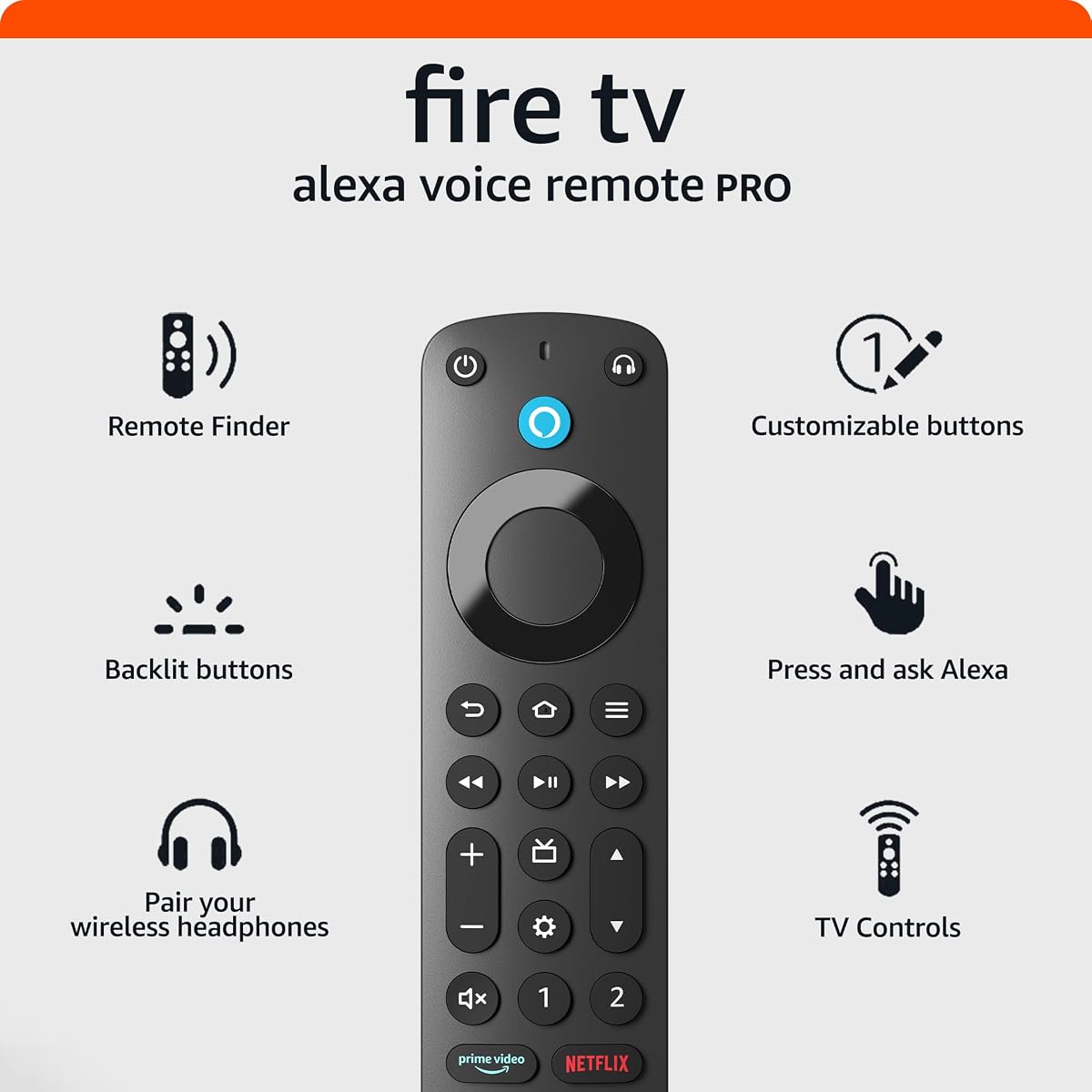
Alexa Voice Remote Pro
4.5Editor score
Remote finder feature
Backlit motion controls
Two customizable buttons
Integrated live-TV controls
This Fire Stick Replacement Remote guide compares 10 options for compatibility, voice control, shortcut buttons, TV functions, and ease of pairing.
A Fire Stick replacement remote should restore navigation, voice commands, app access, and media controls without creating a frustrating setup process. The right choice depends on your exact Fire TV generation, the smart TV model you own, and whether you value a full Alexa remote or a straightforward replacement for a lost device.
We compared the included compatibility lists, voice features, shortcut buttons, TV-control options, pairing methods, package contents, and customer ratings. The list covers official Amazon remotes, general replacements, and models designed for a combination of Fire TV streaming devices and compatible Fire TV-equipped smart televisions.
Each review explains who the product is likely to suit, along with its most useful features and practical limitations. Compatibility varies considerably across generations, so verify your device model before buying, and remember that listing details, supported software functions, and availability can change over time.
4.5Editor score

4.5Editor score

4.4Editor score
The comparison below highlights device coverage, voice control, shortcut or TV functions, and battery arrangements. Compatibility should be checked against the exact model and generation of your Fire Stick, Fire TV Cube, or Fire TV-equipped smart television before ordering.
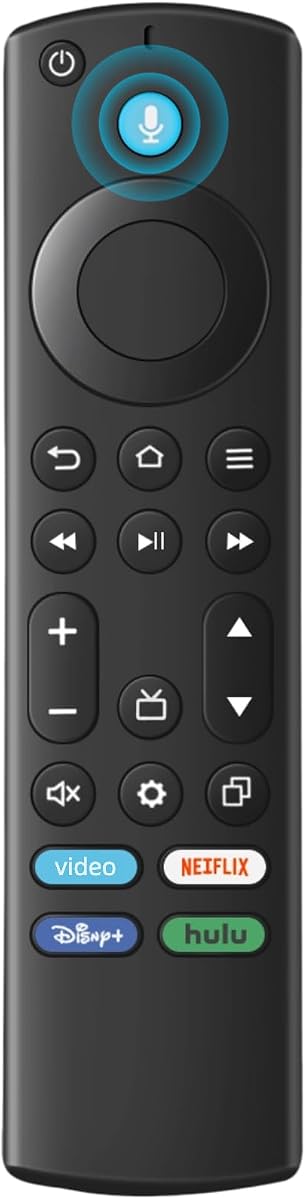


This replacement voice remote carries a 4.2 customer rating and offers a practical middle ground between a basic stick remote and a full-featured Alexa remote. It supports a useful range of current Fire TV hardware, including the third-generation TV Stick, several 4K Stick versions, 4K Max versions, newer TV Cube models, and both generations of TV Stick Lite.
We may earn a commission when you buy through this link, at no additional cost to you.
Its strongest feature is the combination of Alexa-style voice control and broad smart television support. The stated compatibility list includes Omni, Ember, Insignia, Toshiba, and Pioneer smart TVs that accept voice commands. Voice functions can be used to locate content more quickly, while the familiar directional pad and playback controls provide a practical non-voice option.
The main drawback is that batteries are not included and two AAA cells are required. Compatibility is also narrower than the product's broad wording may initially suggest: first- and second-generation TV Stick models, first-generation TV Cube models, and early TV Box generations are expressly excluded. Pairing instructions are included, but the process can differ between streaming players and smart televisions.
This is a sensible choice for someone whose original remote has failed and who wants more than basic navigation without moving to a premium remote. Confirm the exact generation of your device and the voice capability of your television first. If it matches the published list, it offers a balanced replacement with a compact feature set.
The microphone-enabled remote supports voice searching for content, making it especially helpful in Fire TV interfaces where searching can otherwise involve several menu steps. It does not provide the remote-finder, backlight, or extensive customization found on higher-feature official remotes.
The remote is designed for both standalone streaming devices and compatible voice-enabled smart TVs from several established brands. Because pairing methods differ by device, following the supplied instructions is more dependable than assuming every model will connect in the same way.
We may earn a commission when you buy through this link, at no additional cost to you.
The Alexa Voice Remote Pro is the most feature-rich option in this guide, earning a 4.5 customer rating and earning the Best Premium designation. Its standout feature is the ability to emit a ring when asked to find the remote through a compatible Alexa device, the Alexa app, or the Fire TV app. That solves a common problem for anyone who regularly misplaces a remote between cushions.
We may earn a commission when you buy through this link, at no additional cost to you.
The motion-activated backlight is another meaningful convenience. It illuminates the buttons in dim rooms without requiring a separate light source, while dedicated power, volume, and channel controls make the remote useful for live television. A dedicated headphone shortcut opens the onscreen Bluetooth menu, and two customizable buttons can be assigned to channels, apps, or Alexa commands.
Its limitations concern compatibility and complexity. It does not support first- and second-generation Fire TV systems, first-generation Fire TV Stick, Element Fire TV Edition, certain Insignia models, the Hisense U6HF 4K ULED Fire TV Series, or Echo Show 15. Some buyers may also find the number of specialized buttons unnecessary if their priority is simply replacing a lost stick remote.
This is the strongest choice for households that want easier device recovery, better nighttime visibility, and comprehensive television control. It is particularly appealing to owners of recent Fire TV streaming players or Fire TV smart TVs. Buyers with older hardware should verify the exclusion list, but for compatible modern systems this remote provides the most polished overall control experience.
The remote-finder function converts a common annoyance into a simple voice request. Instead of searching around the room, you can ask Alexa or use the associated app to make the remote ring, provided the required compatible device or application is available.
Motion-activated illumination makes the controls easier to locate in a dark viewing room, while dedicated channel and volume buttons reduce the need to enter television settings. The result is a remote better suited to a mixed streaming-and-live-TV setup.
We may earn a commission when you buy through this link, at no additional cost to you.
This replacement remote earns a 4.5 rating and distinguishes itself through an unusually detailed compatibility list. It covers several generations of Fire TV Stick, Stick 4K, 4K Max, and TV Cube hardware, along with numerous Fire TV smart television models identified by series and model numbers. The list also references several original remote part numbers, which can be useful during replacement research.
We may earn a commission when you buy through this link, at no additional cost to you.
Its shortcut layout is a notable advantage over many budget-oriented competitors. The remote includes four shortcut buttons and two customizable buttons that can be programmed by pressing and holding the relevant controls. These shortcuts can place frequently used streaming services within one press, reducing repeated navigation through the Fire TV home screen.
Voice functionality is available, but it must be activated using the included manual. The remote does not include batteries. Compatibility exclusions are more restrictive than the long support list can suggest: it is expressly not intended for Roku devices, Insignia televisions, Toshiba televisions, Hisense televisions, or TCL televisions. That makes model verification especially important.
This product is best for a buyer who has already identified a supported Fire device and values both app shortcuts and broad model coverage. It may be less suitable for a mixed household containing several non-Fire television brands, but for a compatible Fire setup it combines detailed guidance, a strong rating, and flexible shortcut access.
The product description names device families, smart-TV series, and several original remote identifiers. That level of detail makes it easier to compare your existing remote with the supported hardware before ordering.
Six shortcut-related controls include four direct app buttons and two controls that can be assigned to favorite services. These are particularly useful for people who launch the same applications every day.
We may earn a commission when you buy through this link, at no additional cost to you.
This Fire Stick replacement has a 4.3 rating and focuses on recent Fire TV hardware rather than trying to cover every historical generation. Its compatibility list includes first- and second-generation 4K Max devices, first- and second-generation 4K HD models, the Plus and Select versions, second- and third-generation TV Stick models, and second- and third-generation TV Cube models.
We may earn a commission when you buy through this link, at no additional cost to you.
Beyond Fire hardware, the listing names Insignia, Toshiba, Omni, Ember, and Echo Show 12 and 15 devices. It also provides four shortcut buttons, a built-in microphone for voice commands, and a stated control distance of up to 12 meters. The manufacturer also states that the remote's buttons were tested to support more than 20,000 clicks.
The pairing method is distinctive but important to follow correctly. The instructions recommend disconnecting the streaming device's power for 15 seconds, restoring power, reinstalling the device, and then installing fresh batteries so the remote can pair automatically. The package contains one voice remote and a manual, but batteries are not included.
This is a good option for owners of newer streaming hardware who want four shortcut keys and a straightforward alternative to an official remote. It is less suitable for early Fire TV editions, first-generation sticks, or first-generation cubes. Buyers who value recent-model support, voice operation, and clearly stated after-sales assistance will find it particularly practical.
The documented setup process uses a short power disconnection followed by a fresh battery installation. Following these steps can resolve many initial connection issues without navigating complicated remote-management menus.
Four shortcut buttons provide fast access to common applications, while the stated 12-meter range makes the remote practical for larger rooms. The manufacturer additionally reports testing the button set for more than 20,000 clicks.
We may earn a commission when you buy through this link, at no additional cost to you.
This Fire Smart TV remote carries a 4.2 customer rating and is positioned as an easy replacement spanning streaming devices produced from 2018 through 2026. It supports 4K Max, 4K, Plus, Select, HD, third-generation TV Stick, third-generation TV Cube, and first- and second-generation TV Stick Lite models.
We may earn a commission when you buy through this link, at no additional cost to you.
Its advertised automatic synchronization is one of its most attractive features for buyers who want to avoid complicated setup. The remote also supports voice commands for searching, launching applications, and adjusting volume. Four preprogrammed shortcut buttons provide direct access to popular apps and channels, making the layout more useful than a minimal replacement.
Compatibility with smart televisions includes Insignia, Toshiba, Omni, and second- and fourth-series voice-enabled Fire TVs. The product does not support first- or second-generation TV Sticks, soundbars, or other receivers. Two AAA batteries are required and are not included, so users should have fresh cells available before pairing.
This is a good choice for a recent Fire Stick owner who values simple automatic setup and wants shortcut access without paying for the remote-finder and backlight features of the premium official model. It is particularly convenient for users comfortable with a replacement voice remote and comfortable supplying their own batteries. Exact model verification remains essential.
The stated automatic connection behavior reduces the amount of configuration required. If the remote does not connect immediately, a standard pairing process or a full device restart may still be necessary.
The supported range covers several popular Stick, Stick 4K, 4K Max, Lite, and Cube configurations. It is a strong option for homes that have upgraded to relatively recent streaming hardware.
We may earn a commission when you buy through this link, at no additional cost to you.
This All Fire Series replacement earns a 4.3 rating and offers broad coverage across Fire streaming products. Its compatibility list includes TV Stick Lite, second- and third-generation TV Stick devices, first- and second-generation 4K models, several 4K Max versions, all three listed TV Cube generations, and third-generation Fire smart televisions.
We may earn a commission when you buy through this link, at no additional cost to you.
Voice control can search for content, launch applications, play music, check the weather, view compatible camera feeds, and operate supported smart-home devices. Standard directional and playback controls remain available for more precise navigation. These functions make the remote a practical choice for users who enjoy combining television viewing with other Alexa-compatible tasks.
Pairing requires disconnecting the stick from the television, removing its power, reconnecting it, and reinserting it. The user then holds the Home button for 10 to 15 seconds until the amber indicator flashes rapidly, after which the remote should pair automatically. The package includes the remote, a manual, and customer support, but not the two required AAA batteries.
First- and second-generation smart TVs, first-generation Smart TV Sticks, and Smart TV Edition devices are excluded. The product also appears more focused on streaming navigation than direct television control, as it does not highlight dedicated power, volume, or channel keys. It is best for owners of a compatible recent Fire streaming device who values voice capability and broad generation coverage.
Besides locating shows, the remote can launch applications, play music, retrieve basic information, and interact with compatible smart-home devices. Actual feature availability depends on the Fire device, its software, and the other services available in the home.
The pairing method uses a clear physical sequence involving power disconnection and a sustained Home-button press. Watching the amber indicator is important because the flash confirms the remote has entered pairing mode.
We may earn a commission when you buy through this link, at no additional cost to you.
The latest-model Amazon Fire TV Alexa Voice Remote earns a 4.5 rating and is the strongest all-around choice for most compatible Fire TV users. It combines dependable Alexa voice operation with dedicated power, volume, and mute buttons, a guide button, and preset application buttons that make it equally comfortable for streaming and live television.
We may earn a commission when you buy through this link, at no additional cost to you.
Its support list is broad across current Fire TV hardware. Compatible devices include Fire TV Stick Lite, Fire TV Stick HD, third-generation-and-later Fire TV Stick models, first-generation-and-later Fire TV Stick 4K models, 4K Plus, 4K Max, second-generation-and-later TV Cube models, and Echo Show 15. The guide button gathers live-TV applications into one location, while the app buttons shorten access to frequently used services.
This official remote does not support first-, second-, or third-generation Fire TV boxes, first- or second-generation Fire TV Sticks, first-generation TV Cube devices, or Fire TV Edition smart TVs. It also lacks the remote-finder and backlit controls found in the Voice Remote Pro. Those omissions are reasonable for a buyer seeking a conventional official remote rather than the most advanced model.
Two AAA batteries are included, which removes a common source of setup inconvenience. For owners of a compatible recent streaming player or Fire TV television, this is the most balanced recommendation: simple voice control, complete navigation keys, television functions, and a strong customer rating without specialized premium extras.
The combination of power, volume, mute, preset apps, and a dedicated guide button makes the remote practical for viewers who alternate between streaming and live channels. The layout is comprehensive without reaching the specialized complexity of the Pro version.
Alexa can find content, launch applications, and control supported functions by voice, while preset app buttons provide a fast physical alternative. This mix suits both casual viewers and users who prefer not to speak for every action.
We may earn a commission when you buy through this link, at no additional cost to you.
This replacement Firestick remote has a 4.4 rating and offers a compact voice-control option for several common Fire TV devices. It supports TV Stick Lite, the 2020 TV Stick release, TV Stick 4K, second-generation TV Stick, first- and second-generation TV Cube models, and third-generation Fire smart televisions.
We may earn a commission when you buy through this link, at no additional cost to you.
Its voice examples are straightforward: users can request actions such as turning on the television, increasing volume, or switching to a sports channel. The remote also provides conventional navigation for times when speaking is inconvenient. That combination makes it a sensible basic replacement rather than a bare button controller.
Pairing requires holding the Home key for about 10 seconds and waiting for the indicator to flash rapidly. After approximately 30 to 60 seconds, the light should turn off when pairing has succeeded. The instructions also address common problems, including checking battery level, handling a software-update message, manually adding or replacing the remote, and removing and reinstalling the batteries.
First- and second-generation smart TVs, first-generation TV Stick devices, and Smart TV Edition televisions are excluded. Because the remote must be matched manually, users should be comfortable with a short setup process. It is best for compatible owners who need voice control and clear pairing guidance without paying for advanced remote-finding or backlighting features.
The indicator provides an easy way to confirm that the remote has entered pairing mode. Waiting for the light to extinguish gives the user a clear signal that the connection process has completed.
The product guidance addresses several common obstacles, including weak batteries, an interrupted pairing attempt, and an onscreen update message. These suggestions can be more useful than repeatedly pressing random controls when setup does not proceed as expected.
We may earn a commission when you buy through this link, at no additional cost to you.
This Voice Fire Stick Remote has a 4.3 rating and combines broad Fire streaming-device support with compatibility for three major smart-TV brands. It covers first-, second-, and third-generation TV Cube devices, first-generation 4K Max models, first- and second-generation 4K models, second- and third-generation TV Stick devices, TV Stick Lite, third-generation Fire smart TVs, and compatible Insignia, Toshiba, and Pioneer sets.
We may earn a commission when you buy through this link, at no additional cost to you.
Four preset application buttons offer quick access to favorite services, while the navigation and playback controls support more precise content control. Voice functionality can find content and move through entertainment quickly. The overall design prioritizes the most common Fire TV tasks without adding a remote finder or backlit controls.
Pairing uses the Home button for approximately 10 to 15 seconds. Once the LED begins flashing rapidly, the remote should connect automatically after a wait of roughly 30 to 60 seconds. A useful precaution is to remove the batteries from the old remote first, because an existing remote still attempting to pair can interfere with the replacement.
The product is expressly not designed for Roku or Samsung televisions, and it excludes first- and second-generation smart TVs, first-generation TV Sticks, and Smart TV Edition models. It is a good choice for a compatible Fire device or one of the named television brands, especially for users who want a voice remote and four shortcut keys.
Support for Insignia, Toshiba, and Pioneer smart televisions makes the remote useful beyond standalone Fire Stick hardware. Each television must still meet the stated Fire voice and generation requirements.
Removing the batteries from the old remote can prevent it from entering pairing mode at the same time. This is a small but important step when the replacement does not appear immediately.
We may earn a commission when you buy through this link, at no additional cost to you.
This Fire Stick Voice Replacement carries a 4.4 rating and combines broad compatibility with clear setup instructions. It supports HD and Lite configurations, first- and second-generation 4K Max and 4K models, second- and third-generation TV Stick devices, first- through third-generation TV Cube models, and third-generation Fire smart televisions from Omni, Insignia, Toshiba, and Pioneer.
We may earn a commission when you buy through this link, at no additional cost to you.
The remote's voice examples make its intended functions easy to understand. Users can ask it to find action movies, skip ahead, increase volume, or pause a show, while four dedicated shortcut buttons launch selected streaming applications. This combination gives the remote more everyday utility than a basic navigation-only controller.
Pairing is explained in a concise three-step format. Install two AAA batteries, hold the Home button for about 10 seconds until the indicator blinks rapidly, and then wait approximately 30 to 60 seconds for automatic connection. Batteries are not included. First- and second-generation smart TVs, first-generation TV Stick devices, and Smart TV Edition sets are not supported.
This is a strong budget-oriented choice for users with a compatible recent Fire device who want voice control and application shortcuts. It may be especially helpful as a straightforward replacement for a lost remote, although buyers should confirm the model number and television platform first. Dedicated pre-purchase and setup support adds reassurance for first-time replacement buyers.
The listed commands cover common entertainment actions such as finding a category, skipping forward, adjusting volume, and pausing playback. These examples show how the voice function can be used without memorizing a rigid command structure.
Four dedicated shortcut keys provide one-press access to selected streaming applications. They are useful for frequent users who would otherwise navigate through the home screen every time they begin a viewing session.
We may earn a commission when you buy through this link, at no additional cost to you.
Compatibility is the decisive factor in any Fire Stick remote purchase, but voice functions, shortcut access, television controls, pairing methods, and included accessories can also separate otherwise similar products. Use the guide below to narrow the options before comparing the final model list.
Fire Stick and Fire TV hardware names can look similar even when the underlying remote protocol differs. Start by locating the model name or model number on the streaming device, Fire TV Cube, or television. Then compare that information with the product's supported list, paying particular attention to the generation. First-generation sticks, early cubes, Fire TV boxes, and Smart TV Edition hardware are frequently excluded even when a listing broadly mentions Fire TV devices.
Compatibility should also account for the television platform. A remote that supports a standalone Fire Stick may not support every Fire TV-equipped television, and a generic television remote will not necessarily control a streaming stick. If the old remote is available, its model number and button layout can provide additional clues, but the device model remains the most important reference.
Official Amazon remotes are designed around the current Fire TV interface and commonly provide a complete set of navigation, application, voice, and television controls. They are a natural choice for recent compatible devices, particularly when seamless setup and predictable button behavior matter. Replacement remotes can offer a broader selection of supported legacy models in some cases and may include app shortcuts that older official remotes lack.
The trade-off is that third-party compatibility can depend on software versions and the precise television or streaming hardware. A replacement may pair correctly for navigation and voice but offer fewer direct television keys. Consider what failed or disappeared: if the original was an older specialized model, an official current remote may not be the functional equivalent. In general, use official remotes for current hardware and carefully verified replacements for older or broader device combinations.
Most remotes in this category provide a microphone and support Alexa-style requests, but voice capability can differ from button navigation. A remote may open applications, search for shows, or control supported home devices, while some television functions may still require the television's own remote. The quality of the microphone, command handling, and available features also depends on the Fire TV device and its current software.
If you routinely use voice search, prioritize a model that explicitly describes voice activation and provides clear instructions for enabling it. It is also worth checking whether pairing is automatic or requires the remote to be manually added. A voice feature that takes several troubleshooting steps may be less convenient than the shortcut-based alternative offered by a remote with well-positioned app buttons.
Shortcut buttons save time by placing selected streaming applications on the home screen or accessible remote keys. Four shortcuts are common, while some replacements provide two additional customizable controls. A dedicated guide button and channel keys are more important for users who watch live television through Fire TV. Conversely, people who only stream may prefer a simpler layout with fewer specialized keys.
Official remotes often separate app buttons, voice, playback, navigation, and television controls in a familiar layout. Some replacements offer customizable buttons but omit dedicated power, volume, mute, or channel keys. Consider the television setup as a whole: if a soundbar or receiver handles audio, the Fire remote may need to control that equipment through Alexa, while the television's own remote may still be required for display settings.
Most replacements use one of two common methods. Some reconnect automatically after the Fire device is restarted and fresh batteries are installed. Others require holding the Home button until an indicator flashes, then waiting for the device to recognize the remote. Both methods can work, but the manual method gives a visible signal that pairing mode has been entered.
Before pairing, remove the batteries from the old remote so it cannot compete for the device. Keep the streaming device connected to power and television during the process. If a software-update message appears, the instructions may ask you to use the voice or return button. A complete power cycle can resolve some initial failures, and a second pairing attempt with new batteries is a sensible next step.
Battery inclusion is one of the most visible differences among the products reviewed. The standard Amazon Fire TV Voice Remote includes two AAA batteries, while most replacement remotes require the buyer to supply them. Official remotes also commonly include a straightforward user guide. Replacement packages vary, with some including a manual and others emphasizing customer support rather than a detailed printed guide.
Consider the complete ownership experience rather than the remote alone. A fresh set of correctly sized batteries is essential for initial pairing, and a written or digital guide can reduce setup errors. If the household includes children or viewers who are unfamiliar with voice controls, a remote with clear physical shortcuts may need fewer instructions than one dependent on a setup screen.
Remote design influences how often the device gets lost and how comfortably it is used in a dark room. The Alexa Voice Remote Pro adds motion-activated backlighting, which makes the controls easier to see while watching. Its remote-finder function is helpful for households that regularly misplace remotes, although it depends on a compatible Alexa device, application, or Fire TV setup.
For most standard replacements, look for tactile navigation, clearly separated shortcut keys, and a microphone that is easy to identify. A larger button layout can benefit older users or anyone with limited dexterity. Since the supplied product data does not describe dimensions for every option, verify the listing photographs and device dimensions before choosing based on grip or hand size.
Customer ratings provide a useful indication of general satisfaction, but they cannot reveal whether a remote will fit your exact device. A highly rated product may still be wrong for an early Fire Stick generation, while a slightly lower-rated replacement can be the correct choice for a clearly supported television. Ratings are best treated as a secondary signal after compatibility, included functions, and setup instructions.
Also consider what a rating represents. Large sales volumes can make a small percentage of negative experiences significant, while a smaller listing may have less feedback overall. Read the product description in full, paying attention to model numbers and exclusions. If compatibility information conflicts with the listing title, favor the detailed support list and the physical model information.
Begin by identifying your Fire TV streaming device or compatible television model and comparing it with the remote's support list. Install two fresh AAA batteries, paying attention to the polarity markings in the battery compartment. For a first pairing, remove the batteries from the original remote so it cannot attempt to connect at the same time, and ensure the Fire device remains connected to the television and powered.
Follow the pairing method supplied with your chosen remote. Many models require you to hold Home for about 10 to 15 seconds until the indicator flashes rapidly, followed by a wait of approximately 30 to 60 seconds. Other models instruct you to disconnect the streaming device's power for 15 seconds, reconnect it, reinstall the device, and then insert fresh batteries so pairing occurs automatically. A steady indicator or no response may mean the batteries need replacement or the remote is not yet in pairing mode.
After connecting, test the navigation pad, back and home buttons, playback controls, voice microphone, and any shortcut applications. Test television power, volume, mute, or channel functions separately if the remote includes them, because some require compatible television, soundbar, or receiver hardware. For long-term care, remove batteries if the remote will be unused for an extended period, keep it away from moisture and direct heat, and clean the surface with a dry, soft cloth rather than liquid cleaners.
No, even though many listings use broad terms such as Fire Stick, Fire TV, or Smart TV. Compatibility depends on the precise device generation, remote protocol, and sometimes the television brand. Check the detailed support list for your exact model and note every exclusion. A remote designed for a third-generation TV Stick may not work with a first-generation stick, Fire TV box, or Smart TV Edition.
Most of the remotes reviewed require two AAA batteries. The standard official Amazon Fire TV Alexa Voice Remote includes two batteries, while most third-party replacement remotes do not. Use fresh batteries from the same general type and observe the correct polarity. A weak or mismatched battery pair can cause pairing failures or unreliable button responses.
First, remove the batteries from the old remote and replace the batteries in the new one. Confirm that the Fire device is powered and that you have followed the correct pairing method, including the required Home-button hold or power disconnection. If the indicator does not flash, check battery strength and orientation. If pairing fails after the stated wait, restart the streaming device and try the process again.
It depends on the model. Official Amazon remotes such as the Alexa Voice Remote and Voice Remote Pro include dedicated power, volume, mute, and related television controls. Several replacement remotes prioritize streaming navigation, voice commands, and app shortcuts instead. Even when a remote includes television keys, the television, soundbar, or receiver must also be a supported model.
Only if the official remote's compatibility list includes your device. Current official remotes generally support recent Fire TV streaming hardware but exclude many early-generation sticks, cubes, Fire TV boxes, and Smart TV Edition products. Check both the streaming device generation and any television exceptions before buying an official model.
Shortcut buttons are assigned by the manufacturer to certain applications or functions, while customizable buttons can be reassigned according to the remote's instructions. Shortcuts are useful for popular services shared by most users, and customization can accommodate individual habits. Exact behavior varies by model, so consult the included manual before assuming that every labeled button can be changed.
It may control some compatible functions, but it should not be assumed to replace every television remote. Fire TV remotes with dedicated power and volume keys may control supported televisions, soundbars, and receivers, while basic replacements may lack those keys. Display settings, input selection, and some television menus can still require the television's original remote.
Some replacement remote instructions address an onscreen update message by pressing the voice or return button. Because software behavior can change, follow the current instructions supplied with the product and avoid interrupting the device while it completes the process. If the message continues, restart the Fire TV and repeat the pairing procedure with fresh batteries.
The Amazon Fire TV Alexa Voice Remote is the most balanced overall recommendation for compatible modern Fire TV devices, offering voice control, direct application buttons, live-TV functions, and a strong 4.5 customer rating. The Alexa Voice Remote Pro is the premium choice for buyers who specifically value the remote finder, motion-activated backlight, and extra customization, while the Fire Stick Voice Replacement provides a capable budget-oriented route for many recent devices.
Above all, prioritize exact model compatibility. Remote names and generation references can be confusing, and apparently similar products may exclude the precise stick, cube, or television you own. Decide whether you need only streaming navigation or dedicated power, volume, mute, channel, and guide controls. Voice capability, shortcut layout, pairing method, and battery inclusion should then guide the final choice.
Before completing your purchase, revisit the current listing and product instructions to confirm supported models, included items, and any software-related requirements. Product details and availability can change, and Amazon's Alexa interface and supported device functions may also evolve. Verifying those details at the time of ordering helps prevent the most common replacement-remote mistake: choosing by the name rather than the model.