
UAG Plasma
4.5Editor score
Reinforced rugged corners
Rotating hand strap
Covered ports and buttons
An iPad case for construction sites must protect more than the screen. It should tolerate dust, bumps, moisture, awkward handling, and long periods outdoors while still allowing workers to view plans, capture site information, type notes, or use an Apple Pencil. The right case balances rugged protection with practical handling.
The products in this guide were compared using their stated compatibility, protective construction, screen coverage, carry options, stands, hand grips, mounting features, and suitability for demanding work environments. The list covers modern 10.9-inch and 11-inch iPads, older 9.7-inch and 10.2-inch models, and larger 13-inch iPad Pro configurations.
Each review explains where a particular case is most useful, while also noting limitations such as restricted device compatibility or the need for separate accessories. Ratings reflect the supplied customer feedback, and specifications are based on the listed product information. Product prices and availability can change, so compare current listings before buying.
4.5Editor score

3.8Editor score

4.6Editor score
As an Amazon Associate we earn from qualifying purchases.
This side-by-side comparison highlights device fit, protective design, handling features, and worksite-specific functions. It includes models ranging from straightforward three-layer cases to aluminum enclosures, waterproof protective shells, and mounting-ready professional cases.




The Mob Armor X Series is a rigid, professional-style enclosure built for contractors who place more emphasis on physical protection than portability. Its supplied rating is 3.8, but the defining attributes are its corrosion-resistant 5052-H32 aluminum body, black powder-coated finish, and compliance with MIL-STD-810H drop-test standards. Those features make it a compelling choice for active jobsites and shared equipment.
We may earn a commission when you buy through this link, at no additional cost to you.
Protection comes from a combination of the aluminum enclosure and thermoplastic bumpers. The bumper layer creates a shock-absorbing barrier around the device, while the adjustment system is intended to produce a precise fit. Ergonomic thumb holds are provided for both left- and right-handed users, improving control when carrying a tablet between work areas or reviewing plans away from a desk.
The integrated 75mm, 100mm VESA, and AMPS mounting patterns are the standout features. They allow the case to work with Mob Armor TabNetic and compatible Tab Mount equipment, which is valuable for fixed workstations, vehicle setups, or a semi-permanent station on a jobsite. Apple Pencil storage and maintained access to Touch ID and Face ID make the enclosure more practical for everyday field workflows.
Its main trade-off is weight and bulk compared with a flexible composite case. The 3.8 rating is also lower than that of most alternatives, so buyers should consider customer feedback and fit details carefully. It is best for users who need the strongest enclosure and mounting capability in the guide, especially where a tablet is exposed to frequent impacts or shared among workers.
Integrated VESA and AMPS patterns distinguish this case from ordinary protective shells. A worker can use a compatible mount without purchasing a separate adapter, helping turn the iPad into a more permanent site-management or plan-viewing station.
Rigid aluminum, shock-absorbing bumpers, and secure thumb holds make sense when a costly tablet must survive repeated handling. The enclosure is better suited to controlled movement and mounted use than to workers who prefer the lightest possible carry solution.
We may earn a commission when you buy through this link, at no additional cost to you.
The UAG Plasma combines premium rugged construction with several thoughtful field features, earning a 4.5 supplied rating. It is designed for iPad A16 11-inch and 10th-generation 10.9-inch models, making it a strong choice for teams using newer tablets in dusty, wet, or frequently handled environments. Reinforced corners provide an obvious first line of defense around vulnerable edges.
We may earn a commission when you buy through this link, at no additional cost to you.
The case uses rugged co-molded construction and dedicated grips for a secure hold. A built-in 360-degree rotating hand strap supports one-handed use, while the kickstand holds the tablet in portrait or landscape orientation. The built-in screen protector helps guard the display, and covered ports, buttons, and speakers reduce exposure to dust, debris, and construction-site grime.
Portability options include tether anchor points for a shoulder strap, although the compatible UAG adjustable shoulder strap is not included. A dedicated holder accepts an Apple Pencil or Logitech Crayon, and a protected asset-tag window allows quick identification. The case is medical-grade wipe tested, making routine cleaning easier for contractors who work around shared equipment or hygiene-sensitive sites.
The main limitation is that some of the premium package depends on a separately purchased strap. It also does not cover the full range of iPad models found on many job sites. Overall, it is an excellent premium option for modern iPads where grip, corner reinforcement, covered controls, and flexible viewing angles are more important than minimum weight.
The rotating hand strap keeps the tablet close while freeing the worker to point, gesture, or handle other tools. It can make reviewing drawings and entering notes more manageable than using a bare tablet or a case with a fixed handle.
Covered controls reduce debris intrusion, while medical-grade wipe testing supports routine cleaning. The protected asset-tag window is also useful for companies that label and track tablets assigned to different crews.
We may earn a commission when you buy through this link, at no additional cost to you.
The SEYMAC A16 Case is a versatile, value-focused option for contractors using either an iPad A16 11-inch or a 10th-generation 10.9-inch tablet. Its 4.6 supplied rating reflects generally positive customer feedback, while the combination of a hard shell, soft silicone exterior, and built-in screen protector provides a practical balance of protection and handling.
We may earn a commission when you buy through this link, at no additional cost to you.
The rotating stand can be positioned at 30, 45, and 60 degrees for portrait or horizontal use. That range makes the case suitable for reading drawings, typing field notes, watching instructional content, or supporting a tablet during a video call. A pencil loop keeps an Apple Pencil accessible, although the pencil itself is not supplied.
An adjustable rear handle offers a more secure one-handed grip, and the removable shoulder strap can free both hands while the worker moves around a jobsite. The stated protective layers are intended to deflect everyday drops, scratches, and scuffs. Buyers should still confirm the model number on the back of the tablet because compatibility is limited to the listed A-series devices.
This is a strong budget recommendation for teams that need more than a thin sleeve and less than a heavy metal enclosure. It offers the most important daily functions in one package: screen coverage, a grip, a stand, and a carrying strap. The included six-month maintenance or replacement service for product defects adds reassurance, although buyers should review the service terms before purchase.
Multiple hinge angles let a worker move between upright reading and more stable horizontal typing. That flexibility is useful when the tablet must sit on a toolbox, plan table, or other temporary work surface without occupying a hand.
The detachable shoulder strap supports movement between work zones. It is particularly useful for inspections, surveying, inventory checks, and other tasks where carrying a tablet by hand while holding tools would be inconvenient.
We may earn a commission when you buy through this link, at no additional cost to you.
The OtterBox ResQ Series stands apart with an IP68-rated waterproof and dustproof enclosure for compatible 10.2-inch iPads. It carries a 4.4 supplied rating and is especially relevant for construction environments where rain, washdown, or airborne debris can threaten a tablet. The stated sealing is tested for 30 minutes under two meters of water.
We may earn a commission when you buy through this link, at no additional cost to you.
The case combines sealed protection with a built-in screen protector and drop-protection engineering. A slim, clear back window allows direct access for scanning and lets supervisors see barcodes or serial numbers. That transparency is useful for inventory, equipment checks, asset tracking, and documentation workflows where camera access and identification matter.
A detachable, adjustable hand strap supports one-handed use, while a shoulder strap provides a hands-free carrying method. These options are more useful at a site than a traditional sleeve because they help secure the tablet around equipment and allow the worker to focus on tools or other tasks. The case also includes an OtterBox limited lifetime warranty, subject to the provider's terms.
Compatibility is the decisive limitation. Although the product title references iPad 7th, 8th, and 9th generations, the listed bullet information specifically confirms the 7th and 8th generation 10.2-inch versions, so buyers should verify their exact model. It is a strong option for crews still using older 10.2-inch hardware that needs sealed protection.
The waterproof and dustproof enclosure is the defining benefit for outdoor crews. It offers a higher level of environmental protection than open-backed composite cases, particularly when the tablet is exposed to rain, splashing, or dirty surfaces.
The clear back window supports scanning and easy visual identification. Contractors can use it for equipment audits, barcode-based workflows, and tablet identification without removing the iPad from its protective enclosure.
We may earn a commission when you buy through this link, at no additional cost to you.
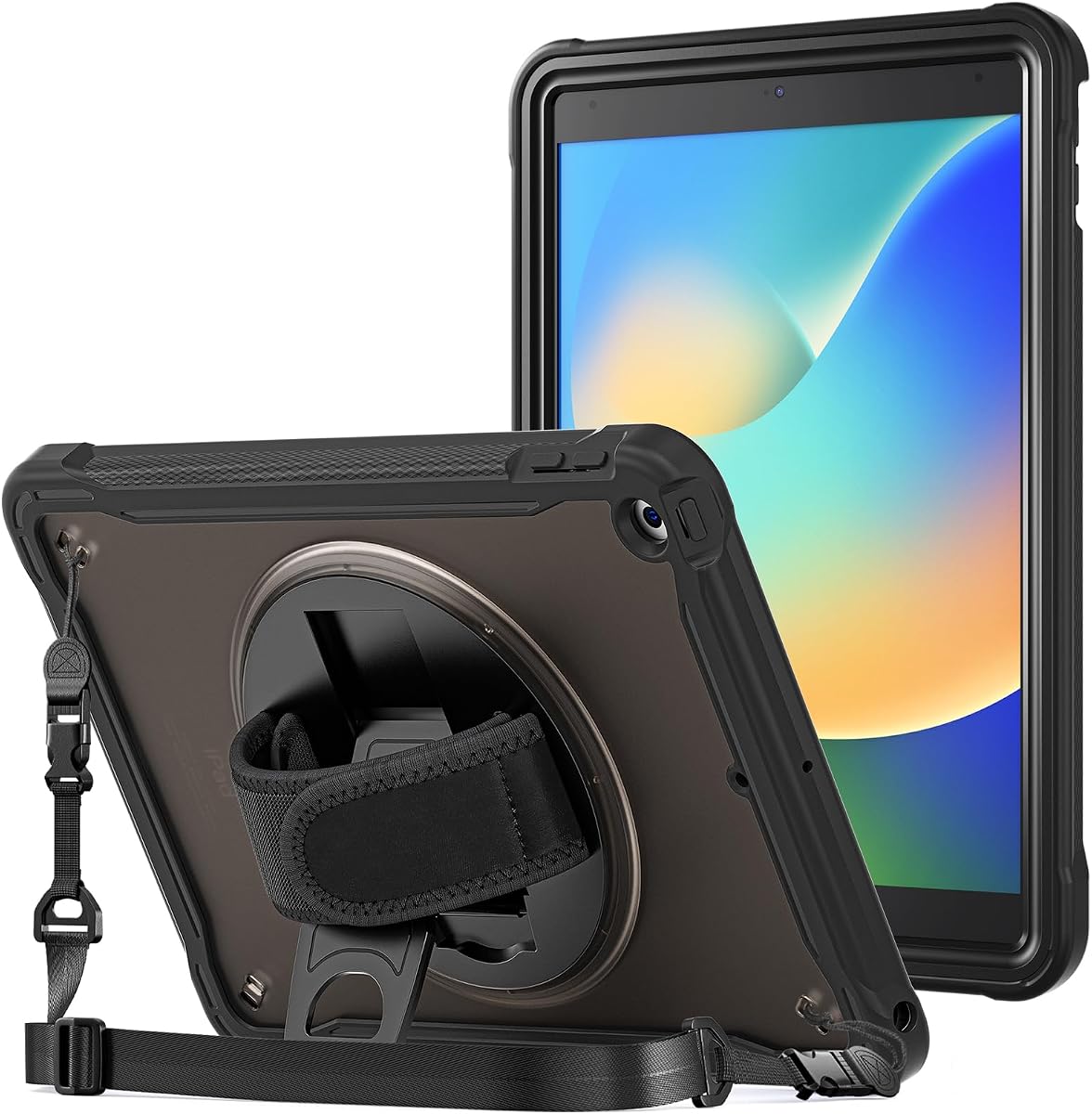
The ProCase A16 Rugged Case has the highest supplied rating in this group at 4.7. It targets iPad A16 11-inch and 10th-generation 10.9-inch models and combines premium polycarbonate with shock-absorbing TPU. That layered composite approach is designed to resist accidental drops, knocks, slips, and scratches without using the rigid bulk of a full metal enclosure.
We may earn a commission when you buy through this link, at no additional cost to you.
A 360-degree rotating stand supports typing and viewing positions, while the ergonomic rear grip helps with one-handed handling. The translucent frosted back lets the owner see the tablet's original color and can make identification easier in a bag full of similar devices. A small leather band holds an Apple Pencil in place for quick access.
The adjustable, removable shoulder strap supports extended carrying and can also attach to a car headrest. That secondary use is relevant to contractors traveling between sites, although the primary construction focus remains protection. Overall, the case combines several useful job-site functions without the weight or rigid structure associated with a metal shell.
It is limited to the specified A16 and 10th-generation model numbers, so checking the identifier on the tablet is essential. Some users may also find a rotating stand less useful than a fixed horizontal support for continuous typing. Overall, it is a balanced, highly rated choice for modern iPads used for plans, field documentation, travel, and communication.
Polycarbonate provides a rigid outer structure while TPU absorbs and cushions impacts. This pairing is a practical middle ground for a tablet that will be carried around a site but does not need to survive the same treatment as permanently mounted field equipment.
The shoulder strap and headrest attachment make this case convenient beyond the job site. Contractors can use it for mobile plan review, presentations, travel, and communication while keeping the tablet enclosed.
We may earn a commission when you buy through this link, at no additional cost to you.
The ProCase 10.2 Rugged Case supports 9th-, 8th-, and 7th-generation 10.2-inch iPads and carries a 4.4 supplied rating. It uses the same practical combination of premium polycarbonate and shock-absorbing TPU found in many modern protective shells, giving older devices meaningful protection against drops, knocks, slips, and scratches.
We may earn a commission when you buy through this link, at no additional cost to you.
The rotating stand supports both typing and viewing, while the rear grip assists one-handed handling. A translucent frosted back retains some visibility of the tablet and a leather band secures a pencil. These are simple but useful additions for drawing, markup, note-taking, and plan review in environments where the tablet may be handled without a desk.
The shoulder strap is adjustable and removable, allowing the tablet to hang close to the body or be carried without occupying both hands. It can also attach to a car headrest, which adds value for workers traveling to different properties. The modular design therefore supports active work, travel, and learning rather than only desk-based protection.
The product is specifically incompatible with other iPad devices, so precise model verification is important. It also lacks the sealed environmental protection offered by the OtterBox ResQ or the rigid structure of the Mob Armor X Series. Its best fit is for an older 10.2-inch fleet that needs balanced, portable protection at a modest cost.
Many organizations still operate 10.2-inch iPads purchased several years ago. This case allows those devices to remain useful without forcing immediate replacement, provided the exact generation and model number are verified.
The rotating stand changes the tablet from a handheld device into a supported workstation. That flexibility is useful for markups, checklists, plan viewing, and video meetings on temporary work surfaces.
We may earn a commission when you buy through this link, at no additional cost to you.
The OtterBox Defender Series provides a familiar multi-layer protection approach for iPad A16 and 10th-generation devices. Its 4.3 supplied rating reflects a solid overall reception, and the case is designed for active, high-impact environments where daily drops, knocks, and construction dust are likely concerns.
We may earn a commission when you buy through this link, at no additional cost to you.
A solid inner shell and resilient outer layer work together to absorb and dissipate impact. Port covers help block dust, dirt, and debris, which adds useful protection during dusty jobsite work. The design is not fully sealed like the ResQ Series, but it addresses many common threats without requiring a completely sealed enclosure.
The stand supports four positions for typing, media viewing, portrait interaction, and landscape streaming. This is more adaptable than a simple fixed support and lets a contractor change the tablet's orientation for plan review, documentation, or communication. Apple Pencil storage keeps the stylus close, while dual lanyard attachment points offer additional carrying or retention options.
The case is made for a specific set of modern iPads, so model checking remains important. A separate shoulder strap would be needed for hands-free transport over long distances. Even so, the Defender Series is a practical all-purpose choice for crews seeking strong impact protection, covered ports, flexible viewing positions, and built-in stylus storage.
The combination of rigid and resilient layers helps distribute impact forces. It is a sensible choice for tablets that move between work areas, vehicles, and client meetings while remaining exposed to routine knocks.
Four positions support portrait, landscape, typing, and viewing needs. Contractors can quickly reposition the tablet according to the task without carrying a separate support accessory.
We may earn a commission when you buy through this link, at no additional cost to you.
The SEYMAC 9.7-Inch Case is designed for several older iPad configurations, including 6th- and 5th-generation models, iPad Air 2, and the 9.7-inch iPad Pro. It has a 4.5 supplied rating and offers a broad set of functions for organizations that have not standardized on newer tablets.
We may earn a commission when you buy through this link, at no additional cost to you.
Its construction combines thermoplastic polycarbonate with soft, anti-skid silicone. A built-in screen protector contributes front coverage, while the flexible exterior improves grip. Buttons, the camera, and ports remain accessible without removing the case, which is important for crews that use communication, documentation, or connectivity features throughout the day.
A soft hand strap, removable shoulder strap, and 360-degree rotating kickstand provide several ways to carry and position the tablet. The stand supports viewing, typing, media use, and outdoor work, while the shoulder strap helps free the user's hands. A pencil holder keeps a stylus within reach, though no pencil is included with the case.
The case is not compatible with the current iPad models found in most new fleets, so buyers must confirm the model number before ordering. It also lacks full waterproofing and the specialized mounting provisions of the Mob Armor. Even so, it is a capable protective option for a 9.7-inch device used for plans, communication, and documentation.
Compatibility with several 9.7-inch families makes this case practical for organizations with mixed tablet inventories. Teams can standardize handling features across more than one older device generation without changing the case style.
The anti-skid silicone exterior, hand strap, and shoulder strap support use around wet, dirty, or uneven work areas. The stand makes it easier to keep plans visible without holding the tablet throughout a task.
We may earn a commission when you buy through this link, at no additional cost to you.
The SEYMAC Anti-Slip Stand Case is a straightforward protective option for iPad A16 11-inch and 10th-generation 10.9-inch devices. Its supplied rating is 4.6, and its main appeal is a stable horizontal stand paired with a three-part protective build designed for bumps, scratches, shocks, and accidental drops.
We may earn a commission when you buy through this link, at no additional cost to you.
The case combines a hard PC frame, shock-absorbing sponge pads, and a soft TPE skin. This layered structure gives the tablet more protection than a thin sleeve while maintaining a comfortable exterior. A built-in screen protector adds coverage to the most visible and vulnerable surface, making the package more complete for daily field use.
The anti-slip kickstand supports the tablet horizontally and is intended to remain stable on work surfaces. A detachable, adjustable shoulder strap allows hands-free carrying during hiking, travel, and outdoor activities. It can also be hung conveniently when the user needs both hands, such as during inspections or repetitive site tasks.
The kickstand is more limited than a 360-degree rotating stand because it primarily supports horizontal placement. It also excludes Air and Pro models. Those constraints are reasonable for buyers who want stable landscape viewing and layered protection without the additional hinge complexity found in some competing cases.
A wide, anti-slip horizontal support is useful for reading drawings, checklists, or forms on a toolbox or plan table. It reduces the need to prop the tablet against unstable objects found around a work area.
The rigid frame controls overall shape, the sponge pads absorb impact, and the TPE skin provides a softer tactile surface. Together they create a practical barrier against the daily knocks associated with mobile use.
We may earn a commission when you buy through this link, at no additional cost to you.
The SEYMAC 13-Inch Pro Case is built for the larger 13-inch iPad Pro M4 and M5 models, with a supplied rating of 4.6. Its larger format makes it a good choice for contractors who need more screen space for detailed drawings, large checklists, project management views, and video consultation.
We may earn a commission when you buy through this link, at no additional cost to you.
Shock-absorbing technology is intended to protect against hits, drops, and bumps, while a built-in screen protector adds front coverage. The case is designed as a full protective accessory rather than a minimal sleeve, which is especially relevant for an expensive large-screen device that may be carried directly between work areas.
A stable stand and rotating handle serve different needs. The handle provides a secure grip during transport, and the stand can hold the tablet for video calls, plan viewing, or media. A detachable shoulder strap allows the user to carry the larger tablet while keeping both hands available for tools or other work.
Its size and weight make it less convenient than a 10.9-inch or 11-inch case, particularly for one-handed use throughout a long shift. The product is also limited to the listed M4 and M5 configurations, and the Apple Pencil is not included. It is best for users who prioritize a large, protected display and have the carrying capacity for a 13-inch device.
A 13-inch display provides additional room for detailed plans and construction documents. The case allows that larger surface to be supported on a work surface or carried securely between locations.
The rotating handle and detachable shoulder strap provide two different ways to manage a relatively large tablet. Workers can select hand-held use for short tasks and shoulder carrying when both hands are needed.
We may earn a commission when you buy through this link, at no additional cost to you.
Choosing a case for a construction site means balancing device fit, impact resistance, environmental protection, handling, and workflow features. The most protective option is not automatically the most convenient, so consider how and where the tablet will actually be used.
Begin with the model identifier printed on the back of the iPad. Cases that look similar can have different camera openings, button positions, dimensions, and port layouts, and the products in this guide cover different generations rather than one universal design. Check both the marketed generation and the specific A-series number listed by the manufacturer. This is particularly important when purchasing for a fleet of tablets because software generation and physical hardware model do not always align in a way a shopper expects.
A useful jobsite case needs more than a decorative outer shell. Look for a rigid inner frame, shock-absorbing intermediate layer, raised or reinforced corners, and a non-slip exterior. The Mob Armor X Series uses an aluminum enclosure and thermoplastic bumpers, while the ProCase and SEYMAC products use combinations of polycarbonate or PC, TPU, TPE, silicone, or foam-like padding. Consider the amount of daily handling, vehicle transport, and possible drops when deciding how much structure is necessary.
Dustproof and waterproof claims are not interchangeable with general rugged construction. A composite case with covered ports may handle ordinary dust and splashes, while a formally sealed enclosure provides a stronger barrier against immersion and fine contaminants. The OtterBox ResQ Series is the only option here with a stated IP68 rating, tested under specific conditions. Review the certification, port covers, and operating limitations carefully, especially if the tablet will be washed down, used in rain, or placed near wet concrete.
The display is one of the most exposed and expensive parts of an iPad. Several cases here include a built-in screen protector, which provides a more complete setup than relying on a separate accessory. Pencil retention is another useful consideration for plan markup, measurements, checklists, and field notes. Look for a secure loop or storage location that keeps the stylus accessible without creating a point that could damage the tablet or catch on clothing.
A case that is difficult to hold becomes a liability when a worker is wearing gloves or carrying tools. Rotating hand straps, rear handles, thumb holds, and non-slip grips offer different levels of control. For longer movements or inspections, a detachable shoulder strap can free both hands. Consider whether the tablet will remain in a pocket, sit on a work surface, hang from a lanyard, or be carried across a site, then select the carry method that matches the real workflow.
A stand is most valuable when it can support the way the tablet is used. Rotating models offer portrait, landscape, and multiple typing angles, while fixed kickstands generally favor horizontal viewing. Consider stability on the surfaces available at work, including toolboxes, plan tables, ladders, or vehicle surfaces. A wider anti-slip base is often more useful than additional hinge positions if the tablet mainly displays drawings or forms.
If the iPad will serve as a fixed station, prioritize integrated mounting patterns over carrying features. The Mob Armor X Series includes 75mm, 100mm VESA, and AMPS patterns that work with compatible TabNetic and Tab Mount systems. A permanent mount can improve plan viewing, equipment monitoring, and video calls, but it is unnecessary for a tablet moved continuously throughout the day. Confirm that the chosen mount and the case are designed to work together before purchasing.
A rugged enclosure can protect a tablet very effectively, but the added bulk matters during a full workday. Rigid aluminum is well suited to mounted equipment or high-value devices, while composite cases are often easier to carry. Large 13-inch models naturally require more space and support than 10.9-inch or 11-inch tablets. The best choice is not simply the most protective model, but the one that provides the required safeguards without making routine handling frustrating.
Install the case on a clean, dry work surface and confirm that every camera, button, speaker, and port opening aligns correctly. If the case includes a screen protector, follow the supplied installation directions and inspect the display for trapped dust or bubbles. Do not force the tablet into a case that does not match its exact model number. Once the fit is verified, check that the closure, hinges, handle, strap anchors, and kickstand are secure before moving the device.
Before each use, inspect the case for cracks, loose bumpers, damaged corners, or a warped stand. Clean the exterior with a soft, lint-free cloth and avoid flooding openings or immersing a case that is not designed for underwater use. Remove grit from the case and connector areas before closing it around the iPad. A separate Apple Pencil should be stored in its holder only when the fit is secure, and lanyards or shoulder straps should be checked for cuts or stretched attachment points.
Use the stand only on a stable, level surface, and avoid standing the tablet where a worker may accidentally kick it. Secure the hand strap or shoulder strap before moving between work areas, especially around stairs, ladders, moving equipment, or traffic routes. If a case has a sealed design, confirm that all port covers and seals are fully closed before exposure to water. After a significant impact, inspect the iPad and case before returning the device to service.
A secure fit with strong impact protection is the foundation, but the best feature depends on the work. A contractor handling a tablet constantly may prioritize a grip, stand, and shoulder strap, while a worker near water may need a formally sealed enclosure. Device compatibility should be checked before comparing any other feature.
A waterproof case is worthwhile when the iPad will be exposed to rain, washdown, wet concrete, or other significant water risks. Rugged composite cases still provide useful protection against drops, dust, and scratches. Only the OtterBox ResQ Series in this guide has a stated IP68 waterproof and dustproof rating.
Check the small model identifier on the back of the tablet and compare it with the list printed in the product description. A generation name alone may not reveal whether buttons, cameras, or dimensions match. Products here support specific A-series numbers, and some explicitly do not fit Air or Pro variants.
It can be useful when the tablet needs to alternate between plan viewing, typing, portrait tasks, and video calls. A fixed anti-slip stand is sufficient for primarily horizontal use and may provide better stability on a flat work surface. The best choice depends on the workflows and surfaces involved.
No Apple Pencil is included with any of the listed products, although several cases provide a holder, loop, or band for one. The UAG Plasma also accommodates the Logitech Crayon. Workers who rely on markup should plan to purchase their preferred stylus separately.
They can be, particularly rigid aluminum models and cases for 13-inch tablets. Rotating hand straps, rear handles, and detachable shoulder straps reduce strain and improve control. Workers should balance their required protection level against the device size and the amount of time it will be carried.
The Mob Armor X Series is the strongest choice in this guide for mounted use because it includes 75mm, 100mm VESA, and AMPS patterns. Other cases focus on handheld protection, stands, and carrying. Confirm compatibility with the intended mount before purchasing any fixed installation.
Use a soft, lint-free cloth to remove loose dust and wipe the exterior with a lightly dampened cloth. Avoid spraying cleaner directly onto the case and prevent liquid from entering uncovered ports. Only immerse or rinse a case if its manufacturer explicitly states that the enclosure supports that cleaning method.
The Mob Armor X Series is the standout choice for professional, high-value use because its aluminum enclosure, shock-absorbing bumpers, secure thumb holds, and integrated mounting patterns are specifically suited to demanding applications. The UAG Plasma is the premium all-around option for modern iPads, offering reinforced corners, covered controls, a rotating strap, and a flexible kickstand.
For buyers seeking a practical value choice, the SEYMAC A16 Case and ProCase A16 Rugged Case provide layered protection, a grip, a rotating stand, and a carrying strap without moving to a rigid metal enclosure. The OtterBox ResQ Series stands apart for sealed environmental protection on supported 10.2-inch models, while the SEYMAC 13-Inch Pro Case is best for workers who need a larger protected display.
Whatever option fits your device, verify the exact model number, assess the likely moisture and impact exposure, and confirm that the included stand, grip, strap, or mount supports your daily workflow. Product prices and availability change frequently, so review the current listing and recent customer feedback before making a final purchase.