
Metal Wall Mount for Nintendo Switch 2
4.7Editor score
Powder-coated steel construction
Console and accessory storage
Mount behind television or desk
Discover the best Nintendo Switch 2 wall mount options, comparing compatibility, charging, storage, ventilation, materials, and installation features.
A Nintendo Switch 2 wall mount can transform a crowded entertainment area by lifting the console, dock, controllers, cables, and game cards into an organized storage zone. The best model depends on whether you prioritize charging convenience, broad console compatibility, a compact footprint, strong materials, or discreet storage behind a television.
This guide compares ten wall mounts and charging organizers using the supplied product information. We examine device compatibility, dock support, ventilation, accessory storage, lighting, construction, mounting hardware, and useful functions such as USB ports and desktop stands. Products made for the original Switch or OLED model are included only when their stated compatibility or adjustable design is clear.
Each review explains who the product suits, what it does well, and where it falls short. The top selections represent an all-in-one charging solution, a compact metal console mount, and a space-saving dock bracket, while the remaining options cover broader compatibility and specialized charging needs. Prices and availability can change, so confirm current listing details before buying.
4.7Editor score

4.8Editor score

4.8Editor score
The comparison below highlights the major differences among all ten options, including Switch 2 support, charging capability, storage, materials, ventilation, and installation approach.



The FASTSNAIL RGB Switch 2 Wall Mount Kit is the most feature-rich product in this guide, combining a console charging position, controller charging, accessory storage, RGB lighting, and a desktop-stand alternative. Its 4.8 rating reflects the strong appeal of a single unit that can centralize nearly an entire Switch setup. It is particularly attractive for players who want their console visible yet safely organized near a television or entertainment center.
We may earn a commission when you buy through this link, at no additional cost to you.
Storage is a major strength. The listed capacity includes room for one Switch console, six Joypads, four wrist straps, two Pro Controllers, and ten game cards, while the P-Controller holders also provide cable organization. The dock area includes two USB 2.0 ports for low-current charging and data transfer. Charging status is easy to read because the indicator turns orange while charging and blue when the console is charged or in standby, and a charging button allows the unit to function as a stand without charging.
The lighting system adds personality without dominating the product's core purpose. Seven monochrome modes and eight dynamic modes cover red, green, blue, orange, sky blue, purple, white, and rainbow effects. A short press changes the effect, while a three-second long press can memorize and turn it off. Compatibility includes Nintendo Switch 2, original Switch, and OLED systems, and four anti-slip silicone pads help stabilize the charging dock when it is used on a desk rather than mounted to a wall.
The trade-off is complexity. A product carrying a charging platform, cable management, multiple storage areas, lighting controls, and wall-mounting hardware will naturally occupy more space than a simple metal bracket. It also requires a compatible Type-C power connection, so buyers should plan cable routing before installation. Even so, the combination of charging, storage, broad compatibility, and desktop flexibility makes this an excellent choice for a shared gaming area or a setup where accessory clutter is already a problem.
The charging station doubles as a storage hub for controllers, game cards, straps, and cables. This reduces the need for separate trays or hooks near the television and keeps frequently used items in one visible area.
The included wall plate and silicone pads make the kit useful behind a television or on a desk. That flexibility is valuable for renters, secondary gaming rooms, and setups where permanent installation may not be desirable.
We may earn a commission when you buy through this link, at no additional cost to you.
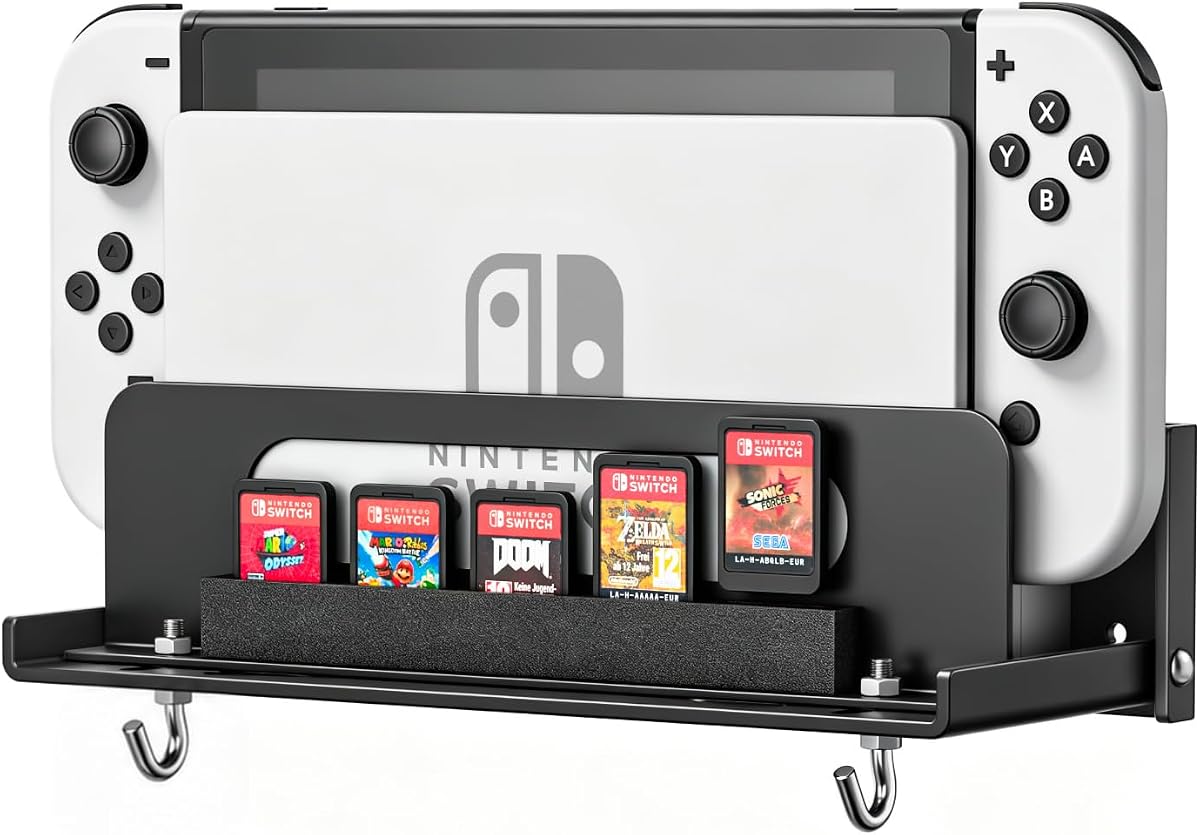
This Metal Wall Mount earns its place as the premium all-metal organizer for Nintendo Switch 2, original Switch, and OLED systems. Its 4.7 rating reflects a straightforward, durable approach: place the console in a secure cradle, organize accessories nearby, and keep the setup compact enough to sit behind a television or on a desktop. It avoids decorative excess in favor of a clean, practical appearance.
We may earn a commission when you buy through this link, at no additional cost to you.
The hollowed steel structure is designed to balance support with heat dissipation. Its form allows air to move around the console instead of enclosing it in a fully sealed shelf. EVA strips are included to reduce shaking, which can improve stability when the console is inserted or removed. Rather than simply offering a hook, this mount creates a defined home for the console and nearby accessories.
The organizer is unusually useful for the range of hardware it supports. It provides four Joy-Con hangers, storage for eight game cards, and a secure console position away from accidental contact. The package includes a wall mounting plate, screws, screw fittings, a bubble level, and a user manual, so the basic installation process is well supported. Its understated finish is likely to blend into a home entertainment area more easily than a lighting-heavy charging station.
The most important limitation is that this is primarily a storage mount rather than a charging system. Players who need a convenient place to recharge controllers will need a separate dock or charging accessory. Installation also requires confidence with basic wall mounting and suitable wall material. Even with those caveats, it is a strong premium pick for someone who values metal construction, broad compatibility, ventilation, and a tidy appearance over integrated lighting or charging electronics.
Powder-coated steel gives this mount a more permanent, furniture-like presence than lightweight plastic organizers. The simple finish is intended to disappear into an entertainment setup while supporting the console securely.
Supporting Switch 2, original Switch, and OLED hardware makes this a practical choice for households that may own more than one console generation. It also simplifies future upgrades without requiring a completely different mounting approach.
We may earn a commission when you buy through this link, at no additional cost to you.
The Monzlteck Wall Mount Bracket is a focused solution for people who want to hide a Nintendo Switch 2 dock beside their television. It carries a 4.8 rating and distinguishes itself through a left-side TV placement that turns a narrow strip beside the display into dedicated console space. The result is a clean installation that keeps the dock visible when needed but away from the main viewing area.
We may earn a commission when you buy through this link, at no additional cost to you.
Its contoured metal bracket is shaped to support the Switch 2 dock securely and resist accidental drops or slips. A matte coating helps guard against scratches while giving the bracket a clean appearance that should blend with modern television furniture. The left-side position also supports tidier cable routing by keeping cables gathered along one side rather than spread around the console area.
Installation hardware is included, and the bracket adds a controller strap hook for a small amount of extra organization. That hook is not a replacement for a comprehensive accessory organizer, but it is useful for preventing wrist straps from dangling onto the floor. The streamlined approach works particularly well for players who already have a charging dock and only need a secure place for the console hardware.
Compatibility is the decisive limitation. The product is designed specifically for the Switch 2 and is explicitly not compatible with the original Switch or OLED model. It also focuses on the dock rather than offering broad storage for game cards and controllers. Those restrictions make it less flexible than the first two picks, but they are reasonable for a buyer who knows exactly what they own and wants the smallest practical mounting solution.
Mounting the dock along the side of the television reduces visual clutter around the screen. It is especially helpful in narrow entertainment centers where a freestanding dock would consume valuable surface space.
The contoured cradle is designed around the newer dock rather than relying on a generic shelf. That focused geometry should appeal to owners who value a close, stable fit and a minimalist installation.
We may earn a commission when you buy through this link, at no additional cost to you.
The HIDEit Mounts Nintendo Switch 2 Wall Mount is built for one clear purpose: holding a Switch 2 console and dock securely behind a television while preserving airflow. Its 4.1 rating is lower than those of the leading selections, but the product's steel cradle, locking points, and open-vent design make it a credible choice for buyers who prioritize secure support and cooling over extensive accessory storage.
We may earn a commission when you buy through this link, at no additional cost to you.
The reinforced cradle is claimed to resist wobble during dock and undock use. Anti-wobble locking points help keep the console from slipping, while the open layout is designed to leave vents, ports, Wi-Fi, and Bluetooth access unobstructed. These details matter because a wall-mounted solution that blocks ventilation or prevents easy controller removal can become frustrating during normal use.
Construction is centered on heavy-gauge, cold-rolled steel rather than plastic. The powder-coated finish is intended to resist rust and protect the Switch from scratches, while the shape should preserve a low-profile appearance behind the display. The product is custom-designed for the Switch 2 only, so it is better suited to a current-generation console than a mixed household setup.
This is a focused mount rather than a complete organizer. It does not advertise game-card slots, controller charging, or a broad hanging system, meaning players may still need separate storage for accessories. Its Switch 2-only fit also limits future flexibility. Even so, it is an appealing match for someone who wants a discreet, steel-backed cradle with a strong emphasis on stable support and unobstructed ventilation.
The open construction keeps the console's vents accessible while the steel cradle provides a firm resting point. This balance is useful for docked play, when airflow around the hardware matters most.
The dedicated Switch 2 fit avoids the compromises of a universal bracket. Owners of original Switch hardware should look elsewhere, but current-generation owners benefit from a design made around their console and dock.
We may earn a commission when you buy through this link, at no additional cost to you.
The Multi-Generation Wall Mount is appealing for households that want one mounting solution to cover Nintendo Switch 2, original Switch, and OLED hardware. Its 4.6 rating reflects a useful balance of broad compatibility, integrated storage, and an open-air design. It is positioned for bedrooms, dorms, gaming rooms, and entertainment centers where freeing desk or cabinet space is important.
We may earn a commission when you buy through this link, at no additional cost to you.
Instead of supporting only the console, the mount includes storage for Joy-Con controllers and game cards. This makes it a more complete station than a basic dock bracket and helps keep frequently used accessories within reach. The ventilated structure is designed to reduce heat buildup around the console and dock during longer sessions, supporting stable use without fully enclosing the hardware.
The package includes mounting hardware and simple installation instructions, with the intention of allowing a quick setup on a wall or entertainment center. Its understated organization is likely to suit users who want the console visible and accessible but do not need elaborate lighting or an integrated charging system. It may also work well in secondary spaces where a permanent-looking, hardware-supported mount is preferred.
The important ambiguity is charging: the supplied information does not identify the unit as a charging dock, so buyers should not assume controllers or console can recharge there. Because it supports three generations, it is also worth checking the exact dimensions and fit of the newest dock before drilling. Overall, it is a practical and flexible organizer for people who value compatibility and consolidated storage above decorative features.
Broad support reduces the need to replace wall hardware after a console upgrade. It also makes the product more appealing to shared spaces where original, OLED, and Switch 2 hardware may all appear over time.
Dedicated positions for controllers and game cards make the mounted area function as a small gaming station. Players can keep essential items together rather than spread across drawers or the floor.
We may earn a commission when you buy through this link, at no additional cost to you.
The VIVO Black MOUNT-ALL02 is a simple metal wall mount for Nintendo Switch 1 and Switch 2 owners who want a low-profile way to secure the console. Its 4.6 rating reflects a solid combination of adjustable fit, open-frame ventilation, and straightforward installation. It is less elaborate than a charging organizer, but that simplicity can be exactly what some entertainment setups need.
We may earn a commission when you buy through this link, at no additional cost to you.
The mounting width adjusts from 1.9 to 3 inches, allowing users to find a secure position for their particular setup. An open-frame construction leaves space around the console for airflow and avoids the appearance of a bulky shelf. The steel body supplies durable support while remaining visually light enough for many home theater arrangements.
The dock slides into the mount according to the product description, and all required hardware and instructions are included. This makes the product approachable for buyers who want a straightforward wall installation rather than a large organizer requiring separate accessory pieces. It is particularly suitable behind a television, where cables can be routed neatly and the mounted hardware can remain out of the main viewing area.
The MOUNT-ALL02 does not provide charging or a meaningful amount of accessory storage, so it will not replace a charging dock. Players who keep several controllers, game cards, or straps nearby still need another organization solution. Its stated Switch 1 and Switch 2 compatibility does not explicitly mention OLED, so buyers with an OLED dock should confirm dimensions. Even so, its adjustable, open, and uncomplicated design makes it a strong option for a minimal console mount.
The one-to-three-inch adjustment range gives users more control over the mounted position than a fixed-size bracket. It also reduces the risk that a generic opening will be either too loose or too restrictive.
The slim open frame maintains visibility and circulation around the console. That makes it easy to combine with a television installation where every visible element is kept behind or beside the screen.
We may earn a commission when you buy through this link, at no additional cost to you.
The HIDEit Mounts Uni-SW is a universal steel wall mount that lists Nintendo Switch 2 compatibility while also accommodating cable boxes, routers, media players, and other small devices. Its 4.7 rating reflects a versatile approach to hiding entertainment hardware and cords. It is especially useful for users whose real priority is a clean television wall rather than a full accessory station.
We may earn a commission when you buy through this link, at no additional cost to you.
Its adjustable frame supports a listed height of three to nine inches, length of four to 10 inches, and depth of 1.76 to 2.7 inches. Those ranges allow it to fit the Switch 2 while remaining useful for other compact media hardware. The included 75mm and 100mm VESA holes permit direct attachment to the back of a television or monitor, while infrared, RF, and Bluetooth signals remain able to pass through as described.
Construction uses 16-gauge cold-rolled steel with a powder-coat finish intended to resist rust, chipping, and scratches. The installation is designed to take three steps without a drilling template, although stud mounting is optional. This makes it convenient for users who want to place a small device directly behind a wall-mounted television and eliminate visible cable clutter.
The key requirement is careful measurement. Because it is a universal mount rather than a model-specific cradle, buyers must compare the Switch 2 and dock dimensions with the stated adjustment range. It also does not provide the controller, game-card, or charging storage offered by the organizers in this list. For a clean multi-device installation, however, the flexibility and VESA support make it a particularly useful choice.
Beyond the Switch 2, the adjustable design can organize routers, media players, and cable boxes. That versatility is valuable in a home media room where several small components compete for limited space.
Built-in VESA holes allow the mount to disappear behind a suitable television. This configuration keeps hardware and cables out of sight while preserving wireless signal operation.
We may earn a commission when you buy through this link, at no additional cost to you.
The RGB Charging Dock Wall Mount is a highly organized charging solution for original Switch and OLED systems, with a 4.7 rating. It combines a four-controller charging dock, a home for the console, storage for several accessory types, two USB ports, and colorful lighting. Its centerpiece is the lighting system, which offers 15 modes spanning monochrome colors and dynamic effects.
We may earn a commission when you buy through this link, at no additional cost to you.
The charging indicators use red for an active charge and blue for a fully charged state, while a switch allows the user to move between charging and stand modes. Storage positions cover Joy-Con controllers, game cards, wrist straps, Pro Controllers, and the console. Two extra USB ports handle low-current charging and data transfer, making the unit useful as a small connection hub rather than merely a wall shelf.
The RGB illumination includes red, green, blue, and other colors, with both static and moving choices. This gives the installation a more decorative appearance than conventional steel mounts and may suit a gaming room where color is part of the visual theme. Four anti-slip pads help maintain stability when the unit is used on a desktop, and the wall plate allows it to sit behind a television.
Compatibility is the key limitation. The supplied product title and description specify Nintendo Switch and Switch OLED models but do not state that the Switch 2 is supported. Owners of the newer console should therefore avoid assuming compatibility and check the listing or manufacturer information before buying. The product is still excellent for original and OLED setups that want attractive lighting, controller charging, and substantial storage in one package.
Four charging positions and readable status lights make the organizer practical, while 15 illumination modes let it serve as a visual feature. Users can select a static color or dynamic effect to suit their room.
The mix of controller, game-card, strap, Pro Controller, and console storage keeps essential items together. It is a particularly good fit for original or OLED owners who want a charging station and organizer in one unit.
We may earn a commission when you buy through this link, at no additional cost to you.
The Mcbazel Metal Bracket is designed specifically for the Nintendo Switch 2 dock that shipped with the 2025 console. Its 4.4 rating reflects a thoughtful two-piece arrangement and a useful emphasis on ventilation. Unlike universal-looking mounts, this bracket is cut for the newer dock shape, making it a precise option for current-generation owners.
We may earn a commission when you buy through this link, at no additional cost to you.
The large bracket measures 19.5 by 6 by 5.6 centimeters and supports the dock with the console seated inside it. A separate small bracket mounts below or beside it, providing a position for a Switch 2 Pro Controller and two hooks for detachable side controllers by their straps. This separation avoids forcing the dock and controller into one crowded hook and allows the controller storage to be positioned independently.
The dock bracket is metal with a powder-coated finish that resists rust and chipping. Four-millimeter anti-scratch pads sit where the bracket contacts the dock, helping protect the shell during repeated removal and insertion. The underside contains a large hollow so warm air can leave from below, an important consideration when the console remains docked for an extended gaming session.
Four wall plugs and four screws are included, but they are essential to the installation. The product description recommends marking the holes, testing the placement with a similarly weighted item, and periodically checking the screws. This bracket will not accommodate the earlier Switch or OLED dock, so buyers must verify their hardware. For a dedicated Switch 2 setup, its precise fit and separate controller piece make it more thoughtfully arranged than a basic one-piece shelf.
Designing around the 2025 dock helps reduce the gaps and movement associated with some adjustable mounts. It is a stronger choice for a buyer who is certain the newer dock is the only hardware involved.
The independent controller bracket can sit below or beside the dock. This makes the installation more flexible and provides dedicated hanging points for a Pro Controller and side controllers.
We may earn a commission when you buy through this link, at no additional cost to you.
The Magnetic Joy-Con Charging Organizer is a controller-focused charging station that supports Nintendo Switch 2, original Switch, and OLED controllers. Its 4.6 rating reflects an unusual combination of broad controller compatibility, magnetic charging contacts, RGB lighting, and direct integration with a Switch dock. Despite appearing in a wall-mount roundup, it is best understood as an adjacent accessory for players who want a tidy charging point near their mounted console.
We may earn a commission when you buy through this link, at no additional cost to you.
The station has four dedicated magnetic charging slots for Switch 2 controllers and four additional ports for original or OLED controllers. The magnetic approach supports bidirectional charging for the newer controllers, reducing the need to carefully align each controller in a conventional slot. Orange LEDs indicate charging, green indicates a full charge or standby, and a touch control turns off the light when glare is unwanted.
The charging cable connects directly to a Switch dock, allowing power to come from the console's dock rather than requiring a separate wall adapter for the organizer. Its hollowed bottom is designed not to obstruct the Switch 2 cooling fan. Six RGB lighting modes add visible feedback and decoration, while the enclosed console-generation compatibility makes the charger useful during a transition between hardware generations.
This is not a wall mount for the console or dock itself, so it cannot replace the dedicated brackets and cradles in this guide. It also takes approximately two and a half to three hours to charge the supported controllers. For a shared household or mixed-generation collection, however, the eight charging positions, magnetic alignment, and dock-integrated power connection make it a practical and distinctive charging solution.
Bidirectional magnetic contacts make it easier to place Switch 2 controllers without repeated alignment. The feature is especially helpful in a dim room or when several controllers are being placed or removed at once.
Separate charging areas accommodate newer and older controller styles in the same station. This broad support is useful for households sharing controllers between different systems.
We may earn a commission when you buy through this link, at no additional cost to you.
The right Nintendo Switch 2 wall mount depends on your console, available wall space, storage habits, and need for charging. Compatibility, airflow, mounting stability, and cable management should be evaluated before installation.
Begin by identifying exactly which hardware you own. Some products are made specifically for the 2025 Nintendo Switch 2 dock, while others support the original Switch, OLED, and Switch 2. The shape and dimensions of each dock differ, so a product that looks similar may not hold the console securely. Products with adjustable brackets can accommodate more than one generation, but buyers should still compare the stated adjustment range with the dimensions of their setup.
The title's Switch 2 wording does not guarantee that every included accessory supports the new system. Check whether compatibility covers the console, dock, controllers, or only some of those elements. Original Switch and OLED owners should also verify whether their dock is included in the stated list.
Summary: Confirm the exact console generation and dock shape before ordering, and never rely on appearance alone.
Decide whether you need a passive storage mount or an active charging organizer. A wall mount that simply holds the dock will not recharge controllers, while charging stations may include controller contacts, status indicators, USB ports, and a power connection. Integrated charging is convenient when the console stays docked, but it adds cable requirements and another piece of electronics to operate. Players with a separate reliable charging dock may prefer the cleaner appearance of a metal bracket.
Check whether the charging function can be switched off. Standby or lighting-off modes can reduce distraction at night, and a dedicated charging button is more useful than unplugging the entire unit. For mixed-generation families, magnetic or separate controller charging positions can simplify daily changes.
Summary: Choose a charging organizer only if you value integrated charging enough to manage its power cable and standby behavior.
Switch hardware needs room to dissipate heat, especially while docked. Open-frame, hollowed, and vent-friendly designs allow air to circulate more freely than a completely enclosed shelf. Look for openings around the console's vents and ports, as well as a bottom path that lets warm air escape. This is particularly important for a wall installation because a solid wall sits close behind the console.
Anti-slip pads, EVA strips, and stable cradles can improve the fit without sealing the console inside a tight cavity. A snug support is helpful, but excessive pressure or blocked airflow is not. If the mount includes a cooling claim, evaluate whether the design visibly supports that claim through open sides, a hollow core, or a raised profile.
Summary: Favor open structures that leave vents and ports accessible while securely supporting the console.
The amount of storage should reflect how many accessories you regularly use. A basic bracket may hold only the console or dock, while organizers add positions for Joy-Con controllers, Pro Controllers, game cards, wrist straps, and cables. Evaluate the stated capacity against your actual collection rather than choosing the largest number printed on the package. Unused hooks and oversized compartments can add bulk without improving daily organization.
Cable management deserves separate attention. Dedicated P-Controller holders or hooks can keep charging leads suspended and away from the floor. Cable boxes or universal mounts may be useful when the main goal is hiding wires behind a television, but they usually do not organize individual Switch accessories in the same way as a dedicated charging station.
Summary: Match controller, game-card, strap, and cable storage to the accessories you use every week rather than the largest collection you own.
Steel is generally preferable to thin plastic for a permanent console mount because it provides a more rigid support and resists warping. Powder-coated steel offers additional protection against rust, chipping, and scratches around the console contact points. Look for reinforced edges, locking points, and anti-wobble features that help stabilize the dock during removal and insertion.
Material alone does not determine fit. A strong bracket can still be wrong for a console generation, while a plastic organizer can be useful when charging and accessory storage matter more. Evaluate construction alongside compatibility, ventilation, and installation requirements rather than treating steel as an automatic guarantee of superiority.
Summary: Prefer rigid steel and protective coatings for long-term installations, but confirm that the design fits your actual hardware.
Choose a location that keeps the console accessible for controller removal and unobstructed by the television. A bracket behind the display is visually tidy, while a left-side mount can use narrow space beside the screen. Desktop operation offers a reversible alternative for renters or temporary setups. Products with silicone pads or a desktop stand are more flexible than mounts designed only for permanent wall attachment.
Check the included hardware before beginning. A complete kit should provide a mounting plate or bracket, screws, wall plugs, screw fittings, a bubble level where appropriate, and instructions. Confirm that your wall type is suitable and use a level for accurate placement. If the product can be attached through television VESA holes, verify both the pattern and the load arrangement.
Summary: Match the mounting method to your wall or television, and confirm that all required hardware and fixings are included.
RGB lighting can make a gaming area feel more personal and help users identify charging status. More lighting modes provide greater control, but illuminated products may be less suitable for a minimalist room or a television viewed in a dark space. A one-touch light-off control is useful for nighttime use, and a static mode can offer a subtler appearance than a moving rainbow effect.
Metal-only mounts tend to blend into an entertainment center and remain visually unobtrusive. Brighter organizers create a deliberate focal point, which works well when the console area is already part of the room's gaming aesthetic. Think about cable visibility, reflected light, and whether the lighting distracts from the screen.
Summary: Treat lighting as a style preference, prioritizing products with a simple off control if you use the television in a dark room.
A multi-generation mount can reduce waste when a household owns original, OLED, and Switch 2 hardware. It also gives shared gaming rooms a consistent place to store each console. The trade-off is that a universal or adjustable design may not hold the newest dock as precisely as a dedicated cradle.
Think about how often you move systems and whether the wall position will remain useful after an upgrade. A model-specific mount usually provides a closer fit, while a universal product offers more flexibility. In bedrooms, dorms, and temporary spaces, a reversible desktop function may matter more than permanent hardware. Choose the level of future-proofing that matches how the console is actually used.
Summary: Prioritize either precise current-generation fit or broad compatibility based on your likelihood of changing consoles or sharing equipment.
Begin by identifying the wall surface, checking the mount's compatibility list, and comparing the console or dock dimensions with the product specifications. Mark the screw locations with a level before drilling. Install the wall plate or bracket securely, then check it with a similarly weighted object before placing the console on it. Route charging and television cables through a planned path so they do not pull against the dock.
Slide or seat the Switch 2 and dock into the bracket using the intended attachment points. Connect the dock to the television and power as needed, and verify that the controller ports, ventilation openings, and indicator lights remain accessible. For charging organizers, place controllers only into slots labeled for their supported generation and use the power-off or standby function when the lights are not wanted.
Inspect the mount periodically, particularly after moving the console or changing cables. Tighten loose screws, remove dust from vents and storage slots, and clean contact pads with a dry, soft cloth. Do not use excessive moisture on electrical charging contacts or LED surfaces. Keep the area dry and avoid placing heavy objects on the console while it is mounted.
No. Some products explicitly support the Switch 2, original Switch, and OLED, while others are cut for only the 2025 Switch 2 dock. A few adjustable or universal designs can accommodate several devices, but their stated dimensions must be checked. Never assume compatibility from the shape of the console alone.
It depends on the mount. A passive steel bracket or cradle only stores the hardware, while a charging organizer includes controller contacts, status indicators, and a power connection. Confirm whether charging is built into the product and whether the included cable is a complete power solution or simply a connection lead.
A properly installed, compatible mount can be used behind a television, provided the vents and ports remain unobstructed. Choose a model with an open or ventilated structure, route cables without strain, and follow all installation instructions. Avoid covers that trap heat around the console.
A wall mount focuses on securing the console or dock in a fixed location. A charging organizer adds controller charging, indicator lights, cable storage, and accessory compartments. The latter is more convenient for a complete gaming station, while the former is often simpler, smaller, and better suited to a minimalist setup.
No. Most use their own wall plate and attach to the wall with included screws and plugs. Some universal mounts also offer VESA holes for attaching directly to the back of a television or monitor. If using VESA holes, confirm that the pattern matches and that the arrangement can safely support the device.
A model that also works as a desktop stand is usually the most flexible. It can be attached to a wall when appropriate and removed without affecting the console when the gaming location changes. Anti-slip pads help keep the freestanding position stable.
Plan the cable route before securing the console so tension does not pull on the dock. Dedicated cable holders can keep charging leads suspended, while cable clips can guide them along the back of the television. Leave enough slack to remove the console safely and prevent plugs from being bent.
Check the screws, wall plugs, and console position shortly after installation and periodically afterward. This is especially useful if the dock is moved frequently, the wall experiences vibration, or the console runs warm. A quick visual inspection also confirms that vents remain open and cables have not become pinched.
The FASTSNAIL RGB Wall Mount Kit is the strongest all-around choice because it combines charging, extensive accessory storage, multi-generation compatibility, lighting, and desktop flexibility. The Metal Console Wall Mount is ideal for buyers who prefer a discreet steel organizer, while the Monzlteck Dock Bracket offers a focused and compact way to mount the Switch 2 dock beside a television.
For specialized needs, the HIDEit Switch 2 cradle emphasizes secure steel support and ventilation, the Multi-Generation Wall Mount favors broad compatibility, and the VIVO mount provides an adjustable open frame. The HIDEit Uni-SW is ideal when hiding several media devices behind a television, the Mcbazel bracket offers precise 2025-dock geometry, and the RGB charging organizer serves original and OLED users particularly well. Prioritize exact hardware fit, open airflow, and stable mounting before considering decorative extras.
Current prices, discounts, and availability can change, so review the latest product listing and specifications before purchasing. Confirm the console generation, dock dimensions, charging requirements, included hardware, and wall location. With those details in mind, you can choose a Nintendo Switch 2 wall mount that improves both organization and everyday convenience.