
NIIMBOT D110 Upgrade Mini Label Maker
4.6Editor score
Automatic label recognition
203 DPI monochrome printing
Pocket-friendly rechargeable design
A dedicated kitchen label printer turns everyday container organization into a faster, neater process. The right model can identify pantry jars, mark expiration dates, label leftovers, and create consistent packaging labels with clear monochrome text. Useful features include automatic tape recognition, flexible sizing, Bluetooth connectivity, and simple mobile editing.
This guide compares ten thermal label printers across print resolution, label width, app capabilities, wireless support, offline functions, and everyday kitchen applications. Compact phone-based models are considered alongside larger machines capable of handling wide jars, containers, and shipping-style labels, so the comparison reflects different organization needs rather than a single ideal format.
Each review identifies the strongest feature, important limitations, and the households most likely to benefit from the printer. The top three recommendations represent budget, overall, and premium choices, while the remaining entries provide alternatives for particular workflows. Product ratings and availability can change, and current prices should always be checked before purchasing.
4.6Editor score

4.4Editor score

4.7Editor score
As an Amazon Associate we earn from qualifying purchases.
The comparison below highlights the main differences in label width, print resolution, connectivity, app flexibility, and portability to help you identify the most practical printer for your kitchen.





The Nelko P21 combines a genuinely portable form factor with one of the most creative app ecosystems in this guide. Its 4.4 rating reflects a strong balance of convenience, print quality, and labeling versatility. At 203 DPI, it produces sharp monochrome text suited to pantry jars, spice containers, leftovers, and household storage boxes, while the built-in rechargeable battery avoids recurring ink or toner purchases.
We may earn a commission when you buy through this link, at no additional cost to you.
Its strongest advantage is the breadth of the Nelko app, which includes more than 3,600 icons, 700 borders, 5,500 materials, 750 templates, and 29 languages. Text, QR codes, barcodes, images, timestamps, borders, and decorative patterns can be combined for practical or personalized labels. Supported fixed lengths include 14×40mm, 14×50mm, and 14×75mm, giving users enough variety for narrow pantry jars and wider food containers without moving to a larger machine.
There are important limitations. The P21 works with iOS and Android phones through Bluetooth but does not connect to computers, and it does not support continuous label tapes. It is not compatible with Google Pixel phones running Android 14, so buyers should confirm device support before ordering. The green sticker on the back of each tape roll must remain intact because damaging it can interfere with printing, and a charging adapter is not included.
The P21 is a strong choice for households that want attractive, customized labels without a large desktop footprint. It is especially useful for students, apartment dwellers, and home organizers who value portability and creative templates. Those who need continuous rolls, computer connectivity, or a wider maximum print area should consider the Phomemo D30, NIIMBOT B2, or SUPVAN T50M Pro instead.
The extensive icon, border, material, and template library makes the P21 useful for more than plain ingredient names. You can add dates, decorative frames, QR codes, and visual identifiers to make freezer containers, snack jars, and pantry shelves easier to navigate.
Its compact body and rechargeable battery make it easy to move between the pantry, refrigerator, and a worktable. Direct thermal printing produces monochrome output without ink, toner, or ribbons, simplifying routine kitchen labeling.
We may earn a commission when you buy through this link, at no additional cost to you.
The NIIMBOT D110 Mini is an approachable choice for routine kitchen labeling, and its 4.5 rating reflects a favorable balance of size, print quality, and ease of use. It weighs 149g and uses Bluetooth with the NIIMBOT app on compatible iOS and Android phones. The 203 DPI print head creates clear black text for ingredient names, pantry dates, and compact container identification.
We may earn a commission when you buy through this link, at no additional cost to you.
The upgraded automatic rewind and first-label calibration are particularly useful for anyone who has struggled with offset alignment. The machine recognizes the starting position when switched on, reducing wasted labels and making batches more consistent. Its 1,500mAh rechargeable battery can support approximately four hours of continuous printing after a full charge, which is sufficient for a concentrated pantry session or frequent lighter use.
This printer supports tapes such as 12×40mm, 14×30mm, and 15×30mm, with an overall printing width of up to 15mm. That is adequate for many spice jars, small pantry containers, cosmetics, cables, and small-business tags, but narrower than several larger models in the guide. Users should not tear or damage the sensor chip on the side of the roll because it can affect print results.
The D110 Mini is best for budget-conscious buyers who mainly need clean, compact labels for jars and small storage containers. It is less appropriate for broad product packaging, large freezer containers, or professional shipping workflows. Those needs are better served by the NADAIIN N20, NIIMBOT B1, or SUPVAN T50M Pro, all of which support wider label formats.
Automatic calibration helps prevent the first label from printing with an offset position. This feature is especially valuable when producing a batch of identical jar labels or dated food labels where consistency matters.
The small supported widths suit spice jars, cosmetics, cable identifiers, and narrow pantry containers. Buyers should confirm their existing tape dimensions and label roll style before purchasing.
We may earn a commission when you buy through this link, at no additional cost to you.
The N12 is a straightforward, affordable entry into Bluetooth thermal label printing. Its 4.4 rating indicates generally positive performance, and the core feature set covers the essentials needed to organize spice jars, leftovers, and pantry supplies. The printer uses BPA-free direct thermal technology, so it creates monochrome output without requiring ink, toner, or ribbons.
We may earn a commission when you buy through this link, at no additional cost to you.
Its rechargeable lithium battery eliminates routine battery replacements and helps control ongoing operating costs. Through the free Nada Print app, users can access more than 1,000 symbols, 270 frames, and 100 fonts. Fixed label sizes include 12×40mm, 14×40mm, 14×50mm, and 14×75mm, providing several options for common kitchen containers while preserving a small, portable format.
The N12 is not the most flexible choice for advanced workflows. Its listed connectivity is through Bluetooth to compatible iOS and Android devices, and the supplied information does not indicate computer support. It also works with fixed lengths rather than continuous labels. Users should verify the exact dimensions of the included tape and any replacement rolls they want to buy.
This model is a good fit for first-time label printer buyers, renters, and anyone seeking a simple way to date food storage containers or identify spices. It also supports office, school, and small-business tasks such as name tags and price labels. Those needing wider labels, offline controls, or computer connectivity should look toward the NIIMBOT B2 or SUPVAN T50M Pro.
The supported tape sizes are well suited to naming spices and marking food containers. A clean monochrome ingredient label is often more useful than a decorative one in a busy pantry, where readability takes priority.
Combining a built-in rechargeable battery with direct thermal printing keeps the device ready for recurring use. No cartridges or ribbon replacements are needed for ordinary black-and-white label production.
We may earn a commission when you buy through this link, at no additional cost to you.
The SUPVAN T50M Pro is designed for households that need labels larger than the narrow strips offered by many mini printers. Its 4.4 rating reflects solid overall versatility, while support for label widths from three-quarter of an inch to two inches makes it suitable for large pantry containers, storage bins, bottles, and jars. The set also includes three tapes for different kitchen projects.
We may earn a commission when you buy through this link, at no additional cost to you.
The companion app adds images from a phone, tablet, or computer and offers more than 30 fonts, 50 frames, and 660 icons without registration. Automatic label size recognition simplifies setup, while its compatibility with square, round, address, cable, jewelry, and file labels provides more freedom than a fixed-format machine. This makes the T50M Pro useful for a kitchen system that includes multiple container shapes.
The trade-off is that the workflow is centered on the app. Unlike the NIIMBOT B2, the supplied information does not mention one-button offline printing. Users therefore need a compatible phone, tablet, or computer and the appropriate application to prepare and transmit each design. It is also a larger and more capable device than the pocket-oriented P21, D110, and N12 models.
The T50M Pro is recommended for organized kitchens that want visually complete labels and broad tape compatibility. It is an especially good fit for users who import photographs or design labels on a computer. Those who require direct offline printing should consider the NIIMBOT B2, while buyers focused on a minimal app and lower-complexity setup may prefer the NADAIIN N20.
A broad print area supports more descriptive ingredient names, larger decorative elements, and multi-line information. This is useful for jars and pantry bins that would look undersized with a narrow label.
Importing images from a phone, tablet, or computer gives users several ways to develop a design. The free library of fonts, frames, and icons also supports quick everyday edits without a subscription requirement.
We may earn a commission when you buy through this link, at no additional cost to you.
The NIIMBOT B2 is the most versatile premium model in this roundup, combining the highest customer rating with wide tape support, offline operation, and flexible connectivity. At 4.7, it stands out among the ten products. Its 203 DPI head produces sharp monochrome output, while 20–50mm label widths cover pantry jars, food containers, office files, and more substantial product tags.
We may earn a commission when you buy through this link, at no additional cost to you.
The one-button offline printing function is the feature most likely to distinguish it from app-only competitors. Users can print current dates, recent records, or specified templates without connecting to the NIIMBOT app. This is useful when dates change frequently or when quickly relabeling stored food. Intelligent identification recognizes and rewinds the first label, reducing setup friction and wasted material.
Connectivity is also unusually broad. The B2 connects to iOS, Android, and Windows PCs over Bluetooth and supports USB printing when a driver is installed. Up to ten phones can be associated at once, allowing switching among three iOS and seven Android devices. The app provides more than 20 languages, 60 fonts, and 1,600 icons, as well as batch printing for repeated or different labels. Pads are not recommended for use with the printer.
The B2 weighs 352g, making it less pocket-friendly than the P21, D110 Mini, or N12 but still portable. It is an excellent choice for serious home organizers, small food businesses, or households that want to move between phone-based and computer-based workflows. Buyers who only need narrow labels and a simple app may find a smaller model more convenient.
One-button printing is particularly useful for dated leftovers, pantry inventory, and frequently updated containers. It reduces dependence on app workflows when a quick standardized label is all that is needed.
With Bluetooth support for several phones plus Windows computer access, the B2 can serve a busy household or small operation. Batch printing further reduces repetitive work when preparing many similar labels.
We may earn a commission when you buy through this link, at no additional cost to you.
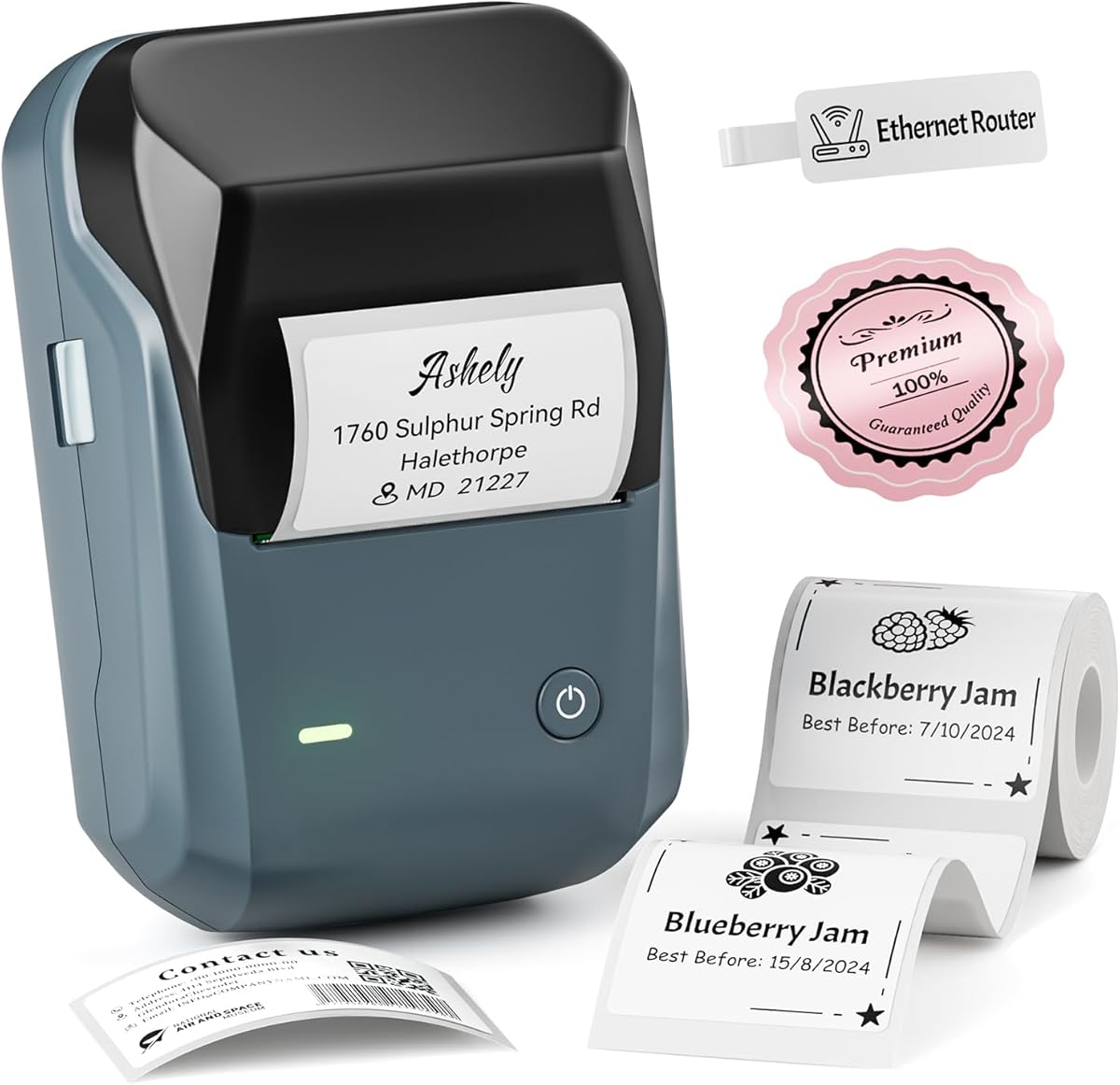
The NIIMBOT D110 Upgrade is a refined version of the popular mini-label format, and its 4.6 rating makes it one of the strongest-rated options in the guide. It uses BPA-free direct thermal technology with a 203 DPI print head to create sharp black text, while high-speed chips support smooth processing and fast output for common kitchen labeling jobs.
We may earn a commission when you buy through this link, at no additional cost to you.
Intelligent identification automatically recognizes the installed label, allowing the printer to work with clear, colorful, gift-style, and round tapes. The supplied information describes these compatible labels as waterproof and oil-proof, which are useful properties for refrigerator containers, pantry jars, and areas where moisture or food residue may be present. Batch printing is available through the NIIMBOT app on compatible iOS and Android phones.
The device is designed to fit in a pocket and includes a rechargeable battery that reaches a full charge in about two hours using a Type-C cable. It does not work with computers. Although it prints black text only, users can achieve colorful visual results by printing on color-pattern label tapes, a distinction that matters when interpreting the word color in the product description.
This upgrade model is a strong recommendation for users who want a small printer with improved clarity and flexible tape recognition. It handles food date marking, cosmetics, school names, and file classification well. Those requiring a wider tape range, direct offline controls, or computer connectivity should examine the NIIMBOT B2 or SUPVAN T50M Pro.
Automatic recognition reduces the need to configure each roll manually. Supporting clear, colorful, round, and other label formats lets one printer handle several parts of a kitchen organization system.
Waterproof and oil-proof compatible label tapes are well suited to refrigerators, pantry containers, and lunch storage. These properties help labels remain readable in environments where standard adhesive labels may deteriorate.
We may earn a commission when you buy through this link, at no additional cost to you.
The Phomemo D30 stands out for its advanced app and support for both continuous and fixed-length tapes. Its 4.3 rating is slightly lower than those of several compact competitors, but the product offers a distinctive feature mix for kitchen users who want more than a short ingredient name. A German thermal print head and 203 DPI resolution support clear, smooth monochrome output.
We may earn a commission when you buy through this link, at no additional cost to you.
The Print Master app provides an extensive design library with more than 4,000 icons, 800 borders, 600 fonts, 6,800 materials, and 1,000 templates. It can add text, tables, logos, barcodes, QR codes, images, timestamps, and borders. More unusually, it supports Excel batch data import, document scanning, OCR text extraction, and voice input, making it useful for producing structured labels from larger lists of pantry items or inventory records.
The D30 is half the size and weight of a traditional label maker, according to the supplied information, and its rechargeable battery supports portable use. However, the advanced feature set can feel excessive for someone who only wants to print a container name. It produces black text only, while colorful effects depend on patterned thermal tapes, and continuous labels must be loaded carefully to maintain alignment.
The D30 is best for organized households, small food businesses, and creative users who value flexible tape formats and sophisticated data entry. It is a strong alternative to the Phomemo-style app experience in the D110 line. Buyers wanting simpler operation should consider the NIIMBOT D110 Upgrade, while those needing offline printing should consider the NIIMBOT B2.
Excel batch import, tables, timestamps, and OCR tools can shorten the process of creating labels for bulk pantry items or inventory. These functions extend the printer beyond one-off container naming into structured record keeping.
Supporting continuous and fixed-length tapes gives users freedom to choose labels for different container shapes. It also makes the D30 a useful option for variable-length ingredient lists where pre-cut labels may not fit.
We may earn a commission when you buy through this link, at no additional cost to you.
The KNAON shipping label printer is built for larger-format thermal media, making it different from the small jar-label makers that dominate this category. Its 4.4 rating reflects solid performance, and support for paper widths from 1.5 to 4.2 inches allows it to handle 4×6 shipping labels, barcode labels, thank-you labels, mailing labels, name tags, and price tags.
We may earn a commission when you buy through this link, at no additional cost to you.
It can reach a printing speed of up to 180mm per second, a useful advantage for users preparing numerous packages or larger batches of product labels. The FlashLabel Pro app includes more than 3,000 templates, 5,000 icons, and 100 fonts. It also supports major shipping and marketplace services such as Amazon, eBay, Shopify, Etsy, PayPal, Poshmark, and DHL, with logistics labels imported as PDF files.
Connectivity is a major strength. Bluetooth works with the app on iOS, Android, Windows, and macOS, while USB connectivity supports Windows, macOS, ChromeOS, and Linux. The device includes a built-in USB drive with drivers and tutorial videos, although the FlashLabel Chrome extension is needed for ChromeOS. Direct Bluetooth connection is not possible for every device; the app is required.
This printer is ideal for a home-based food business, bakery, maker, or small online retailer that also organizes packaged goods. It is not the most natural choice for tiny spice jars, and the included test papers should not be confused with a complete roll of the desired size. Kitchen buyers wanting simple container labels should look to the NIIMBOT B2 or SUPVAN T50M Pro.
A four-by-six format can carry addresses, barcodes, product details, and brand information that would be cramped on a narrow kitchen strip. This makes the printer relevant to home-based food producers as well as general households.
The stated speed of up to 180mm per second supports efficient production of multiple labels. Rapid output is especially valuable during order-packing sessions when labels must be printed repeatedly.
We may earn a commission when you buy through this link, at no additional cost to you.
The NADAIIN N20 offers a balanced combination of portability, wide label support, and creative editing. Its 4.4 rating places it among the stronger general-purpose options, while its 296g body remains easy to carry in a bag. The printer supports labels from 20mm to 50mm wide and a maximum print area of 50×80mm, giving it more room than compact mini models.
We may earn a commission when you buy through this link, at no additional cost to you.
Its 2,000mAh rechargeable battery is generous for a portable label maker, and direct thermal printing at 203 DPI produces sharp black text without cartridges. The N20 works with round, transparent, square, and colored thermal labels. Compatible tapes are described as waterproof, oil-resistant, tear-resistant, self-adhesive, and BPA-free, making them suitable for many kitchen storage situations.
The Nada Print app provides more than 30 fonts, 50 frames, and 660 icons, along with image import from a phone or tablet. A roll of 40×30mm white labels is included, but this product is not intended for conventional shipping labels. The supplied information also identifies compatible 40×30mm and 50×30mm options. Color printing is not supported; output is black and white.
The N20 is a strong all-around choice for home organization, classroom supplies, bakery packaging, jars, bottles, and small-business price tags. It may be more substantial than necessary for tiny labels but less complex than some advanced app ecosystems. Buyers needing computer connectivity or offline one-button printing should favor the NIIMBOT B2.
The 20–50mm support range accommodates narrow ingredient labels and broader product identifiers. This makes the N20 adaptable to mixed kitchen storage without reaching the scale of a shipping printer.
The included starter roll, rechargeable battery, and straightforward app setup let users begin labeling quickly. Its collection of frames, fonts, and icons is sufficient for both practical and decorative designs.
We may earn a commission when you buy through this link, at no additional cost to you.
The NIIMBOT B1 provides a capable balance of wide label printing and compact design, earning a 4.3 rating in this comparison. It supports tape widths from 20mm to 50mm and can print as wide as two inches, making it suitable for large jars, bottles, storage containers, gift packages, and product information labels around the kitchen.
We may earn a commission when you buy through this link, at no additional cost to you.
Its 293g weight is light enough for portable use, and the built-in 1,500mAh battery can remain on standby for up to 100 days according to the supplied information. The NIIMBOT app includes more than 10 fonts and languages, 100 borders, 1,500 symbols, barcodes, QR codes, icons, timestamps, images, tables, and templates. Free fonts and icons are adequate for many daily designs, although the app also contains VIP materials.
Compatibility details deserve attention. The printer works with iOS and Android smartphones but not iPads. USB computer connection requires downloading a driver from NIIMBOT's official website. Most importantly, only NIIMBOT thermal label paper is supported; off-brand rolls may not be recognized and can cause malfunction or poor print results. This limitation makes tape planning essential before purchase.
The B1 is a good option for users who want broad labels without a bulky desktop printer. It can organize kitchen jars and bottles, label homemade food, create price tags, and print product details, QR codes, or logos. Households with an existing collection of non-NIIMBOT rolls should choose a printer with broader compatibility, such as the NIIMBOT B2 or NADAIIN N20.
A two-inch maximum width accommodates more text and graphic elements than narrow mini models. It is a useful size for large pantry jars, food containers, and homemade product packaging.
Compatible NIIMBOT tapes are described as waterproof, oilproof, wipeable, tear-resistant, self-adhesive, abrasion-resistant, and BPA-free. These characteristics suit labels that will be handled, refrigerated, or exposed to kitchen residue.
We may earn a commission when you buy through this link, at no additional cost to you.
The right kitchen label printer depends on container size, labeling frequency, editing preferences, and the types of tapes you already own. The following factors help narrow the field before you choose a compact mini model, a wider household printer, or a shipping-oriented machine.
Begin with the containers you plan to label. Mini printers often handle strips around 12mm to 15mm wide, which suit spice jars, small bottles, and narrow pantry containers. Models supporting 20mm to 50mm can carry longer ingredient names, dates, decorative elements, and QR codes on larger jars, freezer boxes, and storage bins. A shipping printer goes further, supporting broad media for addresses and product information. Always check the maximum print width as well as the supported roll dimensions, because a wide machine may still require a particular label format.
Tape compatibility affects long-term convenience more than many shoppers initially expect. Some manufacturers support only their own branded rolls, while others accept square, round, transparent, colored, file, or cable labels. Fixed-length tapes simplify positioning, whereas continuous rolls offer more freedom for variable text. Automatic recognition and rewind systems can reduce alignment errors. Before ordering a printer, check whether you own compatible rolls and whether the included tape is useful for your intended containers.
Most thermal label makers in this guide use 203 DPI, which provides clear monochrome text for ingredient names, dates, and barcodes. Higher numerical resolution is not automatically required for a kitchen pantry because legibility depends more on label size, text contrast, and printhead condition. Color output is a different matter: thermal printers in this group generally print only black text. Color-patterned tapes can create a colorful background, but the machine is not producing multicolor ink. Choose a photo or full-color device only if that capability is essential.
The app determines how quickly you can create a useful label. Look for suitable fonts, borders, icons, QR codes, barcodes, timestamps, tables, and image import. Batch printing is valuable for pantry inventories, while templates save time on recurring labels. More advanced tools such as OCR, document scanning, and spreadsheet import help with larger inventories but can feel excessive for occasional use. Consider whether you want to design on a phone, tablet, or computer and whether registration is required.
Bluetooth is standard among the portable models, but computer support varies. Some printers rely entirely on a mobile app, while the NIIMBOT B2 and B1 also support computer workflows, and the KNAON offers broad USB and Bluetooth access. Offline printing is useful when you need to stamp current dates or a saved template without opening an app. It also reduces dependence on software updates and phone connection during routine tasks. Check operating-system and device support carefully, particularly regarding tablets and specific phone models.
All ten products are designed for portable use, but size and battery specifications vary. The 149g NIIMBOT D110 Mini and 293g NIIMBOT B1 are particularly easy to carry. The NIIMBOT B2 weighs 352g and provides broader functionality, while the KNAON is intended to move between packing and storage areas. Battery capacity alone does not reveal runtime because label volume, density, and wireless use affect results. For occasional pantry sessions, capacity may matter less than quick recharging and a comfortable body size.
Kitchen labels may encounter moisture, oil, heat, abrasion, and frequent handling. Several products include compatible tapes described as waterproof, oil-proof, oil-resistant, tear-resistant, or wipeable. Tape durability matters as much as the printer housing because a technically accurate label becomes useless when it peels or smudges. Choose a model with compatible water- and oil-resistant stock for refrigerator containers, pantry jars, and lunch boxes. For a food business, also consider a stronger shipping-grade system and the adhesive specifications of the exact media.
Begin by charging the printer according to its instructions, installing the correct tape roll, and downloading the specified mobile or computer app. Update the app before attempting a first print, particularly for devices with known compatibility notes. Power on the printer, connect it through the app, and select the correct model or label size. Several units use automatic recognition, while others require you to choose the tape dimensions manually. Print a test label before preparing a full batch so you can check alignment, character size, and contrast.
Plan labels by purpose before editing. Use short, high-contrast names for everyday pantry containers, reserve dates for items that genuinely need expiration tracking, and add QR codes only when they lead to useful information. For a consistent kitchen system, choose one font, one text size, and a consistent position on the container. If the printer supports batch printing, save a reusable template and confirm that imported text matches the number of labels in the batch.
To maintain the device, keep the thermal head clean and avoid scraping it with hard tools. Do not tear or damage sensor chips on the side of compatible rolls, because these components help the printer detect and position the tape. Store tape in a cool, dry place away from direct heat and humidity, and keep the printer itself away from spills. If output becomes faint or misaligned, clean the printhead as directed, reinstall the roll, and check for a compatible cartridge or tape. Replace the tape before troubleshooting software when the roll is warped, damaged, or the wrong type.
The NIIMBOT B2 is the most versatile option because it supports 20–50mm tape widths, automatic label recognition, offline date printing, and multiple device connections. The Nelko P21 is an excellent compact alternative for decorative pantry labels, while the NIIMBOT D110 Mini is more appropriate for small jars and narrower strips. The best choice ultimately depends on label width, app preferences, and whether you need computer or offline functions.
The thermal printers in this guide generally produce black text only. Some can use patterned or colored label tapes, allowing the printed background to provide color even though the machine does not print colored pixels. If you need full-color photographs, text in multiple ink colors, or highly detailed graphics, look for a dedicated inkjet or dye-sublimation printer rather than a direct thermal model.
Water-resistant labels are useful for refrigerator containers, drink bottles, lunch boxes, and pantry areas exposed to condensation. They are less essential for dry cabinets and sealed storage bins. Several compatible rolls in this guide are described as waterproof and oil-resistant or oil-proof, which can be useful where condensation, cooking residue, or frequent wiping is likely.
Not for most kitchen labeling tasks. Phone-based models are convenient for dates, pantry names, QR codes, and short batches. Computer connectivity becomes more useful when you maintain larger inventories, import spreadsheet data, design detailed graphics, or manage a small business. The NIIMBOT B2 and B1 support computer workflows, while the KNAON provides especially broad platform support.
Choose a printer that supports at least 30mm to 50mm labels for large containers, pantry bins, or detailed ingredient lists. A 50mm-wide label provides more room for text, dates, icons, and QR codes. Mini models with 12mm to 15mm maximum widths are better suited to spice jars, cosmetics, and narrow identification strips.
The NIIMBOT B2 offers one-button offline printing of current dates, a historical record, or a specified template. Other models can add dates and timestamps through their companion apps, usually after the user designs and selects the label. Automatic date stamping is especially useful for leftovers, freezer containers, and pantry items that are updated regularly.
It depends on the model. The NIIMBOT B1 specifically supports only NIIMBOT thermal label paper, while other printers may accept several compatible styles. Tape restrictions are often tied to sensor recognition and automatic positioning. Check the supported media list carefully, and avoid forcing incompatible rolls because poor recognition can lead to misalignment or malfunction.
A model with batch printing, automatic recognition, and a broad size range is the most efficient choice. The NIIMBOT B2, Nelko P21, NIIMBOT D110 Upgrade, and NIIMBOT B1 all provide useful editing or batch capabilities, while the SUPVAN T50M Pro supports larger labels and a generous selection of tape styles. Prepare a consistent template and verify every roll size before a large session.
The NIIMBOT B2 is the strongest all-around recommendation, combining a 4.7 rating, wide 20–50mm tape support, useful offline printing, and connectivity for both mobile devices and Windows computers. The NIIMBOT D110 Upgrade offers a refined 4.6-rated experience in a smaller package, while the Nelko P21 leads the category in creative templates and visual customization for users who want attractive pantry labels.
Your priorities should determine the alternative. Choose the D110 Mini or N12 for the smallest everyday setup, the Phomemo D30 for advanced editing and continuous tapes, and the SUPVAN T50M Pro or NADAIIN N20 for wider household labels. The KNAON is a better fit for shipping and larger-format product work than for tiny spice jars, while the NIIMBOT B1 suits buyers who want two-inch printing and established NIIMBOT tape compatibility.
Before making a final decision, check the printer's supported dimensions against the labels you already own, verify app compatibility with your phone or computer, and consider how often you will print. Ratings, software features, and product availability can change over time. Check the current listing and current price on the linked product page before purchasing, and choose the model that offers the right balance of size, tape support, and editing convenience for your kitchen.