
TECKNET Wireless Trackball Mouse, Bluetooth Mouse with Ergonomic, Black
4.5Editor score
500mAh rechargeable battery
Three-device wireless switching
Sixteen-degree ergonomic angle
Five adjustable DPI levels
A trackball mouse offers precise cursor control without requiring a conventional mouse to move across a desk, helping reduce arm movement and preserve workspace. For wireless models, battery endurance is just as important as comfort, tracking quality, connectivity, and programmable controls when selecting a device for daily work.
This guide compares ten trackball mice built for extended use, focusing on their stated battery systems, charging options, ball size, ergonomics, connectivity, sensitivity controls, and platform support. The selections include rechargeable models and battery-powered models, allowing readers to compare maintenance needs as well as cursor performance and desk-friendly designs.
Each review explains who the product is best suited for, where its strengths stand out, and which compromises deserve consideration. The top selections represent the strongest all-around options, while the complete ranking covers premium, budget-conscious, highly portable, and feature-rich alternatives. Prices and availability can change, so confirm current details before purchasing.
4.5Editor score

4.5Editor score

4.4Editor score
As an Amazon Associate we earn from qualifying purchases.
The comparison below places all ten trackball mice side by side, focusing on battery design, power duration, connection methods, physical size, and the control features that distinguish each model.


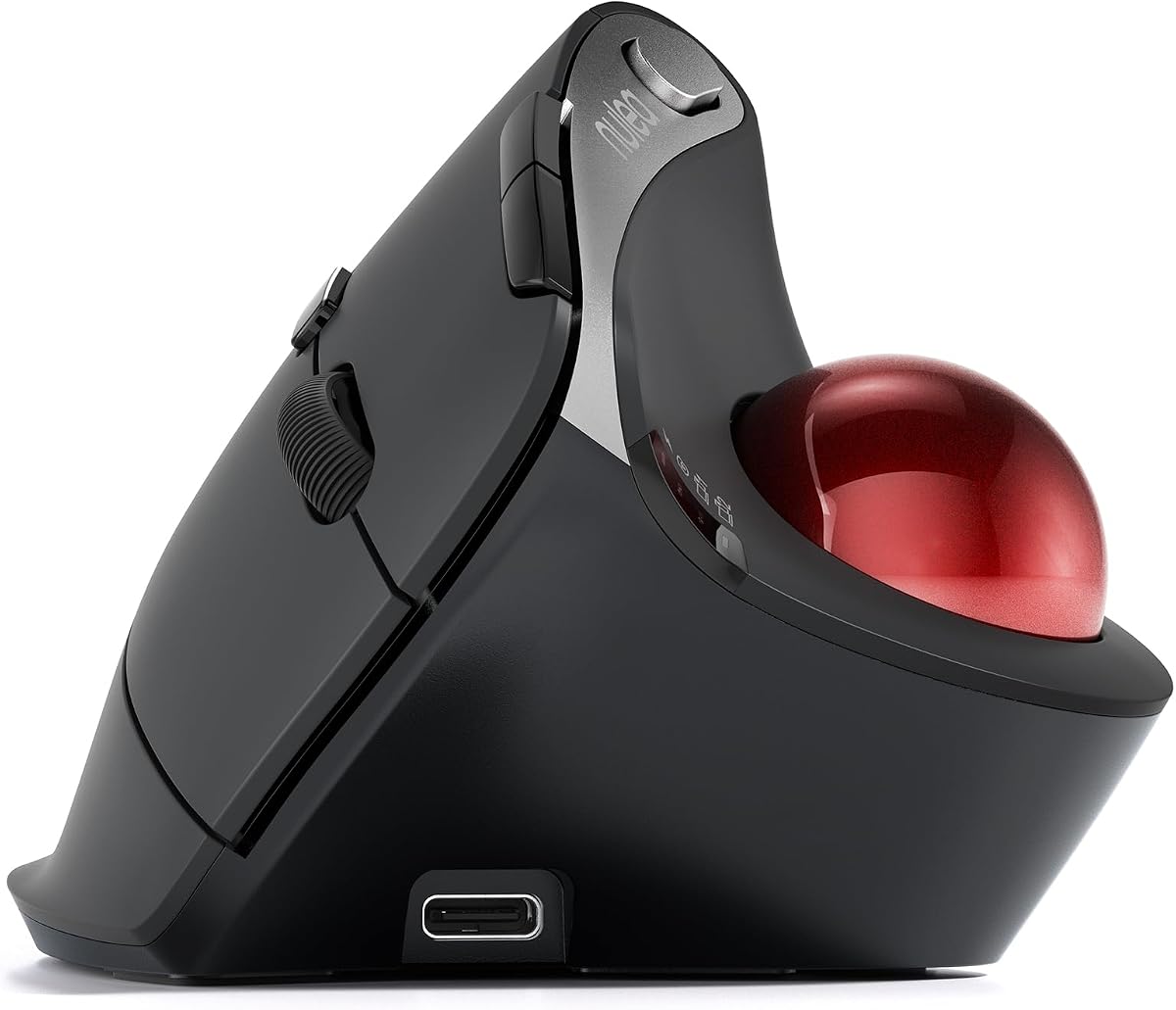


The Nulea M501 combines an ergonomic thumb-operated trackball with a rechargeable battery and multi-device wireless support. It carries a 4.4 rating and stands out as a practical option for people who want one pointing device to handle several computers without continually replacing dry-cell batteries.
We may earn a commission when you buy through this link, at no additional cost to you.
Its curved body is designed to keep the palm in a natural position while the thumb guides the ball. Four DPI levels provide enough variation for ordinary office work, detailed navigation, and faster pointer movement. The mouse can also operate on a couch, bed, writing board, or other surface where a conventional mouse would be awkward.
Connection flexibility is another strength. It supports two Bluetooth connections and a 2.4GHz USB receiver, with a bottom-mounted button used to switch devices. Six buttons include forward and back controls, although the product information specifically notes that those buttons cannot be reprogrammed.
The rechargeable battery is designed for extended use, making the M501 a sensible fit for students, hybrid workers, and anyone who travels between locations. Its limitations are the lack of programmable controls and the need to follow the manufacturer’s charging guidance, including avoiding a fast charger. Overall, it delivers a versatile balance of comfort, connectivity, and low-maintenance power.
Because the ball is controlled by the thumb, the M501 does not need continuous arm movement. Its ability to operate on uneven or nontraditional surfaces makes it especially useful away from a conventional desk.
The integrated rechargeable battery removes the routine expense and interruption of disposable batteries. A button provides quick switching among Bluetooth and USB receiver connections for multi-computer workflows.
We may earn a commission when you buy through this link, at no additional cost to you.
The Logitech MX Ergo S is a premium productivity trackball with one of the strongest battery claims in this group. Its 4.4 rating reflects a feature-rich design that combines advanced thumb control, a 20-degree tilt, quiet clicks, and up to 120 days of use from a full charge.
We may earn a commission when you buy through this link, at no additional cost to you.
Battery convenience is one of its defining advantages. A one-minute USB-C charge can provide up to 24 hours of use, while a complete charge is stated to last as long as 120 days. This makes the mouse attractive for frequent travelers, hybrid employees, and users who would rather not keep spare batteries close at hand.
The sculpted body, soft rubber grip, and tilt angle are intended to reduce forearm strain and support sustained comfort, particularly for medium- to large-sized hands. Users can switch between speed and high-precision tracking, while the Logi Options+ app supports six customizable buttons, shortcuts, and Smart Actions.
Bluetooth and the included Logi Bolt receiver provide dual wireless connectivity, with an Easy-Switch button for moving between devices. The principal compromises are its premium positioning, the need to supply a compatible USB-C charging cable, and a shape that may not suit everyone. Even so, it is the most complete option here for users who prioritize long battery life alongside advanced ergonomic and productivity features.
The stated 120-day endurance is ideal for users who travel light. The one-minute charging option also provides a useful fallback when a full day of work begins with a depleted battery.
Six customizable buttons, saved shortcuts, and Smart Actions make the MX Ergo S more than a simple pointing device. It suits people who repeat detailed tasks and want application-aware controls.
We may earn a commission when you buy through this link, at no additional cost to you.
The Logitech Ergo M575S in black and blue earns a 4.6 rating, making it one of the strongest-rated products in this guide. It offers an established ergonomic trackball design, long battery life, and support for both Bluetooth and the included Logi Bolt receiver without requiring regular cable-based charging.
We may earn a commission when you buy through this link, at no additional cost to you.
Its sculpted shape is intended to support the hand and realign the forearm into a more natural posture. The thumb-operated trackball lets users move the pointer without moving the whole hand, which is useful in compact workspaces, on couches, or anywhere a traditional mouse would occupy too much room.
The M575S supports three customizable buttons, time-saving shortcuts, and Smart Actions through Logitech’s software. Although that is less extensive than the six-button MX Ergo S, it covers common productivity and navigation needs without turning the mouse into a complicated control surface.
The included AA battery and long advertised runtime make this an uncomplicated choice for users who prefer replaceable power over built-in rechargeable cells. Its broad hand-size suitability also makes it easier to recommend as a general-purpose option. It is a strong pick for comfortable everyday use, though people who need wired charging, more buttons, or advanced premium software may prefer a different model.
The sculpted form is designed to keep the hand relaxed and encourage improved forearm alignment. This makes it a practical option for long office sessions where repeated mouse movement can become tiring.
Users can choose Bluetooth for a cleaner setup or the Logi Bolt receiver when a dedicated wireless link is preferable. This flexibility supports both shared computers and multi-device workspaces.
We may earn a commission when you buy through this link, at no additional cost to you.
This black-and-ball-silver version of the Logitech Ergo M575S carries a 4.5 rating and emphasizes a differentiator that matters in many offices: quiet clicks. It retains the familiar M575S emphasis on less hand movement, improved forearm positioning, and a battery that can last for an extended period.
We may earn a commission when you buy through this link, at no additional cost to you.
The stated battery life reaches up to 18 months when paired with the included AA battery, placing it among the most convenient choices for low-maintenance operation. Instead of finding a charging cable or waiting near a power outlet, users can replace the cell when needed and continue working.
The ergonomic shell was developed with Logi Ergo Lab experts and is certified by ergonomists. It is intended to reduce forearm muscle strain and support the hand throughout the day. Cursor speed can be adjusted through the Logi Options+ app, while three customizable buttons and Smart Actions support common workflow shortcuts.
The trackball is also useful on any surface, so it can save space and remain effective in compact or unconventional setups. Its trade-offs are modest: it has fewer programmable controls than the MX Ergo S and uses a disposable battery. For someone who values quiet operation, long battery life, and proven ergonomics, this is one of the most balanced selections in the guide.
Quiet clicks can make a noticeable difference in shared offices, libraries, and quiet home workspaces. The mouse retains crisp button operation while reducing distracting click noise.
A stationary trackball body takes less desk room than a mouse that must travel across a surface. Its broad compatibility with different surfaces adds flexibility beyond the traditional desk.
We may earn a commission when you buy through this link, at no additional cost to you.
The TECKNET Wireless Trackball combines a 4.5 rating with a rechargeable 500mAh battery, multi-device connectivity, and an angular ergonomic design. It is an appealing option for buyers who want many modern features without moving into the most premium product category.
We may earn a commission when you buy through this link, at no additional cost to you.
Its battery can provide a full day of use after approximately 15 minutes of charging, according to the product information. That quick-charge behavior is useful for people who alternate between intensive work and short breaks, while the rechargeable design eliminates recurring disposable-battery purchases.
The mouse supports two Bluetooth channels and a 2.4GHz connection, allowing users to switch among three devices. Its stated wireless range extends to 34 feet, and five DPI settings ranging from 100 to 1200 let users balance precision and speed. A 16-degree vertical angle is designed to improve forearm posture and reduce strain.
The manufacturer recommends spending one to two weeks adapting to the shape, and the dimensions are aimed at medium- to large hands. That adjustment period is worth considering, as trackball comfort depends partly on hand size and technique. Nevertheless, the combination of quick charging, flexible connectivity, and adjustable tracking makes the TECKNET a strong everyday value.
A short charging session is stated to supply a full day of operation. The convenience is particularly noticeable for users who often begin work without checking the battery level.
Five sensitivity levels cover detailed editing, document navigation, and faster screen movement. A single mouse can therefore adapt to different tasks without requiring separate pointing devices.
We may earn a commission when you buy through this link, at no additional cost to you.
The Nulea M506 is a vertically angled, rechargeable trackball with a 4.6 rating. Its most distinctive feature is the 54-degree structure, which is intended to keep the wrist and forearm in a more natural, relaxed position during extended work.
We may earn a commission when you buy through this link, at no additional cost to you.
The built-in rechargeable cell is stated to run continuously for up to 21 days after a full charge. That duration makes the M506 appealing for users who want to charge periodically rather than carry spare batteries or connect the mouse every day. It also supports two Bluetooth channels and a USB receiver for switching among three devices.
Control features are straightforward. A scroll wheel, navigation buttons, and function switches sit within finger reach, while four DPI levels cover settings from 400 to 1600. The product information describes the click feedback as crisp and audible, which may be less suitable for exceptionally quiet offices.
A detachable trackball improves maintenance because dust and dirt can be removed without tools. The pronounced angle may also require a short adjustment period, particularly for users accustomed to flatter mice. Overall, the M506 is a strong choice for people who prioritize a vertical shape, long rechargeable runtime, and simple multi-device operation.
The 54-degree design sets this mouse apart from flatter trackballs. Users who spend long periods working at a desk may appreciate the support it provides for the wrist and forearm.
The removable ball can be detached quickly for cleaning. Maintaining a smooth ball helps preserve consistent cursor movement and reduces the buildup of debris in the mechanism.
We may earn a commission when you buy through this link, at no additional cost to you.
The ELECOM Huge Plus is the most feature-dense trackball in this ranking, with a 4.0 rating and a built-in rechargeable lithium-ion battery. It combines a large 52mm ball, ten programmable buttons, silent clicks, and three connection methods in a design intended for intensive productivity.
We may earn a commission when you buy through this link, at no additional cost to you.
Its standout battery feature is a stated runtime of up to five months per charge. USB-C recharging allows the mouse to continue being used while charging, a valuable capability for demanding workdays. The included USB-C-to-USB-A cable simplifies connection to a compatible charging source.
Connectivity covers Bluetooth, 2.4GHz wireless, and wired USB-C across up to three devices. Ten programmable buttons give users extensive control over navigation and application shortcuts, while MinebeaMitsumi steel bearings are designed to provide smooth rotation and can be replaced with ruby bearing units.
The broad platform list includes Windows, macOS, iPadOS, Android, and ChromeOS, with several specific operating-system versions listed. The trade-off is complexity: the body is large, the control layout is extensive, and a premium-style feature set may be unnecessary for basic browsing. For power users who want deep customization and long intervals between charges, it is nevertheless a compelling option.
Ten programmable buttons offer more control than every other model in the guide. The feature is well suited to creative applications, frequent navigation, and personalized multi-application workflows.
USB-C charging can be performed while the mouse remains in use. This is particularly helpful during long sessions when taking a break to recharge would disrupt productivity.
We may earn a commission when you buy through this link, at no additional cost to you.
The Kensington Expert Wireless is a traditional large-ball trackball with a 4.2 rating. Its 55mm ball, Diamond Eye optical tracking, and patented scroll ring provide precise cursor control, while a detachable wrist rest supports longer periods of use.
We may earn a commission when you buy through this link, at no additional cost to you.
The ambidextrous design can suit both right- and left-handed users. Rather than forcing a strongly sculpted grip, it provides a broad palm rest that helps stabilize the hand. The four-button layout is customizable through KensingtonKonnect software, which can also adjust scroll speed and cursor speed.
Power comes from two included AA batteries, and auto-sleep helps conserve energy when the mouse is not being used. A power-saving mode puts the device to sleep, while software settings allow power behavior to be updated. Wireless connectivity supports built-in Bluetooth LE and a 2.4GHz USB dongle.
Platform limitations deserve attention. The stated compatibility covers Windows, macOS, and Chrome OS, while Linux and Windows ARM-based systems are not supported. Compared with rechargeable models, disposable batteries add ongoing maintenance, but they also make replacement straightforward. It remains a solid choice for users who prioritize a large ball, balanced ambidextrous design, and classic scroll-ring convenience.
The 55mm ball offers a substantial target that can be controlled with controlled fingertip or thumb movement. This makes the Expert Wireless suitable for users who prefer a more traditional trackball feel.
The detachable wrist rest and ambidextrous structure broaden the potential audience. A desktop mouse often enforces a strong handed preference, whereas this design can be positioned for either hand.
We may earn a commission when you buy through this link, at no additional cost to you.
This Logitech MX Ergo S variant has a 4.4 rating and is tailored to PC and Mac users who want premium ergonomics, long battery life, and sophisticated controls. It uses a rechargeable USB-C battery and includes an encrypted Logi Bolt receiver for a dedicated wireless connection.
We may earn a commission when you buy through this link, at no additional cost to you.
Battery performance is a major attraction. The stated maximum of 120 days from a full charge is among the strongest endurance claims in the guide, and a one-minute charge can deliver up to 24 hours of use. This combination offers both long-term convenience and a rapid recovery option when the battery runs low unexpectedly.
Advanced thumb control includes a switch between speed and high-precision tracking. The 20-degree tilt, sculpted shape, and soft rubber grip are designed to support better forearm posture and reduce muscle strain. The Logi Options+ app adds six customizable buttons, shortcuts, and Smart Actions for repeat workflows.
The body is aimed at medium- to large-sized hands, which may limit its appeal for smaller users. A compatible USB-C cable is also not included. Even with those qualifications, the device remains a polished option for users who want long battery life, quiet operation, secure wireless connectivity, and serious customization in one ergonomic package.
The encrypted Logi Bolt receiver provides a suitable option for environments where Bluetooth pairing is inconvenient or where a dedicated dongle is preferred for managed workstations.
A dedicated control switches between fast movement and high precision. This makes the mouse adaptable to both rapid document navigation and detailed positioning work.
We may earn a commission when you buy through this link, at no additional cost to you.
The Kensington SlimBlade Pro is a low-profile wireless trackball with a 4.1 rating. It offers a rechargeable battery, flexible connection options, a large 55mm ball, and a shape designed for both right- and left-handed users in relatively compact workspaces.
We may earn a commission when you buy through this link, at no additional cost to you.
Its rechargeable battery provides a stated four months of operation from one charge. The included 1.5-meter USB-C-to-USB-A cable handles charging, and the mouse also supports wired operation, giving users an additional way to maintain a reliable connection.
Bluetooth BT4.0 or BT5.0, a 2.4GHz USB-A dongle, and a wired cable cover several connectivity preferences. The included USB-A adapter with a USB-C connector improves compatibility with newer computers. Dual sensors track the large ball to provide accurate cursor control and scrolling with less hand and wrist movement.
KensingtonWorks and KensingtonKonnect software allow extensive button programming across eight sets. That level of customization may be useful for experienced users, although setup adds complexity. The main trade-off is size: the listed dimensions are substantial, and the low-profile body still requires more room than a compact trackball. It is a capable rechargeable choice for users who value connectivity options and large-ball control.
Bluetooth, 2.4GHz wireless, and wired operation allow the mouse to fit different workstation requirements. This versatility is useful when moving between modern laptops, shared systems, and fixed desk setups.
The slim shape is intended to reduce arm and wrist movement while taking up less space than the room required to operate a standard mouse. Its ambidextrous approach also broadens hand compatibility.
We may earn a commission when you buy through this link, at no additional cost to you.
The most useful trackball balances endurance with comfort, tracking, connectivity, and controls. Comparing the following factors helps prevent a long battery specification from obscuring an otherwise unsuitable design.
Battery life should be considered in two ways: how long the mouse runs between charges or replacements, and how much attention the power system requires. Rechargeable models eliminate recurring disposable-battery purchases and can be especially convenient for frequent travelers. The Nulea M506 is stated to last up to 21 days, the ELECOM Huge Plus up to five months, and the Logitech MX Ergo S up to 120 days after a full charge. Models powered by AA cells, such as the M575S and Kensington Expert, are convenient because replacing a depleted cell takes only moments.
Choose a rechargeable model if you prefer a single charging routine and want to avoid carrying spares. Choose replaceable batteries if uninterrupted operation and simple cell swaps matter more than cable-based charging.
The charging method affects how easily a trackball fits into a work routine. USB-C is the most versatile standard across the premium selections: the MX Ergo S offers a one-minute charge for up to 24 hours of stated use, while the ELECOM Huge Plus can operate while charging through its included USB-C-to-USB-A cable. The TECKNET model says a 15-minute charge supplies a full day. Some products also include a receiver or charging cable, whereas the MX Ergo S listings specify that a compatible charging cable is not included.
Check what is included before ordering, and use the charging method specified by the manufacturer. A model that supports partial charging is especially helpful for users who regularly work near a power source but occasionally forget to check the battery.
Trackball comfort is highly personal because hand size, grip preference, and posture affect how the device feels. The TECKNET and Logitech MX Ergo S designs are described as suitable for medium to large hands, while the M575S is intended to fit most hand sizes. The Nulea M506 uses a pronounced 54-degree angle, and the TECKNET uses a 16-degree vertical angle. Flat, low-profile options such as the Kensington SlimBlade Pro may feel more familiar but still take up meaningful desk space.
Look for a shape that supports your palm without requiring a cramped grip. If possible, consider hand size guidance and realistic adjustment time, since unfamiliar trackball techniques can initially feel slower than standard mouse movement.
Larger balls can provide more surface area for controlled movement, while smaller balls may feel familiar to users accustomed to compact trackballs. The ELECOM Huge Plus uses a 52mm ball, and both Kensington selections use 55mm balls. The Logitech and Nulea models prioritize smooth thumb control and offer multiple sensitivity levels, including four DPI settings on the M501 and M506 and five on the TECKNET. The M575S can also adjust cursor speed through software.
Choose a larger ball if you prefer deliberate, precise movement and broad fingertip control. Look for adjustable sensitivity if your work alternates between detailed tasks and rapid navigation.
Connectivity determines how easily a trackball can move between computers and work locations. Most of the selections support Bluetooth, while 2.4GHz receivers offer a dedicated alternative. The Nulea M501, M506, and TECKNET can switch among three connected devices. The ELECOM Huge Plus supports Bluetooth, 2.4GHz wireless, and wired USB-C, while the Kensington SlimBlade Pro also offers all three. The M575S supports Bluetooth and Logi Bolt, and the MX Ergo S includes an encrypted Logi Bolt receiver.
For a multi-device workspace, verify the number of saved connections and whether switching requires a physical button. For security-conscious offices, a receiver with encrypted wireless communication may be preferable to open Bluetooth pairing.
Programmable controls can turn a pointing device into a productivity tool, but the best choice depends on how much configuration the user wants to manage. The ELECOM Huge Plus offers ten programmable buttons, and the MX Ergo S offers six customizable buttons with Smart Actions. The M575S provides three customizable buttons, while the Kensington Expert uses four customizable controls. The Nulea M501 has six physical buttons but specifically states that they are not programmable.
Prioritize rich software if you repeat complex application commands. Choose fewer controls if you value immediate usability, clear physical buttons, and minimal setup.
Sound preferences can be as important as battery life. The M575S black-and-silver model, the MX Ergo S, and the ELECOM Huge Plus are described as offering quiet clicks. The Nulea M506 emphasizes crisp, audible feedback, which may be perfectly acceptable in a private office but disruptive in a shared or quiet workspace. A quieter model is generally preferable for libraries, open-plan offices, video calls, and late-night work.
Do not assume every model with the same ball type sounds identical. Read the specific click description and consider the environment in which the device will be used most often.
Long battery life is more useful when the trackball remains clean and the software supports your devices. The Nulea M506 has a detachable ball for tool-free cleaning, and the Kensington Expert has a detachable wrist rest. The Kensington Expert supports Windows, macOS, and Chrome OS but not Linux or Windows ARM-based systems. The ELECOM Huge Plus lists a broad collection of desktop, tablet, and mobile operating systems. The Logi Options+ and Kensington software ecosystems also influence which shortcuts and settings are available.
Confirm operating-system support before buying, especially if you switch among Windows, macOS, Linux, Chrome OS, tablets, or phones. A removable ball or other accessible component can make long-term maintenance easier.
Begin by placing the trackball in the position that naturally supports your hand rather than reaching for it at an angle. Keep the thumb relaxed over the ball and move it with controlled rotations rather than large sweeps. On a conventional mouse, users often move the entire hand to reposition the pointer. With a trackball, keep the palm relatively stable and let the thumb guide the ball, which is the technique required for the advertised reduction in arm and wrist movement.
Connect the device using the method suited to your setup. Pair it over Bluetooth, insert the included 2.4GHz receiver, or connect its cable if the model supports wired operation. Use the device-switching button to move among saved computers, and install the manufacturer’s software when you want custom button assignments, cursor-speed changes, or Smart Actions. For rechargeable models, follow the specified charging cable and avoid fast chargers unless the manufacturer expressly permits them.
Maintain smooth movement by cleaning the ball and the surrounding mechanism on a regular schedule. Remove the ball according to the product instructions, wipe away dust and residue, and check that no hair or debris is restricting rotation. Clean the exposed sensor area gently, let all parts dry fully, and reinstall the ball securely. Replace AA batteries as a complete set when needed, and store the device in a dry environment when it will not be used for an extended period.
The Logitech MX Ergo S is listed with up to 120 days of use from a full charge, while the ELECOM Huge Plus claims up to five months. Actual results vary with activity level, connection method, and settings. AA-powered models such as the Logitech M575S are also attractive because their cells can be replaced without waiting for the device to recharge.
Rechargeable models remove the need to carry spare cells and can be simpler to maintain. Models with partial-charge support are especially convenient because a brief charging break may restore a full workday. Battery-powered models remain useful for people who value immediate replacement and do not want to depend on a charging cable.
Yes, most of the listed trackballs operate on nearly any surface because the sensor tracks the rotating ball rather than direct movement across a mouse pad. Their stationary design also conserves desk space. Users should still check the manufacturer’s surface guidance and make sure the ball and sensor remain free of debris.
They can be more comfortable for some users because the hand stays in place while the thumb moves the ball. That reduces repeated arm and wrist motion, although it does not guarantee relief for every condition. A vertical or strongly sculpted model may suit users who prefer a more neutral wrist angle.
A large ball provides a broad surface for controlled fingertip or thumb movement and can feel precise when deliberately operated. A smaller ball may feel more familiar and require less finger travel. The best choice depends on grip preference, hand size, and the amount of control the user wants.
Many models in this guide support multiple saved devices. The Nulea M501, Nulea M506, and TECKNET support three-device switching, while the ELECOM Huge Plus offers Bluetooth, 2.4GHz, and wired modes. The exact number of simultaneous paired devices should be confirmed in the product specifications before purchase.
Basic pointing, clicking, scrolling, and many sensitivity changes can usually be used without full customization software. Software becomes more important when assigning buttons, creating shortcuts, adjusting scroll behavior, or managing device profiles. Models such as the Nulea M501 use physical buttons but do not offer programmable button functions.
Power the device off and disconnect it if possible. Remove the ball according to the manufacturer’s instructions, gently wipe the ball and exposed sensor area, and remove dust or hair that could interfere with rotation. Avoid pushing debris deeper into the mechanism, and let every part dry before reconnecting or reinstalling the ball.
The Logitech Ergo M575S Black Silver stands out as the editor’s choice because it combines an up-to-18-month battery claim, quiet clicks, a proven ergonomic shape, and useful customization. The TECKNET Wireless Trackball is the best budget-oriented feature bundle, while the Logitech MX Ergo S represents the strongest premium choice with up to 120 days of stated use, rapid charging, and six customizable controls.
Prioritize the power system that matches your habits, but do not ignore hand fit. The Nulea M506 and MX Ergo S emphasize vertical positioning, the M575S supports most hand sizes, and the Kensington models use large balls. If you work across several systems, compare multi-device switching; if you repeat complex commands, consider programmable buttons and reliable companion software.
Finally, verify the current product details, included accessories, compatibility, and battery claims before ordering. Technical configurations can differ among variants of similar models, and current prices and availability change. Checking the listing at the time of purchase helps ensure that the trackball you choose still provides the battery life, connectivity, and ergonomics that match your workspace.