
CyberPower CP1500PFCLCD
4.5Editor score
Pure sine wave output
1500VA, 1000W capacity
Color LCD status display
Twelve NEMA 5-15R outlets
Compare the best battery backup for workstation PC models, examining capacity, wave quality, outlets, displays, runtime data, warranties, and protection
A battery backup for a workstation PC is more than a box that keeps a computer powered during an outage. A capable UPS also conditions unstable voltage, protects connected equipment from surges, and gives you time to save work or shut down safely. The right model depends on your power draw, outlet needs, and sensitivity to backup waveform quality.
We compared ten UPS systems using their stated capacity, wattage, output waveform, outlet configuration, status displays, voltage regulation, battery technology, management options, and warranty coverage. The list includes compact and higher-capacity models, pure sine wave and simulated sine wave units, and one lithium-based system for users who prioritize battery longevity and maintenance-free operation.
Each review explains the product's strongest benefit, relevant limitations, and the setups for which it makes the most sense. Ratings and specifications reflect the supplied product information, while practical recommendations consider factors such as available workstation power, backup duration, and connected peripherals. Prices and availability can change, so verify current listings before purchasing.
4.5Editor score

4.7Editor score

4.4Editor score
The comparison below highlights the principal differences in capacity, output type, outlet access, and system monitoring so you can identify the most suitable UPS for a workstation setup.




The CyberPower CP1500PFCLCD combines a 1500VA, 1000W rating with pure sine wave output, making it a strong all-around battery backup for a workstation PC. Its 4.5 rating reflects a favorable balance of useful capacity, outlet availability, monitoring, and protection. The unit is especially attractive for users who want a modern workstation to receive cleaner backup power than it would from a simulated sine wave model.
We may earn a commission when you buy through this link, at no additional cost to you.
Its most important feature is the combination of PFC support and pure sine wave output. CyberPower specifically positions the system for active PFC and conventional power supplies, which covers many desktop and workstation configurations. Twelve NEMA 5-15R outlets are divided evenly between six battery-backed outlets and six surge-protected-only outlets, providing ample room for a tower, monitor, network device, and other peripherals. A six-foot input cord and offset plug add placement flexibility.
The multifunction color LCD presents detailed battery and power information and can tilt up to 22 degrees, making it easier to read from different positions. Automatic Voltage Regulation corrects minor fluctuations without unnecessarily moving the system to battery mode, which can extend battery life. Two front USB ports, including Type-A and Type-C connections, provide additional charging options for phones and tablets, although they are charging ports rather than UPS-backed communications connections.
This is a sensible choice for a home office or professional desk where the computer uses standard NEMA-compatible power equipment and clean waveform output matters. Its 1000-watt rating gives you room for a substantial workstation, but you should still account for startup surges, monitors, and peripherals. Choose this model over a smaller unit when you want more headroom, and favor a larger system when several high-power components must remain active at the same time.
Pure sine wave output is the defining benefit for users who want compatibility with active PFC and conventional workstation power supplies. It also avoids the stepped waveform associated with many budget-style backup units.
The color LCD provides immediate information about load and battery conditions, while AVR handles small voltage changes without unnecessary battery use. Multiple outlets and USB charging ports make it practical for a complete desk arrangement.
We may earn a commission when you buy through this link, at no additional cost to you.
The CyberPower BRG1500AVRLCD2 earns a 4.7 rating, the highest among the ten products considered. It combines 1500VA and 900W of capacity with an intelligent color LCD, automatic voltage regulation, and support for optional remote management hardware. That combination makes it especially suitable for managed desks, technical offices, and users who want more advanced monitoring than a basic power alarm.
We may earn a commission when you buy through this link, at no additional cost to you.
Twelve NEMA 5-15R outlets include six battery backup and surge protection positions plus six surge-only positions. The six-foot power cord provides useful placement flexibility, and Type-A and Type-C USB ports support charging compatible mobile devices. Remote management requires an optional RMCARD205, RCCARD100, or RWCCARD100 card, so this capability is not included as a standard feature and should be considered when planning a deployment.
The simulated sine wave output is the main qualification to note. It is suitable for the workstations and home-entertainment equipment identified by the manufacturer, but buyers with unusually sensitive loads may prefer a pure sine wave unit. In exchange, the model includes a five-year warranty that includes the battery, a 500,000 connected equipment guarantee, and free PowerPanel Management Software.
This UPS is a strong recommendation for professional users who value warranty coverage, color alerts, and the ability to add remote management. It is especially relevant to an office where one person may need to check power status without physically visiting the workstation. If clean pure sine wave output is the overriding priority, the CyberPower CP1500PFCLCD is the more direct choice, but for managed monitoring and extended coverage, this model leads the field.
Optional remote management cards can extend oversight beyond the physical LCD, which is valuable in offices, studios, and shared technical environments. The required card is an additional purchase, so plan the full deployment before choosing this model.
The five-year warranty includes the battery and provides a generous connected equipment guarantee. That longer coverage makes the model more compelling for users who value support over the product's lifetime.
We may earn a commission when you buy through this link, at no additional cost to you.
The CyberPower CP1500AVRLCD3 delivers 1500VA and 900W through a line-interactive design intended for workstations, network devices, and home-entertainment equipment. Its 4.5 rating and intelligent color LCD make it easy for users to check power status and receive warnings about conditions that could affect uptime. It is a well-equipped standard UPS without the premium lithium battery architecture found elsewhere in this list.
We may earn a commission when you buy through this link, at no additional cost to you.
The outlet panel includes six battery-backed and surge-protected receptacles and six additional surge-only receptacles. A six-foot cord and Type-A and Type-C charging ports help keep a desk organized. Automatic Voltage Regulation corrects minor input fluctuations without switching to battery power, while the color display provides immediate details about battery and power conditions.
Its simulated sine wave output is the main point to evaluate. The manufacturer identifies workstations and common electronics as supported applications, so it is a practical choice for a conventional desktop setup. However, a workstation builder who explicitly wants pure sine wave backup has better-matched options in this roundup. The 900-watt rating also means the total connected load should remain comfortably below that limit after allowing for startup behavior and peripheral use.
This model suits users who want many outlets, a color status panel, and useful monitoring in a familiar line-interactive package. It works particularly well for a workstation with several peripherals that need surge protection but do not all have to remain running on battery. If you require longer battery life, a pure sine wave signal, or the option to add remote management, compare those needs against the specific benefits offered here.
The intelligent color LCD presents detailed power and battery information in a format that is easier to interpret than a simple indicator light. Color alerts can provide early notice of a developing issue before connected equipment is interrupted.
Six battery-backed outlets and six surge-only outlets allow you to separate essential components from accessories that do not need backup. USB charging ports provide additional convenience without taking away standard AC receptacle space.
We may earn a commission when you buy through this link, at no additional cost to you.
The CyberPower EC850LCD is an 850VA, 480W UPS built around efficient operation and intelligent peripheral control. Its 4.4 rating reflects a practical balance of monitoring, outlet availability, and energy-saving ECO mode. It is a sensible choice for a moderate workstation where the computer and essential network equipment need backup, while less important peripherals can switch off when they are not in use.
We may earn a commission when you buy through this link, at no additional cost to you.
The outlet arrangement includes six battery backup and surge protection receptacles alongside six surge-protected receptacles, three of which are ECO controlled. When the connected computer is off or asleep, those controlled outlets can cut power to attached peripherals. The right-angle, 45-degree offset input plug and five-foot cord simplify placement behind a desk, while the tiltable LCD helps keep operating information visible.
Its simulated sine wave output and 480-watt limit make it less suitable than higher-capacity models for power-hungry workstations or unusually sensitive electronics. Its standout advantage is operational efficiency rather than long runtime or premium waveform quality. The ECO behavior is particularly useful when a system includes monitors, speakers, printers, or other devices that can consume power while the main computer is inactive.
Choose this model for an efficient home office or professional desk that needs more than a basic surge protector but does not require a high-power workstation. It works best when the essential computer, monitor, and network equipment represent most of the connected load. Users expecting a longer outage response or pure sine wave output should consider a larger alternative.
ECO mode can power down peripherals when the connected computer is off or in sleep mode. This reduces unnecessary energy use and may lower electricity costs over time without removing surge protection from the outlets.
The offset plug, five-foot cord, and adjustable display make the system easier to position around a workstation. Twelve outlets also provide more connection flexibility than a small surge protector.
We may earn a commission when you buy through this link, at no additional cost to you.
The CyberPower AVRG900LCD provides 900VA and 480W of backup capacity in a system explicitly designed for desktop computers, workstations, networking devices, and home entertainment equipment. Its 4.6 rating is among the strongest in this roundup. The intelligent LCD, automatic voltage regulation, and telephone data-line protection give it a practical profile for desks where both power and communication connections need attention.
We may earn a commission when you buy through this link, at no additional cost to you.
Twelve NEMA 5-15R outlets are divided between six battery-backed surge-protected receptacles and six surge-only receptacles. The right-angle input plug and five-foot cord support easier installation, while the LCD provides detailed information about power and battery conditions. Data-line protection helps stop surges traveling through telephone lines from reaching connected electronics.
The simulated sine wave output is appropriate for the standard devices named by the manufacturer but is not the first choice for users who require pure sine wave compatibility. The 480-watt maximum also means a powerful tower, multiple displays, and numerous peripherals could exceed the recommended load. AVR reduces minor switching and helps preserve battery life, which is a meaningful operating benefit.
This is a good recommendation for a desk that includes a conventional computer, network equipment, and telephone or communications hardware. It offers a strong warranty package, including the battery, plus a 200,000 connected equipment guarantee. Choose a higher-wattage model if your workstation includes power-hungry graphics hardware or numerous high-draw accessories, and favor a pure sine wave unit for more demanding or sensitive configurations.
Data-line protection extends the system's defensive role beyond AC power. It is particularly relevant to setups with telephone, modem, or other communications equipment connected to the workstation.
Automatic Voltage Regulation corrects small voltage changes without moving into battery mode. That behavior can reduce unnecessary battery cycling and support longer service from the backup system.
We may earn a commission when you buy through this link, at no additional cost to you.
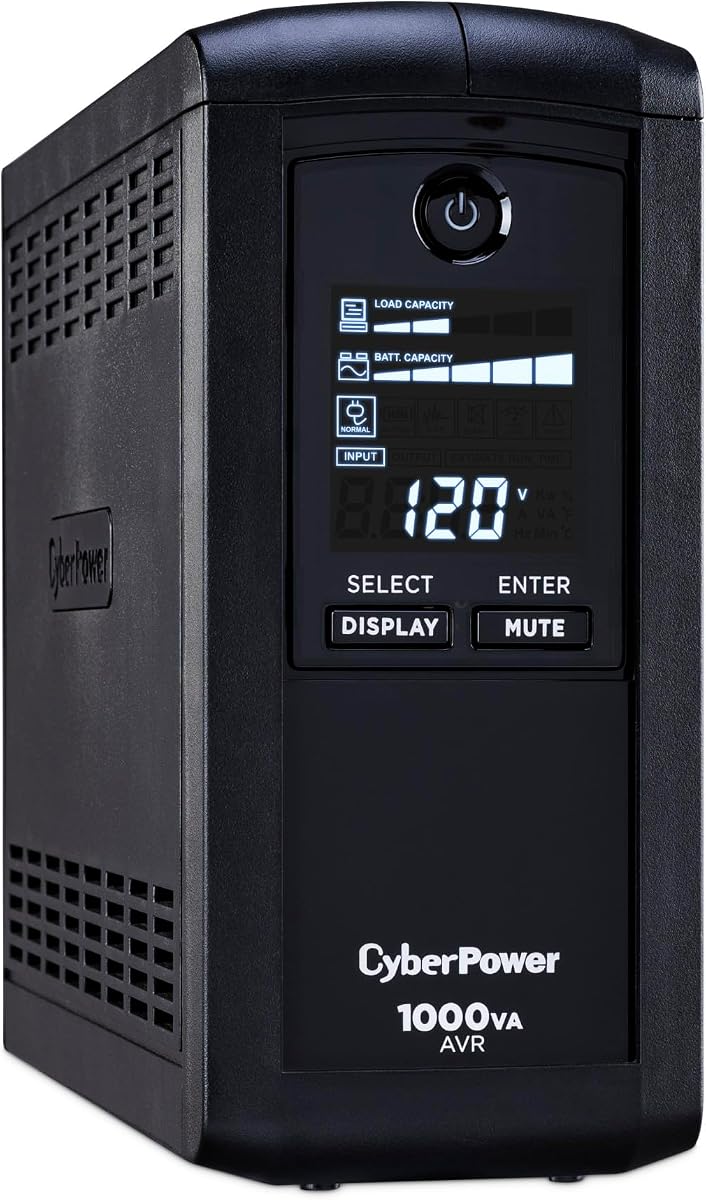
The CyberPower CP1000AVRLCD supplies 1000VA and 600W of capacity, placing it in the middle of the lineup for conventional desktop and workstation protection. Its 4.5 rating reflects a well-rounded system with AVR, a multifunction LCD, and nine NEMA outlets. It is a logical option when you need more than a compact UPS but do not require the greater capacity or pure sine wave output of the leading models.
We may earn a commission when you buy through this link, at no additional cost to you.
Five of the nine outlets provide both battery backup and surge protection, while the remaining four are surge-only. The multifunction display shows estimated runtime, battery capacity, and load capacity, helping the user judge how much additional equipment can be connected. A six-foot cord and right-angle plug provide a degree of placement flexibility around desks and entertainment furniture.
The simulated sine wave output is intended for workstations, network devices, and home-entertainment equipment. Automatic Voltage Regulation corrects minor fluctuations without switching to battery power, which also helps extend battery life. Its 600-watt maximum should be treated as a firm limit, and startup demands from computer components can make operating closer to the maximum less desirable than the headline number suggests.
This model is a good fit for a typical professional desktop with a tower, one or two displays, and essential network equipment. The runtime and load information on the screen makes it easier to determine which devices should remain connected to battery-backed outlets. Buyers who need more outlets, longer coverage, or pure sine wave output should move up to one of the 1500VA alternatives.
Showing estimated runtime, battery capacity, and load capacity gives you a more useful picture than a basic on/off indicator. These readouts help prevent connected equipment from exceeding the intended operating envelope.
AVR handles minor voltage fluctuations without transferring the load to battery mode. It can improve stability while reducing unnecessary battery wear over the life of the system.
We may earn a commission when you buy through this link, at no additional cost to you.
The GOLDENMATE 2000VA/1600W Lithium UPS stands apart with 2000VA, 1600W, pure sine wave output, and a 51.2V, 9Ah lithium iron phosphate battery. Its 4.4 rating reflects strong capacity and battery longevity alongside a more specialized design. For a substantial workstation or a user who wants to avoid recurring lead-acid battery maintenance, it offers the most distinctive feature set in this group.
We may earn a commission when you buy through this link, at no additional cost to you.
The LiFePO4 battery is stated to last more than 10 years and support more than 3,000 charge cycles. The manufacturer also indicates a total-cost-of-ownership reduction of more than 40% compared with conventional lead-acid batteries. These figures are supplied product claims, so buyers should evaluate them against their own duty cycle, operating environment, and maintenance needs rather than treating them as universal guarantees.
All eight NEMA outlets provide surge protection and battery backup, and the wider spacing is intended to accommodate bulky plugs. A communication port with a supplied USB cable can initiate an automatic PC shutdown through Windows settings when connected appropriately. The intelligent LCD, built-in battery management system, PP45 terminals, automatic safety cutoff, and combined mute and display controls make this a feature-rich system for users who want active oversight.
The product is larger and heavier than comparable lead-acid models because of its higher-capacity battery and larger transformer, according to the manufacturer. It supports a 90–140V AC input for standard 110V household power, and generator output may not satisfy its voltage, frequency, waveform, or grounding requirements. This model is best for users who prioritize pure sine wave power, substantial capacity, and long battery life, provided the installation space and electrical input are appropriate.
The LiFePO4 battery is designed for more than 3,000 charge cycles and avoids the routine replacement process associated with conventional lead-acid units. Its stated 10-year-plus lifespan makes it appealing for always-connected workstation environments.
A 1600-watt rating and pure sine wave output provide substantial room for powerful components and cleaner backup power. That makes the model relevant to demanding workstations rather than only basic desktop systems.
The communication port and included USB cable allow automatic shutdown initiation through supported Windows settings. This can reduce the chance of abrupt power loss when the battery enters its final operating stage.
We may earn a commission when you buy through this link, at no additional cost to you.
The CyberPower ST900U is a slim 900VA, 500W standby UPS intended for home offices, home entertainment, computers, gaming consoles, and broadband routers. Its 4.5 rating shows that the compact form factor does not come at the expense of useful features. It is a practical choice for a modest workstation area where conserving depth and maintaining a clean under-desk layout matter more than high-end waveform quality.
We may earn a commission when you buy through this link, at no additional cost to you.
Twelve NEMA 5-15R outlets include six battery-backed and surge-protected positions and six surge-only positions. Four of the outlets are widely spaced to accept larger power plugs, which is valuable when connecting a desktop tower, monitor, and other equipment. The right-angle input plug and five-foot power cord further simplify installation in confined spaces.
Its GreenPower efficiency design uses a compact charger and power inverter to reduce power consumption. The simulated sine wave output suits the common consumer and office devices named by the manufacturer, but it is less appropriate for sensitive or specialized equipment. Since this is a standby design, it switches to battery power when utility input fails, while the smaller 500-watt rating limits the size of the supported load.
This UPS is best for a compact office, dorm-style setup, media shelf, or basic home-office desk. It offers more outlet flexibility and genuine backup capability than a surge-only protector while remaining easier to accommodate than larger systems. Choose a higher-capacity line-interactive or pure sine wave model for a powerful professional workstation, extended runtime, or more sensitive connected equipment.
The low-profile design is intended to fit where a full-size tower UPS would be inconvenient. A slim enclosure can be easier to place under a desk, behind a display, or inside a compact shelving unit.
The GreenPower approach uses a compact charger and inverter to keep standby consumption low. It is a useful design for home offices and media areas where equipment remains connected for long periods.
We may earn a commission when you buy through this link, at no additional cost to you.
The CyberPower CP850AVRLCD offers 850VA and 510W of capacity in a compact intelligent UPS designed for workstations, networking devices, and home entertainment equipment. Its 4.5 rating indicates a well-regarded option for users who need more protection than a surge protector but do not need a large enterprise-style system. The multifunction display keeps operating information visible without requiring additional monitoring hardware.
We may earn a commission when you buy through this link, at no additional cost to you.
Nine NEMA 5-15R outlets are divided into five battery-backed surge-protected receptacles and four surge-only receptacles. The display reports estimated runtime, battery capacity, and load capacity, making it easier to manage connected devices. A six-foot power cord and right-angle, 45-degree offset plug provide flexibility when the outlet is behind furniture or near the floor.
Simulated sine wave output is appropriate for the common electronics identified by CyberPower, and AVR corrects minor fluctuations without switching to battery operation. The 510-watt ceiling requires careful load management, especially for systems with power-hungry processors and graphics hardware. Its smaller capacity also means it is less suitable for extended runtime than the 1200W, 1500W, or 1600W alternatives in the list.
Choose this model for a modest desktop setup, a network-focused workstation, or a home office where essential equipment should remain available during brief outages. It is a good compromise when space, outlet access, and useful status information matter. For a high-power creative workstation, choose a model with greater wattage and preferably pure sine wave output.
The 510-watt rating is sufficient for many standard desktop arrangements, while the display helps users monitor load and remaining runtime. That visibility makes the compact capacity easier to manage.
Automatic Voltage Regulation corrects minor power fluctuations without transferring to battery mode. This supports steadier operation and avoids unnecessary battery cycling during common line variations.
We may earn a commission when you buy through this link, at no additional cost to you.
The CyberPower BRG1500AVRLCD2 provides 1500VA and 900W of backup capacity, a 4.7 rating, and a five-year warranty that includes the battery. These characteristics make it a compelling general-purpose UPS for a professional workstation with several attached devices. The intelligent color LCD supplies immediate information and alerts, while AVR helps manage minor voltage fluctuations.
We may earn a commission when you buy through this link, at no additional cost to you.
Six of the twelve NEMA 5-15R outlets provide battery backup and surge protection, and the other six provide surge protection. A six-foot power cord and Type-A and Type-C USB charging ports are included in the outlet arrangement. The system also supports optional RMCARD205, RCCARD100, or RWCCARD100 management cards for remote oversight, making it adaptable to a more professional deployment.
The simulated sine wave output is suitable for the standard workstations, network devices, and home-entertainment equipment identified in the product information. It is not the ideal selection for a buyer whose primary requirement is pure sine wave power. The 900-watt rating provides more headroom than the smaller CyberPower systems, but a heavily equipped workstation should still be evaluated for startup loads and sustained consumption.
This model is well suited to users who want a five-year warranty, generous connected equipment coverage, and a path toward remote management. It can serve a conventional office workstation, technical desk, or home office requiring a greater number of outlets than compact models provide. It is also a strong alternative when the 500,000 connected equipment guarantee and extended battery coverage outweigh the preference for pure sine wave output.
A five-year warranty that includes the battery reduces uncertainty around one of the most common long-term UPS maintenance concerns. The stated 500,000 connected equipment guarantee adds further protection for properly connected equipment.
Compatibility with optional management cards gives the system a path toward centralized status monitoring. Users who do not need remote access can still use the built-in color LCD for immediate condition information.
We may earn a commission when you buy through this link, at no additional cost to you.
Choosing a workstation UPS requires balancing usable capacity, power quality, connectivity, and physical needs. These factors help prevent an undersized system or an unnecessary feature set from compromising the installation.
Aim to keep the normal connected load comfortably below the stated maximum and prioritize essential equipment for battery-backed outlets. If you need several large displays or additional powered accessories to continue working, move up to a higher-wattage UPS.
Choose pure sine wave for sensitive or performance-oriented systems, and simulated sine wave for conventional supported electronics. Confirm the manufacturer's compatibility guidance whenever the load is unusual.
Estimate runtime using the display, then test your safe-shutdown workflow. Reduce the battery-backed load if you need more operating time rather than relying on a system sized exactly at the limit.
Choose enough outlets for the present and foreseeable setup. Keep essential equipment on battery-backed receptacles and use surge-only outlets for lower-priority accessories.
Prioritize AVR for normal workstation resilience and detailed status displays for proactive control. Consider remote management when no one can regularly visit the equipment.
Conventional lead-acid systems may be more familiar and compact, while lithium iron phosphate reduces battery replacement concerns. Verify physical dimensions and battery support before choosing a long-term installation.
Compare battery inclusion, warranty duration, and connected equipment terms together. Use the complete manufacturer terms to confirm that your installation and connected devices qualify.
Place the UPS on a stable, dry surface with adequate ventilation and enough clearance around its vents. Connect the computer and essential peripherals to battery-backed outlets, while lower-priority accessories can use surge-only receptacles. Avoid extension cords unless the manufacturer expressly permits them, and do not overload the unit. Before operating the UPS, review the input-voltage requirements and confirm that the wall circuit matches the equipment.
Use the LCD and included management software to check load capacity, battery condition, and estimated runtime. Familiarize yourself with alarm conditions, the mute control, and the system's shutdown behavior. Where communication or remote management is supported, configure it for the operating system and test a notification or shutdown procedure. During an outage, monitor the estimated runtime, disconnect nonessential loads when needed, and save work before initiating a controlled shutdown.
Keep the unit plugged in under normal conditions so its batteries remain charged, and test the battery system on a schedule appropriate to your operation. Use a power strip only if it is specifically designed for UPS use and remains within the manufacturer's guidance. Respond to battery replacement warnings promptly, keep firmware and monitoring software current, and consult the manual before cleaning or servicing the enclosure. A periodic controlled test can confirm that the display, alarms, outlets, and computer shutdown workflow are working as expected.
The correct capacity depends on the combined draw of the tower, displays, network equipment, and other devices that must remain active. Add up their power requirements and choose a UPS with comfortable headroom above that total, especially if the computer has power-hungry graphics hardware or startup surges. A 600W system may suit a modest office desktop, while a 1000W or 1600W model provides more room for a substantial or expandable workstation.
It can be important, particularly for modern active PFC power supplies and components with sensitive electronics. Pure sine wave output provides a smoother transition during outages than a simulated waveform. A simulated sine wave model may still work with many supported systems, but a pure sine wave unit is the safer choice when compatibility is uncertain or when power quality is a priority.
A surge protector primarily diverts or blocks voltage spikes, but it does not keep equipment running during an outage. A UPS supplies battery power when utility electricity fails, while typically including surge protection on its outlets. For a workstation, a UPS provides time to save work, send notifications, and shut down safely, whereas a basic surge protector handles only power-quality spikes.
Yes, keeping the UPS connected under normal conditions allows its battery to remain charged and ready. A UPS is designed to sit between the wall outlet and connected equipment while continuously monitoring the power supply. The computer can remain connected too, with the UPS switching to battery when it detects a failure. Testing it occasionally confirms that the battery and alarm system are functioning.
Runtime depends on the model's capacity, the connected load, battery condition, and the behavior of the electronics. A heavily loaded system will run for less time than a lightly loaded one. LCD-equipped models provide an estimated runtime that can guide decisions, and disconnecting nonessential peripherals extends the available operating time. For safety, configure an orderly shutdown before the remaining runtime becomes critical.
Not necessarily. The front USB ports on several models are specified for charging phones and tablets, not for communications protection or automatic PC shutdown. A separate communication port may be required for that function, as offered by the GOLDENMATE system. Check the port labeling and manual before connecting network or data equipment, and do not assume every USB connection has the same purpose.
Yes, as long as the combined power draw remains below the UPS's rated wattage and the monitors use compatible plugs. Each display also increases the load, which can shorten runtime. Put the computer and any essential monitors on battery-backed outlets, and use surge-only outlets for accessories that can wait until power returns. Leave headroom for startup and operating variations.
Remote management lets an administrator check or control supported UPS functions without visiting the workstation. It is especially useful in offices, studios, and other locations where equipment may be unattended. The CyberPower BRG1500AVRLCD2 supports optional RMCARD205, RCCARD100, or RWCCARD100 cards, which must be purchased separately. The benefit depends on the workflow, network access, and the need to monitor more than one location.
The CyberPower CP1500PFCLCD stands out as the best overall choice because its 1000-watt capacity, pure sine wave output, twelve outlets, color LCD, and AVR provide a balanced feature set for a modern workstation. The CyberPower BRG1500AVRLCD2 is the leading option for managed environments, offering the highest listed rating, a five-year battery warranty, and optional remote management cards. The GOLDENMATE lithium UPS takes the premium position for its 1600-watt capacity, pure sine wave output, and long-lived lithium iron phosphate battery.
Before buying, calculate the real connected load, leave room above that figure, and decide which peripherals need to remain active. Pure sine wave output is worth prioritizing for active PFC systems, performance-oriented builds, or any setup where compatibility is uncertain. Outlet count, runtime visibility, AVR, communication options, battery chemistry, physical space, warranty coverage, and connected equipment terms should then be matched to the way the computer is actually used.
Finally, recheck the current product listing, availability, and price before ordering, since both can change over time. Confirm the UPS voltage requirements, inspect the warranty terms, and make sure every intended device has a suitable outlet. A properly sized and installed battery backup gives a workstation more than outage survival: it adds controlled shutdown time, voltage stabilization, surge protection, and greater operational confidence.