
MINISFORUM NAB9S
4.5Editor score
14-core i9 processor
Four independent displays
Dual 2.5G networking
Easy memory and storage access
This Intel Core i9 Mini PC guide compares 10 powerful compact models in 2026 across performance, connectivity, expandability, displays, and everyday use.
An Intel Core i9 Mini PC combines flagship-class processing with a compact footprint, making it useful for demanding offices, creative studios, development setups, home labs, and multi-monitor workspaces. A good model should not merely be powerful: it also needs effective cooling, flexible memory and storage options, dependable networking, convenient peripherals, and enough display outputs for the intended workflow.
We compared ten mini PCs using the specifications and feature details supplied for each product. The assessment covers processor architecture, core and thread counts, memory, storage expansion, graphics, display support, wired and wireless networking, cooling, and practical connectivity. The list includes complete systems, more affordable configurations, and a barebone workstation designed for custom upgrades.
Each review explains the strongest reasons to choose a particular model, along with its limitations and the users most likely to benefit from it. The top selections represent overall performance, value, and specialized workstation capability. Product configurations and prices can change, so confirm the current specifications and listing details before making a purchase.
4.5Editor score

4.5Editor score

4.5Editor score
This side-by-side comparison highlights processor power, memory, display capability, networking, and expansion options across the ten featured Intel Core i9 and Core Ultra 9 mini PCs.


The MINISFORUM M1-1390 is the strongest all-round choice in this guide, earning a 4.5 rating for its combination of flagship processor power, generous memory, fast storage, and unusually complete connectivity. Its Intel Core i9-13900HX provides 24 cores and 32 threads, including eight performance cores and 16 efficiency cores. That broad core count is well suited to rendering, compilation, video editing, virtual machines, and heavy multitasking.
We may earn a commission when you buy through this link, at no additional cost to you.
The supplied 32GB of DDR4 memory operates at 3200MHz and can be expanded to 96GB, giving buyers room to grow as projects become more demanding. A 1TB PCIe 4.0 NVMe SSD is included, while the dual-storage arrangement supports up to two 4TB drives and a combined capacity of 8TB. The system can drive three 4K displays through HDMI, DisplayPort, and USB-C, making it a strong candidate for a compact multi-screen workstation.
Networking is another major strength because the M1-1390 includes a 2.5G Ethernet port, WiFi 6E, and Bluetooth 5.2. Five USB ports cover common peripherals, while the white-and-silver enclosure suits offices, studios, and meeting rooms. The tradeoff is that it relies on integrated Intel UHD Graphics and older DDR4 rather than the DDR5 and newer platform seen in some competing systems.
Choose the M1-1390 when processor throughput, expandable storage, and practical connectivity matter more than discrete graphics. It is particularly attractive to developers, editors, analysts, and office users who want a powerful Core i9 platform without installing a full-size tower. For most buyers seeking the most balanced Core i9 mini PC, it remains the strongest overall recommendation.
The 24-core, 32-thread processor is the main reason this model stands apart. Its hybrid design can allocate performance cores to intensive tasks while efficiency cores handle background activity, which is valuable when editing media, compiling software, and communicating through several applications at once.
The included PCIe 4.0 SSD is suitable for responsive everyday operation, and the second drive position gives large media collections and active projects room to expand. This flexibility is more useful than choosing a compact PC and discovering that its internal storage is difficult to increase later.
We may earn a commission when you buy through this link, at no additional cost to you.
The Beelink GTi13 is a feature-rich Intel Core i9 mini PC with a 4.6 rating. Its 13th-generation Core i9-13900HK combines 14 cores and 20 threads with boost speeds up to 5.4GHz. The configuration is particularly compelling for users who value newer DDR5 memory, extensive ports, and a compact system that can handle simultaneous creative, gaming, development, and broadcasting tasks.
We may earn a commission when you buy through this link, at no additional cost to you.
Its 32GB DDR5 memory is supplied in two slots, with support stated up to 96GB, while the 1TB SSD is also expandable. The inclusion of Thunderbolt 4 allows high-bandwidth data transfer, charging, and video output. A PCIe expansion slot opens the door to a compatible graphics card or other add-in hardware, making this one of the more flexible compact designs in the group.
Two 2.5G Ethernet ports, WiFi 6, Bluetooth 5.2, an SD card slot, and five 10Gbps USB ports make it well equipped for workstations. The feature set extends beyond conventional I/O with a fingerprint sensor, dust-resistant design, AI voice interaction, and a stated MSC2.0 cooling system. The limitation is that the 14-core processor offers less parallel throughput than the 24-core i9 HX alternatives.
This model is a compelling choice for users who want i9 performance, DDR5 speed, and extensive expandability in a single enclosure. It is particularly suitable for creative professionals, programmers, and home-lab users who may eventually add a graphics card. If raw core count is the priority, the M1-1390 or Hyper H2 may be better, but the GTi13 offers the richest balanced feature set.
Thunderbolt 4 and the PCIe expansion slot make the GTi13 more adaptable than a fixed mini-PC design. Users can connect high-speed storage, displays, or compatible accessories while retaining the option to add a more capable graphics solution later.
Dual 2.5G Ethernet connections are useful for high-throughput networks, local storage access, and advanced connection arrangements. WiFi 6 and Bluetooth 5.2 provide convenient wireless alternatives for everyday peripherals and network access.
We may earn a commission when you buy through this link, at no additional cost to you.
The KAMRUI Hyper H2 is a compact high-frequency i9 system built around the 14th-generation Core i9-14900HX. It carries a 4.5 rating and stands out with 24 cores, 32 threads, a stated maximum boost of 5.8GHz, and a 55W processor design. These specifications target demanding multitasking, creative work, gaming, and applications that respond well to high single-core speed.
We may earn a commission when you buy through this link, at no additional cost to you.
It arrives with dual-channel 32GB DDR4 memory, which can be expanded to 64GB, and a 1TB M.2 2280 PCIe 4.0 NVMe SSD. A second M.2 slot allows storage expansion up to 4TB. Triple 4K output is provided through HDMI 2.0, DisplayPort 1.4, and USB-C, so it can support a productive three-monitor arrangement.
The Hyper H2 includes a silent centrifugal fan, dual copper heat pipes, a dual-fin module, and an aluminum heatsink intended to maintain stable performance under load. Its enclosure measures only 5.04 by 5.04 by 1.63 inches, and the included VESA mount makes it especially easy to conceal behind a display. WiFi 6E, Bluetooth 5.2, and multiple USB ports cover general connectivity, although the single 1Gbps Ethernet port trails the dual 2.5G designs.
This is a strong match for someone who wants a current-generation processor, high clock speed, and minimal desk clutter. It may also appeal to gamers because of its high refresh potential and compact VESA-friendly form. Buyers prioritizing newest memory standards or faster built-in networking should consider the GTi13, while the M1-1390 remains the alternative with greater storage expansion.
A stated 5.8GHz maximum boost makes this model appealing for applications that benefit from fast response. Its 24-core design also preserves substantial parallel processing capacity for rendering, development, and content production.
The extremely small chassis and included VESA mount allow the system to sit behind a monitor or inside a media cabinet. This helps preserve the productivity advantages of a desktop without consuming an entire tower footprint.
We may earn a commission when you buy through this link, at no additional cost to you.
The MINISFORUM NAB9S delivers Core i9 performance without including the maximum memory and storage found in the more expensive models. Its 4.5 rating reflects a capable 13th-generation Core i9-13900HK with 14 cores, 20 threads, and speeds up to 5.4GHz. The standard configuration includes 16GB of DDR4 memory and a 500GB PCIe 4.0 NVMe SSD.
We may earn a commission when you buy through this link, at no additional cost to you.
One particularly useful feature is support for four independent displays at 4K 60Hz through dual HDMI and dual USB-C video outputs. That makes the NAB9S especially useful for financial monitoring, office dashboards, editing timelines, development views, and other workflows that benefit from a large virtual desktop.
The system also includes two 2.5G Ethernet ports, dual-band WiFi 6, and Bluetooth 5.2. Its tool-free top cover simplifies access to memory and storage, while two DDR4 SO-DIMM slots support up to 32GB of RAM. A separate 2.5-inch SATA bay allows another hard drive or solid-state drive to be installed, and the revised cooling design uses dual heat pipes, dual airflow channels, active SSD cooling, and dual-side ventilation.
The main limitation is the 16GB memory and 500GB storage in the supplied configuration. More demanding users may need to upgrade both immediately, although the accessible interior makes that less inconvenient. The NAB9S is a compelling choice for budget-conscious buyers who value i9 processing, four screens, and fast networking without paying for a larger complete workstation.
Quad-display support distinguishes the NAB9S from many similarly compact systems. It is particularly useful for traders, engineers, editors, and administrators who want application dashboards, communication, and reference material visible simultaneously.
The removable top cover, two memory slots, and dedicated 2.5-inch storage position make the system more adaptable than a sealed mini PC. Buyers who anticipate growth can add capacity without replacing the entire machine.
We may earn a commission when you buy through this link, at no additional cost to you.
The MINISFORUM MS-01 is the specialist workstation in this collection, earning a 4.5 rating for its enterprise-oriented networking, storage, and expansion capabilities. Its Core i9-13900H processor provides 14 cores, 20 threads, 24MB of cache, and speeds up to 5.4GHz, with integrated Intel Iris Xe Graphics for basic visual output.
We may earn a commission when you buy through this link, at no additional cost to you.
Networking is the major attraction. Two 10Gbps SFP+ ports support link aggregation, while two 2.5G RJ45 ports use Intel I226 controllers. Two USB4 interfaces add Thunderbolt Ethernet at 20Gbps, and the supplied specifications cite a combined potential throughput of up to 65Gbps. This makes the system relevant to NAS users, homelab operators, network professionals, and businesses consolidating data-transfer workflows.
Storage is equally adaptable. The MS-01 supports three M.2 2280 SSDs, including a PCIe 4.0 interface stated to reach 7000MB/s, and can use U.2 and 22110 M.2 drives through the included adapter. RAID0 and RAID1 support is listed. A full PCIe 4.0 x16 slot can accept a discrete graphics card, network controller, or storage controller, which greatly broadens the machine's potential.
The included 32GB DDR5 memory and 1TB SSD make it a usable complete system, but the premium hardware makes it better suited to infrastructure and enthusiast use than a basic home office. Its main appeal is flexibility: the chassis can serve as a network appliance, compact workstation, or expandable local-computing platform. For those needs, it is one of the most capable compact i9 systems in the guide.
The combination of SFP+, RJ45, and USB4 networking creates options that ordinary office mini PCs cannot match. It is especially valuable for high-speed storage access, link aggregation, advanced homelab configurations, and professional network experimentation.
A full-length PCIe slot and numerous SSD options allow this compact system to accept dedicated hardware and substantial storage. The result is closer to a small workstation platform than a simple fixed-purpose desktop.
We may earn a commission when you buy through this link, at no additional cost to you.
The GEEKOM IT13 MAX is a 4.6-rated compact system designed around the Intel Core Ultra 9 185H, a 65W processor with 16 cores. Rather than focusing only on conventional CPU speed, it emphasizes local AI acceleration, strong integrated graphics, quiet operation, and support for both Windows and major Linux distributions.
We may earn a commission when you buy through this link, at no additional cost to you.
Its stated NPU capabilities make it interesting for developers, engineers, scientists, and creators working with local language models, computer vision, transcription, OCR, document processing, and other AI-assisted applications. The product information claims two to three times higher AI power and faster graphics than an i9, with 20 to 30 percent faster video editing. These are manufacturer-provided comparisons, so actual results depend on the software and workload.
The system includes 16GB of DDR5 memory and a 1TB SSD, while dual Ethernet and display arrangements support up to four simultaneous screens, including 8K output through USB-C. IceBlast 3.0 cooling is designed for quiet 65W sustained operation, making the unit suitable for offices, classrooms, studios, and quiet home environments. A three-year warranty adds reassurance for professional deployment.
The main limitation is the 16GB starting memory, which is modest for large local models and heavy multitasking. The IT13 MAX makes the most sense for buyers who actively need local AI and value quiet operation more than maximum storage. For ordinary productivity, it remains capable, but its specialized strengths will be more visible in the right environment.
A dedicated NPU can accelerate compatible local AI tasks without sending every document or prompt to a cloud service. This approach can improve responsiveness and keep sensitive working materials on the device when suitable models and software are used.
The cooling system is designed to sustain 65W performance while reducing fan noise. That makes the IT13 MAX more appropriate for offices, schools, medical environments, and late-night creative work than systems intended to run at maximum fan output constantly.
We may earn a commission when you buy through this link, at no additional cost to you.
The barebone MINISFORUM MS-01 is designed for buyers who want to choose memory, storage, and an operating system themselves. It retains the Core i9-13900H processor with 14 cores, 20 threads, speeds up to 5.4GHz, and integrated Intel Iris Xe Graphics. The 4.5 rating reflects a capable foundation, even though the machine arrives without RAM, SSD, or an operating system.
We may earn a commission when you buy through this link, at no additional cost to you.
Its two DDR5-5200 memory slots and multiple M.2 positions provide substantial configuration freedom. The system supports M.2 2280 drives, 22110 enterprise-style M.2 drives, RAID arrangements, and U.2 SSDs with capacities stated at 7.68TB, 15.36TB, or greater. A PCIe 4.0 x16 slot can accept a compatible discrete graphics card, and the listing specifically notes support for an RTX 3050 that was tested by the manufacturer.
The networking design carries over from the complete MS-01, including two 10G SFP+ interfaces and two 2.5G RJ45 ports. Display connectivity includes HDMI and two USB4 ports, with stated support for 4K 60Hz, 8K 30Hz, and 4K 144Hz output depending on the connection and display configuration. This is a highly flexible platform for homelab, data-storage, and compact workstation builds.
The disadvantage is obvious: buyers must purchase compatible memory and storage, and they must install an operating system themselves. There is also no bundled drive or RAM to provide immediate functionality. The barebone version is best for deliberate builders who understand the required components and want to direct their budget toward the exact configuration they need.
Choosing RAM, drives, and software separately prevents buyers from paying for components they do not want. It also permits larger, faster, or enterprise-focused storage selections that may not fit the standard configuration of a complete mini PC.
The full PCIe slot and multiple display interfaces create a path to dedicated graphics and multi-screen operation. Combined with the high-speed networking, this barebone platform can evolve into a specialized workstation or server-like system.
We may earn a commission when you buy through this link, at no additional cost to you.
The GEEKOM XT13 Pro is a Core i9-13900H mini PC that emphasizes generous memory and storage. Its rating of 4.1 is the lowest among the ten products, but the supplied configuration is still substantial: 32GB of RAM, a 2TB PCIe 4.0 SSD, WiFi 6E, and Bluetooth 5.3. The processor delivers 14 cores and 20 threads with speeds up to 5.4GHz.
We may earn a commission when you buy through this link, at no additional cost to you.
The 32GB memory is particularly useful for multitasking, virtual machines, 4K editing, 3D rendering, and other workflows that can exhaust smaller memory configurations. It can be expanded up to 96GB, and the 2TB drive reduces the likelihood of running out of space for media, project files, games, and applications. Intel Iris Xe Graphics with AV1 encoding and decoding supports everyday gaming and content creation.
Its stated three-year hardware coverage and local technical support are useful for buyers planning business or professional use. The product information also describes reliability testing intended to reduce service downtime. That support and warranty structure is more notable than the relatively modest customer rating, particularly when comparing the machine with newer Core Ultra alternatives.
The XT13 Pro is best suited to users who want substantial memory and storage in a compact desktop without requiring the highest core count. Its 13th-generation platform is mature and capable, though the 14-core processor and less-detailed interface specification trail the newest models in the group. Confirm the current port and display configuration for your needs before purchasing.
The included 32GB offers more breathing room than many compact configurations, which is useful when running virtual machines, editing timelines, rendering scenes, or keeping numerous applications open. Expansion to 96GB provides a practical path for future work.
A 2TB PCIe 4.0 SSD is a meaningful advantage for creators and power users. It can hold large project libraries and application sets while reducing the need for an immediate external-storage upgrade.
We may earn a commission when you buy through this link, at no additional cost to you.
The GEEKOM GT13 MAX combines the Intel Core Ultra 9 185H with 16 cores, 22 threads, Intel Arc graphics, and an AI Boost NPU stated to deliver up to 11 TOPS. Its 4.4 rating reflects a modern platform aimed at AI-assisted work, professional creation, multi-screen operation, and compact deployments where connectivity matters.
We may earn a commission when you buy through this link, at no additional cost to you.
The NPU can support compatible lightweight local language models, private document question answering, retrieval-augmented search, OCR, transcription, meeting summaries, image processing, subtitles, noise reduction, and coding assistance. Intel Arc Graphics provides eight Xe cores, ray tracing, and AV1 decoding, making the system suitable for AAA gaming, 4K editing, and creative tasks. Dual USB4, dual HDMI 2.0, and Mini DisplayPort 1.4 support up to four displays.
Networking is among the strongest attributes. WiFi 7, Bluetooth 5.4, and dual 2.5G Ethernet provide modern wired and wireless options. The supplied 16GB DDR5 memory can expand to 96GB, while the 1TB SSD has stated expansion potential up to 6TB. A reinforced ABS enclosure, IceBlast 2.0 cooling, full-copper heatsink, and extensive vibration, drop, temperature, humidity, port, noise, and salt-spray testing support professional deployment confidence.
The GT13 MAX is ideal for users who want current AI hardware, strong integrated graphics, modern networking, and four-display flexibility in a small enclosure. Its 16GB starting memory is the main concern for large local models and intensive multitasking, though the upgrade path addresses that limitation. A three-year limited warranty and Windows 11 preinstallation add convenience for general users.
Intel Arc graphics and the NPU give this system broader capabilities than a conventional office mini PC. Together they target modern creative workflows, local AI acceleration, and media tasks without requiring a full-size discrete graphics tower.
WiFi 7, dual 2.5G Ethernet, extensive port selection, and ruggedized environmental testing suit offices, studios, schools, and enterprise deployments. The enclosure and cooling design support use beyond a temporary home-computer role.
We may earn a commission when you buy through this link, at no additional cost to you.
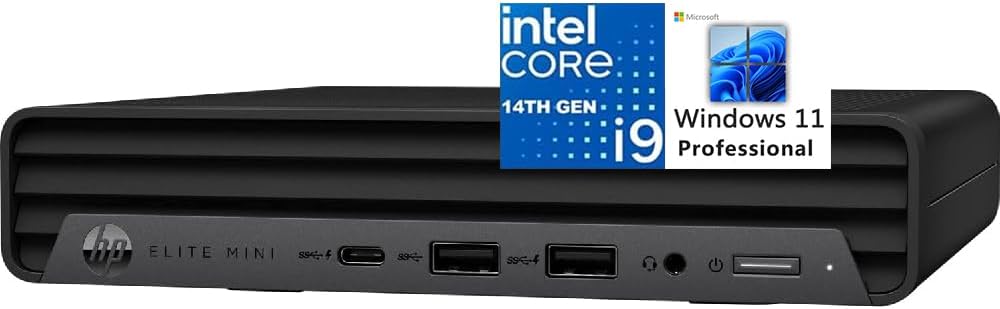
The HP Elite Mini 800 G9 is the most immediately usable business option in the guide. It has a 4.6 rating, ships with Windows 11 Pro 64-bit, and includes a full-size wired keyboard and mouse. Its Core i9-14900T processor provides 24 cores, 32 threads, 32MB of cache, and boost speeds up to 5.4GHz in a design intended for quiet operation.
We may earn a commission when you buy through this link, at no additional cost to you.
The system includes 16GB of DDR5 memory and a 1TB PCIe NVMe M.2 SSD. Integrated Intel UHD Graphics 770 handles normal display tasks, while two DisplayPort 1.4 connectors and HDMI 2.1 support up to three 4K 60Hz displays. This makes it appropriate for professional workspaces, control rooms, engineering desks, and office environments that favor a conventional, vendor-supported platform.
Connectivity includes five USB-A ports, one 20Gbps USB Type-C port, one RJ45 connection, WiFi 6 using the Realtek RTL8852BE, Bluetooth, and a 3.5mm headphone and microphone combination jack. The six-port USB selection is practical for keyboards, mice, storage devices, webcams, and other peripherals without requiring a large hub immediately.
The principal limitation is the 16GB memory configuration, which is modest for a machine with 24 processor cores. Nevertheless, this system is a strong choice for organizations or individuals that want a complete, preconfigured Windows Pro mini PC with peripherals included. It trades specialized networking and storage expansion for simplicity, familiar enterprise support, and a ready-to-use package.
Windows 11 Pro, a wired keyboard, and a mouse remove several common setup tasks. The result is a straightforward option for offices and users who prefer a traditional vendor ecosystem over a specialist mini-PC ecosystem.
The i9-14900T uses 24 cores and 32 threads while targeting efficient, quiet operation. That balance makes it appealing for always-available professional workstations where large full-size towers would be unnecessary.
We may earn a commission when you buy through this link, at no additional cost to you.
The right Core i9 mini PC depends less on the processor badge alone than on the balance between core count, memory, graphics, networking, cooling, and expansion. These factors determine whether the compact system can handle your software and peripherals comfortably over time.
Core count is especially important for rendering, compiling, virtual machines, scientific work, video encoding, and other parallel workloads. The models here range from 14 cores and 20 threads to 24 cores and 32 threads, while maximum boost clocks vary by processor generation. Higher clock speed generally benefits lightly threaded and interactive applications, whereas more cores improve throughput when many tasks run at once.
Choose according to your workload. The 24-core i9-13900HX and i9-14900HX models offer the greatest parallel capacity, while the 14-core i9-13900H and i9-13900HK are still capable for mixed office and creative use. Look beyond clock figures and consider cooling, memory speed, storage, and graphics, since a high-powered chip cannot reach its potential if the rest of the system bottlenecks it.
Memory is one of the most important upgrade considerations in a compact PC. The featured systems include configurations ranging from 16GB to 32GB, with expansion limits stated between 32GB and 96GB. Creative applications, virtual environments, large project files, and heavy browser use can consume memory quickly, making 32GB a more comfortable starting point for demanding work.
DDR5 generally offers higher bandwidth and improved efficiency, while DDR4 remains useful where the primary goal is lower total system cost. Check the number of accessible memory slots, supported capacity, and whether the listed maximum uses all slots. A balanced recommendation is to choose 32GB when possible, especially for editing, development, AI experimentation, or professional multitasking.
Storage capacity should match the size and working habits of your files. The supplied configurations include 500GB, 1TB, and 2TB NVMe SSDs, and several systems support additional M.2 drives. PCIe 4.0 storage is preferable for rapid transfers and application loading, while a separate 2.5-inch bay can accommodate a large SATA drive for archives or inexpensive capacity.
Consider how many drive positions are available, whether RAID is supported, and whether enterprise U.2 or 22110 drives are an option. Also determine whether the memory and storage are easy to access. A tool-free cover and multiple M.2 slots make future expansion more convenient, particularly for a system expected to remain in service for several years.
Integrated graphics can handle office applications, 4K media, AV1 playback, and many creative workflows, but they do not replace a capable discrete GPU for demanding 3D rendering or modern gaming. The i9 HX and HK models use Intel UHD or Iris Xe graphics, while the Core Ultra systems listed include newer Intel Arc graphics with additional Xe cores.
Count the displays and resolutions you need. Triple 4K support is common among the stronger picks, while the MS-01 and Core Ultra models can reach four displays on suitable configurations. Verify port types because HDMI, DisplayPort, and USB-C support different maximum resolutions and refresh rates. A full PCIe slot offers a path to dedicated graphics in selected workstation models.
Wired networking can be decisive for large file transfers, NAS access, servers, and professional environments. A 1Gbps port is sufficient for many routine connections, while 2.5GbE provides a meaningful improvement for fast storage and local networks. Dual 2.5G ports offer more flexibility, and the MS-01 goes further with dual 10G SFP+ interfaces and link aggregation support.
Wireless connectivity matters when cable placement is inconvenient. WiFi 6E and WiFi 7 models support modern routers and high-capacity wireless networks, while Bluetooth versions affect accessory compatibility. For a stationary office, compare both wired and wireless options rather than assuming the fastest label is required. Complex network users should prioritize ports that can connect directly to high-speed infrastructure.
A compact enclosure must move heat away from the processor, memory, and storage while keeping fan noise under control. The featured systems use various cooling strategies, including centrifugal fans, copper heat pipes, dual airflow channels, active SSD cooling, full-copper heatsinks, and dedicated fan assemblies. These details are especially relevant for sustained rendering, compiling, virtual machines, and other extended high-load tasks.
A quiet system is valuable in offices, schools, studios, and home offices, but silence should not come at the expense of stability. Look for cooling features designed specifically to preserve performance under load and for storage cooling that helps maintain consistent transfer speeds. A VESA mount can also improve airflow by positioning the machine away from enclosed surfaces.
The number of USB ports determines how many peripherals can be connected without a hub. Look for USB-A, USB-C, data transfer speed, display capabilities, and whether a USB-C port supports charging. Thunderbolt 4 and USB4 can provide high-bandwidth storage, display, and docking functions, while an SD card reader is useful for photographers and video creators. Audio jacks, fingerprint sensors, and voice features may also improve daily convenience.
PCIe expansion is another major consideration. The MS-01's full-length slot can accept a discrete GPU, high-speed network card, or storage controller, making it unusual among mini PCs. Beelink also supports PCIe expansion and an external dock. For everyone else, USB-C docking, multiple display outputs, and internal M.2 slots provide the main upgrade paths.
Some systems arrive ready to use, while the MS-01 barebone requires memory, storage, and an operating system. Windows 11 Pro suits many professional environments and includes business features such as Copilot, while Linux support is valuable for developers and homelab users. Confirm which operating system is included before ordering, especially if your work depends on a particular application, driver, or security tool.
Also check the box contents. The HP Elite Mini 800 G9 includes Windows 11 Pro, a full-size keyboard, and a mouse, while other complete systems may include power accessories and display cables without peripherals. These details affect setup convenience and may eliminate the need for separate purchases immediately after the mini PC arrives.
Begin by placing the system on a hard, level surface with open space around its vents. Do not place it inside a tightly closed cabinet unless the manufacturer explicitly permits that arrangement. Connect the display, power supply, keyboard, mouse, and network before starting, and use the appropriate power adapter rather than substituting a similar connector from another device.
After the operating system loads, install current operating-system and application updates, then confirm that memory, storage, networking, and displays are recognized correctly. Create a backup strategy before beginning important work. For storage-heavy users, use the available M.2 or 2.5-inch positions to separate operating-system and project data, and take advantage of RAID only after understanding the redundancy and recovery implications.
For routine care, keep vents clear, remove dust from the chassis, and avoid placing the mini PC on soft fabric that can block airflow. Review memory and storage limits before purchasing upgrades, back up important data before changing components, and use the VESA mount where appropriate. During sustained workloads, listen for abnormal fan behavior and verify that high temperatures are not accompanied by instability or unexpected shutdowns.
It depends on the graphics and the intended games. These systems are primarily compact productivity and creation machines, and integrated Intel graphics are not equivalent to dedicated gaming GPUs. The newer Core Ultra models offer stronger Intel Arc graphics, but buyers seeking high frame rates at demanding settings should prioritize a suitable discrete graphics solution. The expandable MS-01 is among the models that can accommodate one.
The M1-1390 and Hyper H2 combine 24 cores with 32 threads, making them strong candidates for rendering and multitasking. The GEEKOM XT13 Pro offers a generous 32GB of memory and 2TB SSD, while the Core Ultra models add newer graphics and AI capabilities. Actual editing performance also depends on codec support, timeline complexity, and whether an external display is used.
At least 16GB is reasonable for office productivity, web applications, and lighter creative work, but 32GB is more appropriate for heavy multitasking, virtual machines, large editing projects, and local AI experimentation. Several systems can expand memory to 96GB. Check the number of slots and maximum capacity before upgrading, and prioritize dual-channel configurations for supported memory performance.
One 2.5G connection is usually more than enough for routine internet access, large file transfers, and a single workstation. Dual 2.5G ports become more useful for network storage, link aggregation, virtual networking, or separating traffic. The MS-01's 10G SFP+ interfaces are aimed more at professionals and homelab users than ordinary home offices.
A complete mini PC normally includes memory, storage, an operating system, and the necessary power accessories. A barebone system includes the chassis, processor, and core platform but requires compatible RAM, storage, and an operating system. The MS-01 barebone can be tailored to specific needs, but it is not immediately ready for use after delivery.
Yes. Most of the featured systems support three displays, while the MS-01 and the GEEKOM Core Ultra models support as many as four on compatible configurations. Maximum resolution and refresh rate depend on the output used, so check whether the setup requires HDMI, DisplayPort, or USB-C. Ensure the chosen monitors support the intended resolution and refresh rate.
Newer models can offer higher boost clocks, newer integrated graphics, better AI hardware, and newer connectivity such as WiFi 7. However, the distinction depends on the exact processor and workload. A 13th-generation model with 24 cores may still offer more parallel throughput than a newer 14-core system, so core count, memory, cooling, and GPU needs should be compared together.
Core Ultra 9 is a newer Intel processor family that replaces the traditional Core i9 branding in some configurations. It remains relevant to an Intel Core i9 Mini PC search because it provides the same broad high-performance positioning, along with an NPU and newer integrated graphics. Review the processor name carefully because specifications and performance differ from older Core i9 models.
The MINISFORUM M1-1390 is the best overall choice because its 24-core processor, expandable 32GB DDR4 configuration, fast PCIe 4.0 storage, three-display support, and 2.5G networking form a particularly balanced package. The MINISFORUM NAB9S offers the strongest value-oriented option, while the MS-01 stands apart for professional networking, enterprise storage, and PCIe graphics expansion.
Prioritize the features your work actually requires. More cores benefit parallel workloads, while faster memory and newer graphics improve responsiveness and media tasks. Display count matters for multi-screen offices, dual high-speed Ethernet is useful for storage and networking, and a PCIe slot becomes essential when integrated graphics are not enough. Cooling and serviceability deserve attention because a compact system should remain stable under sustained load.
Finally, confirm the current listing configuration before ordering. Memory, storage, included accessories, operating systems, and availability can vary, and current prices are subject to change. Once the configuration matches your workflow, choose the most capable system that provides the ports, displays, and expandability you are likely to use rather than paying for unused specialized hardware.
