
Complete HD Stop Motion Animation Kit
4.0Editor score
Dedicated animation software included
Full HD 1080p camera
Upgraded manual focus ring
Project book and tutorials
Creating stop motion animation depends on consistency, control, and the ability to capture many small movements accurately. A useful camera should offer stable footage, straightforward framing, dependable exposure, and enough resolution for viewers to see every carefully repositioned puppet or clay figure. Complete animation kits can make the process especially approachable.
This guide compares ten cameras and camcorders for stop motion animation across frame-by-frame control, resolution, manual focus options, stabilization, lighting support, software compatibility, portability, and overall suitability for beginners or experienced animators. The list includes dedicated animation kits, conventional camcorders, mirrorless cameras, a pocket camera, and a webcam.
Each selection shows why the camera is relevant to animation and where it may be less practical than a specialized setup. The top three picks serve different needs, including a ready-to-use beginner kit, a flexible mirrorless option, and a compact premium creator camera. Product availability and prices change, so confirm current details before purchasing.
4.0Editor score

4.1Editor score

4.5Editor score
As an Amazon Associate we earn from qualifying purchases.
This side-by-side comparison highlights the most important differences among the ten cameras, including dedicated animation support, sensor capabilities, frame-rate options, stabilization, manual focusing, included accessories, and general-purpose camcorder features.




The Canon EOS R6 Mark II Body with Stop Motion Animation Firmware is the most purpose-built camera in this guide for animators who value consistency over point-and-shoot convenience. Its 24.2-megapixel full-frame CMOS sensor, DIGIC X processor, and stop motion animation firmware provide a capable foundation for professionally lit scenes, detailed figures, and controlled frame-by-frame production.
We may earn a commission when you buy through this link, at no additional cost to you.
The most important feature is the increased 1920×1280 Live View resolution when connected to compatible stop motion animation software such as Dragonframe. Dedicated functions including Aperture Lock and Focus Position Memory reduce the likelihood that the framing or depth of field will shift between frames. That matters because even a small accidental adjustment can create visible jumps when the animation is played back.
The camera also supports up to 12 frames per second with the mechanical shutter and up to 40 frames per second with the electronic silent shutter. RAW burst mode and pre-shooting captures provide additional flexibility, while Dual Pixel CMOS AF II covers nearly the entire frame with 1,053 autofocus zones. Those capabilities can help during setup, although consistent manual settings remain more important than relying on automatic changes during the captured sequence.
This is the strongest overall recommendation for an animator who already understands stop motion software and is prepared for a more advanced camera system. It combines sensor quality, exposure control, and animation-specific controls in a body capable of supporting demanding workflows. Beginners seeking a camera, software, and teaching materials in one package may find the dedicated HUE or Complete HD kit easier to start with.
Aperture Lock helps preserve exposure, while Focus Position Memory reduces repeated focusing adjustments. Together, these animation-oriented features support the central goal of keeping the frame visually consistent from the first captured image to the last.
The 24.2MP full-frame sensor and ISO range of 100-102400 provide flexibility for controlled studio work or more demanding lighting situations. The camera can also serve as a general-purpose still and video tool when it is not occupied with animation.
We may earn a commission when you buy through this link, at no additional cost to you.
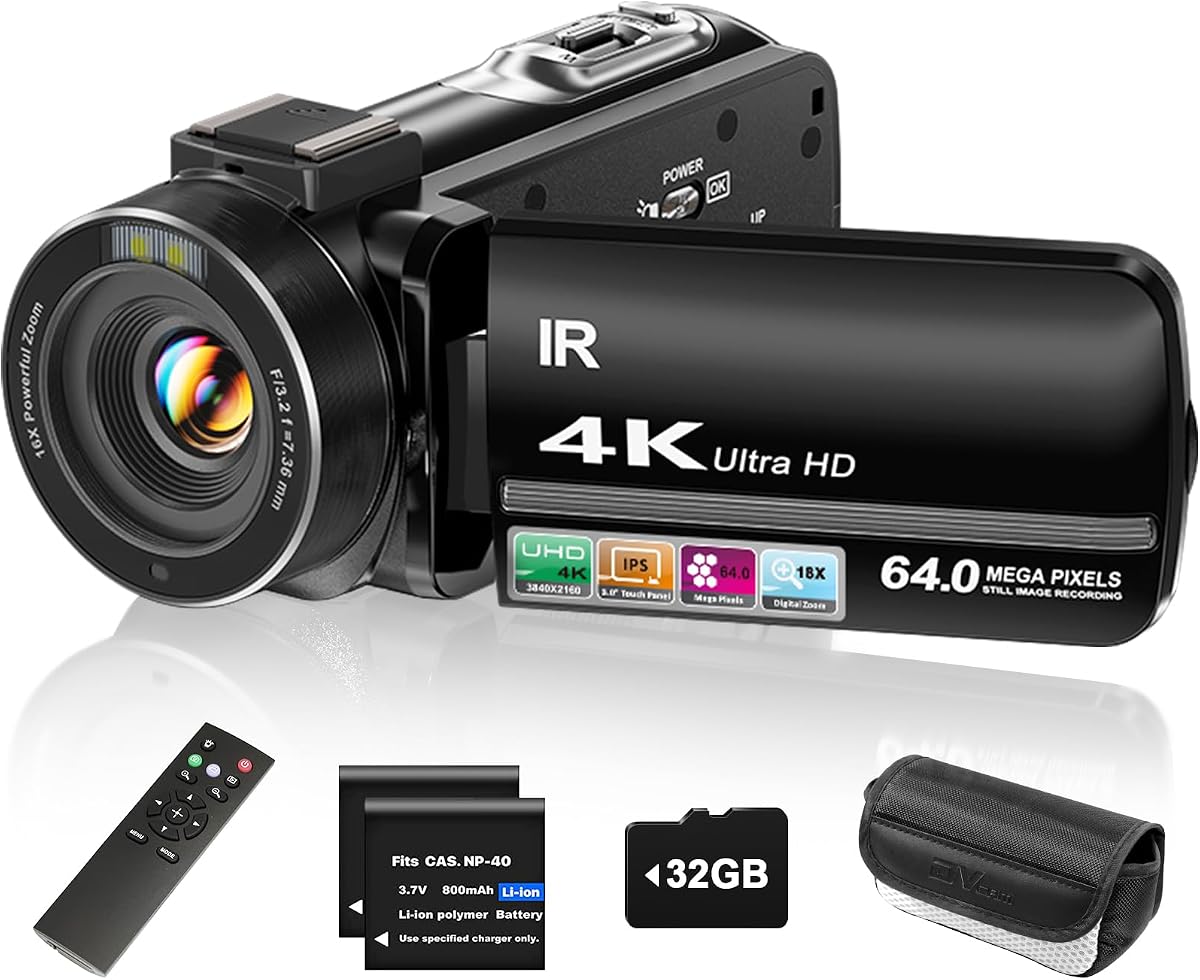
The ZYDIIE 4K Camcorder is a flexible, high-resolution option for creators who want a camera that can make stop motion sequences while also handling vlogs, interviews, family recording, and instructional video. It combines 4K Ultra HD recording, 64-megapixel still images, an 18x digital zoom, a rotating touchscreen, and infrared night vision in one compact package.
We may earn a commission when you buy through this link, at no additional cost to you.
Its rotating three-inch display is particularly useful for animation because the camera can be positioned above, below, or beside a set while the operator still has a clear view. The time-lapse function can help with preliminary motion studies, and slow motion can support animated transitions or background movement. Two high-capacity batteries and an included 32GB memory card reduce some of the practical barriers to a long recording session.
Its limitations are important for frame-by-frame work. The supplied information does not identify a dedicated stop motion mode, aperture lock, focus memory, or specialized animation firmware. The 18x zoom is digital rather than optical, so enlarging distant subjects will not add optical detail. Automatic exposure and focus behavior would also need to be checked carefully before beginning a long sequence.
Choose this camera if you want one versatile device for animation and ordinary video, or if you are experimenting with stop motion on a limited scale. For maximum consistency in elaborate projects, the Canon EOS R6 Mark II with animation firmware is better equipped for repeated frames. For beginners seeking dedicated software and teaching support, one of the purpose-built animation kits may be more direct.
The 270-degree rotating touchscreen lets the camera sit at an unusual height or angle without requiring the operator to look through a fixed rear display. This makes it easier to monitor tabletop puppets, miniature sets, and overhead compositions.
Beyond animation, the camera supports webcam use, face detection, slow motion, continuous shooting, time-lapse, a self-timer, and recording while charging. That range makes it a practical shared device for tutorials, streaming, and everyday capture.
We may earn a commission when you buy through this link, at no additional cost to you.
This Canon EOS R6 Mark II bundle pairs the stop motion animation firmware edition of the camera with a 64GB UHS-II card and a sling backpack. That combination is more complete than the body-only Canon listed elsewhere in this guide, making it attractive for a creator who wants a capable camera and essential storage immediately.
We may earn a commission when you buy through this link, at no additional cost to you.
The 24.2MP full-frame sensor is supported by fast autofocus, 4K60 10-bit internal recording, Canon Log 3, and external 6K ProRes RAW support. For animation, the crucial features are the stop motion functions: full HD Live View resolution, Aperture Lock, and Focus Position Memory. These options support repeated framing and help prevent unintended changes across a sequence.
Sensor-shift five-axis image stabilization, dual UHS-II card slots, a 3.69-million-dot electronic viewfinder, and a vari-angle touchscreen support both animation and broader creative work. The included storage card is useful because high-resolution video and large still files benefit from a suitably capable card. The backpack adds a convenient way to carry the substantial camera body and accessories.
This bundle is a strong choice for an animator who wants a professional-capable system and already has suitable stop motion software. It is less convenient for a complete beginner than an all-in-one kit with instructional material, and the absence of a supplied rating means it should not be judged by the same visible customer feedback as the other selections. Confirm current card, backpack, and camera contents before ordering.
Aperture Lock and Focus Position Memory are especially valuable for frame-by-frame work. They help maintain a repeatable look while the animator repositions the subject or changes physical objects on the set.
The included UHS-II card and sling backpack distinguish this package from a body-only purchase. New users avoid the need to source immediate storage, while the bag provides a basic way to transport the camera and related gear.
We may earn a commission when you buy through this link, at no additional cost to you.
The FlyFrost 8K Camcorder is built as a feature-heavy, portable video tool, with 8K recording at 15fps, 88-megapixel still images, WiFi transfer, a rotating touch display, an external microphone, a lens hood, a folding stabilizer, a remote control, and two batteries. It can be used for stop motion, though it is not explicitly presented as a dedicated animation system.
We may earn a commission when you buy through this link, at no additional cost to you.
The three-inch rotating screen helps frame low, high, or selfie-style views. WiFi connectivity through the iSmart DV2 app allows viewing, transferring, and remote control with compatible Android or iOS devices. The included external microphone can reduce wind and background noise, and the camera can operate as a USB webcam. Its broad feature set may appeal to creators who expect to switch between animation, vlogging, streaming, and conventional recording.
For animation, the headline 8K mode records at 15fps, which is not the same as 8K at a high frame rate. The camera also lacks listed animation-specific features such as aperture lock, focus memory, or dedicated firmware. A folding handheld stabilizer can reduce movement during ordinary video, but stop motion usually benefits more from a rigid tripod or fixed mount. The supplied digital zoom and high-resolution modes should not be mistaken for additional optical detail.
Consider this model if portability, wireless control, and an expansive accessory bundle matter more than purpose-built animation workflow. It is a credible experimental option for small puppet animations, and its 8K resolution may provide ample image data. For repeated professional frames, however, a camera with dedicated stop motion controls is the more sensible investment.
WiFi app support can make it easier to review footage or trigger the camera from a distance. That may be useful in a compact studio where the animator cannot easily reach the physical controls after moving a puppet.
The folding stabilizer, lens hood, external microphone, remote, and two batteries create a versatile travel kit. These accessories can support a broader video workflow even when the camera is not used exclusively for animation.
We may earn a commission when you buy through this link, at no additional cost to you.
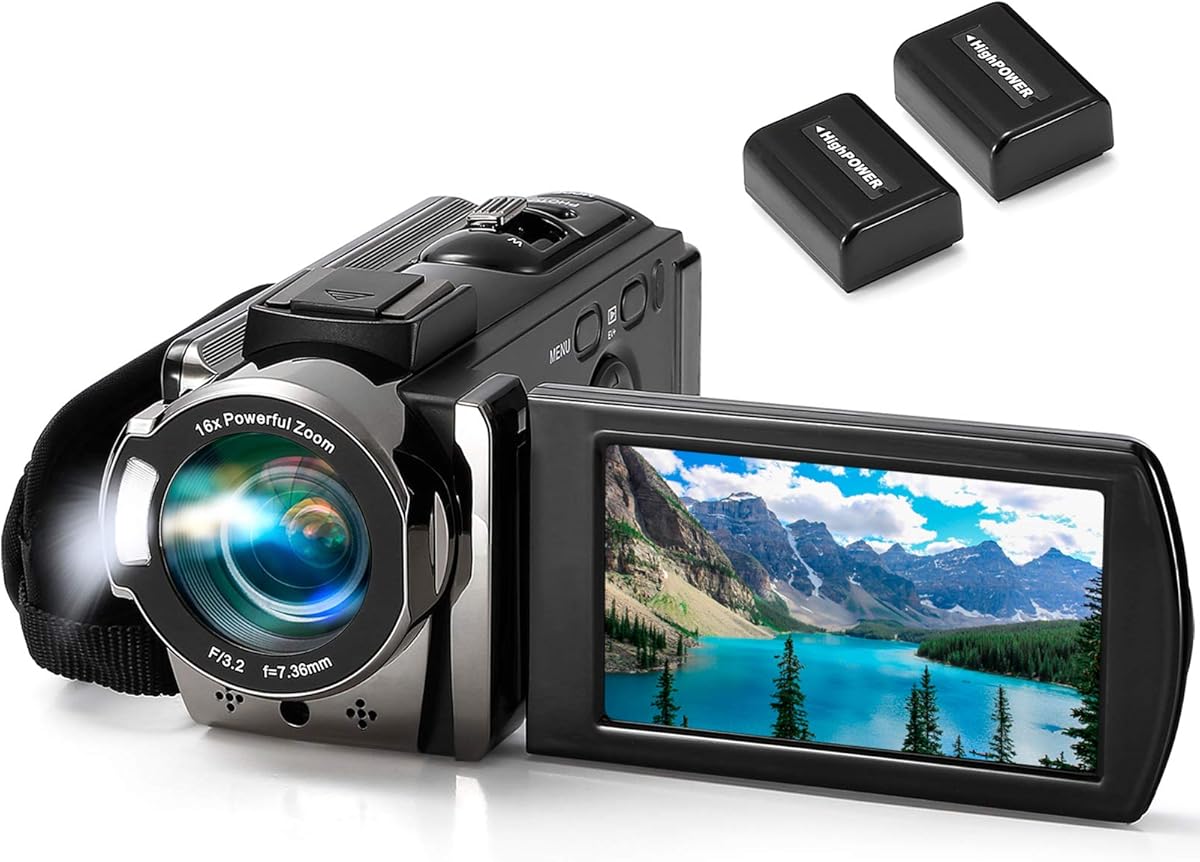
The kimire Full HD 1080P Camcorder is a straightforward option for students, families, and first-time animators who want a conventional camera with a rotating display and familiar recording controls. It captures 1080p video at 15fps, 24-megapixel JPEG photographs, and supports a 16x digital zoom, anti-shake, face capture, a self-timer, and a pause function.
We may earn a commission when you buy through this link, at no additional cost to you.
Its three-inch display rotates through 270 degrees, allowing the camera to be turned toward the operator for a front-facing view or angled for overhead and low-position shots. This is useful when filming stop motion figures with the camera resting directly on a tabletop. The pause function can also make capture and editing more convenient by allowing a recording session to continue without creating a separate file every time.
The principal drawback is the 15fps recording rate, which gives stop motion a relatively limited set of frames and may make fast movements appear less fluid. There is also no supplied indication of manual exposure controls, a dedicated animation mode, or animation software. The 16x zoom is digital, and the camera relies on automatic settings that should be tested for consistency before a serious sequence.
This camcorder makes the most sense for learning basic animation concepts, creating short classroom projects, or producing simple sequences with third-party software. Two NP-FV5 batteries are included, and recording while charging offers another convenience. Creators ready to make frequent use of animation should examine the included Complete HD kit or a camera with explicit stop motion firmware.
The rotating LCD can be positioned to remain visible when the camera sits directly on the animation stage. This reduces the need for a separate monitor during simple demonstrations and short exercises.
The pause function lets an animator stop and resume recording without starting an entirely new clip. It is particularly useful for assembling short sequences, reviewing a setup, or moving between subjects before continuing.
We may earn a commission when you buy through this link, at no additional cost to you.
The DJI Osmo Pocket 3 Creator Combo is a compact, premium camera built around a one-inch CMOS sensor, a two-inch rotating touchscreen, and three-axis mechanical stabilization. It records 4K video at up to 120fps and supports D-Log M, 10-bit color, ActiveTrack 6.0, and direct connection to two DJI Mic 2 or Mic Mini transmitters.
We may earn a commission when you buy through this link, at no additional cost to you.
For stop motion, its compact size makes it easy to position near a small set, while the touchscreen offers immediate access to framing and settings. Mechanical stabilization can help when the camera is mounted rather than handheld. The high-frame-rate 4K mode also provides useful raw material for motion studies or conventional animated inserts, even if individual stop motion frames are captured at a different setting.
The device is not specifically designed for repeated frame animation, however. Its small body provides fewer physical controls than a mirrorless camera, and the product information does not mention aperture lock, focus memory, or dedicated stop motion firmware. A flexible mount or tripod is necessary to prevent accidental movement. The Creator Combo includes a battery handle, a DJI Mic 2 transmitter, and a mini tripod, which improves the basic shooting package.
Choose the Osmo Pocket 3 when portability, refined stabilization, and a polished screen matter more than a specialized animation workflow. It is particularly attractive for a creator working across animation, short-form video, and travel content. For a dedicated studio where a camera will remain mounted for hours, the Canon R6 Mark II animation firmware offers a more purpose-built approach.
The three-axis mechanical gimbal keeps the framing steadier than a basic handheld camcorder. When the camera is secured to a compatible support, it can remain stable while the animator moves objects within the frame.
The rotating display simplifies front-facing, vertical, and high-angle composition, while the included DJI Mic 2 transmitter adds a straightforward wireless audio option. The expanded Creator Combo is therefore useful beyond a single animation project.
We may earn a commission when you buy through this link, at no additional cost to you.
The Canon EOS R6 Mark II with stop motion animation firmware represents the most expandable camera approach in the list. It combines a 24.2-megapixel full-frame sensor with Full HD Live View resolution for compatible animation software, Aperture Lock, Focus Position Memory, and the broader imaging tools expected from a professional mirrorless camera.
We may earn a commission when you buy through this link, at no additional cost to you.
Its 4K60 10-bit internal recording, Canon Log 3, and external 6K ProRes RAW support make it useful for conventional video alongside stop motion. Dual Pixel CMOS AF II supports rapid subject detection and tracking, while mechanical and electronic shooting speeds provide options for still photography. A 3.69-million-dot electronic viewfinder, vari-angle touchscreen, sensor-shift stabilization, and dual UHS-II slots further improve its general creative flexibility.
The tradeoff is complexity. Dedicated animation functions require compatible stop motion software and careful configuration. The camera body and lenses represent a larger system than a compact animation kit, and the supplied product information does not include an accessory rating. A new animator may need help understanding focus behavior, exposure settings, and the connection between the camera and animation application.
Despite those considerations, this Canon is a strong choice for a creator who plans to move beyond simple classroom exercises. Its frame-control features, image quality, and broad recording capabilities support ambitious animation and hybrid production. Confirm that the specific bundle still contains the 64GB UHS-II card and sling backpack, and verify current compatibility with the animation software you intend to use.
Aperture Lock helps stabilize the look of successive frames, while Focus Position Memory preserves the chosen focus distance. These controls reduce two common sources of visible inconsistency in stop motion footage.
The full-frame sensor, high-resolution viewfinder, touchscreen, stabilization, and video options allow the camera to support animation alongside photography and conventional production. The included card and backpack also make it easier to begin using the system immediately.
We may earn a commission when you buy through this link, at no additional cost to you.
The 4K Digital Camera with Macro and Wide Angle Lens is a compact camera suited to creators interested in close-up animation with small figures, miniature props, crafts, or models. It records 4K video, captures 48-megapixel photographs, supports 16x digital zoom, and includes a 2-in-1 macro and wide-angle attachment.
We may earn a commission when you buy through this link, at no additional cost to you.
The macro capability is the defining feature for stop motion. It allows the camera to fill more of the frame with a small subject, which can make subtle movements easier to see and reduce the physical distance between the lens and the set. The 52mm lens thread also allows compatible filters and optical attachments, adding some flexibility beyond the included lens.
As with most compact cameras, the supplied information does not mention a dedicated stop motion mode, manual focus memory, aperture lock, or animation firmware. The camera supports flash, self-timer, slow motion, time-lapse, webcam use, and recording while charging. Its rechargeable 1500mAh battery and compatibility with memory cards up to 128GB make it convenient for short projects, although storage is not included.
This camera is a good experimental choice for learners, hobbyists, and anyone animating very small subjects. The included macro lens gives it an angle of differentiation that many ordinary camcorders cannot offer. For long projects requiring exact exposure and focus consistency, a dedicated stop motion camera or mirrorless system would provide better frame-control tools.
The included macro lens is valuable when tiny movements need to fill the frame. It also reduces glare and shadows that can become distracting when a subject is positioned very close to a conventional camera lens.
Besides macro and wide-angle photography, the camera provides time-lapse, slow motion, flash, and USB webcam functions. Those extras make it suitable for previsualization, motion tests, and general creator content.
We may earn a commission when you buy through this link, at no additional cost to you.
The Complete HD Stop Motion Animation Kit is the most approachable dedicated package in this guide. It combines a Full HD 1080p camera with a low-profile body, an upgraded manual focus ring, animation software, a step-by-step book, free online tutorials, and a connection that keeps the camera attached to the computer during capture.
We may earn a commission when you buy through this link, at no additional cost to you.
Unlike a general camcorder, this product is explicitly designed for stop motion. Its software can capture successive frames and assemble them into an animation, while the manual focus ring allows the animator to lock a consistent plane of focus. The included material covers LEGO Brickfilms, toys, modeling clay, action figures, custom armatures, and other common subjects.
Its main limitation is technical age. The listed compatibility references Windows 7, 8, and 10 and OS X 7.1 or later, so a current computer user should verify modern operating system support before buying. The camera records at Full HD 1080p rather than 4K, and its sensor and lens system are unlikely to compete with a modern mirrorless camera for dynamic range or low-light flexibility.
For a beginner, educator, parent, or hobbyist, the kit still offers a very clear path into the craft. It removes the need to research compatible software and build a capture workflow from separate pieces. Choose it when approachability and teaching support outweigh the benefits of a more advanced interchangeable-lens system.
The included camera, software, book, and tutorials cover the basic stages of creating an animation. Learners can focus on posing and shooting before they need to assemble a camera and software combination themselves.
The upgraded focus ring gives the animator direct control over the focal plane. Once the set is arranged, maintaining the same focus setting across numerous frames helps prevent distracting shifts in sharpness.
We may earn a commission when you buy through this link, at no additional cost to you.
The USB 2.0 HD Pro Widescreen Video Webcam is the simplest option for a creator who wants to experiment with stop motion using a computer, a set, and minimal additional equipment. It outputs a 1920×1080 image, includes a five-element lens, offers a manual focus ring, and connects through USB.
We may earn a commission when you buy through this link, at no additional cost to you.
The manual focus control is the key advantage over many entry-level webcams. An animator can set the focus once and maintain a consistent focal plane while moving a figure through a shot. The flexible stand also makes it straightforward to position the camera close to a tabletop set or at a slightly elevated angle. A built-in noise-canceling microphone can capture basic audio without requiring a separate microphone.
However, the webcam is not presented as a dedicated animation product. There is no included stop motion software, animation firmware, or focus memory, and the listed operating system support includes older Windows and MacOS versions. Users will need compatible animation software and should verify current driver and operating system compatibility. Its fixed-lens design also offers little room for changing the field of view.
This webcam works well for a first exercise, classroom demonstration, or simple figure animation built around the computer already in the room. It is less suitable for elaborate sets, extensive manual lens control, or a polished multi-camera workflow. A ready-to-use animation kit is generally the smarter starting point, while a mirrorless camera makes sense once the animator is ready for finer control.
The focus ring allows an animator to set and retain a chosen distance. Since the webcam is designed to stay connected, it can remain in the same position while software collects a sequence of individual frames.
A flexible stand and a single USB connection keep the physical setup uncomplicated. This makes the camera approachable for small stop motion exercises using familiar characters, toys, or basic modeling clay.
We may earn a commission when you buy through this link, at no additional cost to you.
The right camera for stop motion animation is one that maintains consistent focus, exposure, framing, and position while recording many small movements. Resolution matters, but repeatable frames and a smooth production workflow are usually more important to the finished animation.
Summary: Prioritize repeatable exposure, focus, and framing over automatic convenience.
Summary: Full HD is sufficient for many projects, while higher resolution adds useful detail.
Summary: More usable frames improve motion control, but exposure stability must remain consistent.
Summary: Choose manual focus for consistency and a lens that matches the scale of your set.
Summary: Use stable, even lighting and choose a camera whose exposure can remain locked.
Summary: Verify animation software, operating system support, and live-view requirements first.
Summary: Use a rigid mount, and treat stabilization as a supplement rather than a replacement.
Summary: Favor clear controls, adaptable viewing, and a setup that fits your working space.
Begin by securing the camera to a sturdy tripod, clamp, or stand at the same height and angle you intend to use for the entire scene. Connect it to the computer, confirm that the animation software recognizes the live image, and disable automatic changes that could alter exposure or focus between captures. Photograph a test frame and inspect the edges of the set for sharpness, reflections, and unwanted shadows.
Create a consistent lighting arrangement before placing the subjects. Turn off or reposition room lights that could change during a session, and avoid mixing sources with visibly different colors. Focus manually on the important action plane, then lock aperture, shutter speed, ISO, and focus settings when the camera permits it. Capture several test frames before moving the subject so that any visible changes can be corrected early.
Move the subject in small, deliberate increments, pressing the capture control after every adjustment. Keep hands and tools outside the frame, and avoid touching the camera or table. After completing a short passage, review it at playback speed and inspect individual frames for unintended movement. When finished, disconnect power and storage safely, remove the battery if appropriate, clean the lens with a soft microfiber cloth, and store the camera in a dry, padded case away from direct heat and moisture.
A dedicated camera is helpful but not strictly necessary for every project. Any camera that produces stable, sharp images and communicates with compatible animation software can be used. A dedicated kit is especially convenient for beginners because it combines the camera, software, and instructions, while a mirrorless camera with stop motion firmware offers more advanced control.
Yes, 1080p is sufficient for many web, classroom, and short-film projects. The result depends on good lighting, accurate focus, and a subject that fills the frame effectively. Higher resolution can add fine detail and cropping flexibility, but it will not rescue unstable framing or inconsistent exposure.
Autofocus may hunt, shift, or refocus when a subject is moved, even if the change is tiny on screen. Manual focus lets you choose the focal plane once and keep it stable. On a compact set, focusing on the main action area and keeping the camera physically fixed is usually more dependable than allowing automatic focus to make each decision.
Yes, many conventional camcorders can work when paired with compatible capture software. Features such as a rotating screen, time-lapse mode, manual focus, and recording while charging can make the process easier. The main requirements are stable output, repeatable settings, and software that can capture individual frames on command.
More frames can provide smoother movement and more options for subtle transitions. The improvement depends on reliable exposure and an animator who can move subjects accurately. A camera with fewer frames may still produce excellent results when the action is simple, lighting is stable, and every captured frame is clean.
A rigid tripod or mount is more important than stabilization. Stabilization is designed to compensate for movement while recording video and cannot fully replace a fixed camera position. It can still be useful when the camera must be moved between setups or used for conventional video alongside animation.
Use bright, soft, and steady light that covers the shooting area evenly. Position lamps outside the frame and keep them fixed throughout the sequence. Diffused light can reduce harsh shadows, while a stable setup prevents brightness changes from appearing between frames.
Choose an animation kit if you want the shortest path to learning and need the included camera, software, and instructions. Choose a mirrorless camera with stop motion firmware if you already understand the workflow and want finer exposure, focus, and video controls. Check software and operating system compatibility before making either choice.
The Canon EOS R6 Mark II with stop motion animation firmware stands out as the strongest overall option because it combines a high-resolution full-frame sensor with animation-specific controls for exposure and focus consistency. The Complete HD Stop Motion Animation Kit is the most approachable starting package, while the DJI Osmo Pocket 3 Creator Combo delivers a compact premium package for creators who value portability and mechanical stabilization.
Before purchasing, prioritize a stable mount, repeatable focus and exposure, and compatible animation software over headline resolution alone. A camera with an included manual focus ring may be ideal for a classroom or simple tabletop set, while an interchangeable-lens system offers greater control for detailed miniature scenes and professional workflows. Match the camera to the scale and ambition of the project rather than buying for unused features.
Product configurations, compatibility details, ratings, and prices can change, so review the current listing before ordering. Check that the operating system supports the camera and its software, confirm what accessories are included, and confirm the current cost. Those checks will help ensure that the chosen camera works smoothly with your animation setup from the first frame.