
Cable Matters 2-Pack 6-Pin to 8-Pin PCIe GPU Power Adapter Cable
4.7Editor score
Converts 6-pin to 8-pin
Two adapters included
Keyed, locking connector design
Our GPU power adapters guide compares connector types, power ratings, cable routing, and compatibility to help you choose the right fit for your graphics card
GPU power adapters make it easier to connect a graphics card to a compatible power supply, but choosing the wrong cable can be inconvenient or unsafe. The useful options in this guide range from simple 6-pin-to-8-pin converters to 12VHPWR extensions, right-angle power bridges, and power adapters designed for high-output graphics cards.
We compared the ten products by examining their connector layouts, stated power capabilities, cable lengths, bend orientation, supported graphics cards, power-supply requirements, and practical value. The list also distinguishes between basic PCIe adapters, 16-pin 12VHPWR extensions, and cables intended to improve routing in compact computer cases.
Each review explains the product's strongest benefits, limitations, and ideal installation. Ratings reflect the supplied customer feedback, while technical details are based on the listed product information. Availability and prices can change, so confirm the connectors, wattage, and power-supply compatibility before ordering.
4.7Editor score

4.7Editor score

4.2Editor score
The comparison covers conventional 6-pin adapters, 12VHPWR-to-PCIe conversion cables, right-angle extensions, and power-supply bridges. The key differences are connector direction, stated power capacity, supported hardware, cable length, and how each option improves routing or compatibility.


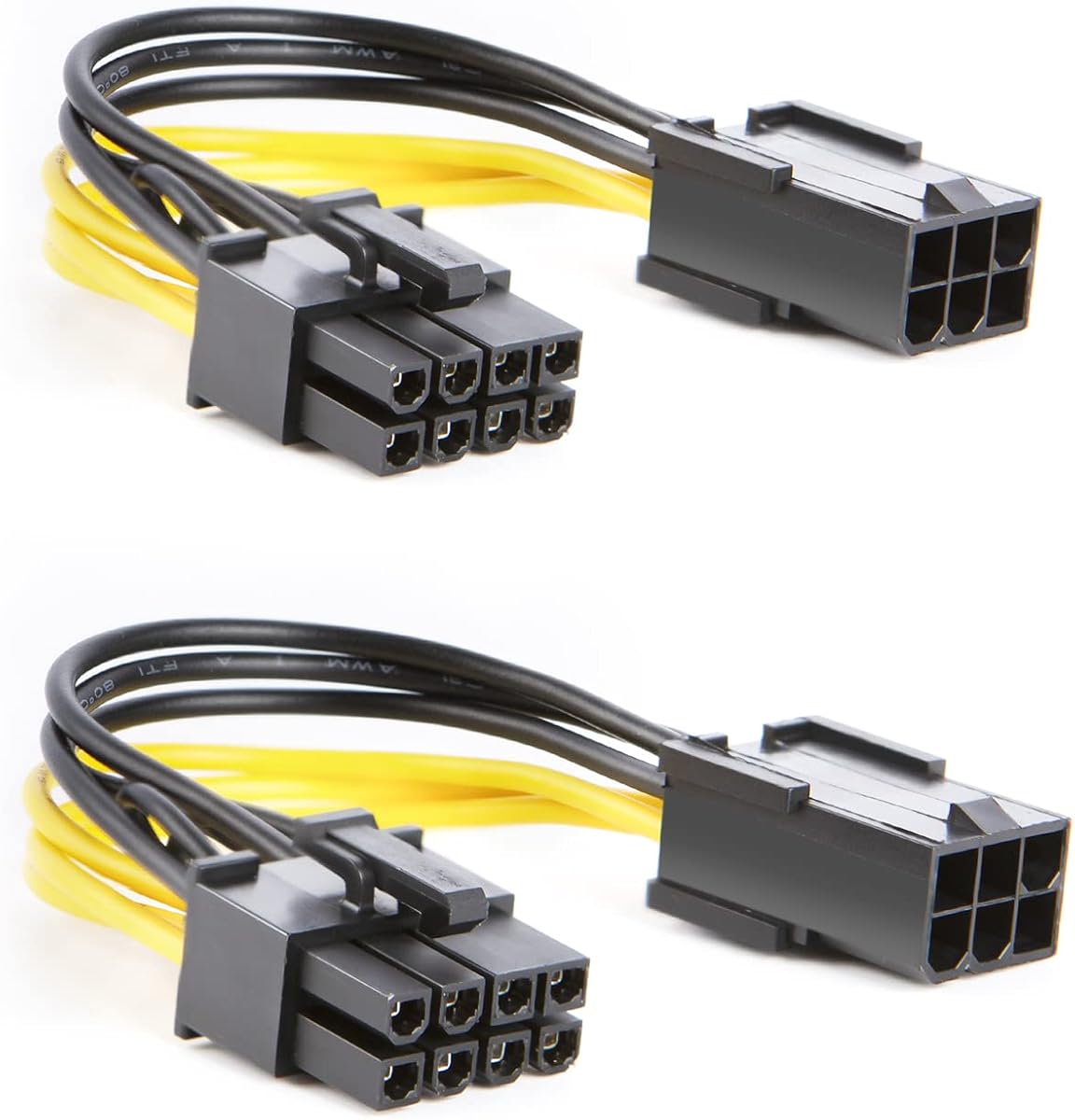


The Cable Matters 6-Pin to 8-Pin PCIe GPU Power Adapter Cable is a straightforward option for a graphics card with an 8-pin PCIe input and a power supply offering a suitable 6-pin PCIe connection. It carries a 4.7 rating, and its useful 2-pack configuration gives buyers an active adapter plus a spare or a second option for another compatible system.
We may earn a commission when you buy through this link, at no additional cost to you.
Its standout qualities are clarity and physical design. The 6-pin female end accepts a compatible 6-pin PCIe plug from the power supply, while the 8-pin male end includes a locking latch. A keyed housing supports correct alignment, and the four-inch length keeps the connection compact enough for a tidy installation.
The central limitation is fundamental: this adapter changes the connector shape but does not increase the power supply's wattage, current capacity, or available output. It is therefore not a way to power a demanding graphics card beyond the documented capabilities of the PSU or GPU. It is also not designed for CPU/EPS 8-pin ports.
This is a sensible budget choice for a low-power compatible graphics card, a second system, or a replacement adapter kept on hand. Before buying, verify that both the PSU has the correct PCIe output and the graphics card's requirements fall within the available power. For those conditions, its two-pack format makes it especially convenient.
Including two adapters adds flexibility without complicating the installation. Builders can keep a replacement available or use the second cable with a separate compatible computer, making the pack more useful than a single loose adapter.
The locking latch and keyed housing help establish a correctly aligned connection. They do not alter the underlying limitations of the PSU, so users must still validate the GPU's documented power requirements before installation.
We may earn a commission when you buy through this link, at no additional cost to you.
The Bangfun 16Pin GPU RTX 4070 Super Power Adapter Cable combines a right-angle 16-pin connector with two 8-pin PCIe inputs from the power supply. Its 4.7 rating reflects strong customer reception, while the 13-inch length and 90-degree design are particularly useful in compact cases where a short native cable would be sharply bent.
We may earn a commission when you buy through this link, at no additional cost to you.
The cable uses 16AWG tinned copper wire and alloy-copper plug terminals. According to the product information, the 2×8-pin configuration supports 300W to 400W output, with peak power up to 400W. A high-density flexible sleeve and nylon braided exterior provide more room to bend than a thick, rigid cable.
The included transparent acrylic cable combs help manage the extension for a cleaner appearance. The right-angle GPU end is designed to reduce pressure near the connector and improve clearance from the case side panel, although users still need to route the cable without creating a tight bend elsewhere.
This is the most versatile choice here for a compatible 16-pin graphics card that uses two 8-pin PSU connections. It is particularly attractive for smaller cases or builders who want more routing flexibility. It must not be used with a 12-pin GeForce RTX 3090 Series GPU, and both 8-pin PSU connections need to be available and appropriate for the GPU's power needs.
The 90-degree connector and extended 13-inch cable create additional room for routing around a side panel or other internal obstacles. This can reduce strain at the graphics-card connector while keeping the visible cable arrangement orderly.
The 16AWG tinned copper construction and stated support up to 400W make this option suitable for compatible midrange and high-power applications within that limit. Users should still confirm that the PSU and GPU match the cable's rating and connector arrangement.
We may earn a commission when you buy through this link, at no additional cost to you.
The NZXT 12VHPWR Adapter Cable is designed to connect an NVIDIA 40 Series GPU with a 12VHPWR port to an existing NZXT ATX 2.X power supply. It has a 4.2 rating and is guaranteed for use with NZXT C-Series Gold ATX 2.X power supplies, reducing ambiguity for builders within that ecosystem.
We may earn a commission when you buy through this link, at no additional cost to you.
Its major advantage is the stated 600W rating, which distinguishes it from several dual 8-pin alternatives in the list. The GPU-side connector is 12+4-pin 12VHPWR, while the PSU side uses dual 8-pin PCIe connectors. A compact cable also replaces the bulky adapter commonly supplied with NVIDIA 40 Series graphics cards.
This is not a universal cable for every ATX 2.X power supply, despite the broader generation being supported in the product description. The explicit guarantee applies to NZXT C-Series Gold ATX 2.X models. It also cannot make an underpowered PSU adequate; the selected power supply must support the graphics card and the two connected leads.
NZXT builders who want a 600W-rated, purpose-made 12VHPWR solution will find this option especially appealing. It suits a 40 Series graphics card with a 12VHPWR input and an eligible NZXT power supply. Buyers outside that hardware combination should examine the more broadly compatible 16-pin extensions instead.
The cable links a 16-pin graphics-card connection to dual 8-pin PCIe outputs, allowing compatible 40 Series cards to operate with an existing NZXT ATX 2.X supply. Its guaranteed C-Series support narrows the compatibility question for supported models.
With a stated rating up to 600W, the adapter offers substantial headroom within its compatibility envelope. Its compact construction also removes the visual bulk and routing inconvenience of the standard adapter included with many NVIDIA 40 Series cards.
We may earn a commission when you buy through this link, at no additional cost to you.
The Fasgear 16 Pin GPU Cable Adapter Extension Cable is a dual 8-pin-to-16-pin solution with a 4.5 rating. Its listed compatibility includes GeForce RTX 5070, RTX 5070 Ti, RTX 4090, RTX 4080, RTX 4070 Ti, RTX 4070 with a 16-pin interface, and RTX 3090 Ti, provided the power supply can meet the GPU's requirements.
We may earn a commission when you buy through this link, at no additional cost to you.
The 12V-2×6-style extension uses 16AWG tinned copper wire and is rated up to 600W. Alloy-copper and tinned plug terminals are intended to support stable current transfer. Four transparent cable combs help organize the 30-centimeter sleeved extension, which is longer than the original 10-centimeter power cable mentioned in the product information.
A key caution is that the cable requires two unoccupied 8-pin PCIe ports on the PSU. Using fewer than two connections may cause system damage, so it should never be treated as a partially populated adapter. It is also incompatible with graphics cards that use a native 12-pin or 8-pin connector.
This is a good option for a builder who wants a longer, braided 16-pin extension and has two suitable PSU sockets. For the RTX 5080 and RTX 5090 series, the seller recommends using 3×8-pin or 4×8-pin for greater stability, so this particular dual-8-pin design may not be the preferred arrangement for those cards.
The 30-centimeter length provides additional space to route around obstructions and away from the graphics card. The included combs help retain that flexibility without allowing the sleeved cable to create a cluttered appearance.
Both 8-pin PSU connectors must be occupied and appropriate for the system. Partial use can create a hazardous or unstable configuration, so the warning should be treated as an essential installation requirement rather than optional guidance.
We may earn a commission when you buy through this link, at no additional cost to you.
This 12VHPWR Cable Extension is a compact conversion cable with a 6.8-inch, or 17-centimeter, length. It has a 4.4 rating and uses a 16-pin female connector to mate with a PSU's native 12VHPWR output cable, followed by dual 8-pin 6+2 male connectors for a graphics card.
We may earn a commission when you buy through this link, at no additional cost to you.
The cable is designed to work with power supplies that include an original 12VHPWR or 12V-2X6 PCIe output cable. Listed examples include several Corsair and Seasonic ATX 3.0 and ATX 3.1 models. Its 16AWG copper wire is stated to support output up to 600W.
The connector direction makes it important to read the description carefully. This is a conversion cable, not a modular cable. It can connect a 12VHPWR-equipped PSU to a GPU with dual 8-pin inputs, but it is expressly not compatible with a GPU that already has a native 12+4-pin connector, including the RTX 4070 Ti Super and RTX 5070.
This cable is most useful when a builder wants to use a native 12VHPWR PSU lead but connect to an older dual-8-pin graphics card. Its short length is helpful for compact layouts, while the 600W rating provides a high stated capacity. Always confirm the actual connectors on both the PSU and GPU before buying.
Unlike the common 16-pin male-to-dual-8-pin female extension, this cable receives a native PSU lead at its female end. That arrangement can turn an existing 12VHPWR power supply into a dual-8-pin graphics-card connection.
At only 6.8 inches, the cable can reduce excess cable inside a case. Its listed 16AWG copper construction and 600W capacity suit compatible high-output configurations when the PSU and GPU specifications align.
We may earn a commission when you buy through this link, at no additional cost to you.
The PCIE 5.0 16Pin GPU Power 12VHPWR Extension Cable is a 13-inch, dual 8-pin-to-16-pin adapter with a 4.5 rating. It is aimed primarily at GeForce RTX 4070, RTX 4070 Ti, and RTX 4070 Super models with a 16-pin interface, and it also appears in the title for RTX 5090, RTX 5080, and RTX 5070 Ti.
We may earn a commission when you buy through this link, at no additional cost to you.
A high-density flexible protective sleeve and nylon braided fiber give the cable more flexibility than a thick, stiff power lead. The 16AWG tinned copper wire is stated to support 300W to 450W output, with a peak of up to 450W. Alloy-copper and tinned plug terminals are intended to support stable current transfer.
The longer cable creates room for gentler bends and easier routing in tight cases. Four transparent acrylic cable combs are included for managing the extension. While the title suggests support for several newer cards, the detailed description specifically emphasizes the 16-pin RTX 4070 family, so buyers with other models should verify compatibility carefully.
This is a good middle-ground extension for a compatible 16-pin GPU whose requirements fit the stated capacity. It offers a practical balance between flexibility, length, and organization. It is less suitable for a builder seeking a 600W-rated option or a cable whose officially described GPU compatibility must cover an especially broad range of models.
The braided sleeve and extended length make the connection easier to route without a sharp bend immediately at the GPU. The cable combs help preserve that tidy route after the system is assembled.
The stated maximum of 450W gives buyers a defined benchmark for compatibility. The graphics card, PSU, and both PCIe connections must all remain within the limits described for this extension.
We may earn a commission when you buy through this link, at no additional cost to you.
The CableCreation 6-Pin to 8-Pin PCIe Express Power Adapter Cable is a basic two-pack converter for systems with a 6-pin PSU output and an 8-pin graphics-card input. It has a 4.7 rating, uses 18AWG pure copper conductors, and is RoHS certified.
We may earn a commission when you buy through this link, at no additional cost to you.
The four-inch adapter is short and direct, making it easy to position without excess slack. Its 2-pack gives users a spare or a second cable for another system. The product information lists compatibility with 8-pin PCIe graphics cards from major brands such as Gigabyte, Radeon, and Sapphire.
The most important specification is its maximum 36W support. That makes it appropriate only for graphics cards whose requirements fit within that limit. Although it changes a 6-pin connection into an 8-pin connector, it cannot upgrade the PSU or provide power beyond what the original supply can deliver.
This adapter is best for a compatible, modest-power graphics card or as a convenient replacement cable to keep on hand. Its simple construction, strong customer rating, and two-pack format are useful qualities, but the 36W ceiling makes it unsuitable for many modern high-performance GPUs. Check the card's documented requirements first.
Two short adapters provide useful redundancy without creating a complicated kit. One can remain installed while the other serves as a replacement or supports a second compatible system.
The stated 36W maximum is the decisive limitation. Buyers should pair this adapter only with a GPU whose documented requirements fit that ceiling and ensure the PSU already has the necessary output.
We may earn a commission when you buy through this link, at no additional cost to you.
The Corsair PCIe 5.0 12VHPWR GPU Power Bridge is a right-angle adapter for NVIDIA GeForce RTX 40 Series graphics cards with a PCIe 5.0 12VHPWR connection. Its 3.9 rating is the lowest among the listed products, but the specialized purpose remains useful for builders who need a tighter cable route.
We may earn a commission when you buy through this link, at no additional cost to you.
The 180-degree bend lets the attached cable complete its route close to the graphics card and away from the case's side panel. This can reduce pressure against the panel, improve the appearance of the build, and help prevent the connector from being pushed into an uncomfortable position.
The bridge is built for high thermal endurance, with the product information stating that it can withstand temperatures up to 105°C. That makes it relevant to power-hungry graphics cards, although thermal endurance alone does not determine whether a particular GPU is compatible. The GPU must use the specified 12VHPWR interface.
This is a specialized routing accessory rather than a general dual 8-pin converter. It suits an RTX 40 Series build where side-panel clearance is limited and a 12VHPWR connection is present. Buyers seeking a more universally compatible cable or one with dual 8-pin inputs should consider another option from the list.
The 180-degree configuration changes the direction of the attached cable, allowing it to run parallel to the graphics card rather than directly into the case wall. This is especially useful in builds with little clearance beside the card.
A stated thermal endurance of up to 105°C suits a component positioned near a high-output graphics card. Proper seating and routing remain necessary, and users should follow the manufacturer's handling instructions.
We may earn a commission when you buy through this link, at no additional cost to you.
The EVGA PowerLink is a support bracket for multiple PCI Express power connections, with a 4.4 rating. It is designed for NVIDIA Founders Edition and a broad selection of EVGA GeForce graphics cards, including RTX 2080 Ti, RTX 2080, RTX 2070, RTX 2060, GTX 1660, GTX 1650, GTX 1080, GTX 1070, and GTX 1060 families.
We may earn a commission when you buy through this link, at no additional cost to you.
Its central purpose is cable management. Adjustable spacing allows the PCI-E power connections to line up more neatly, while integrated solid-state capacitors provide power filtering. The design is intended to keep multiple power leads organized and make installation easier than leaving each connector unsupported.
This is a specialized accessory rather than a conventional adapter that converts one connector type into another. Its support list is centered on particular NVIDIA Founders Edition and EVGA models, so it should not be assumed to fit arbitrary modern graphics cards or every possible power-input arrangement.
The EVGA PowerLink is most useful for a compatible multi-PCIe-connector EVGA build in which tidy routing is the main concern. Its supported card list and adjustable spacing make it a good fit within that narrow group, while the filtering capacitors add another layer of electrical conditioning for the established design.
Adjustable spacing helps multiple PCI-E connectors sit in an orderly row. The result is less visual clutter around the graphics card and a more deliberate appearance in the finished system.
Integrated solid-state capacitors provide the stated power-filtering function. Because the bracket supports a defined group of EVGA and Founders Edition cards, checking the model list is essential before installation.
We may earn a commission when you buy through this link, at no additional cost to you.
The ATX 3.0 12VHPWR Graphics Card 600W Power Adapter uses a 16-pin modular input and three ATX 8-pin outputs. It has a 5.0 rating, the highest listed score, and its right-angle 90-degree connector is designed to improve cable routing, reduce port strain, and support airflow in compact builds.
We may earn a commission when you buy through this link, at no additional cost to you.
The adapter is stated to deliver up to 600W and uses an aluminum alloy construction intended for sustained operation. Its three 8-pin outputs distinguish it from dual 8-pin alternatives, providing a different power arrangement for compatible systems with enough available PSU connectors.
Connector layout is the key installation detail. The available version is Type B, which uses an outer-oriented four-pin layout, while Type A uses an inner-oriented arrangement. Buyers should consult the product images because selecting the wrong interface type can make the adapter unsuitable for the available PSU configuration.
This is a compelling choice for a builder with a compatible 16-pin input, a 600W-capable setup, and three available 8-pin PSU outputs. The right-angle design adds practical value in tight cases, while the high customer rating indicates favorable feedback. It is less convenient for users whose PSU offers only two free 8-pin connectors.
The triple 8-pin arrangement gives compatible systems another way to distribute GPU power. Every required PSU connection should be available and properly seated, and the graphics card's total requirements must remain within the adapter's stated 600W capacity.
The 90-degree connector helps the cable leave the GPU in a more compact direction, which can ease side-panel clearance and reduce strain. Type A and Type B use different four-pin orientations, so identifying the correct version is essential.
We may earn a commission when you buy through this link, at no additional cost to you.
The right GPU power adapter depends first on the connectors already present on your graphics card and power supply. After identifying that fit, compare stated wattage, cable length, bend direction, conductor construction, and the number of PSU connections required.
Begin by identifying the input built into the graphics card. Older cards may use one or two 8-pin PCIe connectors, while many modern high-performance cards use a 12+4-pin 12VHPWR or 12V-2×6 connection. A cable cannot safely bridge unrelated formats merely because their pin count looks similar. CPU/EPS 8-pin connectors also have a different purpose and should not be confused with PCIe power connectors.
In short, inspect the GPU before the PSU. Purchase only an adapter whose GPU-side connector physically and electrically matches the card.
Then check the power supply. Some PSUs provide fixed PCIe cables with 6-pin or 8-pin plugs, while newer modular units may include a native 12VHPWR output. The adapter must connect to the available output in the correct direction. An extension that requires two 8-pin PSU sockets cannot be replaced by a single socket, and a native 12VHPWR lead does not automatically work with every dual 8-pin adapter.
In short, choose the PSU-side connector before considering cable length or appearance. The complete connection path must match on both ends.
Compare the adapter's stated capacity with the graphics card's documented power requirements. The list includes conventional adapters with lower ceilings, dual 8-pin options rated from 400W to 600W, and a triple 8-pin design rated up to 600W. A connector adapter only changes the physical connection; it does not increase the PSU's wattage, current capacity, or available power.
In short, always use the lowest relevant limit among the GPU requirements, PSU capability, and cable specification. A higher connector rating is useful only when every other part of the chain can supply the required power.
Length influences both routing and stress. Short four-inch adapters suit straightforward layouts, while 13-inch and 30-centimeter extensions provide additional room to avoid sharp bends near the graphics card. A right-angle connector can improve clearance from a side panel. However, extra length should be managed with clips or combs so it does not obstruct airflow or press against moving components.
In short, choose the shortest length that still allows a relaxed route. Avoid forcing a short cable into a tight bend merely to improve appearance.
Connector direction is easy to overlook because several products use similar parts with opposite roles. Most listed extensions have a 16-pin male end that connects to the graphics card and dual 8-pin female ends that connect to the PSU. The compact 12VHPWR conversion cable reverses that arrangement: its 16-pin female end receives a native PSU cable, while dual 8-pin male plugs connect to the GPU.
In short, trace the cable from the PSU to the GPU before ordering. A female connector on the product may be correct because it mates with a male PSU plug.
Some adapters require every listed PSU connection to be occupied. The Fasgear cable, for example, states that connecting fewer than its two 8-pin PSU connectors may cause damage. A three-8-pin adapter needs three available, appropriate sockets. Using all required connectors can also improve load distribution, while leaving one unconnected may be unsafe.
In short, count the free PSU ports before buying. If the supply lacks enough sockets, select a different adapter rather than attempting a partial connection.
Look for features that support full seating and correct alignment. The Cable Matters adapter includes a locking latch on its 8-pin male connector and a keyed housing. Tinned copper conductors, alloy-copper terminals, and braided sleeves appear on several 16-pin products, while the Corsair bridge emphasizes thermal endurance. These attributes can aid durability, but none replaces proper installation.
In short, favor a connector that seats completely and retains its latch. Never force a plug into an orientation it does not naturally accept.
Finally, check the explicit compatibility statements. The NZXT cable is guaranteed for NZXT C-Series Gold ATX 2.X power supplies, while the EVGA PowerLink supports a defined set of NVIDIA Founders Edition and EVGA GeForce cards. Other 16-pin cables list broad GPU families but still require a native 16-pin input. A title can mention many model names, yet the detailed connector requirement remains the deciding factor.
In short, read both the product title and detailed notes. Match the exact interface, wattage, and model requirements before making a purchase.
Before installation, power down the computer, switch off the PSU, and disconnect the power cord. Identify the graphics-card input and the PSU output, then confirm that every cable in the chain matches the required connector type. Check that the graphics card's power requirements and the PSU's output are within the adapter's stated limits.
Connect the adapter in the direction specified by its product information. Route each cable with a gentle bend, avoid pinching it against the side panel, and ensure that locking latches or modular connectors are fully seated. If an adapter requires multiple 8-pin PSU connections, attach all of them before operating the system.
After installation, inspect the connection from several angles and confirm that no cable has been forced into the wrong orientation. Keep the connector area clear of dust and keep the cable away from sharp edges or fans. Do not repeatedly bend the cable immediately beside the GPU connector, and replace the adapter if it becomes damaged, excessively hot, or difficult to seat.
No. A GPU power adapter changes connector arrangements but cannot increase the PSU's wattage, current capacity, or available output. The graphics card must still be compatible with the total power supplied by the system. If the card requires more power than the PSU provides, the correct solution is a suitable higher-capacity power supply rather than a more capable-looking adapter.
A 6-pin-to-8-pin adapter is intended for a graphics card with a single 8-pin PCIe input and a PSU with a suitable 6-pin PCIe output. A 12VHPWR cable serves a different connector arrangement, usually linking a 16-pin graphics-card input to dual 8-pin PSU connectors or a native 12VHPWR output. They are not interchangeable.
No. CPU/EPS 8-pin connectors and PCIe 8-pin graphics connectors serve different purposes and are not treated as interchangeable by the listed products. The Cable Matters adapter specifically notes that it is not compatible with CPU/EPS 8-pin ports. Always identify the connector by its shape, labeling, and intended device.
The 16-pin graphics-card input draws from two PCIe connections to distribute power across the cable. Both supplied PSU connectors are therefore required, and using fewer can create an unsafe or unstable configuration. The Fasgear product explicitly warns that connecting fewer than two connectors may cause system damage.
No. Products differ in connector direction, supported hardware, and whether they are true 12VHPWR or 12V-2×6 designs. Some use a 16-pin male end for the GPU, while the compact 12VHPWR conversion cable has a 16-pin female end that receives a native PSU lead. Confirm both ends rather than relying on the 12+4-pin label.
They can improve routing and reduce pressure or an excessively sharp bend near the connector, but they do not guarantee that a graphics card will run cool. Airflow, case ventilation, GPU cooling, PSU capacity, and connector quality also matter. The right-angle design should complement those factors rather than replace them.
Only if both the graphics card's documented requirements and the adapter's stated limit permit it. The CableCreation adapter supports up to 36W, making it unsuitable for many modern high-power cards. The Cable Matters version also does not add PSU capacity. Verify the GPU's power specification before choosing either option.
Plan the route before connecting the GPU, keeping the cable away from sharp case edges, fans, and the side panel. Use the included cable combs where available, maintain a relaxed bend near the connector, and avoid excess cable obstructing airflow. A right-angle connector can improve clearance, but the rest of the route still needs sufficient space.
The Cable Matters 6-Pin to 8-Pin Adapter is the budget-friendly pick when a compatible low-power GPU needs a simple 6-to-8-pin connection, while the Bangfun 16Pin 90 Degree Cable offers flexible routing and a stated 400W ceiling for compatible 16-pin cards. The NZXT 12VHPWR Adapter Cable stands out for its stated 600W capacity and guaranteed support with eligible NZXT C-Series Gold ATX 2.X power supplies.
Prioritize exact connector compatibility before considering length or appearance. Confirm whether the GPU needs one 8-pin, dual 8-pin, or a native 16-pin connection; identify what the PSU actually provides; and make sure every required cable is present. Then select a product with an appropriate stated wattage and a bend direction that suits the case.
Finally, remember that prices and availability can change, and the correct model should be judged against the hardware currently in the build. Review the product details, connector illustrations, PSU requirements, and graphics-card specifications immediately before ordering to avoid an incompatible or underpowered connection.