
E1000 Heat Shrink Label Maker
4.4Editor score
Three dedicated cable modes
Waterproof laminated label support
Prints twenty labels together
Explore the best label maker for network cables, comparing print quality, media support, portability, durability, and features for professional labeling.
A label maker for network cables should produce clear, durable identifiers that remain readable after cables enter racks, patch panels, conduits, and crowded workspaces. The right choice depends on print resolution, supported label materials, screen visibility, text customization, and whether you need a portable device or a computer-connected industrial system.
We compared ten options built for network, electrical, data, and general cable labeling. The evaluation considers cable-specific modes, compatible media, heat-shrink and wrap support, print quality, power options, portability, barcode features, and practical information for home, office, and professional installations.
The list includes everything from compact thermal-transfer machines to rugged handheld printers and a fully connected industrial model. Each review highlights the strongest use case, meaningful limitations, and ideal buyer, while ratings and features reflect the supplied product information. Prices and availability change over time.
4.4Editor score

4.6Editor score

4.8Editor score
The comparison below organizes all ten machines by the factors that matter most for network-cable projects: supported media, print capabilities, screen or editing method, portability, and professional labeling functions.


The E1000 Heat Shrink Label Maker is a cable-oriented handheld with a 4.4 rating and a feature set tailored to identification work rather than generic office labeling. Its three cable modes, dedicated wrap and flag formats, and support for both heat-shrink tubes and flexible laminated labels make it a practical choice for network installers, facilities teams, and advanced home users.
We may earn a commission when you buy through this link, at no additional cost to you.
Media support is one of its strongest distinctions. The included 12mm heat-shrink tape is rated for 300V and 125°C, while the flexible ID labels are laminated for resistance to water, oil, abrasion, and extreme temperatures. A two-to-one shrink ratio helps the tube fit securely around the intended wire or cable, while the machine also supports fixed-length labels, general labels, and breaker labels.
The E1000 is designed to reduce waste and repetitive work. It can print twenty labels in one batch, and the narrower setting reportedly saves 42 millimeters per label. A computer-style QWERTY keyboard makes text entry more familiar, while one-touch shortcuts streamline cable wraps, flags, and other common formats. It can run on six AAA dry cells or through the included USB-C cable.
The trade-offs are practical rather than serious. AAA batteries are not included, so users should account for that when planning field work, and the supplied information does not describe screen size or resolution. Even so, the combination of cable modes, rugged media options, and efficient batch printing makes this a strong recommendation for anyone who labels cables frequently and wants dedicated controls without moving to a computer.
Three cable modes and one-touch controls for wraps and flags reduce the setup required for common network and electrical labels. That focus makes the E1000 more approachable than a general label maker that requires repeated manual spacing and sizing.
Heat-shrink tape and laminated flexible labels offer convincing options for high-heat, moisture-prone, oily, or abrasive locations. These are especially useful around equipment rooms, network racks, industrial workspaces, and exposed cable runs.
We may earn a commission when you buy through this link, at no additional cost to you.
The H1100 is a standalone label maker with a 4.3 rating, a backlit LCD, and a 203 DPI printing system. It is especially attractive for users who need to create cable identifiers in dim network rooms, offices, storage areas, or home workshops because the illuminated display helps reduce the need to guess at the current label content.
We may earn a commission when you buy through this link, at no additional cost to you.
The machine includes three cable modes and works with 12mm laminated tapes designed to resist water, oil, abrasion, and extreme temperatures. Its interface offers 16 fonts, 100 frames, and 800 symbols, while built-in encryption is intended to improve print clarity. This combination provides enough flexibility for naming network ports, identifying bundles, and creating general household or office labels.
Ease of use is a major strength. The product information describes straightforward setup, user-friendly menus, intuitive settings, and a lightweight body. Those qualities matter because a label maker is most useful when a technician can enter a meaningful identifier quickly and repeat the process across dozens of cables without navigating a complex interface.
The main limitation is that the supplied details do not identify the number of printable lines, supported barcode types, or broad professional media compatibility. It is therefore most convincing as a versatile home, office, and light-duty field tool rather than a full industrial labeling platform. Even with that caveat, the backlit screen and cable-specific modes create a clear advantage for standalone work.
A backlit LCD can make an immediate difference in equipment closets and other poorly illuminated spaces. Reviewing text before printing helps catch incorrect port names, reversed room numbers, or other small mistakes that become difficult to remove later.
Sixteen fonts, 100 frames, and 800 symbols create more design flexibility than a minimal cable-only device. The result is a useful middle ground for users who need both professional identification and labels for school items, household organization, and office equipment.
We may earn a commission when you buy through this link, at no additional cost to you.
The Makeid P31S is the most comprehensively specified professional network-cable label maker in this roundup. Its 4.6 rating reflects a capable package that combines a 300 DPI print head, more than 30 media sizes, up to eight lines of text, barcode and QR creation, and compatibility with vinyl, self-laminating wraps, PET, nylon cloth, and heat-shrink tubing.
We may earn a commission when you buy through this link, at no additional cost to you.
Thermal-transfer printing is designed to produce sharp, smudge-resistant output at speeds of up to 100 labels per minute. The 1-inch print head can create cable schedules, panel labels, asset tags, and machine-readable codes. App and PC software support bulk data import, making the P31S well suited to structured deployments where many ports, switches, racks, or assets need consistent identifiers.
The rechargeable 2600 mAh battery is listed for up to 90 days of standby use, which adds convenience for extended jobsite projects. Compliance with ANSI and TIA/EIA-606-A standards is another important advantage for electrical, datacom, and IT labeling. The device also includes three years of replacement coverage and technical support according to the supplied information.
This is not the simplest option for someone who only needs occasional decorative labels. A broad media catalog, desktop and app integration, imported data, and multi-code functions introduce more complexity than a basic handheld device. For network professionals, however, that complexity translates into control, speed, and standardization, making the P31S a particularly convincing all-purpose recommendation.
ANSI and TIA/EIA-606-A support matters when a label must communicate more than a casual room name. The standards alignment is especially relevant for datacom, electrical, and IT teams managing connected equipment and infrastructure.
One-inch wide output, eight text lines, fast thermal-transfer printing, and bulk importing allow the P31S to handle entire labeling schedules rather than isolated tags. That makes it useful for contractors standardizing multiple sites as well as internal network teams.
We may earn a commission when you buy through this link, at no additional cost to you.
The Brother P-touch Pro pairs a familiar handheld format with a 4.6 rating and an emphasis on electrical and cable identification. It is designed for users who want a straightforward label maker without giving up durable laminated media, and its dedicated Cable Wrap, Cable Flag, Faceplate, and Serialize keys make common network-related tasks fast.
We may earn a commission when you buy through this link, at no additional cost to you.
The graphical LCD lets users preview a label before committing it to tape. This is a meaningful advantage when identifying multiple similar ports or cables, because it reduces wasted material and mistaken text. The device provides three fonts and more than 300 symbols, while its two-line output covers most common cable identifiers and panel tasks without becoming overly complicated.
Brother Genuine TZe tapes are available in 3.5mm, 6mm, 9mm, and 12mm widths, with different adhesive and finish choices. That range makes it possible to select media for indoor organization, electrical panels, workshop use, and tougher outdoor applications. The lightweight body and detachable wrist strap support mobile use.
The principal limitations are the two-line restriction and the need to purchase the AC adapter separately if wall-powered operation is preferred; six AAA batteries are also required. Nonetheless, the shortcut keys, preview screen, and broad genuine-tape ecosystem make this one of the most approachable professional choices for technicians and serious home users.
Cable Wrap, Cable Flag, Faceplate, and Serialize keys place frequently used structures one press away. For installers repeatedly labeling patch panels and cables, these controls reduce repetitive formatting work.
The graphical screen gives immediate feedback on spacing, line breaks, and text selection. Seeing the result before printing is particularly helpful when a single ambiguous character could affect a larger network documentation scheme.
We may earn a commission when you buy through this link, at no additional cost to you.
The BRADY M210 is a handheld professional label maker carrying a 4.6 rating. Its appeal lies in a focused, portable approach to field labeling, especially for electricians, facilities personnel, network technicians, and maintenance teams that regularly need consistent cable identifiers away from a desk.
We may earn a commission when you buy through this link, at no additional cost to you.
BRADY is strongly associated with professional identification products, which makes the M210 worth considering for users who prioritize workplace familiarity and dedicated labeling equipment. Its handheld format supports direct interaction with cable bundles and equipment, while the 4.6 rating suggests a generally positive customer reception despite the limited information provided.
This recommendation must be interpreted within the available data. The supplied listing identifies the machine as the BRADY M210 handheld label maker but does not detail print resolution, display size, supported media widths, battery life, barcode functions, or thermal-transfer technology. Consequently, it would be inappropriate to imply capabilities that have not been confirmed.
For a buyer comparing industrial tools, the M210 remains a credible candidate because of its professional positioning and strong rating. It would be wise to verify exact cable media compatibility and connectivity options against the current manufacturer listing. The known qualities make it a worthwhile contender, while the missing specifications make direct technical comparison less certain.
BRADY's established presence in workplace identification gives the M210 a recognizable identity for technicians. Buyers already familiar with professional labeling systems may find that continuity reassuring when selecting equipment for cable-management workflows.
The 4.6 rating is encouraging, but the concise supplied listing leaves important technical questions unanswered. Confirming display, power, media, and connectivity specifications can prevent a mismatch between the device and a specific labeling standard.
We may earn a commission when you buy through this link, at no additional cost to you.
The Epson LABELWORKS LW-PX700 is a portable industrial label maker with a 4.4 rating and a strong emphasis on media flexibility. It can print heat-shrink tube, self-laminating wrap, vinyl, standard industrial tape, and specialty media, allowing one device to handle several physical labeling needs found in electrical and network installations.
We may earn a commission when you buy through this link, at no additional cost to you.
Labels can be created up to 1 inch, or 24mm, wide. That larger format gives it an advantage when a cable identifier, panel designation, or equipment tag needs more text than a narrow wrap label can accommodate. A large, clear preview screen shows how the finished label will look before printing, helping users avoid errors and wasted material.
Automatic rewind is another workflow-focused feature. It simplifies the tape path after output and reduces manual handling during repetitive jobs. The package includes an AC adapter, a cartridge of 212VTBWPX standard industrial tape, and a guide, so the core accessories are available at the outset.
The tradeoff is size and complexity. A device supporting five media categories and 24mm-wide output is naturally less compact than a basic handheld label maker, and choosing among specialized tapes requires more attention. For installers who need several media formats and broad professional capability, though, the LW-PX700 provides a notably versatile package.
Heat-shrink tube, self-laminating wrap, vinyl, industrial tape, and specialty media provide useful flexibility. A technician can adapt the output to permanent wrapping, flexible identification, and exposed cable termination without changing devices.
The 24mm maximum width supports longer names, richer instructions, and larger panel identifiers. It is useful when a port tag must include a room, function, destination, or other context rather than only a short code.
We may earn a commission when you buy through this link, at no additional cost to you.
The Brady M211 Bluetooth Kit takes a different approach to portable labeling by using a phone, the Express Labels Mobile App, and a dedicated printer. Its 4.3 rating and rugged feature set make it particularly relevant to field technicians who already manage documentation on a mobile device and prefer not to carry a separate text-entry keypad.
We may earn a commission when you buy through this link, at no additional cost to you.
An attachable magnet allows the printer to be positioned hands-free, which can be useful while working around racks, panels, conduit, or equipment. The included hard case protects the printer, labels, and accessories, while a belt clip supports transport. Its power brick can charge the printer, phone, or tablet, reducing the number of charging items that must be carried.
Durability is another distinguishing strength. The M211 is listed as resistant to 250-pound crushes, six-foot drops, and military-grade shocks under MIL-STD-810G. Those figures make it better suited to demanding mobile environments than a lightweight home label maker, although the exact test conditions should be considered when interpreting them.
The main compromise is dependence on a phone-based workflow. The supplied information does not state print resolution, maximum label width, or supported line count, so buyers who need those details should verify them. For users who value ruggedness and mobile convenience, the kit is a compelling option, especially when a compact printer with minimal onboard controls is desirable.
The Express Labels Mobile App gives users a familiar touchscreen environment for composing labels. Existing contact lists, saved formats, or copied network details can reduce the need to type information repeatedly on a tiny hardware keypad.
Magnetic placement, a belt clip, a protective case, and drop resistance all support work away from a desk. The included power brick adds flexibility by charging the printer or the user's phone, although users should still plan their power needs carefully.
We may earn a commission when you buy through this link, at no additional cost to you.
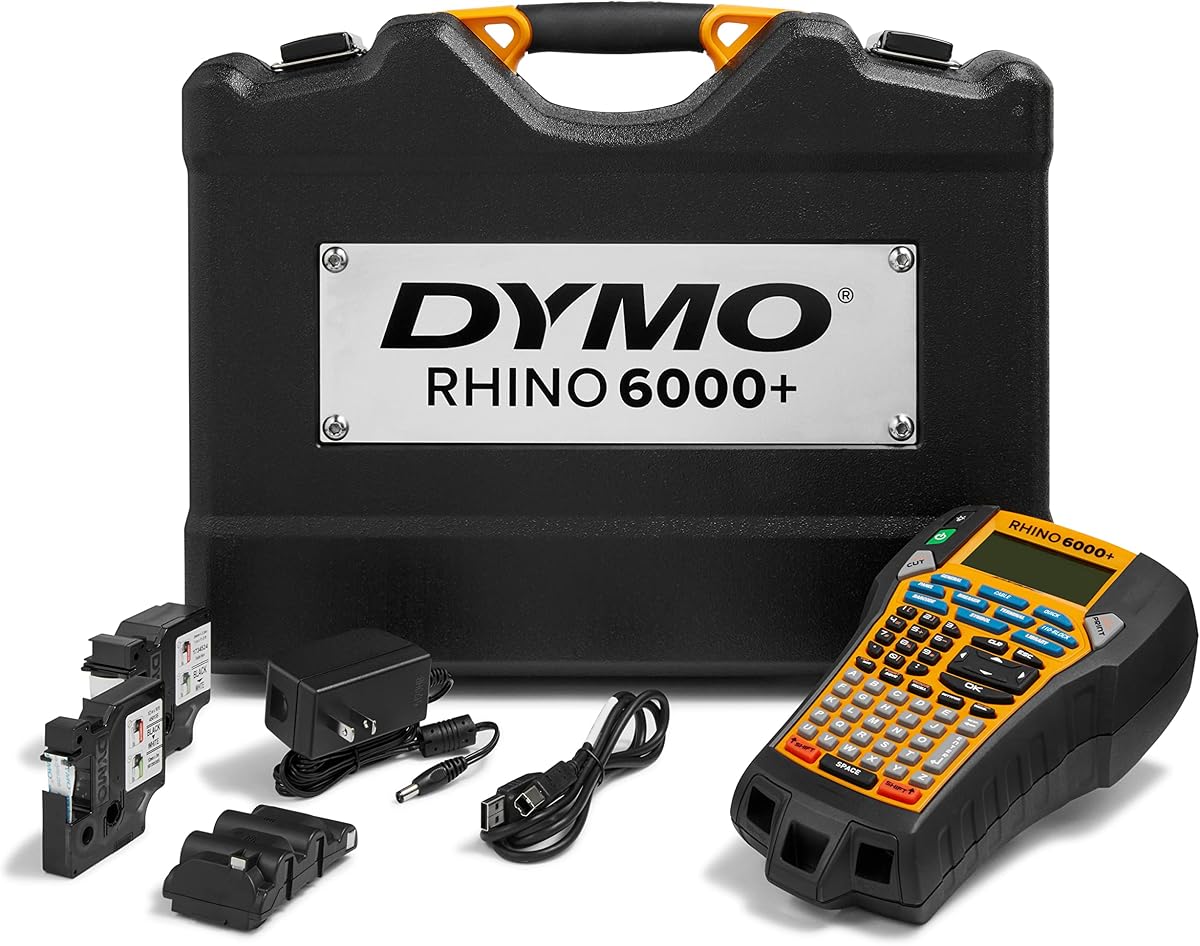
The DYMO Rhino 6000 is a computer-connected industrial label maker built for demanding jobsite output. Its 4.3 rating reflects a specialized tool whose key strength is the ability to design barcodes and complex label layouts in DYMO ID software before sending them to the handheld printer for production.
We may earn a commission when you buy through this link, at no additional cost to you.
One-touch Hot Keys automatically size, space, and format text, combining the convenience of physical shortcuts with the flexibility of desktop editing. The device meets key ANSI and TIA/EIA-606-B industry labeling standards, making it a relevant candidate for network, electrical, and infrastructure teams that require consistent identifiers.
The package is substantial for a portable product. It includes a hard carry case, a vinyl tape cassette, a flexible nylon tape cassette, and a rechargeable lithium-ion battery. Nylon media is particularly relevant for flexible network cables because it can conform around a bundle without the behavior associated with a rigid vinyl tag.
Its main limitation is the dependence on a computer-connected workflow, which is less convenient for quick spontaneous labeling than a self-contained handheld. Users who need advanced layouts, barcodes, and desktop-based control will find that trade-off worthwhile. For structured network documentation projects, the Rhino 6000 is one of the most complete options here.
DYMO ID software expands the device beyond short standalone text labels. Barcodes, structured layouts, and imported information can make cable schedules and equipment records more consistent across a project.
A flexible nylon cassette gives the kit a practical network-media option that can wrap around cables without requiring a rigid tag. Vinyl and nylon in the same package also let users match the material to different labeling environments.
We may earn a commission when you buy through this link, at no additional cost to you.
The DYMO Rhino 5200 earns the highest rating in the supplied group at 4.8, reflecting a particularly well-received combination of industrial capability and standalone operation. Its five-line output provides more space for detailed cable, panel, and equipment identifiers than a basic two-line handheld without requiring desktop software for every task.
We may earn a commission when you buy through this link, at no additional cost to you.
The large two-line backlit display makes settings and text easier to review in difficult lighting. Exclusive hot keys automatically size, space, and format labels, allowing users to move quickly through common industrial configurations. A pre-programmed symbol library reduces the effort needed to access commonly used characters.
Machine-readable output adds another layer of utility. The Rhino 5200 prints Code 39 and Code 128 barcodes on 3/4-inch labels, which can support more structured asset and cable-tracking systems. It is sold as one unit, and the industrial design indicates a device intended for repeatable professional work.
The tradeoff is its standalone design and the absence of stated computer connectivity in the supplied information. Users needing extensive data imports or complex desktop layouts may prefer a computer-connected model. For fast, detailed, barcode-capable labels without a phone or PC, the 5200 is nevertheless the most compelling premium standalone pick.
Additional lines make it easier to include a destination, function, source, and code on one tag. That richer format can reduce the number of separate identifiers needed around a busy patch panel.
Code 39 and Code 128 support provides useful machine-readable options in a self-contained device. Standalone barcode printing is valuable when a technician needs to create an asset tag directly at the equipment location.
We may earn a commission when you buy through this link, at no additional cost to you.
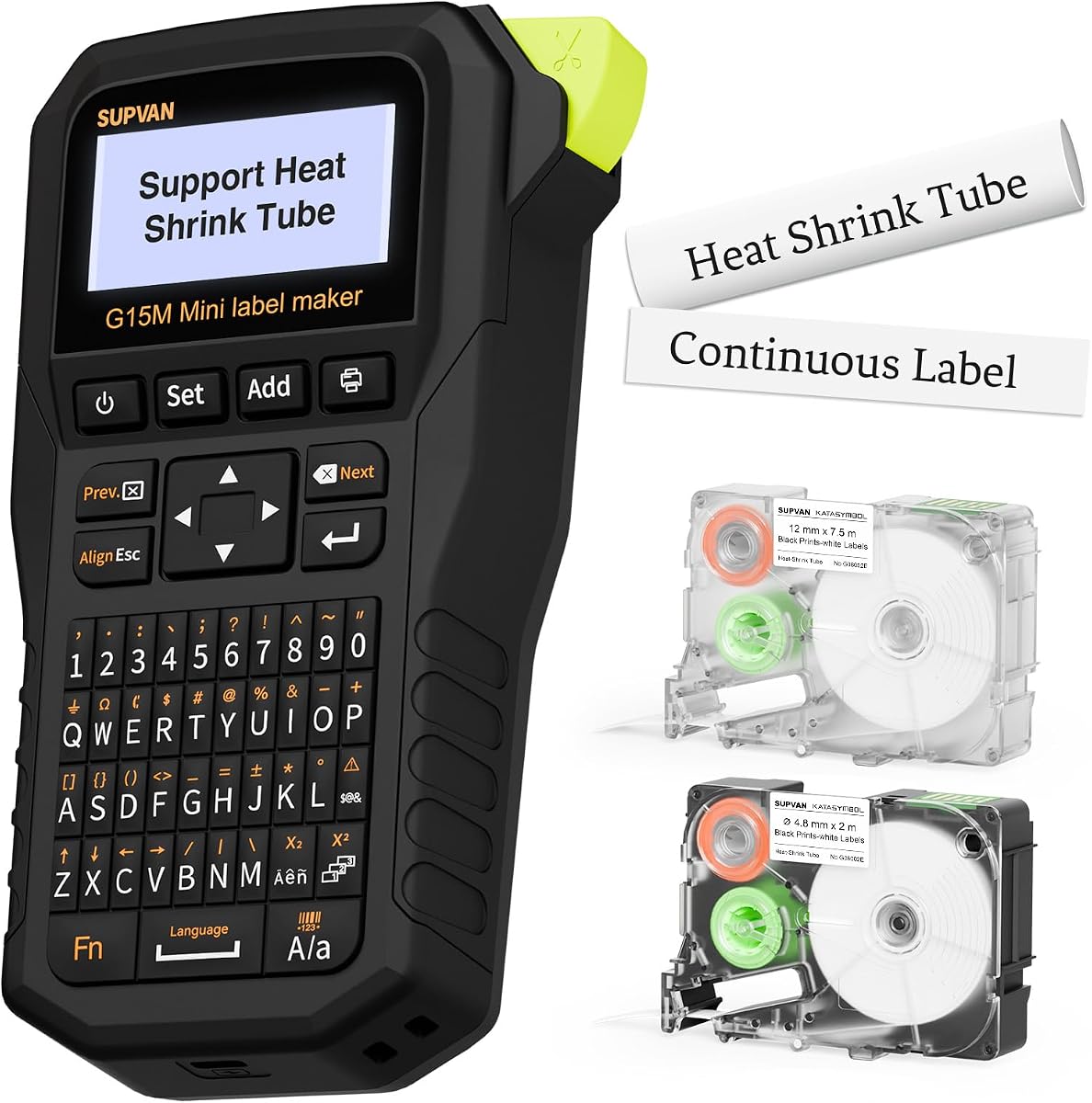
The SUPVAN G15M is a compact label maker with a 4.3 rating, built around portability, broad media compatibility, and unusually detailed customization. At 0.88 pound and measuring 3.35 by 6.7 by 1.7 inches, it is easy to carry in a toolbox, network kit, or field bag for cable labeling away from a workstation.
We may earn a commission when you buy through this link, at no additional cost to you.
It supports heat-shrink tubes, continuous labels, fixed-size labels, and cable labels. Thermal-transfer technology is described as resisting UV, heat, and water for up to 10 years, making the output suitable for demanding indoor and outdoor uses. Minimal 0.19-inch margins help conserve material by reducing unused space around each label.
Customization is unusually strong for a mini device. Users can select from nine font sizes, six font styles, five frames, and more than 400 icons, with support for multicolor printing and up to four lines. The built-in 1200 mAh rechargeable battery is advertised for as much as three months of use on one charge, which supports mobile work without frequent charging.
The compact size and lack of stated barcode support limit its appeal for large asset databases or formal cable schedules. However, for technicians, installers, and advanced users who value a small body, extensive styling, and long intervals between charges, the G15M is a highly portable and versatile choice.
The 0.88-pound housing is easy to carry and less likely to obstruct work in a crowded rack or equipment cabinet. Its rechargeable design also removes the need to keep spare batteries as part of a field kit.
Nine font sizes, six styles, five frames, and 400-plus icons make the G15M useful for visually distinctive labels. Multicolor and four-line output add context for home systems, offices, workshops, and detailed cable identification.
We may earn a commission when you buy through this link, at no additional cost to you.
The right network-cable label maker balances media compatibility, readable output, editing convenience, and durability. Consider the labels you already use, the physical conditions around your cables, the complexity of your documentation, and how often the device will travel between locations.
Choose a model that supports the media you already use or can obtain consistently.
Prioritize sharp output and a clear preview, especially for small or detailed identifiers.
Favor cable shortcuts for frequent hands-on work and connected editing for structured deployments.
Match line count and label width to the complexity of your actual identifiers.
Match both media and housing durability to the environment in which labels must last.
Balance battery life, charging method, size, and carrying accessories against expected mobility.
Check barcode formats and data-import methods whenever labels must work with tracking systems.
Prioritize standards when required, but ensure the machine remains practical for the intended user.
Begin by preparing a consistent naming scheme before printing. Decide what each label must communicate, such as the source, destination, rack position, port number, cable type, or service purpose. Clean the cable surface and allow it to dry completely before applying a self-laminating or wrap label, and confirm that the cable diameter falls within the media manufacturer’s recommended range. For heat-shrink tubes, position the tube before shrinking it around the termination.
Load the appropriate tape or cassette according to the machine’s instructions, then set the media width and type in the settings. Use cable Wrap mode for text that should run around a bundle, Flag mode for a short tag that extends from the cable, and a general label layout for equipment or panels. Preview every label, check port identifiers character by character, and print one test label before producing a large batch. Remove the printed label carefully and press it firmly against the cable.
Store the device dry, away from direct heat, and with the tape compartment protected from dust. Replace batteries or charge the unit according to the manufacturer’s guidance, and avoid leaving batteries inside a device that will remain unused for a long period. Clean the exterior with a soft, dry cloth rather than aggressive solvents. Periodically test a label in the intended environment and inspect heat-shrink adhesion, wrap edges, fading, and print clarity so damaged identifiers can be replaced before they cause network confusion.
A self-laminating wrap is convenient for existing cables because it surrounds the jacket without requiring removal of the connector. Heat-shrink tubing is more permanent and works well when cables are terminated or installed at the job site. The ideal machine supports the media already used by your organization and can print characters clearly at the required width.
Barcode support is useful when network or asset labels feed into a documentation system, CMDB, or inventory process. It is less essential for simple room numbers, switch names, or basic cable destinations. Consider Code 39, Code 128, QR codes, import methods, and supported line counts if your documentation workflow depends on machine-readable data.
A standalone machine is usually faster for individual labels because text is entered directly on the device. Computer-connected and phone-based systems are better for bulk imports, consistent templates, complex barcodes, and large cable schedules. A hybrid approach can work well by using a handheld printer with software-generated label files when a project requires both.
The appropriate width depends on the cable diameter and the amount of information required. Narrow wraps suit compact bundles, while wider labels are easier to read and can contain more detail. Confirm that the machine supports the selected width and that the label or heat-shrink tube is large enough to fit securely around the cable.
They can be used outdoors when the selected tape and the printer’s environmental specifications are suitable. Look for water, UV, oil, abrasion, and temperature resistance, particularly for exposed pathways, exterior equipment, or industrial environments. The label maker itself should also be kept dry and protected from excessive heat and impact.
Thermal-transfer labels use a ribbon to transfer pigment onto the material, while direct thermal labels create images through a chemically treated surface. Thermal transfer is generally better suited to durable cable identification because the printed layer is less exposed to heat, fading, and abrasion. The supplied product information identifies thermal-transfer technology for several industrial options, including the Makeid P31S and SUPVAN G15M.
A backlit display is especially valuable in dim server rooms, closets, basements, and equipment cabinets. It makes text and menu choices easier to review and reduces incorrect labels caused by poor visibility. It is less critical when the machine is primarily used at a well-lit desk, but it remains a meaningful convenience for portable field work.
Yes, if your labels must conform to formal electrical, datacom, or IT documentation practices. ANSI and TIA/EIA-606-oriented support can help organize identifiers consistently and make them more understandable to other technicians. For informal home networks, the standard is less important, but the same emphasis on clear naming remains valuable.
The Makeid P31S stands out as the most complete professional system, combining 300 DPI output, extensive media support, barcodes, bulk importing, and standards-aware labeling. The E1000 is a strong cable-focused alternative with three cable modes, heat-shrink and flexible-label support, and efficient batch printing. For a premium standalone tool, the highly rated DYMO Rhino 5200 combines five lines, barcodes, a backlit display, and automatic formatting.
Most buyers should prioritize the label media they already use, the clarity of the preview, the amount of information each label must carry, and the environment around the cable. Compact models suit mobile work, phone-connected devices improve access to mobile editing, and computer-connected systems shine when complex layouts and imported data are central to the workflow. Standardized naming is as important as the printer itself.
Before purchasing, verify current media availability, connectivity requirements, power options, and the specific labeling standard used by your network team. Ratings can change as additional customer feedback appears, and prices, promotions, bundle contents, and product availability also change. Comparing those current details against the priorities in this guide will help identify the most suitable label maker for the job.