
LAFVIN Basic Starter Kit for ESP32
4.5Editor score
ESP32 Wi-Fi development board
Tutorial with lessons and code
Compatible with Arduino IDE
Our expert guide compares the 10 best microcontroller kits for beginners, covering tutorials, components, programming options, connectivity, project variety
A microcontroller kit for beginners should make electronics approachable without stripping away the hands-on learning that makes embedded programming engaging. The strongest combinations pair a recognizable development board with useful sensors, displays, motors, breadboards, wiring accessories, and clear instructions that explain not only what to assemble, but why each connection works.
The products in this guide were compared by considering the learning materials, component selection, supported programming environments, board capabilities, project variety, and practical barriers to getting started. The list covers Arduino-compatible boards, ESP32 Wi-Fi and Bluetooth kits, Raspberry Pi Pico options, camera-focused systems, and a modular soldering project for learners ready to move beyond simple breadboard exercises.
Each review identifies the kit's strongest use case and any meaningful compromises so new users can choose according to their preferred language, interests, and experience with electronics. Ratings and availability can change over time, and prices fluctuate frequently, so confirm the current listing and included components before making a final purchase.
4.5Editor score

4.7Editor score

5.0Editor score
This side-by-side comparison highlights each kit's controller platform, learning resources, component range, connectivity, and ideal learning path, helping you distinguish a simple first kit from a comprehensive connected-project system.




The LAFVIN Basic Starter Kit for ESP32 provides an approachable introduction to Wi-Fi-enabled microcontroller development, and its 4.5 rating reflects a generally positive reception among users seeking a compact learning package. It centers on an ESP32S development board and introduces electronics through modules that a beginner can connect, program, and observe without needing a large collection of advanced equipment.
We may earn a commission when you buy through this link, at no additional cost to you.
The supplied tutorial includes lessons and code, while the board works with the Arduino IDE, reducing the barrier for someone who has encountered Arduino-style programming before. Its practical value comes from showing how an ESP32 can control components such as an LED, DHT11 sensor, and OLED module. That combination introduces output control, data input, and display use in a way that remains connected to achievable projects rather than abstract exercises.
Its main limitation is scope. This is a basic kit, not a comprehensive laboratory of sensors, motors, drivers, and displays, so learners may eventually need additional modules. The instructions are also described as something to download after receiving the kit. That is a minor inconvenience for someone comfortable finding resources online, but it may disappoint buyers who expect a printed guide in the box.
It is a strong choice for budget-conscious beginners who specifically want ESP32 and Wi-Fi capability rather than a generic Arduino board. Choose it for small connected experiments, foundational sensor work, and an introduction to the Arduino IDE. If your goal is the broadest possible collection of components immediately, the REXQualis or ESP-32 Super Starter Kit offers a more expansive path.
Because the ESP32S board includes Wi-Fi functionality, learners can progress from blinking outputs to connected controls and sensor monitoring. The included module examples give that wireless capability a practical context, helping beginners understand why embedded networking is useful rather than treating it as an abstract board feature.
The combination of assembly instructions, lessons, and sample code creates a useful progression from physical wiring to program control. Users should download the tutorial before assembly so they can map each included component to the intended project and avoid making connections that do not match the lesson.
We may earn a commission when you buy through this link, at no additional cost to you.
The REXQualis Super Starter Kit is the strongest general-purpose option in this guide for beginners who want a comprehensive introduction to electronics and Arduino programming. Its 4.7 rating reflects a well-regarded package built around an Arduino UNO R3 compatible board, a large base board, and a substantial collection of sensors, displays, motors, drivers, and other learning components.
We may earn a commission when you buy through this link, at no additional cost to you.
A major strength is the breadth of the inventory. The base board can be used with sensors, a servo, motor, ULN2003 driver board, LCD modules, and compatible accessories, allowing a learner to move through several kinds of circuit without purchasing each stage separately. The LCD1602 module arrives with a pin header, which removes a common early obstacle, while the included 9V power adapter provides a straightforward alternative to managing a battery during longer sessions.
The kit is less focused on built-in connectivity than the ESP32 choices, and that is a meaningful distinction for anyone interested in wireless control. It also requires a downloaded PDF tutorial and datasheets rather than providing paper documentation in the box. Even so, the organization of individually packaged and labeled components, the base board design, and the range of supported experiments compensate for those limitations.
This is our Editor's Choice because it balances accessibility, component variety, and a familiar development environment with relatively little assembly friction. It is ideal for a learner who wants to understand foundational electronics through many physical projects. Choose it over a smaller kit if breadth, accessories, and a conventional Arduino workflow matter more than native Wi-Fi.
The sensors, LCD, servo, motor, and driver board let beginners explore input, output, display, motion, and controlled power in one package. This variety makes the kit useful for both structured lessons and self-directed experimentation once the basic wiring patterns are understood.
The UNO R3 form factor and Arduino IDE compatibility make this a familiar starting point for the vast ecosystem of beginner examples. The included base board also reduces repeated wiring complexity, letting learners focus more on program logic and component behavior.
We may earn a commission when you buy through this link, at no additional cost to you.
The amomii Testudo Soldering Practice Kit takes a different approach to beginner electronics by combining a reusable USB-C microcontroller with modular shields that form a digital piano, infrared remote, and arcade console. Its 4.7 rating reflects a substantial learning package for users who want to understand physical circuit construction rather than begin with solderless breadboards alone.
We may earn a commission when you buy through this link, at no additional cost to you.
Its defining strength is the included Soldering Fundamentals course. It covers joint anatomy, temperature and tip selection, circuit-board reading, and common fault correction, supported by color-printed instructions, PDF manuals, and HD video tutorials. Because the modules can be reconfigured, the same hardware can also access more than ten software functions through the amomii Link browser tool, including games, musical tools, remote-control experiments, and temperature monitoring.
This is not the simplest option, and the required soldering iron and basic tools are not included. Small parts and exposed assembly work also make adult supervision important for younger children. The no-code activation workflow may also disappoint learners who specifically want traditional embedded programming, although an optional coding masterclass covers manual code uploads through the Arduino IDE.
Buy the Testudo if your goal is to learn soldering, build durable devices, and understand the physical side of electronics. It is particularly engaging for beginners who enjoy gaming, music, or tangible gadgets and are ready to work carefully through a more advanced assembly process. For conventional sensor-and-breadboard lessons, the Arduino and ESP32 kits are simpler choices.
Soldering teaches a core maker skill that breadboard-based kits rarely address. The structured course provides the context needed to understand joints, heat, tips, and circuit faults, while the three completed devices give learners lasting hardware rather than disposable exercise boards.
The custom controller can move between shields, and open-source code, schematics, hardware files, and printable enclosure designs support further experimentation. This creates a bridge between beginner assembly and more advanced making, especially for users interested in customized cases and future inventions.
We may earn a commission when you buy through this link, at no additional cost to you.
The Horizon Uno Electronics Starter Kit is built around a straightforward proposition: beginners need a hardware platform and a clearly explained path through electronics fundamentals, circuit design, and microcontroller coding. Its 4.7 rating and inclusion of a full online course make it particularly appealing to visual learners and educators who want a guided curriculum.
We may earn a commission when you buy through this link, at no additional cost to you.
The Horizon Uno board is Arduino-compatible and accompanied by LEDs, sensors, resistors, jumper wires, servos, and specialty components. Each kit includes a unique access code for a course created by robotics engineers. That material includes lectures, laboratories, projects, and problem sets, giving learners more than a loose collection of sample sketches.
Video delivery can be particularly helpful for physical electronics because wiring mistakes, sensor behavior, and code changes are easier to understand when demonstrated. The trade-off is dependence on course access and an internet connection, along with less information about a large standalone project catalog than some comprehensive kits provide. Buyers should also account for the possibility that access methods may change over time.
This kit is well suited to students, self-learners, and educators who value guided video instruction and a structured electronics curriculum. Choose it when a clear learning sequence is the priority. If you prefer downloadable documents and a large menu of immediately accessible projects, the Freenove or ESP-32 Super Starter Kit may fit more closely.
A structured course helps beginners understand the purpose of each experiment before extending it. Demonstrations can make troubleshooting more approachable because learners can compare their wiring, output, and code with the steps shown in the lesson.
The mix of lectures, labs, projects, and problem sets resembles a guided course more than a simple parts bundle. That makes it useful for STEM programs and for learners who benefit from clearly sequenced exercises and regular opportunities to check their understanding.
We may earn a commission when you buy through this link, at no additional cost to you.
The LAFVIN Basic Starter Kit for Raspberry Pi Pico offers a flexible way to enter embedded development through the RP2040 platform. Its 4.5 rating reflects a well-rounded package that combines a Pico development board with an LCD1602, SG90 servo, WS2812 RGB lighting, a human-body sensing module, a buzzer, and buttons.
We may earn a commission when you buy through this link, at no additional cost to you.
Its standout feature is support for MicroPython, C/C++, and Piper Make graphical programming. That range allows a complete beginner to begin with visual blocks, move into Python for rapid experimentation, and later explore C for deeper control. The accompanying project tutorials and sample code are intended to help users complete circuit connections, download programs, and verify results.
The component set is balanced but not enormous. A learner focused on a very broad catalog of sensors or advanced wireless projects may need to expand beyond this basic kit. Likewise, users committed to traditional Arduino workflows may find that the Pico platform and its language options are less immediately familiar.
This is an excellent choice for beginners who want Python or graphical programming and enjoy experimenting with displays, lights, sound, and motion. It also suits school labs seeking a compact STEM kit with multiple entry points into coding. For a Raspberry Pi Pico package with a stronger emphasis on MicroPython documentation, the GeeekPi option is worth comparing.
Graphical programming gives absolute beginners a low-code starting point, while MicroPython offers a readable text-based environment and C/C++ supports deeper technical study. This flexibility lets the same hardware serve multiple stages of a learner's development.
The LCD, RGB LED, buzzer, buttons, sensor, and servo each demonstrate a different principle. Learners can connect those parts to displays, conditional responses, input detection, sound generation, and controlled movement, building a practical foundation for later projects.
We may earn a commission when you buy through this link, at no additional cost to you.
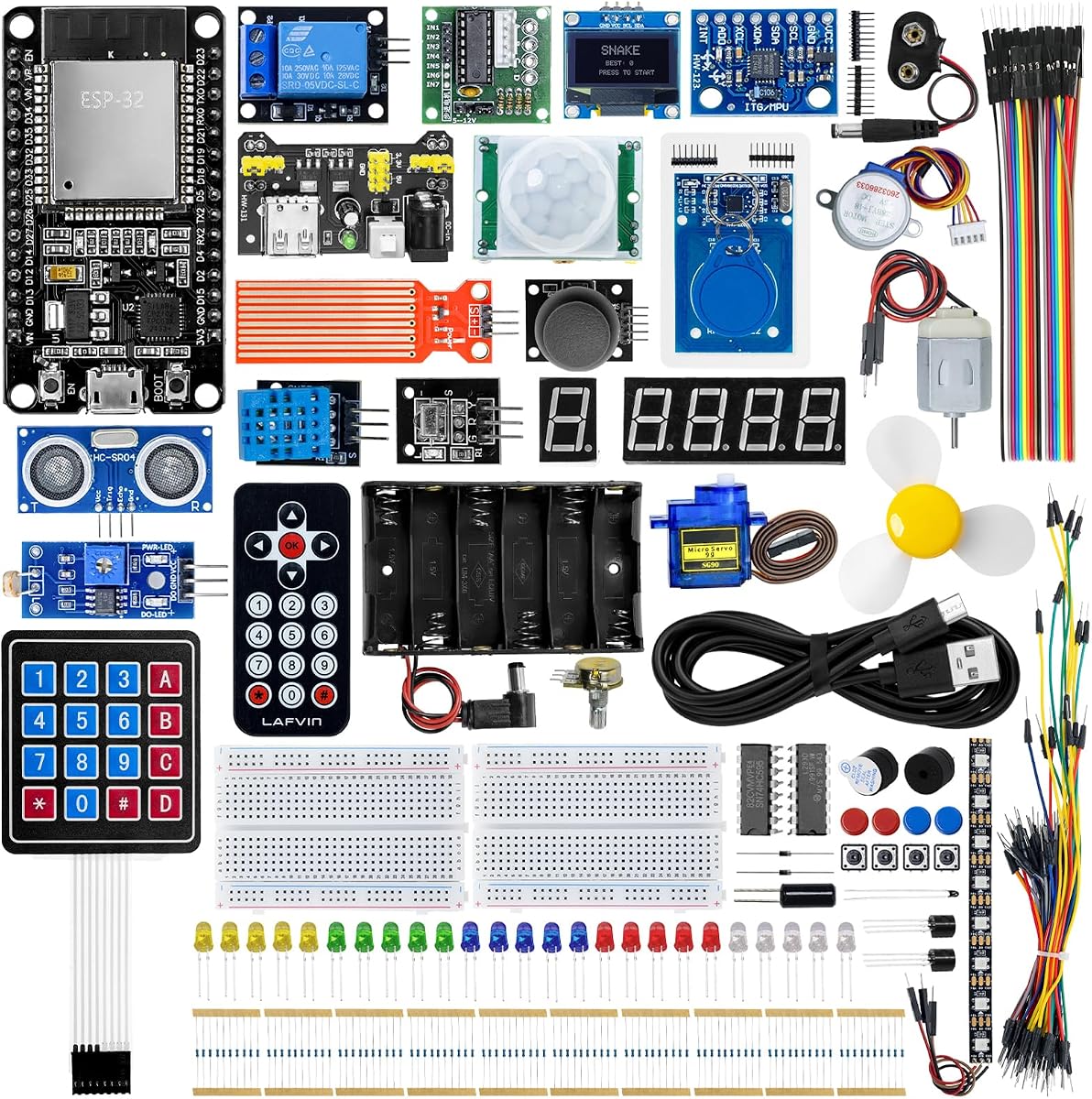
The LAFVIN ESP32 Ultimate Starter Kit is designed for beginners who want to explore connected electronics through a substantial collection of modules. Its 4.3 rating makes it the lowest-rated selection in this roundup, but the product data supports its value for users who prioritize Wi-Fi learning, sensor breadth, and varied project ideas.
We may earn a commission when you buy through this link, at no additional cost to you.
The kit includes an ESP32 platform, tutorials, wiring diagrams, sample code, and project courses. Its modules cover ultrasonic sensing, RFID, servo control, MPU6050 motion sensing, OLED displays, temperature and humidity measurement, and PIR motion detection. These parts support more than twenty project types, including access-control concepts, environmental monitoring, a Snake game, motion alarms, smart-home prototypes, and browser-based remote control.
The breadth is both advantage and burden. A large inventory can feel overwhelming to someone completely new to electronics, and the range of projects may require careful organization and a deliberate learning path. The rating also suggests that some buyers may find aspects of the package or documentation less consistent than those of the highest-rated kits.
Choose this kit when wireless control and a wide range of interactive experiments are central to your interests. It is especially useful for students who want to see sensor data through a browser or remotely operate outputs. The REXQualis kit offers a more traditional Arduino foundation, while the ESP-32 Super Starter Kit has a stronger listed rating and larger guided project count.
The tutorials place Wi-Fi communication in practical scenarios, including browser interfaces, real-time sensor displays, and remotely controlled outputs. This gives beginners a reason to learn networking while still working with understandable electronic systems.
A varied component set supports both input-focused and output-focused projects. Learners can compare environmental sensing, motion detection, RFID input, servo movement, and visual feedback, gradually building a reusable mental model of embedded systems.
We may earn a commission when you buy through this link, at no additional cost to you.
The GeeekPi Micro Python Programming Kit is designed for Raspberry Pi Pico enthusiasts who want to learn embedded programming through Python rather than a general-purpose electronics collection. Its 4.4 rating reflects a focused package with a Pico development board, breadboard, I2C 1602 LCD display, and compatible modules for hands-on experiments.
We may earn a commission when you buy through this link, at no additional cost to you.
The supplied demo code and detailed manual make it possible to work through experiments immediately, while the associated wiki provides additional downloadable tutorials. The design explicitly leaves room for learners to modify each experiment, which is important because copying a finished sketch teaches less than changing its inputs, outputs, and logic.
This narrower focus is both its strength and limitation. Users benefit from a coherent MicroPython pathway, but the listed materials do not suggest the massive project catalog or component inventory found in the Freenove, REXQualis, or larger ESP32 packages. The product is therefore better viewed as a focused learning kit than an all-in-one laboratory.
It is best for Raspberry Pi beginners, Python learners, and software engineers who want to understand microcontroller concepts through readable code. Choose it when Python is your preferred entry point and the included display and breadboard provide enough range for early experimentation. Consider the LAFVIN Pico kit if graphical programming or a broader module assortment would be more useful.
MicroPython gives beginners a concise environment for experimenting with inputs, outputs, timing, and display updates. The included examples can serve as a starting point that learners modify, making the kit suitable for building programming confidence as well as circuit knowledge.
The included breadboard makes it easy to revise wiring as concepts become clearer. This is particularly useful in a Pico-focused kit because the platform invites experimentation with the same display and module set across multiple small programs.
We may earn a commission when you buy through this link, at no additional cost to you.
The ESP-32 Super Starter Kit stands out with a 5.0 rating, a dual-core ESP32 controller, built-in Wi-Fi and Bluetooth 4.2, and more than 35 bundled modules and components. It combines substantial hardware with an online curriculum covering more than 25 projects, circuit diagrams, and sample code, making it the most complete premium option here.
We may earn a commission when you buy through this link, at no additional cost to you.
The component inventory includes sensors, displays, motors, buttons, LEDs, an OLED screen, a servo, and a keypad. That variety supports projects ranging from basic circuits and input handling to weather stations, smart-home controllers, remote-control devices, and interactive gadgets. Arduino IDE compatibility allows users to approach the board through a widely supported environment, while USB-C and the CP2102 interface support a modern development setup.
One practical issue deserves attention: the product data says a printing error means the QR code on the instruction manual points to the wrong learning-resource page. Buyers must contact the seller through Amazon buyer-seller messaging to receive the tutorials and sample codes. This is an avoidable inconvenience, although the required support process is clearly described. As with most component-rich kits, beginners will also benefit from organizing parts before starting.
This is our Best Premium pick for users ready to make connected projects and work through a substantial learning path. Choose it if the breadth of the hardware, wireless functions, and guided project progression justify a larger commitment. It may be overkill for a single LED exercise, but it offers one of the strongest foundations for a long-term learning program.
The ESP32's dual-core design, Wi-Fi, and Bluetooth 4.2 open possibilities well beyond simple output control. The included curriculum guides users from simpler circuits toward connected devices, helping wireless capabilities become a natural part of the learning progression.
A large parts collection is most useful when paired with sequenced projects. More than 25 guided builds, complete code, and circuit diagrams give the components a clear path through the curriculum, reducing the uncertainty that often accompanies large starter kits.
We may earn a commission when you buy through this link, at no additional cost to you.
The Freenove ESP32-S3 Camera Board Ultimate Starter Kit is a comprehensive system for beginners who want to move beyond blinking LEDs into embedded imaging and advanced connected projects. Its 4.6 rating reflects a deep curriculum, modern hardware, and an unusually large collection of parts, including 243 items in total.
We may earn a commission when you buy through this link, at no additional cost to you.
The board uses a dual-core 32-bit ESP32-S3 processor capable of reaching 240 MHz, with 8 MB of flash, 8 MB of PSRAM, 2.4 GHz Wi-Fi, Bluetooth 5 LE, USB-OTG, a USB code uploader, a camera, and a memory card slot. A 1 GB memory card and card reader are included, and MicroPython, C, and Processing examples support both embedded and computer-assisted workflows.
The downloadable English tutorial spans 828 pages and guides 121 projects from simple to complex, with schematics, wiring diagrams, complete code, and detailed explanations. This depth is a major advantage, but it also makes the kit less approachable for someone seeking a tiny first exercise. The tutorial is not printed in the box, and its length means learners should follow a deliberate progression rather than skim it randomly.
Choose this kit for an ambitious beginner who wants to learn camera control, wireless communication, and embedded graphics with extensive references. It is especially suitable for users interested in advanced IoT or image-based projects. New learners wanting a gentler introduction should start with the REXQualis, Horizon Uno, or LAFVIN Basic kit instead.
The integrated camera and memory support introduce image capture in a way that standard sensor kits cannot. Learners can move from displaying camera output to connected image projects, making the platform attractive for anyone interested in computer vision, monitoring, or interactive installations.
Schematics, wiring diagrams, code, and detailed explanations support self-paced study over many sessions. The tutorial's scale is useful for users who want to understand why circuits work and gradually tackle more complex projects, though novices may need guidance in selecting a sensible starting point.
We may earn a commission when you buy through this link, at no additional cost to you.
The Freenove ESP32 Camera Board Ultimate Starter Kit provides a traditional ESP32 route into camera-based embedded learning. It shares the Freenove approach of combining a Wi-Fi and Bluetooth development board with a camera, storage support, a large component inventory, and a long downloadable reference covering 122 projects.
We may earn a commission when you buy through this link, at no additional cost to you.
The board is a dual-core 32-bit processor reaching 240 MHz, with 4 MB of flash, 8 MB of PSRAM, 2.4 GHz Wi-Fi, and Bluetooth 4.2 LE. A USB code uploader, camera, memory-card slot, 1 GB card, and reader are included. MicroPython, C, and Processing code sets let learners work at different levels, while the 795-page English tutorial provides schematics, wiring diagrams, complete code, and explanations.
Like the ESP32-S3 version, it is better suited to a motivated learner than someone who wants the smallest possible introduction. Its extensive project count and component total create a strong long-term platform, but the downloadable manual and complexity can make the early stages less approachable. The learning materials can also be viewed online and translated through a browser, according to the product information.
This is an excellent option for beginners who want camera projects, classic ESP32 wireless capabilities, and a deep project library without moving to the S3 board. Consider the ESP32-S3 Freenove model if greater flash capacity and Bluetooth 5 are priorities, while the smaller Arduino or ESP32 basic kits are more suitable for first-time users seeking simpler directions.
MicroPython offers an approachable embedded language, C supports traditional low-level development, and Processing enables graphical interfaces running on a computer. This combination helps learners move between immediate experiments, firmware development, and visual data presentation.
The 122-project structure starts with simpler exercises and advances toward more demanding work. Each listed project includes supporting reference material, allowing learners to treat the kit as a long-term curriculum rather than a one-time collection of components.
We may earn a commission when you buy through this link, at no additional cost to you.
The right starter kit depends on your preferred programming environment, the kinds of projects that excite you, and how much physical assembly you want to undertake. Consider the controller, learning materials, component range, connectivity, documentation, and long-term expandability before choosing.
Programming support often matters more than the number of components when you are selecting a first kit. Arduino-compatible systems provide access to a large collection of familiar examples, while Raspberry Pi Pico kits can be especially attractive to Python learners. The Freenove camera systems go further by offering MicroPython, C, and Processing, creating a path from readable embedded code to visual desktop applications. Consider the software environment you already know, but also consider the environment you would be excited to learn.
Prioritize a kit whose examples and tutorials use the language you intend to pursue. A broad set of components is less valuable when the included code is difficult to understand or the required tools are not explained.
A useful starter kit should teach a sequence rather than merely list parts. Look for wiring diagrams, explanations of component behavior, complete code, exercises, and projects that gradually introduce new ideas. The REXQualis package provides downloadable tutorials and datasheets, Horizon Uno centers on a structured video course, and the amomii Testudo includes soldering fundamentals alongside optional coding lessons. Printed documentation can be convenient, but a well-organized downloadable guide is also workable if you are comfortable navigating it on a computer.
Choose materials that match your learning style and explain not only how to assemble a project, but also why each component and code block is present. A clear progression gives every included part a purpose and makes troubleshooting easier.
Basic kits commonly include LEDs, buttons, resistors, jumper wires, and a breadboard, which cover foundational input and output exercises. More advanced sets add displays, servos, motors, relay or driver modules, environmental sensors, motion sensors, RFID components, and communication boards. The LAFVIN Pico kit provides a balanced mix, while the LAFVIN ESP32 Ultimate, Horizon Uno, and ESP-32 Super Starter kits cover a wider range of physical functions. If your goal is IoT, prioritize Wi-Fi-compatible boards and network-oriented modules rather than simply buying the largest box.
List the projects you want to attempt and check that the required board and modules are included. A focused component set is often better than an overwhelming assortment if it directly supports your first three or four projects.
Many beginner kits rely on breadboards and jumper wires, allowing mistakes to be corrected without permanent assembly. The amomii Testudo is different because it is explicitly a soldering practice system with interchangeable circuit boards and a course covering joints, temperature, tips, and fault correction. A soldering iron and basic tools are not included, so budget separately for equipment and safe work space. Soldering can be highly rewarding, but it is not necessary for learning programming and basic circuits.
Start with a solderless kit if low commitment and easy rewiring are priorities. Choose a soldering kit if making durable, finished gadgets is central to your interest and you are comfortable learning a new physical skill.
Wi-Fi and Bluetooth can make projects more engaging by enabling phone control, browser dashboards, wireless sensor readings, and connected household prototypes. Every ESP32 option reviewed here supports Wi-Fi, and most also include Bluetooth, but the two Freenove camera kits differ in processor generation and Bluetooth version. A classic Arduino UNO R3 kit does not provide native wireless communication, which is a reasonable trade-off for learners focused on local electronics and reliable foundational examples.
If wireless control is part of your goal, verify the board and tutorials before buying. If connectivity is secondary, a traditional Arduino kit may offer a simpler and less expensive learning path.
Beginner-friendly kits differ greatly in the amount of setup required. Some modules arrive with headers already fitted, as noted for the REXQualis LCD1602, while others require the user to understand pin connections and attach components carefully. The Testudo contains small parts and is intended for a more involved assembly process; its product information advises adult accompaniment for children under 14. Always work on a stable, ventilated surface, keep components away from children and pets, and follow electrical guidance supplied with your board.
Choose the least complicated kit that still supports your interests. A smoother first experience can be more educational than beginning with advanced assembly and troubleshooting.
Digital materials can provide extensive diagrams and code, but they should be easy to find and understand. Some products place the tutorial link on the box, while the ESP-32 Super Starter Kit requires contacting the seller because of an incorrect QR code on the manual. That is a manageable issue, yet it is a reminder to review access instructions before purchase. Look for downloadable documents, online lessons, component labels, and a clear way to request help if an example does not work as written.
Favor a kit with organized components and instructions that connect each part to a named exercise. Good documentation can turn a confusing collection of wires and modules into a coherent learning experience.
A good starter kit should be a platform rather than a sealed one-time project. Check whether the board uses standard breadboard-friendly pins, whether tutorials teach general concepts, and whether the manufacturer offers additional examples or open resources. The Freenove kits provide extensive downloadable references, the Testudo includes open-source code, hardware files, schematics, and printable enclosure designs, and the LAFVIN kits support common development environments. Expansion also depends on component availability and the learner's willingness to learn basic datasheets and schematic reading.
Choose a kit that leaves room for personal projects after the guided lessons end. The best starter system is the one you will still be using when curiosity becomes your primary instructor.
Begin by identifying every included component, reading the kit's introduction, and creating an inventory before connecting power. Download or open the relevant lesson, verify the board and component names against the diagram, and inspect each wire for damaged insulation or loose contacts. Beginners should disconnect power while changing wiring and follow the voltage requirements in the tutorial rather than assuming every module uses the same supply.
Work in small, testable stages. First verify that the development board is recognized by the computer and that a simple program runs. Then add one breadboard component, confirm the circuit diagram and pin numbers, and test the result before adding another element. Keep jumper wires short where practical, avoid bridging adjacent contacts, and handle sensors, displays, and small boards by their edges rather than their pins.
Care for the kit by storing parts in labeled compartments, coiling cables without sharp bends, and keeping conductive items away from the breadboard contacts. Soldering-based systems require ventilation, eye protection, a heat-resistant work surface, and careful storage of the heated tool. Periodically check connectors, clean dust from exposed surfaces with appropriate electronics-safe methods, and update the software only after saving working examples.
The REXQualis Super Starter Kit is generally the most approachable all-around option because it combines a familiar Arduino UNO R3 compatible board, a base board, many labeled components, and downloadable tutorials. The Horizon Uno is also approachable for people who prefer video instruction. Whichever kit you select, start with a simple blinking-LED or button exercise before attempting the more advanced modules.
Arduino is a familiar starting point for basic electronics and has a large body of beginner examples. ESP32 is better when Wi-Fi, Bluetooth, and connected IoT projects are important. Raspberry Pi Pico is attractive for Python and MicroPython learners. Choose based on your preferred software and the project type you want to pursue, rather than treating one platform as universally easier.
Most breadboard-based kits do not require soldering because components connect through jumper wires. The amomii Testudo is specifically designed as a soldering practice kit, and a soldering iron plus basic tools are required but not included. Beginners who do not want to learn soldering should choose a kit with pre-soldered modules and a breadboard.
Yes, provided the kit includes beginner-friendly examples and the board works with a supported environment such as Arduino IDE. The LAFVIN Basic, LAFVIN Ultimate, and ESP-32 Super kits all provide tutorials and code. Start with simple input and output exercises, learn how the board and IDE connect, and expand one concept at a time.
The GeeekPi Micro Python kit and the LAFVIN Raspberry Pi Pico kit both center on MicroPython, making them the clearest choices for Python-focused learning. The LAFVIN Pico kit also supports C/C++ and Piper Make, while the GeeekPi package emphasizes MicroPython experiments and a detailed manual. The Freenove camera systems support MicroPython as well, but their scope is considerably more advanced.
Good early projects include an LED alert, button-controlled output, temperature display, light-controlled alarm, or servo movement system. Move to a connected project only after basic wiring and code are comfortable, such as a browser-based sensor monitor or phone-controlled light. Reusing familiar components lets you focus on new concepts instead of troubleshooting several unfamiliar parts at once.
Check the listed board, breadboard or base board, jumper wires, LEDs, buttons, resistors, sensors, displays, motors, and power accessories against the projects shown in the tutorial. Also verify whether wires need soldering and whether a USB cable, power adapter, or other tool is included. The comparison table highlights each kit's broad structure, while the reviews call out important exceptions.
Yes, and that is one of the main benefits of a comprehensive starter kit. Wiring exercises teach electrical relationships, while code demonstrates how sensors influence outputs and how the controller processes information. The most effective learning method is to connect each project to a clear question, predict the result, test it, and then change one part of the code or circuit to see what changes.
The LAFVIN Basic ESP32 Kit is the most economical way to begin with a Wi-Fi-capable board, while the REXQualis Arduino Super Starter Kit is the strongest all-around choice for broad foundational electronics and familiar Arduino workflows. The ESP-32 Super Starter Kit takes the premium path with a high rating, extensive components, and more than 25 guided projects. Each serves a different first step rather than a single universal winner.
Prioritize the learning material and platform that match your interests. Python learners may prefer the GeeekPi or LAFVIN Pico kits, camera-focused users should examine the two Freenove systems, and learners who want to master soldering can consider the modular amomii Testudo. The Horizon Uno is especially valuable for anyone who prefers a structured video course and guided classroom-style progression.
Before ordering, confirm that the current listing includes the board, modules, accessories, and learning resources described here. Ratings, package contents, availability, and prices can change, and manufacturer instructions may evolve. Review the latest product page and tutorial access details so your chosen kit matches your skill level, interests, and available tools.